مقدمة
Welcome to your new NIMO 15.6" FHD Laptop N151. This manual provides essential information to help you get started, operate, maintain, and troubleshoot your device. Please read through these instructions carefully to ensure optimal performance and longevity of your laptop.
يثبت
1. فك الصندوق والفحص الأولي
أزل جميع العناصر من العبوة بعناية. تأكد من وجود المكونات التالية:
- 1 × كمبيوتر محمول Nimo N151
- شاحن سريع من النوع C بقوة 65 واط بتقنية الشحن السريع PD
- 1 × دليل المستخدم (هذه الوثيقة)
- ويندوز 11 هوم (مثبت مسبقًا)
Inspect the laptop for any physical damage. If any components are missing or damaged, contact customer support immediately.
2. Charging the Laptop
Before first use, fully charge your laptop. Connect the provided Type-C 65W PD Fast Charger to the Type-C charging port on your laptop and then to a power outlet. The charge LED indicator will illuminate.

Image: The NIMO laptop connected to its Type-C PD fast charger, illustrating the charging process.
3. التشغيل والإعداد الأولي
Press the power button located on the keyboard. The laptop will boot up and guide you through the initial Windows 11 Home setup process. Follow the on-screen instructions to configure your language, region, network, and user account.
تشغيل الكمبيوتر المحمول
عرض
Your NIMO laptop features a 15.6-inch Full HD (1920x1080) Anti-Glare IPS display. This display offers clear visuals and reduced eye strain, suitable for various tasks from work to entertainment.

Image: The NIMO laptop's 15.6-inch FHD IPS display, highlighting its narrow bezels and vibrant visual capabilities.
Keyboard and Fingerprint Sensor
The laptop is equipped with a backlit keyboard for comfortable typing in various lighting conditions and a numeric keypad for efficient data entry. A fingerprint sensor is integrated for secure and quick login.

Image: Close-up of the NIMO laptop's backlit keyboard, showcasing the fingerprint sensor and numeric keypad.
Webكاميرا
A 2MP webcam is integrated for video calls and online meetings.
المنافذ والاتصال
The NIMO N151 offers a variety of ports for versatile connectivity:
- منافذ USB 3.0: لنقل البيانات بسرعة عالية.
- منفذ USB 2.0: لتوصيل الأجهزة الطرفية.
- منفذ HDMI: للاتصال بالشاشات الخارجية.
- Type-C Ports: One for charging (PD Fast Charger) and one for multifunction use.
- منفذ كارت الذاكرة الصغيرة: لتوسيع مساحة التخزين أو النقل files.
- مقبس سماعة رأس مزدوج: لإدخال/إخراج الصوت.
- فتحة قفل Kensington: لأسباب أمنية جسدية.
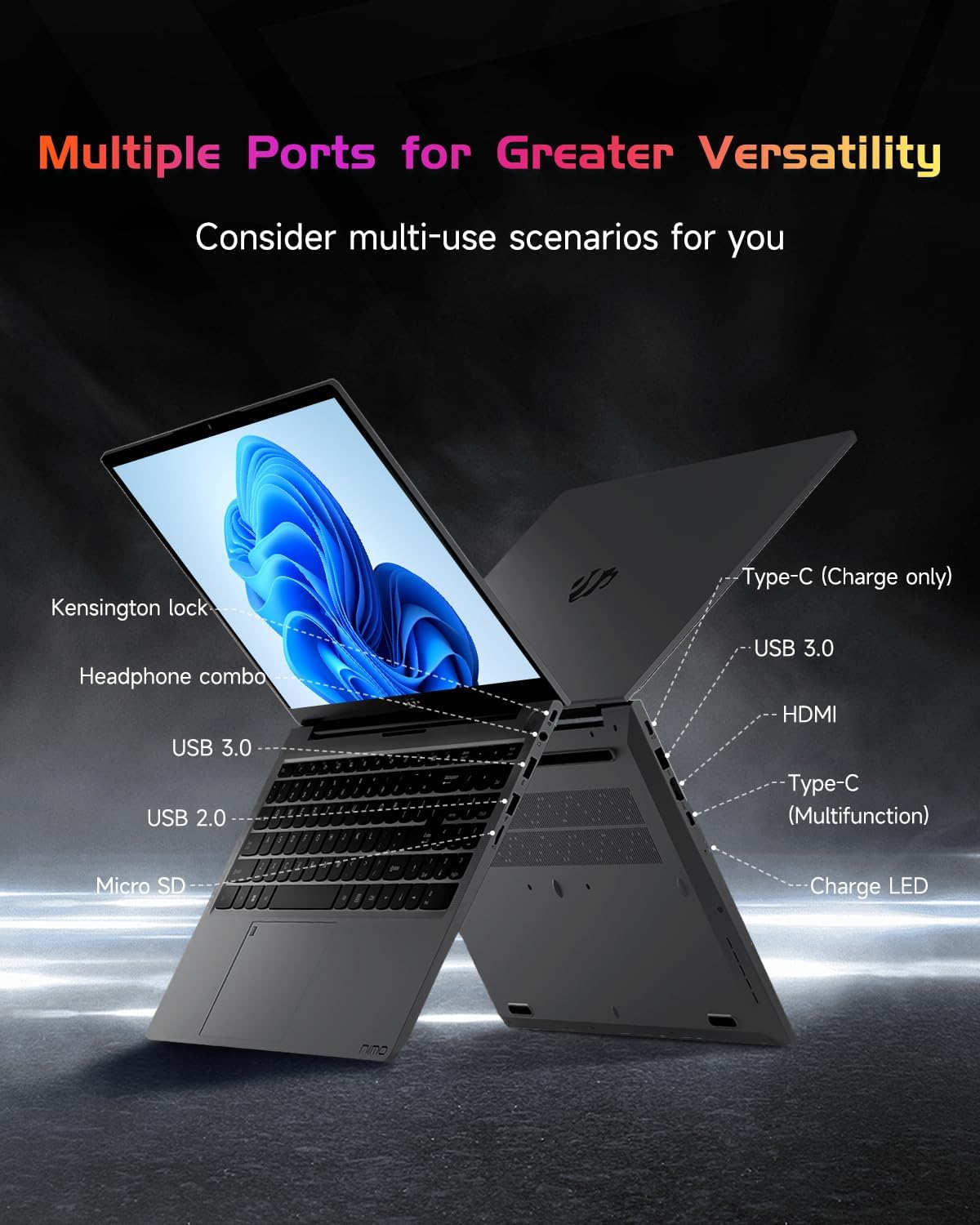
صورة: الجانب الاحترافيfile of the NIMO laptop, displaying its array of ports for diverse connectivity needs.
Stay connected with integrated Wi-Fi 6 for fast wireless internet and Bluetooth 5.2 for connecting wireless accessories.
المعالج والأداء
Powered by the Intel Alder Lake-N100 12th Gen processor, the NIMO N151 delivers reliable performance for multitasking, streaming, and everyday computing tasks. It comes with 16GB DDR4 RAM and a 256GB PCIe SSD for fast startups and seamless operation.

Image: A visual representation of the Intel Alder Lake-N100 12th Gen processor, highlighting its role in the laptop's performance.
نظام التشغيل
The laptop comes pre-installed with Windows 11 Home, offering a modern and intuitive user experience.
صيانة
الرعاية العامة
- Keep the laptop in a clean, dry environment away from extreme temperatures.
- تجنب سكب السوائل على لوحة المفاتيح أو الشاشة.
- Use a soft, lint-free cloth to clean the screen and exterior. Do not use harsh chemicals.
- التأكد من التهوية المناسبة من خلال عدم سد فتحات الهواء.
العناية بالبطارية
لإطالة عمر البطارية، تجنب تفريغها بالكامل بشكل متكرر. يُنصح بالحفاظ على شحن البطارية بين 20% و80% كلما أمكن ذلك.
استكشاف الأخطاء وإصلاحها
المشاكل الشائعة والحلول
- الكمبيوتر المحمول لا يعمل: Ensure the charger is properly connected and the battery has sufficient charge. Try holding the power button for 10-15 seconds to perform a hard reset.
- الشاشة فارغة: قم بتوصيل شاشة خارجية للتحقق من وجود مشكلة في الشاشة. أعد تشغيل الكمبيوتر المحمول.
- مشاكل الاتصال بشبكة Wi-Fi: تحقق من تفعيل Wi-Fi في إعدادات Windows. أعد تشغيل جهاز التوجيه والكمبيوتر المحمول.
- الأداء البطيء: Close unnecessary applications, check for malware, and ensure Windows is up to date.
For persistent issues, refer to the online support resources or contact NIMO customer service.
تحديد
| ميزة | التفاصيل |
|---|---|
| ماركة | نيمو |
| اسم الموديل | نيمو N151 |
| حجم الشاشة | 15.6 بوصة |
| دقة الشاشة | 1920 × 1080 بكسل (FHD) |
| المعالج | Intel Pentium Quad Core N100 (up to 3.4 GHz) |
| كبش | 16 جيجا بايت DDR4 |
| سرعة الذاكرة | 3200 ميجا هرتز |
| القرص الصلب | قرص صلب SSD بسعة 256 جيجابايت (PCIe) |
| معالج الرسوميات المساعد | الرسومات المتكاملة |
| نظام التشغيل | ويندوز 11 هوم |
| نوع لاسلكي | 802.11a/b/g/n/ac (Wi-Fi 6) |
| بلوتوث | بلوتوث 5.2 |
| منافذ USB 2.0 | 1 |
| منافذ USB 3.0 | 3 |
| متوسط عمر البطارية | 5 ساعة |
| وزن العنصر | 3.8 رطل |
| أبعاد المنتج | 14.07 × 8.98 × 0.76 بوصة |
| المميزات الخاصة | Backlit Keyboard, Fingerprint Reader, HD Audio, Memory Card Slot, Numeric Keypad |
الضمان والدعم
جهاز الكمبيوتر المحمول NIMO الخاص بك مشمول بـ ضمان المصنع لمدة 2 عامًا, ensuring peace of mind for your purchase. Additionally, NIMO offers a سياسة إرجاع سهلة لمدة 90 يومًا.
For technical assistance, warranty claims, or returns, please contact NIMO customer support through their official channels. Refer to the contact information provided with your product or on the NIMO webموقع.
فيديوهات المنتج
شاهد هذه الفيديوهات الرسمية للحصول على معلومات شاملةview and demonstration of your NIMO laptop's features.
NIMO 15.6 Laptop Comprehensive Introduction
Video: A detailed introduction to the NIMO 15.6" FHD Laptop, showcasinتصميمه ووظائفه الرئيسية.
NIMO Laptop: Perfect for Work and Study, Anytime, Anywhere
Video: This video highlights the NIMO laptop's versatility for both work and study environments, emphasizing its portability.
NIMO 15.6 FHD Laptop for Students Home Work
Video: A demonstration of the NIMO 15.6" FHD Laptop's suitability for students and home-based work tasks.
Efficiency Meets Convenience: Nimo Laptop
Video: This video showcases the NIMO laptop's efficiency and convenient features for daily use.
NIMO Laptop UGC
Video: User-generated content featuring the NIMO laptop, demonstrating real-world usage scenarios.
NIMO 15.6 FHD Laptop Promotion Video
Video: A promotional video for the NIMO 15.6" FHD Laptop, showcasinج- مميزاته وفوائده.


