1. المقدمة
This manual provides detailed instructions for the installation, operation, and maintenance of your Cooler Master Elite 481 Wood Computer Case. Please read this manual thoroughly before beginning installation to ensure proper setup and safe usage. Keep this manual for future reference.
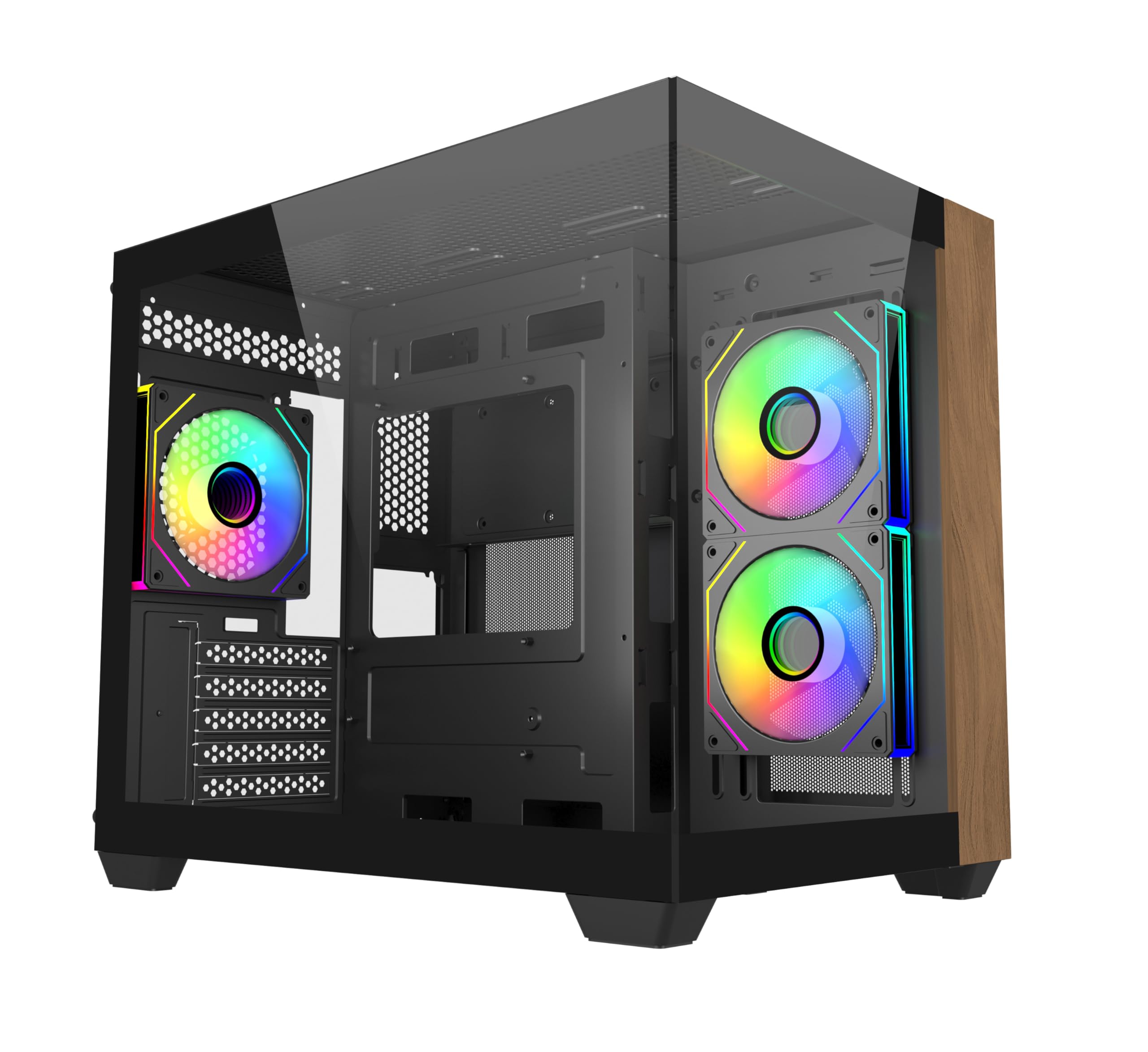
الصورة 1.1: الجبهة view of the Cooler Master Elite 481 Wood Computer Case.
2. معلومات السلامة
- Always disconnect the power supply from the wall outlet before installing or servicing any components inside the computer case.
- Avoid exposing the case to moisture, dust, or extreme temperatures.
- تعامل مع ألواح الزجاج المقسى بحذر. فهي هشة وقد تنكسر إذا سقطت أو تعرضت لصدمة.
- Ensure all cables are routed properly and secured to prevent interference with fans or other moving parts.
- Do not attempt to modify the case or its components, as this may void your warranty and pose a safety risk.
3. محتويات العبوة
تأكد من وجود كافة المكونات قبل البدء في التثبيت:
- علبة كمبيوتر خشبية Cooler Master Elite 481
- صندوق الملحقات (براغي، فواصل، روابط الكابلات، إلخ).
- 3 x Pre-installed ARGB Fans (2 reverse-blade side intake, 1 rear exhaust)
- دليل المستخدم (هذا المستند)
4. الإعداد والتثبيت
4.1 إعداد القضية
Carefully remove the case from its packaging. Place it on a stable, flat surface. Remove the tempered glass side panels by unscrewing the retaining screws and gently sliding them off. Store them safely to prevent damage.

Image 4.1: The case features dual tempered glass panels for a panoramic view.
4.2 تركيب اللوحة الأم
The Elite 481 Wood supports mATX motherboards. Install the necessary standoffs for your motherboard form factor. Carefully place your motherboard into the case, aligning it with the standoffs, and secure it with screws.
4.3 تركيب وحدة إمداد الطاقة (PSU)
The case features a top-mounted PSU chamber in the right compartment. Install your PSU into this designated area and secure it with screws. Route the necessary power cables through the cable management cutouts.
4.4 تركيب محرك التخزين
Utilize the available mounting points for 2.5-inch SSDs and 3.5-inch HDDs. Secure drives using the provided screws or tool-less mechanisms where applicable.
4.5 تثبيت بطاقة الرسومات (GPU)
The case supports GPUs up to 410mm in length. Remove the necessary PCIe slot covers, insert your graphics card into the PCIe slot on your motherboard, and secure it with the retaining clip and screw.

Image 4.2: The case accommodates large graphics cards up to 410mm.
4.6 تركيب نظام التبريد (المراوح والمشعات)
The Elite 481 Wood supports up to 9 fans and offers extensive radiator support:
- مراوح مثبتة مسبقًا: 2 x 120mm reverse-blade ARGB fans (side intake), 1 x 120mm ARGB fan (rear exhaust).
- دعم المبرد: Dual 360mm radiators (top and bottom), and a 280mm side radiator.
Install additional fans or radiators as needed, ensuring proper airflow direction for optimal cooling.

Image 4.3: Vertical cooling configuration with multiple fan mounts and radiator support.
4.7 إدارة الكابلات
The dual-chamber architecture provides 95mm of cable management space in the right chamber. Utilize the cable cutouts and included cable ties to route and secure cables neatly, ensuring unobstructed airflow and a clean build appearance.
4.8 Connecting Front I/O Panel
Connect the front I/O panel cables (USB 3.0, USB 3.2 Gen 2x2 Type-C, audio, power, reset, LED) to the corresponding headers on your motherboard. Refer to your motherboard manual for specific header locations.

Image 4.4: The upgraded high-speed I/O panel features USB 3.2 Gen 2x2 Type-C and dual USB 3.0 ports.
5. تعليمات التشغيل
5.1 تشغيل/إيقاف التشغيل
Press the power button on the front I/O panel to turn your system on or off. A short press typically powers on, while a longer press (usually 4-5 seconds) will force a shutdown.
5.2 التحكم في مروحة ARGB
The pre-installed ARGB fans are compatible with major motherboard ARGB software for synchronized lighting control. Connect the fan ARGB cables to your motherboard's 3-pin 5V ARGB header. Use your motherboard's software (e.g., ASUS Aura Sync, MSI Mystic Light, Gigabyte RGB Fusion, ASRock Polychrome Sync) to customize lighting effects.

Image 5.1: Pre-installed ARGB fans with motherboard sync support.
6. الصيانة
- فلاتر الغبار: The case features mesh panels on the top and bottom for ventilation. Regularly clean these dust filters to maintain optimal airflow and prevent dust buildup inside the system. Dust filters can typically be removed, cleaned with compressed air or water, and reinstalled.
- التنظيف الخارجي: امسحي الأسطح الخارجية بقطعة ناعمة ، دamp cloth. Avoid using harsh chemicals or abrasive materials that could damage the finish or the wood panel.
- التنظيف الداخلي: Periodically use compressed air to remove dust from internal components, especially fan blades and heatsinks. Ensure the system is powered off and unplugged before cleaning.
7. استكشاف الأخطاء وإصلاحها
- النظام لا يعمل:
- Check if the power supply is properly connected to the wall outlet and the PSU switch is in the 'ON' position.
- Ensure all power cables from the PSU are securely connected to the motherboard and components.
- تأكد من أن كابل زر الطاقة الموجود باللوحة الأمامية متصل بشكل صحيح بموصل الطاقة الخاص باللوحة الأم.
- المراوح لا تدور/إضاءة ARGB لا تعمل:
- تأكد من توصيل كابلات طاقة المروحة بشكل آمن باللوحة الأم أو وحدة التحكم بالمروحة.
- تأكد من توصيل كابلات ARGB بموصل ARGB 5V ثلاثي السنون المتوافق على اللوحة الأم.
- Confirm that ARGB software is installed and configured correctly on your operating system.
- درجات الحرارة المرتفعة:
- Verify that all case fans are spinning and oriented correctly for optimal airflow (bottom-to-top is recommended for this case).
- Clean any dust buildup on filters, fans, and heatsinks.
- Ensure proper thermal paste application on CPU cooler.
8. المواصفات
| ميزة | مواصفة |
|---|---|
| رقم الموديل | E481-KHNN-S00 |
| ماركة | كولر ماستر |
| نوع الحالة | البرج الاوسط |
| التوافق مع اللوحة الأم | مايكرو ATX |
| لون | أسود |
| الأبعاد (الطول × العرض × الارتفاع) | 53.1 × 54.4 × 26.1 سم |
| وزن العنصر | 13 كجم |
| تخليص GPU | حتى 410 ملم |
| دعم المبرد | Top: 360mm, Bottom: 360mm, Side: 280mm |
| مراوح مثبتة مسبقًا | 3 × ARGB (2 × مدخل جانبي، 1 × عادم خلفي) |
| منافذ الإدخال والإخراج | 2 x USB 3.0 Type-A, 1 x USB 3.2 Gen 2x2 Type-C |
| مساحة إدارة الكابلات | 95 ملم |
9. معلومات الضمان
Cooler Master products are covered by a limited warranty. For specific warranty terms and conditions, please refer to the warranty card included with your product or visit the official Cooler Master webالموقع. احتفظ بإثبات الشراء الخاص بك لتقديم مطالبات الضمان.
10. الدعم
For technical support, product inquiries, or assistance with installation, please visit the official Cooler Master support website or contact their customer service department. You can find contact information and FAQs on their webموقع.
كولر ماستر الرسمي Webموقع: www.coolermaster.com