1. المقدمة
Thank you for choosing the EWEADN V102 Wired Gaming Keyboard. This manual provides detailed instructions for setting up, operating, and maintaining your keyboard to ensure optimal performance and longevity. The V102 features a compact 98-key layout, dynamic RGB backlighting, a multi-function control knob, and a smart display screen.
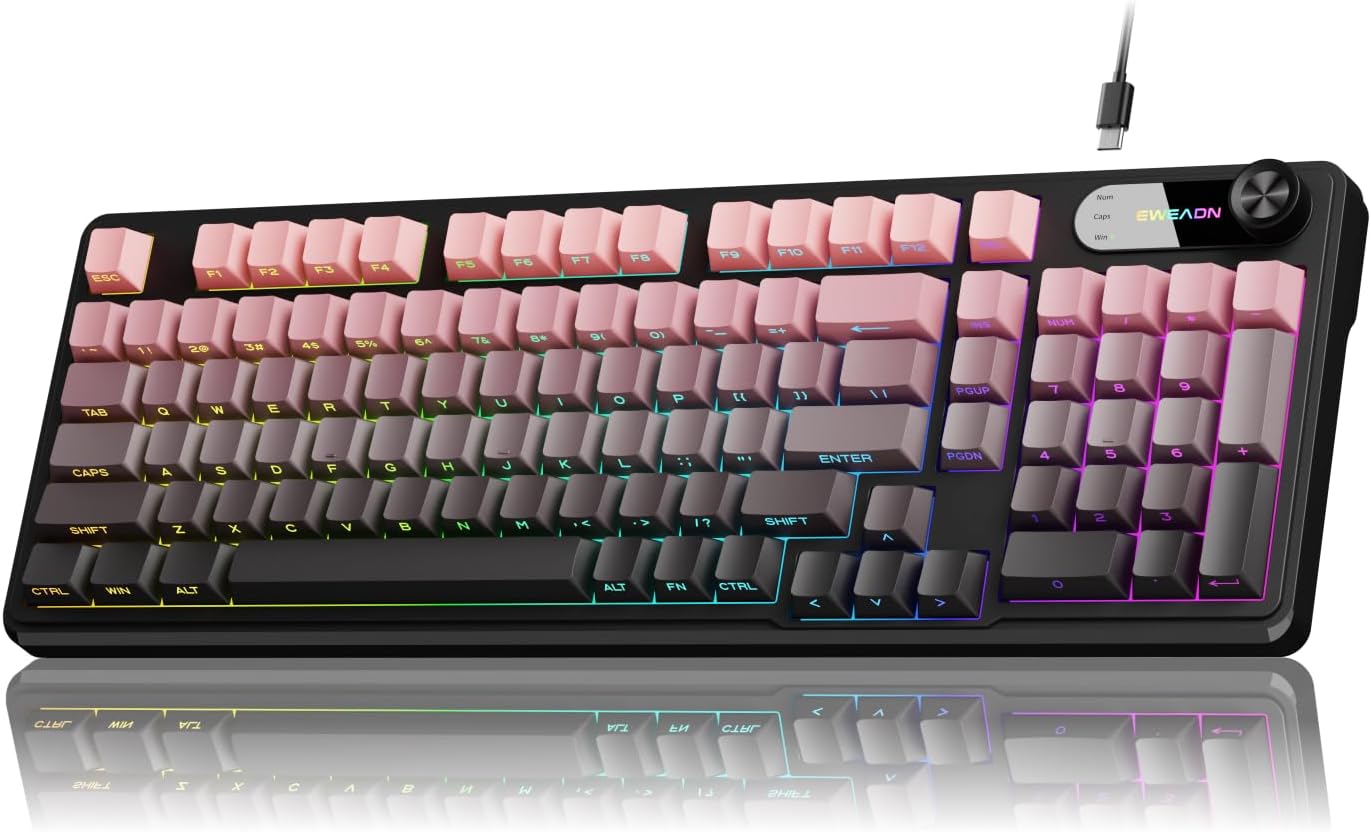
Image 1: EWEADN V102 Wired Gaming Keyboard, showcasinبفضل تصميمه المدمج وإضاءة RGB.
2. محتويات العبوة
يرجى التأكد من وجود جميع العناصر في الحزمة الخاصة بك:
- EWEADN V102 Wired Gaming Keyboard
- كابل USB Type-C
- دليل المستخدم (هذا المستند)
3. الإعداد
3.1 توصيل لوحة المفاتيح
- Locate the USB Type-C port on the back of the EWEADN V102 keyboard.
- Connect one end of the provided USB Type-C cable to the keyboard's port.
- Connect the other end of the USB cable to an available USB port on your computer (PC, Laptop, Gaming Console, Tablet, or Smartphone).
- لوحة المفاتيح سهلة الاستخدام، ويجب أن يتعرف عليها نظام التشغيل الخاص بك تلقائيًا.

Image 2: Illustration of the wired Type-C connection, showing the cable connecting the keyboard to a computer.
4. تعليمات التشغيل
4.1 Multi-Function Control Knob
The rotary knob on the keyboard provides quick access to various functions:
- Default Mode (Backlight Control):
- Press the knob: Toggles between different RGB backlight modes.
- Rotate the knob: Adjusts the backlight brightness (5 levels).
- Multimedia Mode (Volume Control):
- To switch to Multimedia Mode: Press and hold زر FN + مقبض.
- Press the knob: Mutes/unmutes audio.
- Rotate the knob: Adjusts system volume.
- To switch back to Backlight Control Mode: Press and hold زر FN + مقبض مرة أخرى.

الصورة 3: تفصيلية view of the multi-function control knob, illustrating its use for backlight and volume adjustments.
4.2 Dynamic RGB Backlighting
The keyboard features 12 dynamic RGB lighting effects. Control the backlighting using the following key combinations:
- الجبهة الوطنية + الإضافية: Cycles through 12 different RGB lighting effects.
- FN + PGUP/PGDN: Adjusts backlight brightness (5 levels).
- FN + "_" / "+": Adjusts lighting speed (5 levels).
- FN + Backspace: Toggles backlight On/Off.

Image 4: Visual guide to RGB backlight controls, showing key combinations for effects, brightness, and speed.
4.3 Smart Display Screen
The built-in display screen provides real-time status indicators:
- Caps lock: Indicates when Caps Lock is active.
- قفل الأرقام: Indicates when Num Lock is active.
- قفل الفوز: Indicates when the Windows key is locked (preventing accidental presses during gaming).
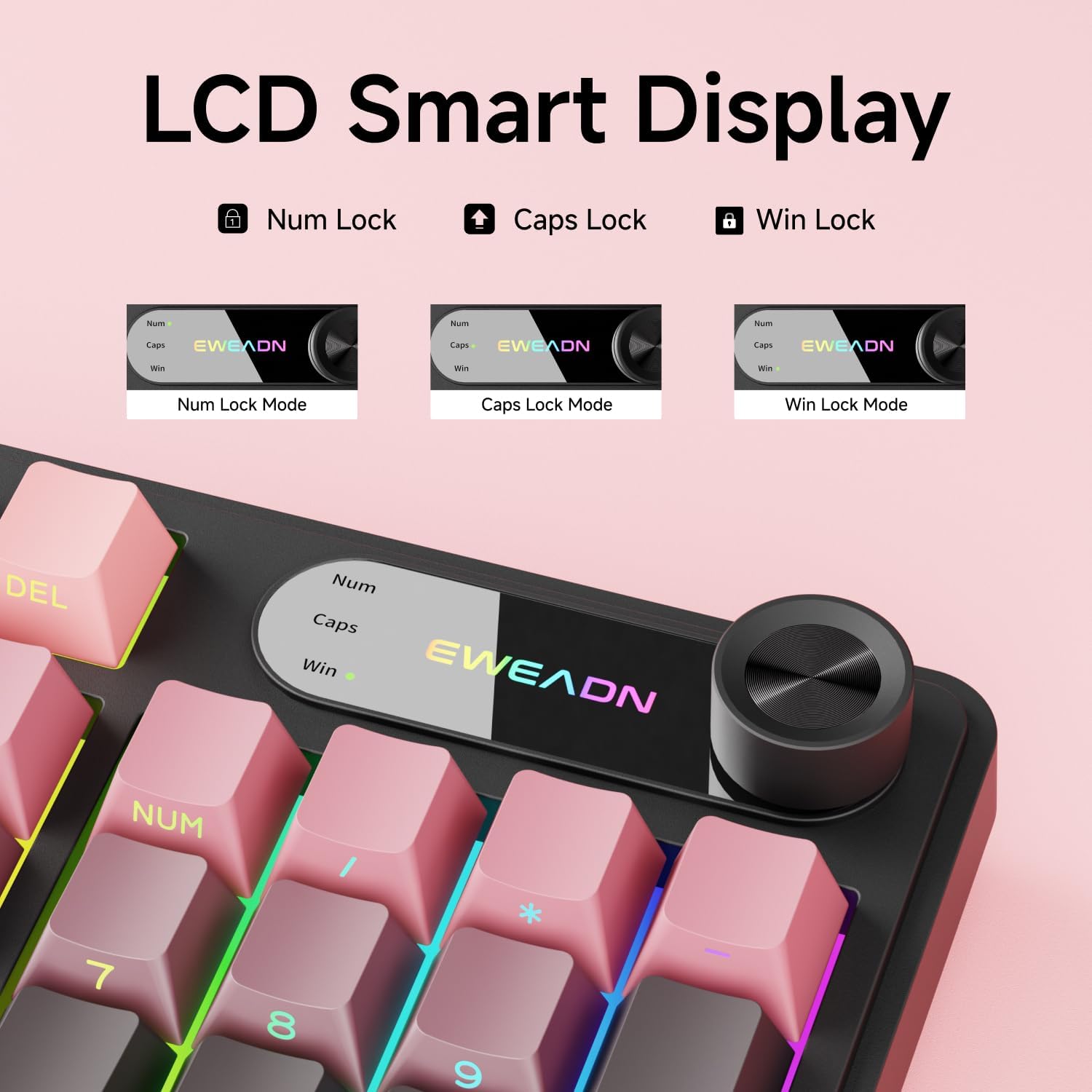
Image 5: Close-up of the LCD smart display, showing indicators for Num Lock, Caps Lock, and Win Lock.
4.4 Dual-System Compatibility
The EWEADN V102 keyboard supports both Windows and Mac operating systems. Switch between layouts using the following key combinations:
- الجبهة الوطنية + أ: Switches to Windows layout.
- FN + S: Switches to Mac layout.

Image 6: Diagram illustrating the FN+A and FN+S key combinations for switching between Windows and Mac layouts.
4.5 Adjustable Typing Angles
The keyboard is equipped with two-stage adjustable feet on the bottom, allowing you to choose a comfortable typing angle:
- اول سtage: Provides a slight incline.
- ثانية ثانيةtage: Provides a steeper incline for ergonomic comfort.

Image 7: Illustration of the keyboard's two-stage adjustable feet, demonstrating different typing angles.
5. الصيانة
5.1 التنظيف
- افصل لوحة المفاتيح عن الكمبيوتر قبل التنظيف.
- استخدم قطعة قماش ناعمة وخالية من الوبر وامسحها برفق.ampامسح أغطية المفاتيح وسطح لوحة المفاتيح بالماء أو بمحلول تنظيف خفيف.
- تجنب استخدام المواد الكيميائية القاسية، أو المنظفات الكاشطة، أو المذيبات.
- لإزالة الغبار والحطام بين المفاتيح، استخدم الهواء المضغوط.
5.2 Spill Resistance
The keyboard features a spill-resistant design. In case of accidental spills:
- افصل لوحة المفاتيح عن جهاز الكمبيوتر الخاص بك فوراً.
- Wipe off any liquid from the surface with a clean cloth.
- Allow the keyboard to air dry completely before reconnecting it.

Image 8: Visual representation of the keyboard's spill-resistant capabilities.
6. استكشاف الأخطاء وإصلاحها
- لوحة المفاتيح لا تستجيب: Ensure the USB Type-C cable is securely connected to both the keyboard and the computer. Try a different USB port or a different cable.
- المفاتيح غير مسجلة: Check for any debris under the keycaps. If specific keys are not working, contact customer support.
- الإضاءة الخلفية لا تعمل: Ensure the backlight is not turned off (FN + Backspace). Adjust brightness using FN + PGUP/PGDN.
- Knob not controlling volume: Ensure the knob is in Multimedia Mode (press and hold FN + Knob to switch).
- وظائف المفاتيح غير الصحيحة (Mac/Windows): Verify you are in the correct operating system layout (FN + A for Windows, FN + S for Mac).
7. المواصفات
| ميزة | التفاصيل |
|---|---|
| رقم الموديل | رقم V102 |
| الاتصال | سلكي (USB من النوع C) |
| تخطيط المفتاح | 98-Key Compact Layout |
| نوع لوحة المفاتيح | Wired Membrane Keyboard |
| الإضاءة الخلفية | RGB (16.8 مليون لون) |
| المميزات الخاصة | Multi-Function Knob, Smart Display Screen, Ergonomic Design, Adjustable Feet, Spill Resistant |
| الأجهزة المتوافقة | Laptop, PC, Gaming Console, Tablet, Smartphone |
| مادة | المعدن والبلاستيك |
| وزن العنصر | 1 جنيه |
8. الضمان والدعم
EWEADN is committed to providing quality products and customer satisfaction. For any inquiries, troubleshooting assistance, or warranty claims, please contact our support team.
معلومات الاتصال 8.1
- دعم البريد الإلكتروني: eweadnkeyboard@outlook.com
- متجر أمازون: Visit the EWEADN Store page on Amazon and click "Ask a question" to contact the seller.

الصورة 9: انتهىview of EWEADN's after-sales support services, including Q&A, troubleshooting, and returns.


