1. المقدمة
Thank you for choosing BUGANI Buds True Wireless Earbuds. This manual provides detailed instructions on how to set up, operate, and maintain your earbuds to ensure optimal performance and longevity. Please read this manual thoroughly before using the product.
2. محتويات العبوة
- 1 pair of BUGANI B09 True Wireless Earbuds
- 1 كابل شحن USB-C
- 3 أزواج من أطراف الأذن (S، M، L)
- 3 pairs of Silicone Ear Hooks (S, M, L)
- 1 دليل المستخدم
3. انتهى المنتجview
Familiarize yourself with the components of your BUGANI Buds.
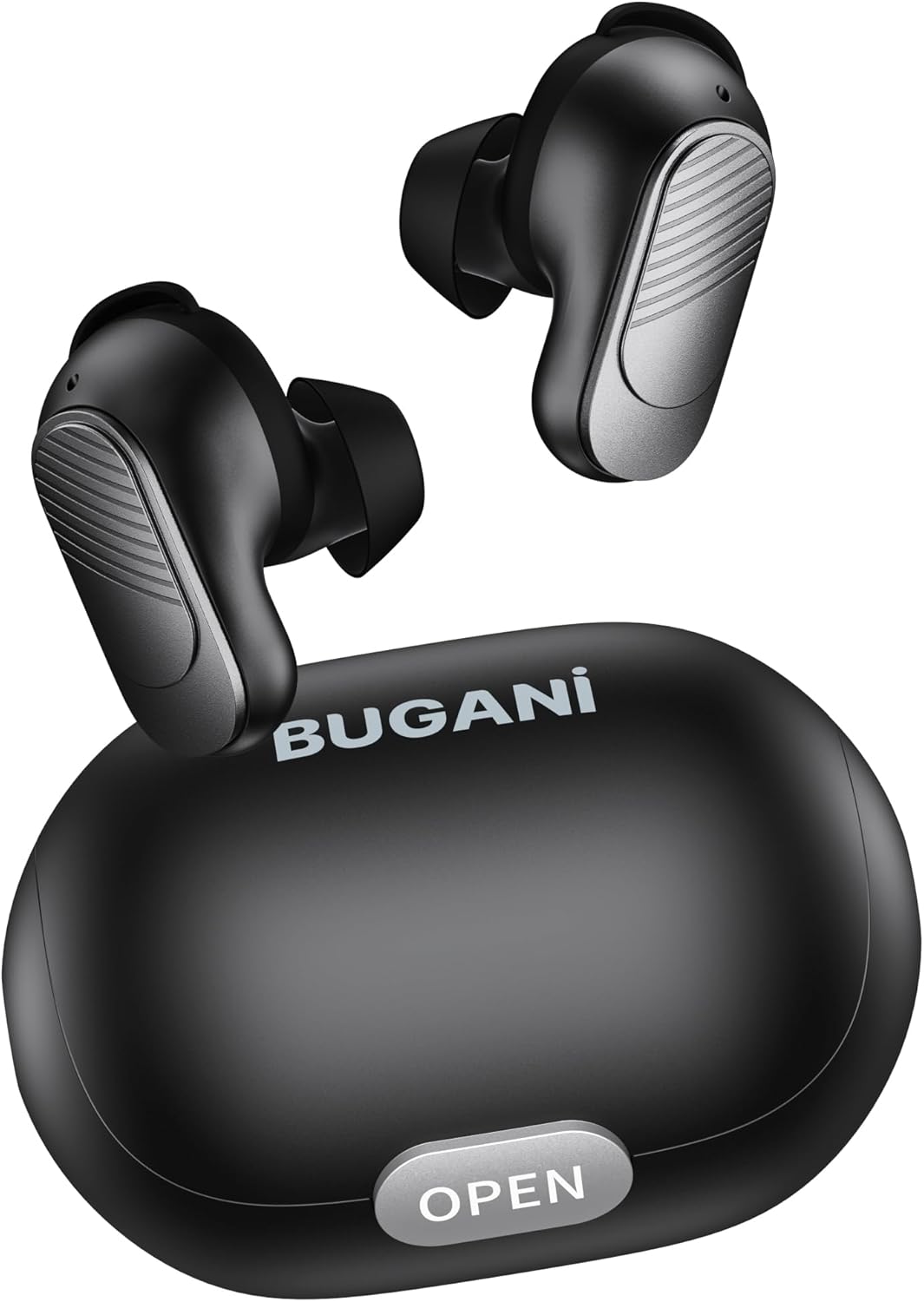
Image: BUGANI Buds True Wireless Earbuds with their charging case. The earbuds are black with silver accents, and the case is a sleek black oval shape with an "OPEN" button.

Image: An exploded diagram showing the internal components of a BUGANI Bud earbud, highlighting the driver and circuit board for enhanced sound quality.

Image: Illustration demonstrating the battery life of BUGANI Buds. It shows 6 hours of playback on a single charge and an additional 24 hours with the charging case, totaling 30 hours.

Image: A woman using BUGANI Buds during a phone call, with an inset showing the earbud and the "MIC" label, indicating the dual microphone for clear calls.

Image: A woman exercising while wearing BUGANI Buds, with an overlay showing the IPX6 water resistance icon, signifying protection against sweat and splashes.

Image: A woman wearing BUGANI Buds, with insets highlighting the lightweight design (3.9g) and the ergonomic fit with proper ear wingtips for comfort.
4. الإعداد
4.1 الشحن الأولي
Before first use, fully charge the earbuds and the charging case. Connect the USB-C charging cable to the charging port on the case and a power source. The indicator lights on the case will show charging status.
4.2 اختيار أطراف الأذن المناسبة
Select the eartips (S, M, L) and silicone ear hooks that provide the most comfortable and secure fit for your ears. A proper seal is crucial for optimal sound quality and noise isolation.
5. تعليمات التشغيل
5.1 تشغيل/إيقاف التشغيل
- تشغيل الطاقة: افتح حافظة الشحن ، وسيتم تشغيل سماعات الأذن تلقائيًا.
- إيقاف التشغيل: أعد وضع سماعات الأذن في علبة الشحن وأغلق الغطاء. ستتوقف تلقائيًا وتبدأ عملية الشحن.
5.2 اقتران بلوتوث
- تأكد من وضع سماعات الأذن في علبة الشحن وأن الغطاء مفتوح.
- على جهازك (الهاتف الذكي، الجهاز اللوحي، وما إلى ذلك)، قم بتمكين البلوتوث.
- بحث عن "BUGANI Buds" in the list of available Bluetooth devices.
- Select "BUGANI Buds" to connect. Once connected, you will hear a confirmation tone.
- سيتم إعادة توصيل سماعات الأذن تلقائيًا بالجهاز المقترن الأخير عند إخراجها من العلبة، إذا تم تمكين البلوتوث على الجهاز.
5.3 الضوابط التي تعمل باللمس
The BUGANI Buds feature intuitive touch controls on each earbud:
| فعل | سماعة الأذن اليسرى | سماعة الأذن اليمنى |
|---|---|---|
| تشغيل/إيقاف مؤقت | نقرة واحدة | نقرة واحدة |
| المسار التالي | الضغط مرتين | |
| المسار السابق | الضغط مرتين | |
| الرد على المكالمة/إنهائها | نقرة واحدة | نقرة واحدة |
| رفض المكالمة | الضغط لفترة طويلة (2 ثوان) | الضغط لفترة طويلة (2 ثوان) |
| تفعيل المساعد الصوتي | الصنبور الثلاثي | الصنبور الثلاثي |
5.4 شحن سماعات الأذن والعلبة
- سماعات الأذن: Place the earbuds into the charging case. They will automatically charge.
- علبة الشحن: Connect the USB-C cable to the charging port on the case and a USB power adapter (not included). The indicator lights will show the charging status.
6. الصيانة
- قم بتنظيف سماعات الأذن وعلبة الشحن بانتظام باستخدام قطعة قماش ناعمة وجافة.
- لا تستخدم المنظفات أو المذيبات الكاشطة.
- حافظ على نظافة نقاط التلامس الخاصة بالشحن في كل من سماعات الأذن والعلبة لضمان الشحن السليم.
- قم بتخزين سماعات الأذن في علبة الشحن الخاصة بها عند عدم استخدامها لحمايتها وإبقائها مشحونة.
- تجنب تعريض سماعات الأذن لدرجات حرارة عالية أو رطوبة أو أشعة الشمس المباشرة.
- While IPX6 water-resistant, do not immerse the earbuds in water.
7. استكشاف الأخطاء وإصلاحها
| مشكلة | الحل المحتمل |
|---|---|
| سماعات الأذن لا تقترن |
|
| تعمل سماعة أذن واحدة فقط |
|
| جودة الصوت سيئة |
|
| سماعات الأذن لا تشحن |
|
8. المواصفات
| ميزة | التفاصيل |
|---|---|
| اسم الموديل | ب09 |
| ماركة | بوجاني |
| تكنولوجيا الاتصال | لاسلكي (بلوتوث 5.3) |
| تكنولوجيا الاتصالات اللاسلكية | بلوتوث |
| نوع التحكم | التحكم باللمس |
| مستوى مقاومة الماء | IPX6 (مقاوم للماء) |
| نطاق التردد | 20 هرتز - 20,000 هرتز |
| تكوين البطارية | ليثيوم أيون |
| بطارية قابلة لإعادة الشحن | نعم |
| وضع الأذن | داخل الأذن |
| عامل الشكل | داخل الأذن |
| مادة | بلاستيك |
| لون | أسود |
| ASIN | B0FBRKTKTS |
9. الضمان والدعم
For warranty information and technical support, please refer to the official BUGANI webالموقع أو تواصل مع خدمة العملاء. احتفظ بإيصال الشراء لطلبات الضمان.
Return Policy: This product typically has a 30-day refund/replacement return policy.
Manufacturer: BUGANI


