1. انتهى المنتجview
The Cudy AC1200 Outdoor Wireless Access Point (AP1200 Outdoor) is designed to provide reliable and high-speed Wi-Fi connectivity in outdoor environments. It supports the latest 802.11ac Wave 2 technology, offering dual-band Wi-Fi speeds up to 867 Mbps on 5 GHz and 300 Mbps on 2.4 GHz. Key features include MU-MIMO, Beamforming, IP65 waterproof rating, 4KV lightning protection, and flexible Power over Ethernet (PoE) options.

Figure 1: Cudy AP1200 Outdoor Wireless Access Point Overview
2. محتويات العبوة
تأكد من أن طردك يحتوي على جميع العناصر المدرجة أدناه:
- AP1200 Outdoor Wireless Access Point
- محول الطاقة
- Detachable Antennas (2 units)
- سلك الطاقة
- تصاعد كيت
- كابل إيثرنت
- دليل التثبيت (هذا الدليل)
3. انتهت الأجهزةview
3.1 المظهر الجسدي
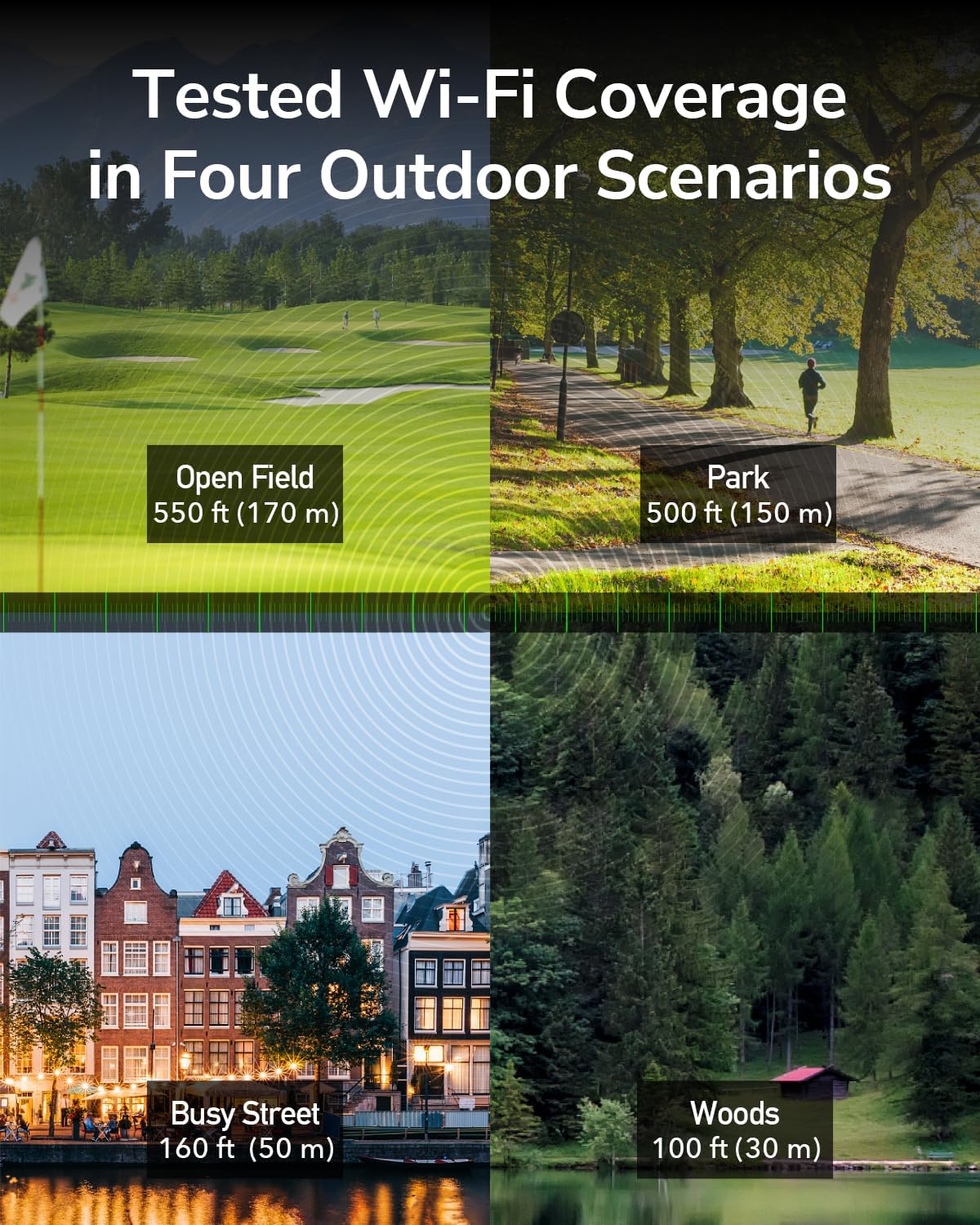
Figure 2: Cudy AP1200 Outdoor Access Point
3.2 مؤشرات LED
يحتوي الجهاز على عدة مؤشرات LED لعرض حالته:
- مؤشر الطاقة LED: يشير إلى حالة الطاقة.
- مؤشر LED للشبكة المحلية: Indicates Ethernet connection status.
- 2.4GHz Wi-Fi LED: Indicates 2.4GHz wireless activity.
- 5GHz Wi-Fi LED: Indicates 5GHz wireless activity.
3.3 المنافذ والأزرار
The device includes the following ports and buttons:
- RJ45 Port (PoE-IN): Used for both data and power input via Power over Ethernet.
- زر إعادة الضبط: يستخدم لاستعادة إعدادات المصنع الافتراضية.
- موصلات الهوائي: Two RP-SMA connectors for detachable antennas.

Figure 3: RJ45 Port with PoE-IN
4. الإعداد والتثبيت
4.1 تركيب الهوائيات
Carefully screw the two detachable 5dBi antennas onto the RP-SMA connectors on the device. Ensure they are securely fastened but do not overtighten.

Figure 4: Antennas Attached to AP1200 Outdoor
4.2 اتصال الطاقة عبر الإيثرنت (PoE)
The AP1200 Outdoor supports 802.3at/af PoE or 24~50V passive power supply. Use the included PoE adapter to power the device and connect it to your network.
- Connect one end of an Ethernet cable to the LAN port of your router or network switch.
- Connect the other end of this Ethernet cable to the 'LAN' port on the PoE adapter.
- Connect one end of the included Ethernet cable to the 'PoE' port on the PoE adapter.
- Open the protective cover on the AP1200 Outdoor and connect the other end of the Ethernet cable from the PoE adapter to the RJ45 (PoE-IN) port on the AP.
- Plug the PoE adapter into a power outlet. The device will power on, and the Power LED will illuminate.
4.3 خيارات التركيب
The AP1200 Outdoor can be mounted on a pole or a wall using the provided mounting kit. Choose a location that offers optimal Wi-Fi coverage and is protected from direct impact.
- تركيب القطب: Use the straps and brackets to secure the device to a pole.
- التثبيت على الحائط: Use screws and anchors to attach the device to a wall.

Figure 5: Mounting Options (Wall and Pole)
5. أوضاع التشغيل
The Cudy AP1200 Outdoor supports multiple operating modes to suit various network requirements:
- وضع نقطة الوصول (AP): Connects to a wired network and transforms it into a wireless network, allowing multiple Wi-Fi devices to connect.
- وضع الموسع: يوسع نطاق تغطية شبكة لاسلكية موجودة.
- وضع جهاز التوجيه: يعمل كجهاز توجيه رئيسي، ويوفر إمكانية الوصول إلى الإنترنت للأجهزة المتصلة.
- وضع ويسب: Connects wirelessly to an Internet Service Provider (ISP) network and shares the connection with local devices.
- Mesh Router Mode: Creates a seamless mesh Wi-Fi network with other compatible devices.

وضع نقطة الوصول

وضع الموجه

وضع مكرر

وضع WISP
6. التكوين
To configure the AP1200 Outdoor, connect a computer to the device via Ethernet or Wi-Fi. Access the web- واجهة إدارة قائمة باستخدام ملف web المتصفح.
- Ensure your computer is connected to the AP1200 Outdoor (either directly via Ethernet or to its default Wi-Fi network).
- افتح web المتصفح وأدخل عنوان IP الافتراضي (عادةً
192.168.10.1or refer to the Quick Installation Guide) in the address bar. - أدخل اسم المستخدم وكلمة المرور الافتراضيين (عادةً
admin(لكلا الطرفين). - Follow the on-screen wizard to set up your desired operating mode, Wi-Fi name (SSID), and password.
- احفظ إعداداتك وأعد تشغيل الجهاز إذا طُلب منك ذلك.
7. الصيانة
7.1 تحديثات البرامج الثابتة
Regularly check for and install firmware updates to ensure optimal performance, security, and access to new features. Visit the Cudy official website for the latest firmware for your AP1200 Outdoor model.
7.2 التنظيف
As an outdoor device with an IP65 rating, the AP1200 Outdoor is protected against dust and water. However, periodic cleaning can help maintain its appearance and prevent excessive buildup. Use a soft, damp استخدم قطعة قماش لمسح السطح الخارجي. لا تستخدم مواد كيميائية قاسية أو منظفات كاشطة.
7.3 الاعتبارات البيئية
The device is designed to operate in a wide range of outdoor temperatures (-40°C to 65°C). Ensure proper ventilation and avoid placing it in direct sunlight for prolonged periods if possible, to maximize lifespan.

Figure 6: Weather-Proof Design
8. استكشاف الأخطاء وإصلاحها
If you encounter issues with your AP1200 Outdoor, refer to the following common troubleshooting steps:
- لا يوجد طاقة: Ensure the PoE adapter is correctly plugged into a power outlet and the Ethernet cable is securely connected to the AP's PoE-IN port. Check the power LED.
- لا يوجد اتصال بالإنترنت: Verify that your main router has internet access. Check the Ethernet cable connections between the router, PoE adapter, and AP. Ensure the AP is configured in the correct operating mode.
- إشارة واي فاي ضعيفة: Adjust the antenna orientation. Relocate the AP to a more central position or higher elevation. Check for physical obstructions.
- لا يمكن الوصول Web صفحة الإدارة: Ensure your device is connected to the AP's network. Verify the IP address entered in the browser is correct. Try clearing your browser's cache or using a different browser.
- اعدادات المصنع: If problems persist, you may need to perform a factory reset. With the device powered on, use a paperclip to press and hold the Reset button for approximately 5-10 seconds until the LEDs flash. The device will restart with factory default settings.
9. المواصفات
| ميزة | وصف |
|---|---|
| اسم الموديل | AP1200 في الهواء الطلق |
| أبعاد المنتج | 9.45 × 3.94 × 2.11 بوصة |
| وزن العنصر | 14.6 أونصات |
| المعيار اللاسلكي | 802.11ac الموجة 2 |
| فئة نطاق التردد | النطاق المزدوج (2.4 جيجاهرتز و 5 جيجاهرتز) |
| سرعة الواي فاي (5 جيجاهرتز) | تصل إلى 867 ميجابايت في الثانية |
| سرعة الواي فاي (2.4 جيجاهرتز) | تصل إلى 300 ميجابايت في الثانية |
| الهوائيات | 2 external 5dBi detachable antennas |
| الموانئ | 1x RJ45 (PoE-IN) |
| مزود الطاقة | 802.3at/af PoE or 24~50V Passive PoE (adapter included) |
| حماية الطقس | IP65 rated waterproof housing, 4KV lightning protection |
| درجة حرارة التشغيل | -40 درجة مئوية إلى 65 درجة مئوية |
| الأجهزة المتوافقة | كمبيوتر شخصي، كاميرا أمنية، تلفزيون ذكي، هاتف ذكي، جهاز لوحي |
10. معلومات الضمان
Cudy products are backed by a limited warranty. For detailed warranty terms and conditions, please refer to the warranty card included with your product or visit the official Cudy webالموقع. احتفظ بإيصال الشراء الخاص بك كإثبات للشراء في حالة مطالبات الضمان.
11. الدعم الفني
If you require further assistance or have questions not covered in this manual, please contact Cudy Technical Support. You can find contact information, FAQs, and additional resources on the official Cudy webموقع:
- Webموقع: www.cudy.com
- بريد إلكتروني: ارجع إلى webموقع مخصص لعناوين البريد الإلكتروني للدعم.


