1. المقدمة
Thank you for choosing the MCHOSE Mix 87 Magnetic Switch Gaming Keyboard. This manual provides detailed instructions for setting up, operating, and maintaining your keyboard to ensure optimal performance. The Mix 87 is designed for competitive gaming, featuring Hall Effect magnetic switches with rapid trigger technology and adjustable actuation.
2. محتويات العبوة
يرجى التأكد من وجود جميع العناصر في الحزمة الخاصة بك:
- MCHOSE Mix 87 Gaming Keyboard
- كابل USB-C
- كيكاب بولير
- Extra Switches (2 pieces)
- دليل المستخدم (هذا المستند)
3. انتهى المنتجview
The MCHOSE Mix 87 is a Tenkeyless (TKL) keyboard featuring 87 keys, Hall Effect magnetic switches, and a dedicated volume knob. Its design prioritizes speed, precision, and customization for an enhanced gaming experience.

الصورة 3.1: قمة view of the MCHOSE Mix 87 Gaming Keyboard, showcasing its 87-key layout, dedicated function keys, and volume knob. The keyboard features RGB backlighting visible through the translucent keycaps.
المميزات الرئيسية:
- مفاتيح مغناطيسية تعمل بتأثير هول: Offers adjustable actuation points from 0.01mm to 3.4mm.
- Rapid Trigger (RT) Mode: Allows keys to react instantly upon release, enhancing responsiveness.
- 8000 Hz Polling Rate: Minimizes input latency for competitive gaming.
- الإضاءة الخلفية RGB: Customizable 16 million color options with various effects.
- مقبض مخصص للتحكم في مستوى الصوت: For convenient audio control.
- هيكل تثبيت الحشية: Provides a comfortable typing feel and acoustic profile.

الصورة 3.2: Close-up of the MCHOSE Mix 87 keyboard highlighting its magnetic switch technology. The image emphasizes the 0.001mm precision and 0.08ms event-level delay, crucial for high-performance gaming.
4. الإعداد
4.1 توصيل لوحة المفاتيح
- Locate the USB-C port on the back of your MCHOSE Mix 87 keyboard.
- قم بتوصيل أحد طرفي كابل USB-C المقدم بلوحة المفاتيح.
- قم بتوصيل الطرف الآخر من كابل USB-C بمنفذ USB المتوفر على جهاز الكمبيوتر الخاص بك.
- سيتم التعرف على لوحة المفاتيح تلقائيًا بواسطة نظام التشغيل الخاص بك.
4.2 توافق النظام
The MCHOSE Mix 87 keyboard is compatible with the following operating systems:
- نوافذ
- ماك
- اي او اس
- أندرويد
5. تعليمات التشغيل
5.1 الوظائف الأساسية الرئيسية
The MCHOSE Mix 87 features a standard 87-key TKL layout. All keys function as labeled. Use the Fn key in combination with other keys for secondary functions, typically indicated by icons or alternative labels on the keycaps.
5.2 Volume Knob Operation
The dedicated knob located in the upper right corner of the keyboard controls audio output.
- Rotate Left: خفض مستوى الصوت.
- تدوير لليمين: زيادة الحجم.
- اضغط لأسفل: كتم/إلغاء كتم الصوت.
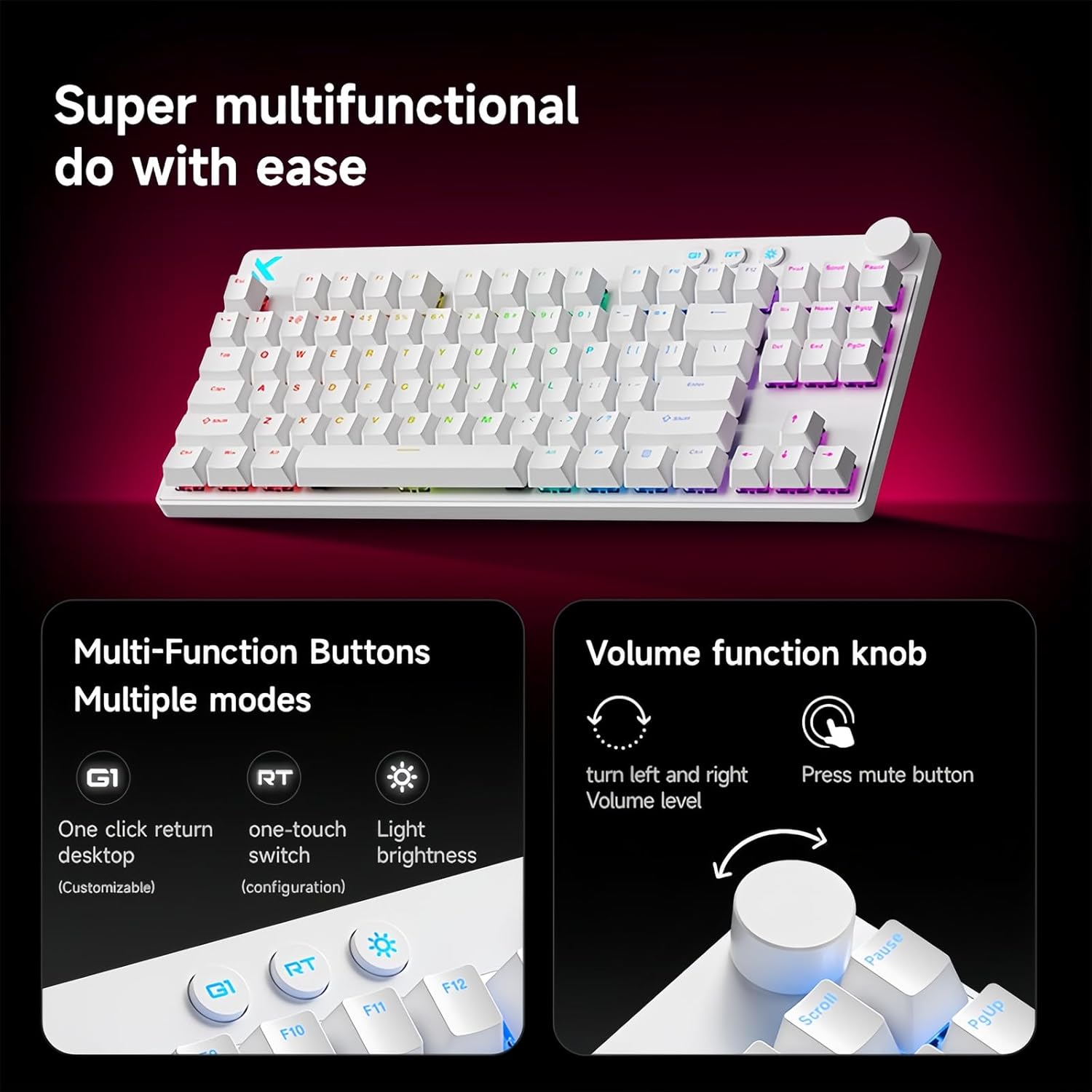
الصورة 5.1: Illustration of the multi-function buttons (G1, RT, Light) and the volume knob on the MCHOSE Mix 87 keyboard. The image details the functions of the knob for volume adjustment and muting, and the customizable nature of the G1 button.
5.3 زرًا متعدد الوظائف
Above the numeric row, there are three dedicated buttons:
- G1 Button: Customizable function, typically set to return to desktop.
- RT Button: Toggles or adjusts Rapid Trigger mode.
- زر الضوء: Adjusts RGB lighting brightness or cycles through lighting modes.
5.4 Rapid Trigger (RT) Mode and Adjustable Actuation
The Mix 87 features Hall Effect magnetic switches that allow for precise control over actuation and de-actuation points.
- Adjustable Actuation: The trigger point can be set from 0.01mm to 3.4mm, allowing you to customize key sensitivity. This is configured via the web سائق.
- الزناد السريع (RT): This mode allows a key to register a new press as soon as it begins to move upwards, without needing to return to its reset point. This significantly reduces input delay for repeated key presses. The RT Smart Mode offers 1-15 adjustable levels for fine-tuning responsiveness.
- الوظائف المتقدمة: Supports SOCD (Simultaneous Opposite Cardinal Directions), DKS (Dynamic Keystrokes), MT (Macro Toggle), and TGL (Toggle) functions for advanced control.

الصورة 5.2: Visual representation of the MCHOSE Mix 87's performance capabilities, including 0.001mm precision, 256K ultra-high scanning rate, 0.08ms ultra-low latency, and 8K ultra-high polling rate. It also highlights the magnetic axis Algorithm 3.0, 15-level adjustable RT Smart mode, and ADC Direct Link for WASD keys.
5.5 الإضاءة الخلفية RGB
The keyboard features 16 million color RGB backlighting with various effects. Use the dedicated Light button or the software driver to customize lighting:
- Cycle through preset lighting effects.
- ضبط مستويات السطوع.
- Customize individual key lighting.
- Enable music rhythm synchronization.
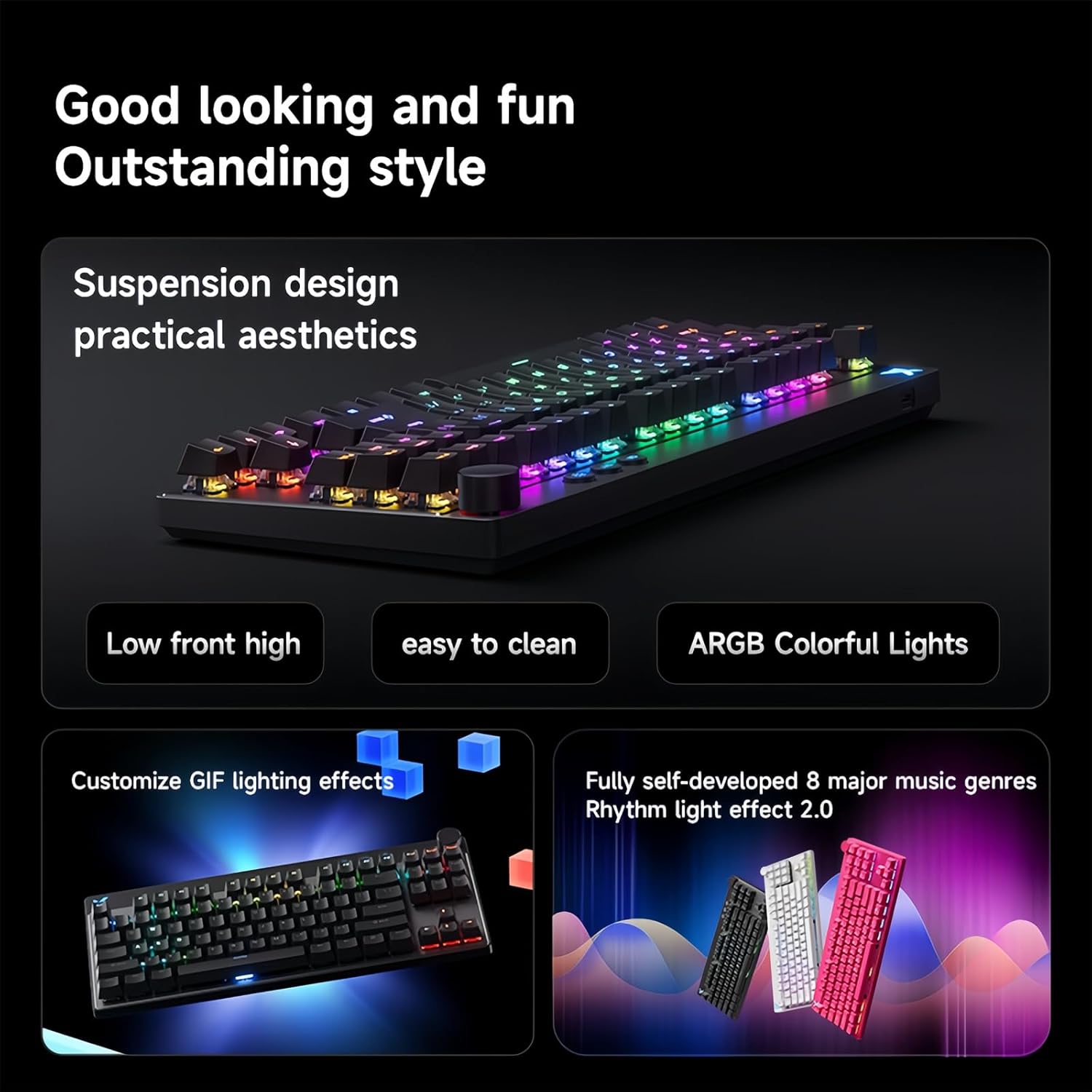
الصورة 5.3: The MCHOSE Mix 87 keyboard showcasing its suspension design and ARGB colorful lighting. The image highlights the aesthetic appeal and practical features like easy cleaning and customizable GIF lighting effects, along with music rhythm light effects.
6. Software Driver
The MCHOSE Mix 87 supports a customizable web-based driver, eliminating the need for software downloads and installations. This driver provides access to advanced settings and customization options.
6.1 الوصول إلى Web سائق
للوصول إلى web driver, open your web browser and navigate to one of the following URLs:
- Official MCHOSE Web السائق: https://www.mchose.com.cn
- Alternative M HUB Client Driver: https://www.maicong.cn
ال web driver allows you to:
- Adjust key actuation points.
- Configure Rapid Trigger (RT) levels.
- تخصيص تأثيرات الإضاءة والألوان RGB.
- Program macros and reassign key functions.
- Update firmware (if available).

الصورة 6.1: Screenshot illustrating the MCHOSE web-based driver interface. This driver allows users to customize keyboard settings without installing dedicated software, offering cross-platform compatibility.
7. الصيانة
7.1 تنظيف لوحة المفاتيح
للحفاظ على مظهر ووظائف لوحة المفاتيح الخاصة بك:
- افصل لوحة المفاتيح عن الكمبيوتر قبل التنظيف.
- استخدم قطعة قماش ناعمة وخالية من الوبر وامسحها برفق.ampاغسل أغطية المفاتيح والهيكل بالماء أو محلول التنظيف المعتدل.
- For dust and debris between keycaps, use compressed air or the provided keycap puller to remove keycaps and clean underneath.
- Avoid using harsh chemicals, abrasives, or solvents, as these can damage the keyboard's finish.
7.2 التخزين
When not in use, store the keyboard in a dry, cool place away from direct sunlight and extreme temperatures.
8. استكشاف الأخطاء وإصلاحها
8.1 لوحة المفاتيح لا تستجيب
- تأكد من توصيل كابل USB-C بشكل آمن بكل من لوحة المفاتيح والكمبيوتر.
- حاول توصيل لوحة المفاتيح بمنفذ USB مختلف على جهاز الكمبيوتر الخاص بك.
- قم باختبار لوحة المفاتيح على جهاز كمبيوتر آخر لاستبعاد المشكلات الخاصة بالنظام.
- أعد تشغيل الكمبيوتر الخاص بك.
8.2 RGB Lighting Not Working or Incorrect
- Check the brightness settings using the dedicated Light button or the web سائق.
- Ensure no software conflicts are present (e.g., other RGB control software).
- Reset the keyboard settings via the web driver if customization issues persist.
8.3 Actuation Issues or Inconsistent Key Presses
- Verify your actuation point settings in the web سائق.
- Ensure Rapid Trigger (RT) mode is configured to your preference.
- Clean around the affected switch to remove any debris.
- If an extra switch is available, consider replacing the problematic switch.
9. المواصفات
| اسم الموديل | Mix 87 Keyboard |
| نوع الاتصال | USB-C سلكي |
| عدد المفاتيح | 87 keys (TKL Layout) |
| نوع المفتاح | Hall Effect Magnetic Switches (Apollo) |
| تشغيل قابل للتعديل | 0.01 مم - 3.4 مم |
| Rapid Trigger (RT) Mode | Supported, 1-15 Level Adjustable |
| معدل التصويت | 8 كيلو هرتز |
| معدل المسح | 256 كيلو |
| كمون | 0.08 مللي ثانية |
| الإضاءة الخلفية | 16 مليون لون RGB |
| بناء | حامل الحشية |
| المواد Keycap | شفاف |
| أبعاد المنتج | 14.1 × 6 × 1.4 بوصة (35.8 × 15.2 × 3.6 سم) |
| وزن العنصر | 2 رطل (0.91 كجم) |
| توافق النظام | ويندوز، ماك، آي أو إس، أندرويد |
10. الضمان والدعم
For warranty information and technical support, please refer to the official MCHOSE webالموقع أو تواصل مع بائع التجزئة. احتفظ بإثبات الشراء لطلبات الضمان.


