1. المقدمة
This manual provides detailed instructions for the installation, operation, and maintenance of your Blaupunkt CALI 1000 Car Multimedia System. This system includes a 10.1" touchscreen single DIN digital multimedia receiver, a 4-channel amplifier, and two 6x8" 3-way car speakers, along with a complete wiring kit. Please read this manual thoroughly before installation and use to ensure proper function and safety.
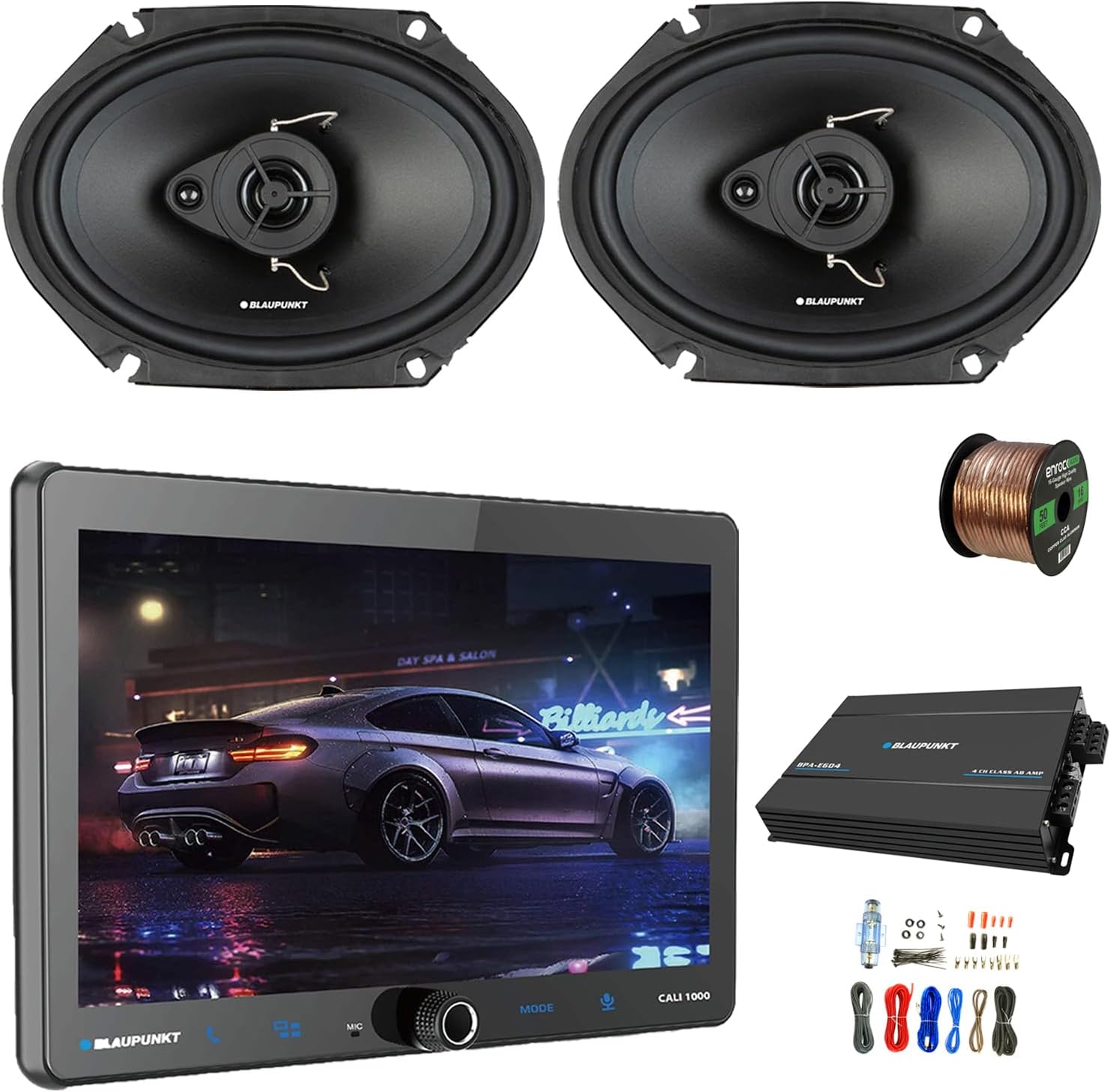
الشكل 1.1: زيادةview of the Blaupunkt CALI 1000 Car Multimedia System components, including the receiver, amplifier, speakers, and wiring kit.
2. معلومات السلامة
يجب دائمًا مراعاة احتياطات السلامة التالية أثناء التثبيت والتشغيل:
- يوصى بالتركيب الاحترافي: قد يكون تركيب أجهزة الصوت في السيارة عملية معقدة. لذا يُنصح بشدة أن يقوم فني متخصص ومؤهل بإجراء عملية التركيب.
- افصل البطارية: Before starting any electrical work, disconnect the vehicle's negative battery terminal to prevent electrical shorts and damage.
- التوصيلات الصحيحة: Ensure all wiring connections are secure and insulated to prevent short circuits. Use appropriate gauge wires as specified.
- تهوية: تأكد من amplifier is installed in a location with adequate ventilation to prevent overheating.
- تجنب المشتتات: Do not operate the receiver's advanced features or adjust settings while driving. Distracted driving can lead to accidents.
- التحكم في مستوى الصوت: Prolonged exposure to high volume levels can cause hearing damage. Adjust the volume to a safe level.
- الماء والرطوبة: احتفظ بالوحدة بعيدًا عن الماء والرطوبة الزائدة.
3. محتويات العبوة
تأكد من وجود جميع العناصر في الحزمة الخاصة بك:
- جهاز استقبال الوسائط المتعددة الرقمي Blaupunkt CALI 1000 بشاشة لمس مقاس 10.1 بوصة، أحادي DIN
- Blaupunkt BPAE604 4-Channel Ampالقمامة
- 2 x Blaupunkt BPS-E683 6x8" 3-Way Car Speakers (without grilles)
- مكتمل Amplifier Installation Kit (power cable, ground cable, RCA cables, remote turn-on wire, fuse holder, terminals, zip ties)
- 50 Feet of 16-Gauge Speaker Wire
- Mounting Hardware and Accessories
- دليل المستخدم (هذا المستند)
4. انتهى المنتجview
4.1. CALI 1000 Digital Multimedia Receiver
The CALI 1000 is a single DIN receiver featuring a large 10.1-inch QLED touchscreen display. It offers advanced connectivity options including Wireless Apple CarPlay, Android Auto, GPS, WiFi, and Bluetooth for hands-free communication and audio streaming. It also supports rearview camera input, A/V input, and steering wheel controls.

الشكل 4.1: أمام view of the Blaupunkt CALI 1000 receiver, highlighting the 10.1-inch touchscreen and control knob.

الشكل 4.2: Diagram illustrating the adjustable floating panel mechanism of the CALI 1000 receiver, allowing for various viewزوايا متعددة.
4.2. BPS-E683 6x8" 3-Way Car Speakers
The BPS-E683 speakers are 6x8 inch 3-way coaxial speakers designed for balanced and detailed audio reproduction. Each speaker features a woofer, tweeter, and super tweeter to cover a wide frequency range. They are rated for 30 Watts RMS and 60 Watts Max power handling per pair.

الشكل 4.3: Pair of Blaupunkt BPS-E683 6x8 inch 3-way car speakers.

الشكل 4.4: Technical diagram and features of the Blaupunkt E-Series BPS-E683 speakers, detailing components like the PP cone, neodymium tweeter, and PET dome tweeter.
4.3. BPAE604 4-Channel Ampالقمامة
The BPAE604 is a 4-channel Class A/B amplifier designed to provide powerful and clear audio output. It delivers 60 Watts RMS per channel at 4 Ohms and 90 Watts RMS per channel at 2 Ohms, with a maximum power output of 1800 Watts.

الشكل 4.5: قمة view of the Blaupunkt BPAE604 4-channel ampمكبر.
4.4. Amplifier Wiring Kit and Speaker Wire
The included wiring kit contains all necessary cables and accessories for amplifier installation, including power, ground, RCA, and remote turn-on wires, along with a fuse holder and various terminals. A 50-foot roll of 16-gauge speaker wire is also provided for connecting the speakers to the ampمكبر.

الشكل 4.6: Various components included in the amplifier wiring kit, such as cables, fuse holder, and terminals.

الشكل 4.7: Spool of 16-gauge speaker wire included for audio connections.
5. الإعداد والتثبيت
يُعدّ التركيب الصحيح أمراً بالغ الأهمية لتحقيق الأداء الأمثل والسلامة. إذا كنت غير متأكد من أي خطوة، فاستشر فني تركيب متخصص.
5.1. خطوات ما قبل التثبيت
- قراءة الدليل: Familiarize yourself with all instructions before beginning.
- افصل البطارية: افصل الطرف السالب لبطارية سيارتك.
- جمع الأدوات: Ensure you have all necessary tools (screwdrivers, wire strippers, crimpers, multimeter, etc.).
- تخطيط الخطة: Determine the best mounting locations for the receiver, amplifier, and speakers, considering cable routing and ventilation.
5.2. Receiver Installation (CALI 1000)
- إزالة الوحدة الموجودة: Carefully remove your vehicle's existing head unit.
- Mount Single DIN Chassis: Install the CALI 1000's single DIN chassis into the dashboard opening using the provided mounting hardware.
- ربط حزمة الأسلاك: Connect the vehicle's wiring harness to the receiver's harness. Ensure connections for power (constant and switched), ground, speaker outputs, and antenna are correct.
- Connect External Inputs: Connect the GPS antenna, rearview camera input, A/V input, and steering wheel control interface (if applicable).
- Attach Floating Display: Secure the 10.1" QLED touchscreen display to the single DIN chassis. Adjust the angle for optimal viewعمل.
5.3. Speaker Installation (BPS-E683)
- إزالة السماعات القديمة: Carefully remove the factory 6x8" speakers from their mounting locations.
- جبل المتحدثين الجدد: Install the BPS-E683 speakers into the existing openings. Ensure a secure fit.
- Connect Speaker Wire: Use the provided 16-gauge speaker wire to connect the speakers to the ampمكبر الصوت. راقب القطبية الصحيحة (+ إلى + و - إلى -).
5.4. Amplifier Installation (BPAE604)
- جبل Ampمكبر: Choose a secure, well-ventilated location (e.g., under a seat, in the trunk) and mount the BPAE604 ampمكبر.
- أسلاك الطاقة:
- Run the power cable from the vehicle's battery, through the firewall, to the amplifier. Install the fuse holder within 18 inches of the battery.
- قم بتوصيل كابل الأرض من amplifier to a clean, unpainted metal surface on the vehicle chassis, ensuring a solid electrical connection.
- Connect the remote turn-on wire from the receiver's remote output to the ampمدخل التحكم عن بعد الخاص بمكبر الصوت.
- روابط آر سي إيه: Connect the RCA cables from the CALI 1000 receiver's RCA outputs to the BPAE604 ampمدخلات RCA للمضخم.
- توصيلات السماعات: Connect the speaker wires from the BPS-E683 speakers to the amplifier's speaker output terminals. Double-check polarity.
5.5. ما بعد التثبيت
- إعادة توصيل البطارية: أعد توصيل الطرف السالب لبطارية السيارة.
- التشغيل الأولي: Turn on the vehicle's ignition and power on the CALI 1000 receiver.
- نظام اختبار: Test all functions: radio, Bluetooth, CarPlay/Android Auto, GPS, and speaker output. Adjust amplifier gain settings as needed.
6. تعليمات التشغيل
6.1. CALI 1000 Receiver Basic Operation
- تشغيل/إيقاف التشغيل: Press the power button (usually integrated with the volume knob) to turn the unit on or off.
- التحكم في مستوى الصوت: قم بتدوير المقبض أو استخدم عناصر التحكم في شاشة اللمس لضبط مستوى الصوت.
- اختيار الوضع: Use the 'MODE' button or touchscreen icons to switch between sources (Radio, Bluetooth, CarPlay/Android Auto, USB, AV In).
- واجهة شاشة تعمل باللمس: Navigate menus and select functions by touching the corresponding icons on the 10.1" QLED display.
6.2. الراديو (AM/FM)
- Select 'Radio' mode.
- استخدم وظائف البحث/المسح للعثور على المحطات أو اضبطها يدويًا.
- Save favorite stations to preset buttons for quick access.
6.3. اتصال البلوتوث
- قم بتمكين البلوتوث على جهازك المحمول.
- On the CALI 1000, select 'Bluetooth' mode and enter pairing mode.
- بحث عن the CALI 1000 on your mobile device and select it to pair.
- Once paired, you can make/receive calls hands-free and stream audio.
6.4. Apple CarPlay و Android Auto لاسلكيًا
- Ensure your iPhone or Android device has Wi-Fi and Bluetooth enabled.
- قم بتوصيل هاتفك بجهاز CALI 1000 عبر البلوتوث.
- Follow the on-screen prompts to initiate Wireless CarPlay or Android Auto.
- Access compatible apps like navigation, music, and messaging directly from the receiver's display.
6.5. نظام الملاحة GPS
- Access the built-in GPS application from the main menu.
- Enter your destination and follow the voice-guided directions.
6.6. Amplifier Settings (BPAE604)
- السيطرة: Adjust the gain knob on the amplifier to match the output level of the receiver. Start low and increase gradually until the sound is clear without distortion.
- إعدادات التقاطع: إذا كان لديك amplifier has built-in crossover controls (e.g., LPF, HPF), adjust them to optimize the frequency range sent to your speakers. Refer to the amplifier's specific manual for detailed instructions.
7. الصيانة
- تنظيف الشاشة: استخدم قطعة قماش ناعمة وخالية من الوبر لمسح شاشة اللمس برفق. لإزالة البقع الصعبة، امسحها برفق.ampامسح القماش بالماء أو بمنظف مناسب للشاشات. تجنب المواد الكيميائية القاسية.
- النظافة العامة: Keep the receiver, amplifier, and speakers free from dust and debris. Use a soft brush or compressed air for hard-to-reach areas.
- فحص الكابلات: قم بفحص جميع توصيلات الأسلاك بشكل دوري للتأكد من إحكامها وعدم وجود علامات تآكل أو تلف.
- تحديثات البرامج: تحقق من Blaupunkt website for any available firmware updates for the CALI 1000 receiver to ensure optimal performance and access to new features.
8. استكشاف الأخطاء وإصلاحها
| مشكلة | السبب المحتمل | حل |
|---|---|---|
| No power to receiver/ampالقمامة | Blown fuse, loose power/ground connection, incorrect wiring. | Check vehicle's fuse box and amplifier's inline fuse. Verify all power and ground connections are secure. Ensure remote turn-on wire is connected and receiving signal. |
| لا يوجد صوت من مكبرات الصوت | توصيلات مكبرات الصوت غير صحيحة، amplifier not powered, gain too low, mute activated. | Check speaker wire polarity and connections at both amplifier and speakers. Ensure amplifier is powered on. Adjust amplifier gain. Check receiver's mute setting. |
| البلوتوث غير متصل | Device not in pairing mode, previous connection interference. | Ensure both devices are in pairing mode. Delete previous Bluetooth profiles from both devices and attempt to re-pair. |
| عدم تشغيل CarPlay/Android Auto | Bluetooth/Wi-Fi issues, phone settings, app compatibility. | Verify Bluetooth and Wi-Fi are active on your phone. Ensure CarPlay/Android Auto is enabled in your phone's settings. Restart both phone and receiver. |
| GPS signal loss or inaccuracy | موقع هوائي نظام تحديد المواقع العالمي (GPS)، والتداخل البيئي. | Ensure the GPS antenna has a clear line of sight to the sky (e.g., mounted on the dashboard). Avoid placing it near metal obstructions. |
| صوت مشوه | Amplifier gain too high, poor quality audio source, damaged speakers. | يقلل amplifier gain. Test with a different audio source. Inspect speakers for physical damage. |
9. المواصفات
9.1. Blaupunkt CALI 1000 Receiver
- عرض: 10.1" QLED Touchscreen (1280x720 resolution)
- عامل الشكل: Single DIN with Floating Display
- نظام التشغيل: Android 10.0 (OS A53 Quad-core Processor, 2.0GHz)
- ذاكرة: 2+32 جيجا
- الاتصال: Wireless Apple CarPlay, Android Auto, Bluetooth (BT 4.1 version), Built-in GPS, Wi-Fi (5G)
- المدخلات: مؤخرةview Camera, A/V Input, Steering Wheel Control, Dual Rear USB
- المخرجات: RCA 4.1 Channel Output (FL/FR/RL/RR/SUB)
- راديو: ص/فم
- سمات: DSP, Seven Colors Illumination, Support 720P and 1080P AHD camera
9.2. Blaupunkt BPS-E683 6x8" 3-Way Speakers
- يكتب: 6x8" 3-Way Coaxial Speaker
- التعامل مع الطاقة: 30 Watts RMS / 60 Watts Max (per pair)
- مقاومة: 4 أوم
- استجابة التردد: شنومكهز - شنومكهز
- حساسية: 88.2 ديسيبل
- مكبر الصوت: PP Cone with Rubber Surround, Steel Basket
- مكبر الصوت: Neodymium Tweeter Magnet, PET Balanced Dome Tweeter, Ceramic w/PET Diaphragm Super Tweeter
- البوابات: غير متضمن
9.3. Blaupunkt BPAE604 4-Channel Ampالقمامة
- القنوات: 4 قناة
- فصل: أ/ب
- القدرة الفعالة (4 أوم): 60 واط × 4
- القدرة الفعالة (2 أوم): 90 واط × 4
- RMS Power (Bridged, 4 Ohms): 180 واط × 2
- القوة القصوى: 1800 واط
- إشارة إلى نسبة الضوضاء: 90 ديسيبل
10. الضمان والدعم
10.1. معلومات الضمان
Blaupunkt products are manufactured to high-quality standards. For specific warranty terms and conditions, please refer to the warranty card included with your product or visit the official Blaupunkt webالموقع. احتفظ بإثبات الشراء الخاص بك لتقديم مطالبات الضمان.
10.2. دعم العملاء
If you encounter any issues not covered in this manual or require further assistance, please contact Blaupunkt customer support. Contact information can typically be found on the official Blaupunkt webالموقع أو على عبوة منتجك.
- الموارد المتاحة على الإنترنت: Visit the official Blaupunkt website for FAQs, additional manuals, and software updates.
- الدعم الفني: Contact the technical support team for installation or operational queries.


