1. المقدمة
This manual provides comprehensive instructions for the safe and effective operation of your Jumper T14 2.4GHz ELRS Radio Controller. Please read this manual thoroughly before using the device to ensure proper setup, optimal performance, and to prevent damage or injury. Keep this manual for future reference.
2. معلومات السلامة
Always operate the radio controller in a safe and responsible manner. Failure to follow safety guidelines can result in property damage, serious injury, or even death.
- بيئة: Operate in open areas, away from people, animals, and obstacles. Avoid flying near power lines, roads, or crowded places.
- سلامة البطارية: Use only recommended batteries. Do not overcharge or over-discharge. Store batteries in a fireproof bag.
- فحوصات ما قبل الرحلة: Always perform a thorough pre-flight check of your aircraft and radio controller before each use.
- البرامج الثابتة: Keep your radio controller's firmware updated to the latest stable version for optimal performance and security.
- الماء والرطوبة: Keep the radio controller away from water and high humidity.
- أطفال: This product is not a toy. Keep out of reach of children under 16 years of age. Adult supervision is required for minors.
3. انتهى المنتجview
The Jumper T14 is a compact and ergonomic 2.4GHz ELRS radio controller designed for FPV drones and other RC applications. It features CNC Hall Gimbals, an OLED screen, and runs on EdgeTX firmware.
3.1. Radio System Components

الشكل 3.1: Detailed diagram of the Jumper T14 Radio Controller, highlighting key components and controls on the front, back, and side views. This includes switches, dials, gimbals, screen, module compartment, and charging port.
- اللوحة الأمامية:
- VS-M CNC Hall Gimbals: High-precision gimbals for smooth control.
- 2.42" OLED Screen: Clear display for EdgeTX interface.
- زر الطاقة: For turning the unit on/off.
- Switches (2-position, 3-position): قابل للتكوين لوظائف متنوعة.
- Dials (S1, S2): Rotary controls for fine adjustments.
- أزرار القطع: For adjusting stick trims.
- SYS Button: الوصول إلى قائمة النظام.
- زر الصفحة: Page navigation.
- RTN Button: Return/back button.
- أضواء مؤشر الحالة: Provide operational feedback.
- اللوحة الخلفية:
- Standard JR Module Compartment: For external RF modules.
- External Cooling Fan: Helps dissipate heat from internal components.
- علبة البطارية: يحتوي على البطارية.
- Side/Top Panel:
- USB-C 10W Fast Charging Port: لشحن البيانات وتوصيلها.
- زر DFU: Device Firmware Upgrade mode button.
- Trainer Port: For connecting to a simulator or another radio.
- مفتاح تشغيل مؤقت: Spring-loaded switch.
- مفتاح الإغلاق: Stays in position until toggled.
- Adjustable and Foldable Antenna: لنقل الإشارة.
- Reserved Antenna DIY Port: For custom antenna modifications.
- مقبض قابل للطي: For portability and comfortable grip.
3.2. Key Features Visuals
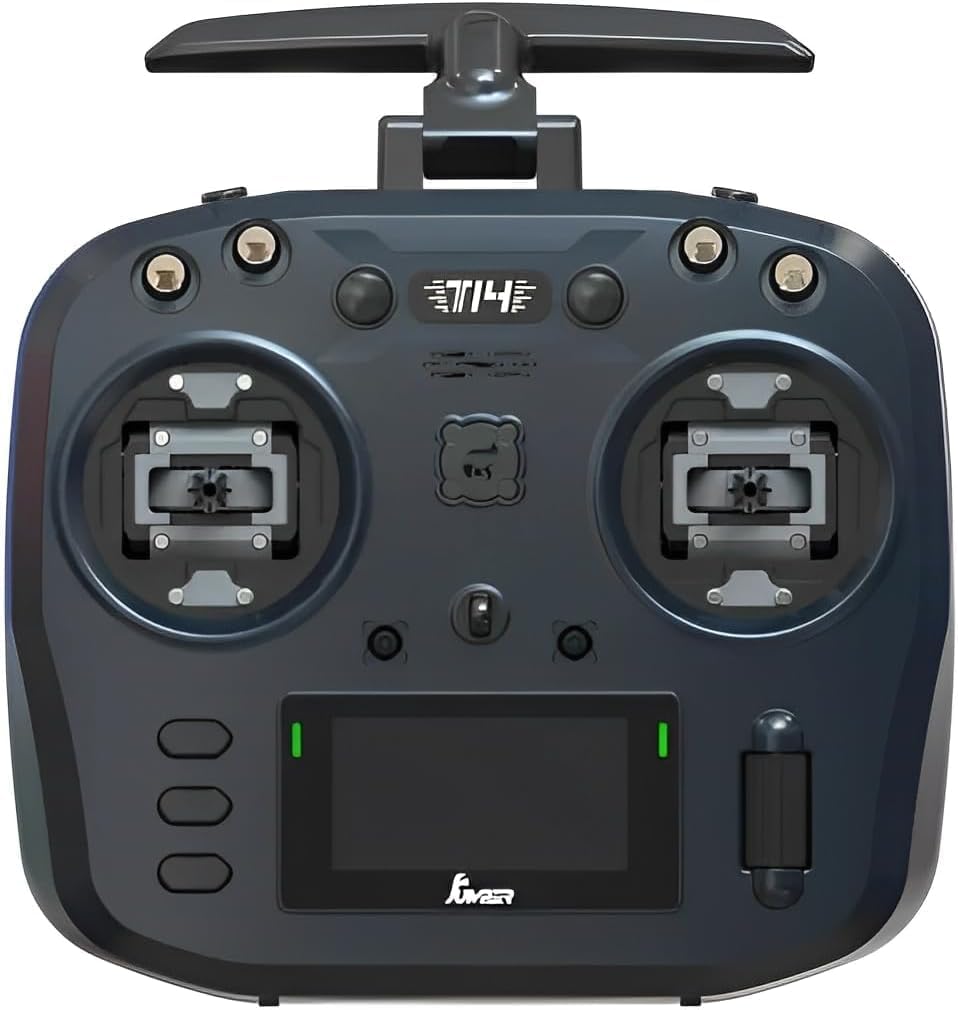
الشكل 3.2: أمام view of the Jumper T14, showcasing the dual gimbals, OLED screen, and various control switches and dials.

الشكل 3.3: مؤخرة view of the Jumper T14, showing the JR module bay, cooling fan, and battery compartment cover.

الشكل 3.4: Detail of the USB-C port, used for charging the internal battery and connecting to a computer for firmware updates or simulator use.

الشكل 3.5: Illustration highlighting the precision CNC Hall Sensor Gimbals, which provide accurate and durable control inputs.
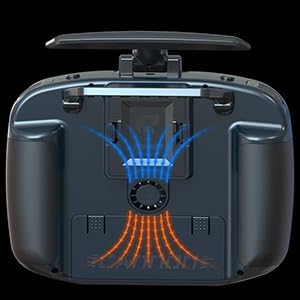
الشكل 3.6: Diagram illustrating the internal cooling fan system, designed to maintain optimal operating temperatures for the internal electronics.

الشكل 3.7: View of the bi-directional foldable antennas, which can be adjusted for optimal signal transmission and folded for compact storage.
4. الإعداد
4.1. تركيب البطارية وشحنها
The Jumper T14 uses a rechargeable battery (not specified in input, assuming common RC battery types like 18650 or LiPo). Ensure the battery is fully charged before first use.
- افتح غطاء حجرة البطارية الموجود في الجزء الخلفي من الراديو.
- Insert the battery, ensuring correct polarity if applicable.
- أغلق غطاء حجرة البطارية جيدًا.
- Connect the supplied USB-C cable to the USB-C port on the top of the radio and to a compatible USB power adapter (e.g., 5V/2A).
- The OLED screen or indicator lights will show charging status. Disconnect once fully charged.
4.2. Initial Power On and EdgeTX Setup
Upon first power-on, the radio will guide you through initial setup steps for the EdgeTX firmware.
- Press and hold the Power Button until the OLED screen illuminates.
- Follow the on-screen prompts to calibrate gimbals, set date/time, and configure basic radio settings.
- Navigate menus using the scroll wheel and SYS/PAGE/RTN buttons.
4.3. ELRS Binding
To bind your Jumper T14 with an ELRS receiver, follow the standard ELRS binding procedure:
- Ensure your ELRS receiver is powered on and in binding mode (typically by cycling power three times).
- On the T14, navigate to the ELRS LUA script or the internal module settings within EdgeTX.
- Select the "Bind" option. The radio will transmit a binding signal.
- Once the receiver's LED indicates a successful bind (refer to your receiver's manual), the process is complete.
5. تعليمات التشغيل
5.1. عناصر التحكم الأساسية
- الجمبل أداة: Control the primary movements of your aircraft (Throttle, Rudder, Aileron, Elevator).
- المفاتيح: Used for arming, flight modes, special functions, etc. Assign functions in EdgeTX.
- الأقراص: Typically used for fine-tuning parameters like camera tilt, gain, or volume.
- أزرار القطع: Adjust the neutral position of the gimbals for stable flight.
5.2. Model Setup in EdgeTX
EdgeTX offers extensive customization for different models. Refer to the official EdgeTX documentation for detailed instructions on advanced model setup.
- From the main screen, press the SYS button to enter the System menu.
- Navigate to "Model Select" or "Model Setup" to create a new model or edit an existing one.
- Configure internal or external RF module settings (e.g., ELRS protocol, power output).
- Set up mixes, inputs, outputs, and special functions according to your aircraft's requirements.
6. الصيانة
- تنظيف: Use a soft, dry cloth to clean the radio controller. Avoid abrasive cleaners or solvents.
- تخزين: Store the radio in a cool, dry place, away from direct sunlight and extreme temperatures. Remove the battery if storing for extended periods.
- تحديثات البرامج الثابتة: Regularly check for and install the latest EdgeTX firmware updates from the official EdgeTX webموقع (www.edgetx.org) to ensure optimal performance and access to new features.
- العناية بالجيمبال: The CNC Hall Gimbals are durable, but avoid excessive force or impact. Keep them free from dust and debris.
7. استكشاف الأخطاء وإصلاحها
| مشكلة | السبب المحتمل | حل |
|---|---|---|
| الراديو لا يعمل. | انخفاض مستوى شحن البطارية أو نفادها؛ تركيب البطارية بشكل غير صحيح. | Charge the battery; ensure battery is correctly installed with proper polarity. |
| No signal to receiver. | Not bound; incorrect ELRS settings; antenna issue. | Perform binding procedure; verify ELRS protocol and power settings in EdgeTX; check antenna connection. |
| Gimbals not responding correctly. | يحتاج إلى معايرة؛ عائق مادي. | Recalibrate gimbals via EdgeTX system menu; check for debris around gimbals. |
| الشاشة فارغة أو متجمدة. | Firmware issue; system crash. | Try restarting the radio. If persistent, attempt DFU mode and reflash firmware. |
8. المواصفات
| ميزة | التفاصيل |
|---|---|
| أبعاد المنتج | 9 × 6 × 1.5 بوصة |
| وزن العنصر | 14.4 أونصات |
| ASIN | B0F9WQSDGF |
| العمر الموصى به من قبل الشركة المصنعة | 16 سنوات وما فوق |
| الشركة المصنعة | سترة |
| الجمبل أداة | CNC Hall Sensor Gimbals |
| وحدة RF | Built-in 2.4GHz ELRS |
| عرض | 2.42" OLED Screen |
| البرامج الثابتة | EdgeTX |
| الشحن | USB-C 10W Fast Charging |
9. الضمان والدعم
For warranty information and technical support, please refer to the official ARRIS webالموقع الإلكتروني أو تواصل مع خدمة العملاء مباشرةً. احتفظ بإثبات الشراء لطلبات الضمان.
الشركة المصنعة: سترة
ماركة: أريس
الدعم عبر الإنترنت: Visit the ARRIS official website for FAQs, firmware downloads, and contact information. متجر ARRIS على أمازون


