تعليمات السلامة الهامة
يرجى قراءة وفهم جميع تعليمات السلامة قبل استخدام هذا المنتج. احتفظ بهذا الدليل للرجوع إليه مستقبلًا.
- تهوية: تأكد من التهوية الكافية. لا تسد أي فتحات تهوية.
- الماء والرطوبة: لا تعرض هذا الجهاز للمطر أو الرطوبة. لا تضع أشياء مملوءة بالسوائل، مثل المزهريات، على الجهاز.
- مصادر الحرارة: لا تقم بالتثبيت بالقرب من أي مصادر للحرارة مثل المشعات أو فتحات التدفئة أو المواقد أو أي أجهزة أخرى (بما في ذلك ampالمُضخِّمات) التي تنتج الحرارة.
- مصادر الطاقة: Use only power supplies specified by the manufacturer. Ensure the power cord is protected from being walked on or pinched.
- تنظيف: نظف فقط بقطعة قماش جافة.
- الخدمة: لا تحاول خدمة هذا المنتج بنفسك. قم بإحالة جميع أعمال الصيانة إلى أفراد الخدمة المؤهلين.
محتويات الحزمة
تأكد من تضمين جميع العناصر المدرجة أدناه في الحزمة الخاصة بك:
- Kuephom CD-X2A Boombox
- سلك الطاقة المتردد
- دليل المستخدم (هذه الوثيقة)
- جهاز التحكم عن بعد
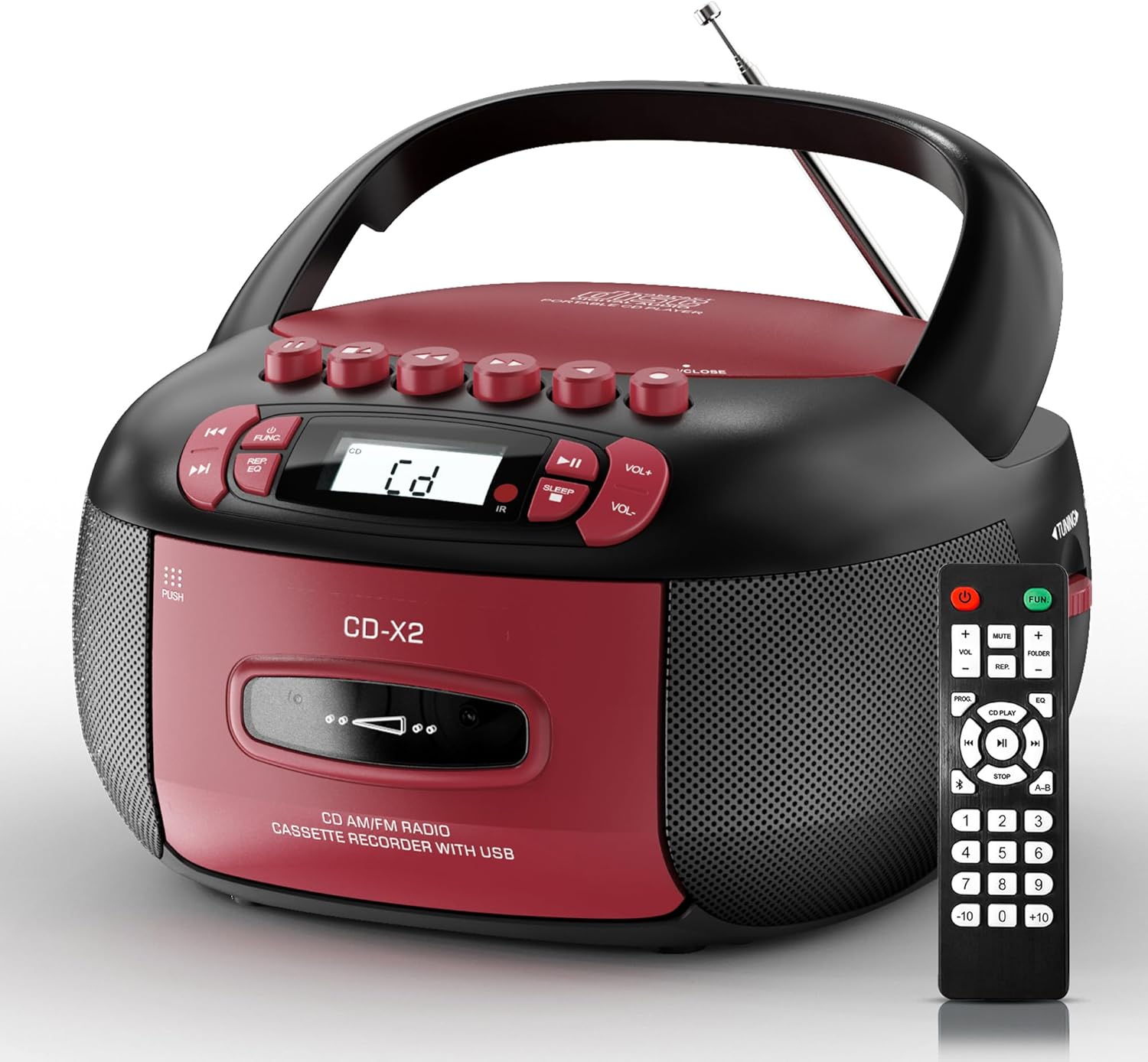
Image: The Kuephom CD-X2A Boombox with its included remote control, showcasing its compact design and red/black color scheme.
المنتج انتهىview
Familiarize yourself with the various components and controls of your Kuephom CD-X2A Boombox.
عناصر التحكم في اللوحة الأمامية
- زر الطاقة / الوظيفة: Press and hold to power on/off. Press to cycle through modes (CD, USB, Bluetooth, Radio, AUX, Tape).
- أزرار التحكم في مستوى الصوت +/-: ضبط مستوى الصوت.
- زر التشغيل/الإيقاف المؤقت: Start or pause playback for CD, USB, Bluetooth, or Tape.
- زر التوقف: أوقف التشغيل.
- Skip/Search Buttons: Navigate between tracks on CD/USB or fast forward/rewind on tape.
- زر EQ: حدد الإعدادات المسبقة للمعادل.
- زر مؤقت النوم: ضبط مؤقت النوم.
ضوابط اللوحة الجانبية
- موجة الضبط: Manually tune AM/FM radio stations.
- مقبس سماعة الرأس: قم بتوصيل سماعات الرأس للاستماع الخاص.
- منفذ AUX-in: قم بتوصيل أجهزة الصوت الخارجية.
- منفذ USB: Insert USB drives for MP3/WMA playback.
ميزات اللوحة العلوية
- حجرة الأقراص المضغوطة: Top-loading compartment for CDs.
- حجرة الكاسيت: Front-loading compartment for cassette tapes.
- هوائي تلسكوبي: Extend for improved radio reception.

Image: The boombox highlighting its multiple functions including CD/MP3, Bluetooth, Type I/II tape, USB, FM/AM Radios, Sleep timer, Remote, Phone jack, AUX, and Tape recording.

الصورة: عن قرب views of the boombox's phone jack, top-loading CD player, telescopic antenna, and tape play/record buttons.
يثبت
Powering the Boombox
طاقة التيار المتردد
- Connect the supplied AC power cord to the AC IN jack on the back of the boombox.
- Plug the other end of the power cord into a standard AC wall outlet (120V~60Hz).
طاقة البطارية
- Open the battery compartment cover located on the bottom of the boombox.
- أدخل 6 بطاريات من الحجم "C" (غير مرفقة)، مع التأكد من القطبية الصحيحة (+/-).
- أغلق غطاء حجرة البطارية جيدًا.
- When operating on battery power, disconnect the AC power cord.

Image: The boombox demonstrating both AC power connection and the use of 6 C-size batteries for portable operation.
جهاز التحكم عن بعد
- Insert 2 x 'AAA' batteries (not included) into the remote control, observing polarity.
- Point the remote control towards the boombox's IR sensor for optimal operation.

Image: An individual comfortably operating the boombox using the remote control from a distance.
تعليمات التشغيل
التشغيل العام
- تشغيل/إيقاف التشغيل: Press and hold the Power/Function button to turn the unit on or off.
- اختيار الوظيفة: Press the Power/Function button repeatedly to switch between CD, USB, Bluetooth, Radio (AM/FM), AUX, and Tape modes.
تشغيل القرص المضغوط
- افتح غطاء حجرة القرص المضغوط.
- Place a CD (CD, CD-R, MP3, WMA compatible) onto the spindle with the label side facing up.
- أغلق غطاء حجرة القرص المضغوط.
- Press the Power/Function button to select 'CD' mode.
- اضغط على زر التشغيل/الإيقاف المؤقت لبدء التشغيل.
- Use the Skip/Search buttons to navigate tracks.
- Press the Repeat button to repeat a single track, folder, or all tracks.
- Press the Program button to program a custom playback sequence.

Image: The boombox's display showing 'CD' mode, with icons indicating compatibility with CD, CD-R, CD-RW, WMA, and MP3 formats, along with single cycle, repeat folder, repeat all, random play, and play in order options.
تشغيل وتسجيل الكاسيت
- Press the 'OPEN/CLOSE' button on the cassette compartment to open it.
- أدخل شريط كاسيت.
- أغلق حجرة الكاسيت.
- Press the Power/Function button to select 'TAPE' mode.
- اضغط على زر التشغيل لبدء التشغيل.
- Use the Fast Forward/Rewind buttons to navigate the tape.
- تسجيل: In TAPE mode, select the desired source (CD, Bluetooth, USB, or AM/FM radio). Press the Record button to begin recording onto the cassette. The unit features an auto-stop function when the tape reaches its end.

Image: A hand inserting a cassette tape into the boombox's front-loading compartment, with controls for tape operation visible.
راديو AM/FM
- Press the Power/Function button to select 'RADIO' mode. Press again to switch between AM and FM bands.
- Extend the telescopic antenna for better FM reception. For AM, rotate the unit for best reception.
- Use the Tuning knob on the side to manually tune to your desired station. The frequency will be displayed on the screen.

Image: A man relaxing on a couch with the boombox, which displays various FM/AM radio frequencies, indicating good reception.
اتصال البلوتوث
- Press the Power/Function button to select 'BT' (Bluetooth) mode. The display will show 'BT' and flash, indicating it's in pairing mode.
- On your mobile device, enable Bluetooth and search for 'CD-X2A'.
- Select 'CD-X2A' to pair. Once paired, the 'BT' indicator will stop flashing.
- You can now stream audio wirelessly from your device to the boombox.

Image: A woman in a living room wirelessly streaming audio from her smartphone to the boombox via Bluetooth 5.1, indicating a stable connection.
تشغيل USB
- Insert a USB flash drive into the USB port on the side of the boombox.
- Press the Power/Function button to select 'USB' mode.
- The boombox will automatically detect and play compatible MP3/WMA files.
- Use the Play/Pause, Stop, and Skip/Search buttons to control playback.
مدخلات AUX
- Connect an external audio device (e.g., smartphone, MP3 player) to the AUX-in port using a 3.5mm audio cable (not included).
- Press the Power/Function button to select 'AUX' mode.
- يمكنك التحكم في التشغيل مباشرة من جهازك الخارجي المتصل.
مؤقت النوم
- While the unit is playing, press the Sleep Timer button.
- Repeatedly press the button to cycle through available sleep timer durations (e.g., 15, 30, 60, 90 minutes).
- The unit will automatically power off after the selected time.

Image: A man sleeping in bed with the boombox on his nightstand, illustrating the sleep timer feature which allows the device to turn off automatically.
صيانة
- تنظيف: Use a soft, dry cloth to clean the exterior of the boombox. Do not use abrasive cleaners or solvents.
- العناية بالقرص المضغوط: أمسك الأقراص المضغوطة من حوافها. نظّف الأقراص المضغوطة المتسخة بقطعة قماش ناعمة وخالية من الوبر، وامسحها من المنتصف إلى الخارج.
- العناية بالكاسيت: Keep cassette tapes away from direct sunlight and heat. Periodically clean the tape heads with a specialized cassette head cleaner.
- تخزين: When not in use for extended periods, disconnect the power cord and remove batteries. Store the unit in a cool, dry place.
استكشاف الأخطاء وإصلاحها
إذا واجهتك مشاكل، فراجع الجدول أدناه للاطلاع على المشاكل الشائعة وحلولها.
| مشكلة | السبب المحتمل | حل |
|---|---|---|
| لا يوجد طاقة | سلك التيار المتردد غير متصل؛ البطاريات فارغة أو تم إدخالها بشكل غير صحيح. | Check AC connection; Replace or correctly insert batteries. |
| لا يوجد صوت | مستوى الصوت منخفض جدًا؛ تم اختيار وضع تشغيل غير صحيح؛ سماعات الرأس موصولة. | Increase volume; Select correct mode; Disconnect headphones. |
| CD skips or doesn't play | CD dirty or scratched; CD inserted incorrectly; Incompatible CD format. | Clean or replace CD; Insert CD correctly; Ensure CD is compatible (CD, CD-R, MP3, WMA). |
| راديو ثابت/استقبال ضعيف | الهوائي غير ممتد/غير مثبت في مكانه؛ إشارة ضعيفة. | Extend and adjust telescopic antenna; Try repositioning the unit. |
| البلوتوث غير مقترن | Boombox not in pairing mode; Device Bluetooth off; Device too far. | Ensure boombox is in 'BT' mode and flashing; Enable Bluetooth on device; Move device closer. |
| لا يعمل شريط الكاسيت/لا يسجل | Tape inserted incorrectly; Tape heads dirty; Auto-stop engaged. | Insert tape correctly; Clean tape heads; Check tape end. |
تحديد
| ميزة | التفاصيل |
|---|---|
| رقم الموديل | سي دي-X2A |
| أبعاد المنتج (الطول × العرض × الارتفاع) | 8.39 × 4.8 × 8.54 بوصة |
| وزن العنصر | 3.45 رطل |
| مصدر الطاقة | AC 120V~60Hz or 6 x 'C' size batteries |
| تكنولوجيا الاتصال | مساعد، بلوتوث، USB |
| نوع السماعة | Stereo (2W+2W output) |
| تنسيقات الأقراص المدعومة | CD, CD-R, MP3, WMA |
| Supported Tape Types | Type I/II Cassette |
| نطاقات الراديو | ص/فم |
| المميزات الخاصة | Tape Recording, Sleep Timer, Earphone Jack, Remote Control |
الضمان والدعم
Kuephom products are designed for reliability and performance. This product comes with a standard manufacturer's warranty against defects in materials and workmanship under normal use.
For warranty claims, technical assistance, or any questions regarding your Kuephom CD-X2A Boombox, please contact Kuephom customer support. Refer to the contact information provided with your purchase documentation or visit the official Kuephom webموقع للحصول على تفاصيل الدعم.
We are committed to providing lifetime service support and 7/24 customer assistance for our products.


