1. المقدمة
The Bloomy Luminology IPL Epilator utilizes advanced Intense Pulsed Light (IPL) technology for effective and long-lasting hair removal. Designed for both facial and body hair, this device offers 5 adjustable intensity levels to suit various skin types and treatment areas. Its integrated skin protection system ensures safe operation for both men and women.
The device features a sapphire filter, LCD display, and an ergonomic design for comfortable use. It provides a large flash area for quick treatments on areas like legs, arms, and back, and offers two modes: automatic for large areas and manual for sensitive or precise areas.
2. معلومات السلامة
- Always wear the provided safety glasses during operation to protect your eyes from the intense pulsed light.
- Do not use the device on irritated, damaged, or recently tanned skin.
- قم بإجراء اختبار حساسية على منطقة صغيرة من الجلد قبل 24 ساعة من العلاج الكامل للتحقق من وجود أي ردود فعل سلبية.
- The device includes a skin detection system and eye protection features for enhanced safety.
- احتفظ بالجهاز بعيدًا عن الماء ولا تستخدمه في البيئات الرطبة.
- Consult a doctor before use if you have any underlying skin conditions or are taking photosensitive medication.
3. محتويات العبوة
يرجى التحقق من الحزمة للعناصر التالية:
- Bloomy Luminology IPL Epilator
- Power Adapter (AC100-240V, DC 12V/3A)
- نظارات السلامة
- دليل المستخدم (هذا المستند)
4. الإعداد
- تحضير البشرة: Ensure the treatment area is clean, dry, and shaved. Do not wax or pluck hair before IPL treatment, as the hair follicle needs to be present for the light to be effective.
- توصيل الطاقة: Plug the power adapter into the device and then into a power outlet. The device will power on.
- ارتداء نظارات السلامة: Put on the provided safety glasses before turning on the device to protect your eyes.

Image: Steps for preparing the skin, connecting the power, and adjusting the intensity level of the IPL device.
5. تعليمات التشغيل
5.1. Adjusting Intensity Levels
The Bloomy Luminology IPL Epilator features 5 adjustable intensity levels. It is recommended to start with the lowest intensity (Level 1) and gradually increase it based on your skin's comfort and reaction. Higher intensity levels generally yield better results but require careful monitoring of skin sensitivity.
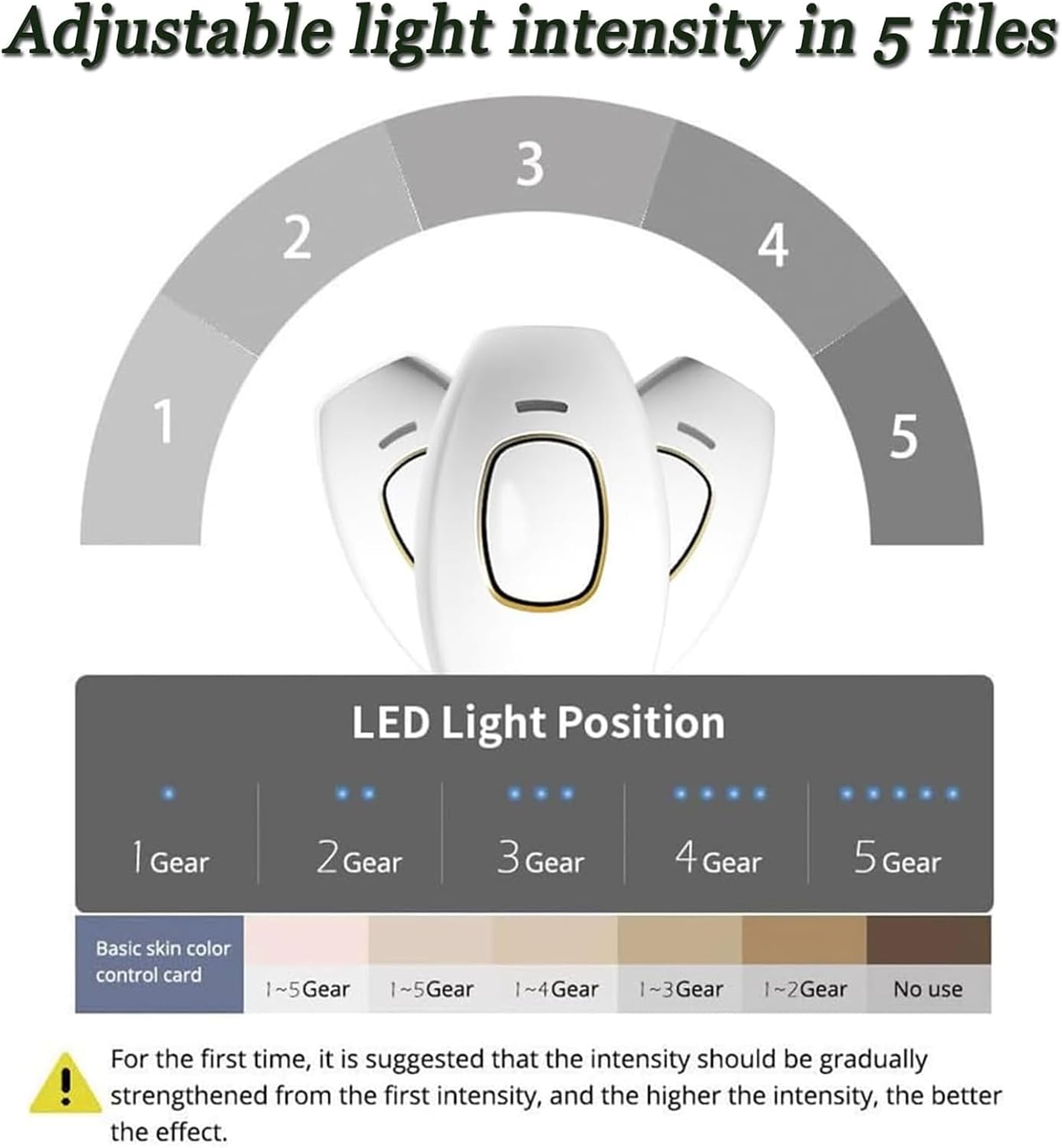
Image: Visual guide for selecting appropriate intensity levels based on skin tone.
5.2. Treatment Modes
The device offers two treatment modes:
- وضع الفلاش اليدوي: Ideal for precision areas such as the underarm, bikini line, and face. Press the flash button for each pulse.
- Automatic Flash Mode: Suitable for larger, straightforward areas like legs and stomach. Hold down the flash button, and the device will emit continuous flashes as you glide it over the skin.

Image: Explanation of Manual and Automatic flash modes for different body areas.
5.3. التطبيق
- Ensure your skin is clean, dry, and shaved.
- Select the appropriate intensity level and treatment mode.
- Place the device's flash window firmly against your skin, ensuring full contact.
- For Manual Mode, press the flash button. For Automatic Mode, hold the button and glide the device slowly over the skin.
- Move the device to the next area, ensuring slight overlap to cover all hair follicles.
- Avoid flashing the same area multiple times in one session.
5.4. Treatment Schedule
Typical treatment times for various body parts:
- Underarm (each side): 1 minute
- Face: 2 minutes
- Arm: 3 minutes
- Neck: 1 minute
- Shank: 5 minutes
- Shoulder: 1 minute
- Back: 12 minutes
- Thigh: 5 minutes
Consistent use over approximately 8 weeks is typically required to inhibit hair regrowth. Individual results may vary.
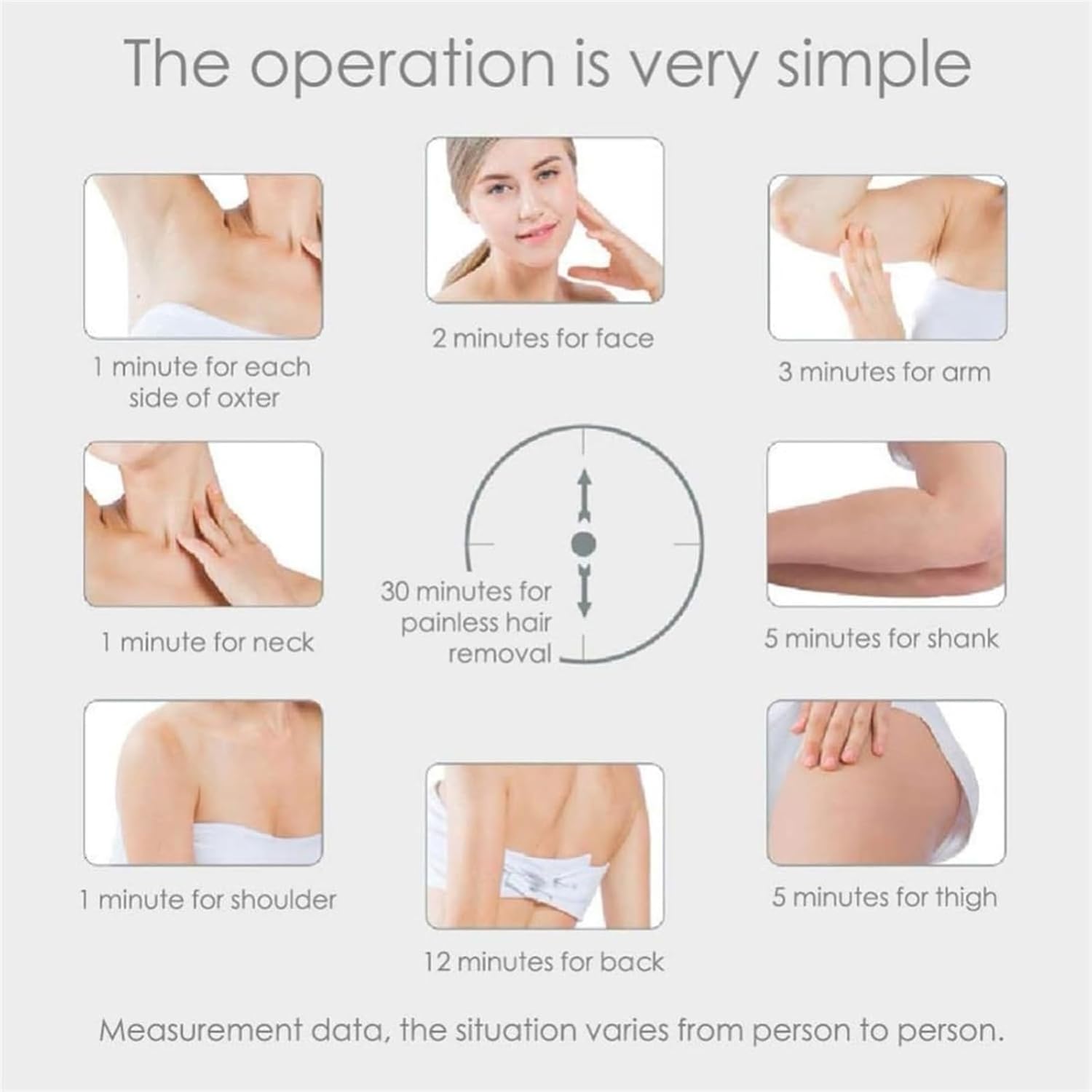
Image: Estimated treatment durations for various body areas.
6. الصيانة
- تنظيف: After each use, ensure the device is unplugged and cooled down. Gently wipe the flash window with a soft, dry cloth. Do not use abrasive cleaners or immerse the device in water.
- تخزين: قم بتخزين الجهاز في مكان بارد وجاف، بعيدًا عن أشعة الشمس المباشرة وبعيدًا عن متناول الأطفال.
7. استكشاف الأخطاء وإصلاحها
- الجهاز لا يعمل: تأكد من توصيل محول الطاقة بشكل آمن بالجهاز ومأخذ الطاقة العامل.
- لا يوجد فلاش: Check if the flash window is in full contact with the skin. The device has a skin contact sensor that prevents flashing if not properly placed. Ensure the intensity level is set correctly.
- تهيج الجلد: If you experience redness or discomfort, reduce the intensity level or discontinue use. Ensure your skin is clean and dry before treatment.
- Uneven results: Ensure you are overlapping treatment areas slightly and consistently applying the device.
8. المواصفات
| ميزة | مواصفة |
|---|---|
| اسم الموديل | Luminology |
| الشركة المصنعة | مزهر |
| مصدر الضوء | الضوء النبضي (IPL) |
| طاقة | 1.5 – 3.9 J/cm² (Technical: 4.2 J/cm² max) |
| Flash Area | 33 × 10 مم² |
| الطول الموجي | 470-1100 نانومتر |
| Lamp حياة | ≥ 500,000 flashes |
| محول | AC100-240V, DC 12V/3A |
| وزن | 186 g (Device), 180 g (Item) |
| أبعاد | 124 × 83 × 48.5 mm (Device), 48 x 8 x 0.1 cm (Product) |
| درجة حرارة التشغيل | 5 درجة مئوية – 30 درجة مئوية |
| رطوبة التشغيل | 30% – 60% رطوبة نسبية |
| مصدر الطاقة | كهربائي |
| مستوى مقاومة الماء | غير مقاوم للماء |
| المجلدtage | 220 فولت |
| وقت التشغيل | 60 دقائق |
9. الضمان والدعم
For warranty information or technical support, please refer to the documentation provided with your purchase or contact Bloomy customer service. Keep your purchase receipt as proof of purchase.