1. المقدمة
شكرا لك على الشراءasing the Paladone Stitch Alarm Clock. This device combines a functional alarm clock with a charming Stitch figure, a soft night light, and a musical alarm. Designed for ease of use, it is a portable and decorative addition to any room. This manual provides detailed instructions for setup, operation, and maintenance to ensure you get the most out of your product.

الشكل 1: الجبهة view of the Paladone Stitch Alarm Clock, displaying the digital time and control buttons.
2. معلومات السلامة
- احفظ الجهاز بعيدًا عن الماء والرطوبة.
- لا تعرضه لأشعة الشمس المباشرة أو درجات الحرارة القصوى.
- استخدم فقط نوع البطارية المحدد (بطاريتان AA).
- لا تخلط بين البطاريات القديمة والجديدة أو أنواع مختلفة من البطاريات.
- قم بإزالة البطاريات إذا كنت لن تستخدم الجهاز لفترة طويلة.
- هذا المنتج ليس لعبة. يُحفظ بعيدًا عن متناول الأطفال الصغار.
3. الإعداد
3.1 تركيب البطارية
- Locate the battery compartment on the underside of the alarm clock.
- افتح غطاء حجرة البطارية.
- Insert 3 x AA batteries (not included), ensuring correct polarity (+/-) as indicated inside the compartment.
- أغلق غطاء حجرة البطارية جيدًا.
The digital display should now illuminate, indicating the clock is powered on.
4. تعليمات التشغيل
4.1 ضبط الوقت
- اضغط مع الاستمرار على تعيين button (often represented by a clock icon) located on the front panel until the hour digits begin to flash.
- استخدم + و - أزرار لضبط الساعة.
- اضغط على تعيين اضغط على الزر مرة أخرى للانتقال إلى أرقام الدقائق.
- استخدم + و - أزرار لضبط الدقائق.
- اضغط على تعيين button one more time to confirm the time and exit setting mode.
4.2 ضبط المنبه
- اضغط مع الاستمرار على إنذار button (often represented by an alarm icon) until the alarm hour digits begin to flash.
- استخدم + و - أزرار لضبط ساعة التنبيه.
- اضغط على إنذار اضغط على الزر مرة أخرى للانتقال إلى أرقام دقائق المنبه.
- استخدم + و - أزرار لضبط دقائق التنبيه.
- اضغط على إنذار button one more time to confirm the alarm time. The alarm icon on the display will illuminate, indicating the alarm is active.
4.3 Activating the Night Light
The integrated night light is activated by gently pressing down on Stitch's head figure located on top of the alarm clock. Pressing it again will turn the night light off.
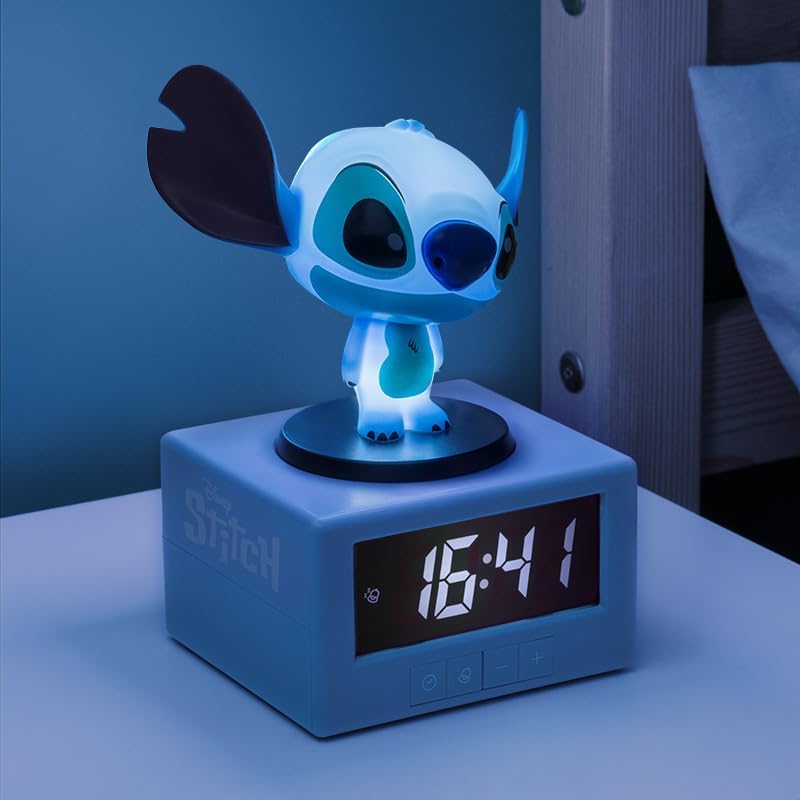
Figure 2: The Stitch Alarm Clock with its night light feature activated, illuminating the Stitch figure.
4.4 وظيفة الغفوة
When the alarm sounds, press down on Stitch's head to activate the snooze function. The alarm will temporarily pause and sound again after approximately 5-10 minutes (duration may vary by model). To turn off the alarm completely, press any other button on the front panel.
5. الصيانة
5.1 التنظيف
To clean the alarm clock, gently wipe the surface with a soft, dry cloth. Do not use abrasive cleaners, solvents, or immerse the device in water. Ensure the device is turned off and batteries are removed before cleaning.
5.2 استبدال البطارية
When the display dims or the alarm function becomes unreliable, it is time to replace the batteries. Follow the battery installation steps in Section 3.1.
6. استكشاف الأخطاء وإصلاحها
- لا يوجد عرض / الجهاز لا يعمل:
Ensure batteries are inserted correctly with the right polarity. Replace with fresh AA batteries. - إنذار لا يصدر:
Verify that the alarm time is set correctly and the alarm icon is visible on the display. Check battery level. - ضوء الليل غير مفعل:
Ensure Stitch's head is pressed firmly. Check battery level. - عرض الوقت غير صحيح:
Reset the time following the instructions in Section 4.1.
7. المواصفات
| رقم الموديل | PP14273LS |
| الأبعاد (الطول × العرض × الارتفاع) | 10.5 × 3.81 × 12 سم |
| وزن | 250 جرام |
| مصدر الطاقة | 3 بطاريات AA (غير متضمنة) |
| نوع العرض | رقمي |
| المميزات الخاصة | Illuminated, Musical Alarm, Snooze Function, Night Light |
8. الضمان والدعم
For warranty information and customer support, please refer to the documentation provided at the time of purchase or visit the official Paladone webالموقع. احتفظ بإثبات الشراء الخاص بك لاستخدامه في أي مطالبات بالضمان.
For further assistance, you may contact Paladone customer service through their official channels. Details can typically be found on the product packaging or the brand's webموقع.


