1. المقدمة
Thank you for choosing the Novodesk AZ5130 6-in-1 Automatic Vacuum Sealer Machine. This manual provides essential information for the safe and efficient operation, maintenance, and troubleshooting of your new appliance. Please read these instructions thoroughly before first use and retain them for future reference.

Image 1.1: The Novodesk AZ5130 Vacuum Sealer in operation, sealing food for preservation.
2. تعليمات السلامة الهامة
عند استخدام الأجهزة الكهربائية، يجب دائمًا اتباع احتياطات السلامة الأساسية لتقليل خطر نشوب حريق أو حدوث صدمة كهربائية أو إصابة الأشخاص، بما في ذلك ما يلي:
- اقرأ كافة التعليمات قبل استخدام هذا الجهاز.
- Do not operate the appliance with a damaged power cord or plug. If the cord or plug is damaged, contact customer support for assistance.
- لا تغمر الجهاز أو سلك الطاقة أو القابس في الماء أو أي سوائل أخرى.
- لا يُقصد استخدام هذا الجهاز من قبل الأشخاص (بما في ذلك الأطفال) ذوي القدرات البدنية أو الحسية أو العقلية المحدودة، أو الذين يفتقرون إلى الخبرة والمعرفة، ما لم يتم الإشراف عليهم أو توجيههم فيما يتعلق باستخدام الجهاز من قبل شخص مسؤول عن سلامتهم.
- من الضروري المراقبة الدقيقة عند استخدام أي جهاز بواسطة الأطفال أو بالقرب منه.
- افصل الجهاز عن المقبس عند عدم استخدامه وقبل التنظيف. اتركه ليبرد قبل تركيب أو خلع الأجزاء وقبل تنظيف الجهاز.
- لا تستخدم الملحقات غير الموصى بها من قبل الشركة المصنعة.
- لا تستخدمه في الهواء الطلق.
- لا تضعه على أو بالقرب من موقد غاز أو كهرباء ساخن، أو في فرن ساخن.
- تأكد دائمًا من إحكام إغلاق الغطاء قبل التشغيل.
- Use only vacuum sealer bags designed for vacuum sealing.
3. محتويات العبوة
Carefully unpack your Novodesk AZ5130 Vacuum Sealer and check that all items are present and in good condition. If any items are missing or damaged, please contact customer support.
- 1 x Novodesk AZ5130 Vacuum Sealer Machine
- 1 الحبل العاشر الطاقة
- 1 x Vacuum Hose (for external vacuuming)
- 2 x Sealing Foam Gaskets (replacement)
- 6 x Pre-cut Vacuum Bags (3.9" x 7.8")
- 6 x Pre-cut Vacuum Bags (7.8" x 11.8")

Image 3.1: All components included in the Novodesk AZ5130 Vacuum Sealer package.
4. انتهى المنتجview
Familiarize yourself with the various parts and functions of your vacuum sealer.

Image 4.1: Control panel and function buttons of the vacuum sealer.
وظائف لوحة التحكم:
- Process Indicator Light: Illuminates to show operating status.
- وضع الجاف: For vacuum sealing dry foods like nuts and grains.
- الوضع الرطب: For vacuum sealing foods with a small amount of liquid.
- وظيفة النبض: Allows manual control of the vacuum process, ideal for fragile foods.
- Seal Function: Seals bags without vacuuming.
- زر التوقف: يوقف العملية الحالية.
Image 4.2: Internal components of the vacuum sealer.
المكونات الرئيسية:
- غرفة فراغ: المنطقة التي يتم فيها إخراج الهواء من الكيس.
- Silicone Strip: Helps create a tight seal.
- شريط عازل: Heats to create the bag seal (4mm wide).
- Foam Seal Ring: Ensures proper vacuum.
- Cover Slaps: Prevents the vacuum bag from coming out of the vacuum chamber.
- External Sliding Cutter: Integrated cutter for custom bag sizes.
- External VAC Port: For connecting the vacuum hose to jars and containers.
5. الإعداد
Before first use, ensure the appliance is clean and dry. Place the vacuum sealer on a flat, stable surface.
خطوات الإعداد الأولية:
- Connect the power cord to the appliance and then to a suitable electrical outlet.
- Prepare your vacuum bag with food, ensuring the open end is clean and dry. Leave at least 2-3 inches of space between the food and the top of the bag.
6. تعليمات التشغيل
6.1. Basic Vacuum Sealing (Dry & Moist Modes)
Follow these steps for standard vacuum sealing of food bags:
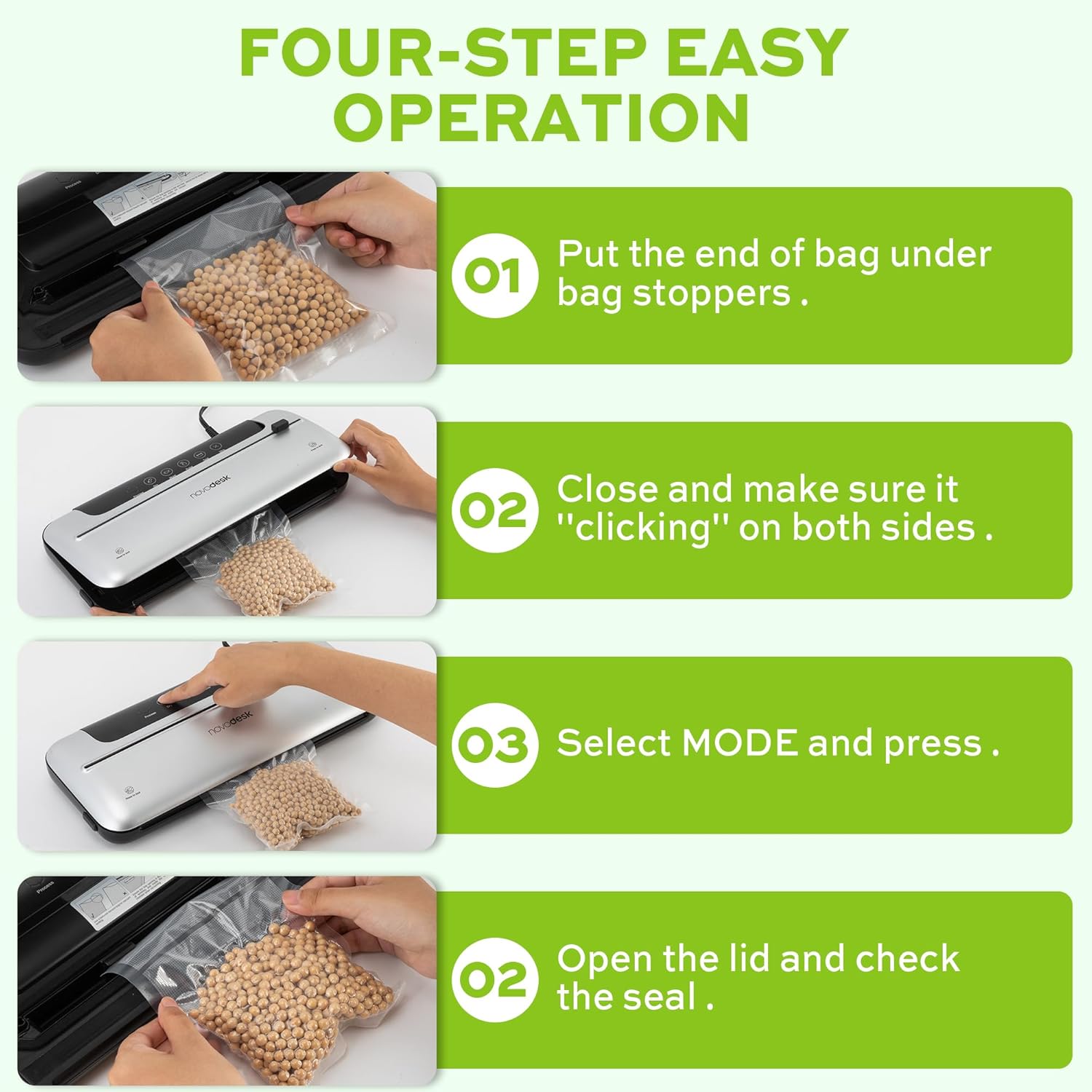
Image 6.1: Four-step easy operation for vacuum sealing.
- تحضير الحقيبة: Place the open end of the vacuum bag under the bag stoppers, ensuring it is flat and centered within the vacuum chamber.
- إغلاق الغطاء: Firmly close the lid of the vacuum sealer. Press down on both sides until you hear a "clicking" sound, indicating that the lid is securely latched.
- حدد الوضع: Choose the appropriate mode for your food:
- اضغط على جاف button for dry foods.
- اضغط على رطب button for moist foods.
- التحقق من الختم: Once the process is complete and the indicator light turns off, open the lid and remove the sealed bag. Inspect the seal to ensure it is airtight.
6.2. وظيفة النبض
The Pulse function provides manual control over the vacuum process, which is ideal for delicate or fragile foods that could be crushed by full vacuum pressure.
- Follow steps 1 and 2 from "6.1. Basic Vacuum Sealing".
- اضغط مع الاستمرار على نبض button. The machine will begin to vacuum.
- أطلق سراح نبض button when the desired vacuum level is reached.
- اضغط على ختم زر لإغلاق الحقيبة.
- افتح الغطاء وأخرج الكيس المغلق.
6.3. Seal Only Function
Use the Seal function to create a seal without vacuuming, useful for making custom-sized bags from a roll or resealing snack bags.
- ضع الطرف المفتوح للكيس على شريط الإغلاق.
- أغلق الغطاء بإحكام حتى تسمع صوت طقطقة.
- اضغط على ختم اضغط على الزر. ستقوم الآلة بتسخين الكيس وإغلاقه.
- Once the sealing process is complete, open the lid and remove the sealed bag.
6.4. External Vacuum Function (for Jars/Containers)
Your vacuum sealer includes an external vacuum hose for use with compatible vacuum-sealable jars, containers, and wine stoppers.

Image 6.2: Using the external vacuum system with various containers.
- Prepare your vacuum-sealable jar or container with food. Ensure the lid is properly placed.
- Insert one end of the vacuum hose into the external VAC port on the vacuum sealer.
- Insert the other end of the vacuum hose into the port on your vacuum-sealable jar or container.
- Close the lid of the vacuum sealer (no bag needed inside).
- اضغط على External VAC button (if available, otherwise use Dry/Moist mode to activate vacuum pump). The machine will begin to remove air from the container.
- Once the vacuum process is complete, remove the hose. The container should now be sealed.
6.5. Using the External Sliding Cutter
The integrated sliding cutter allows you to create custom-sized bags from a roll of vacuum sealer material.
- Place the vacuum bag roll across the cutting area.
- Slide the cutter blade across the bag material to achieve the desired length.
7. الصيانة والتنظيف
سيضمن التنظيف والصيانة المنتظمان طول عمر جهاز تغليف الطعام بالتفريغ الهوائي وأدائه الأمثل.
تعليمات التنظيف:
- افصل الجهاز دائمًا قبل التنظيف.
- امسح الجزء الخارجي من الجهاز بقطعة قماش ناعمة، دamp القماش. لا تستخدم المنظفات أو المذيبات الكاشطة.
- نظف حجرة التفريغ ومنطقة شريط الإحكام باستخدام مزيل البقع.amp قطعة قماش. تأكد من عدم وجود أي بقايا طعام أو سوائل.
- The foam seal rings can be removed for cleaning if necessary. Wash with mild soap and water, rinse thoroughly, and allow to air dry completely before reinserting.
- تأكد من جفاف جميع الأجزاء تماماً قبل تخزين الجهاز أو استخدامه مرة أخرى.
تخزين:
Store the vacuum sealer in a clean, dry place. For best results, store with the lid unlatched to prevent compression of the foam seal rings, which can affect sealing performance over time.
8. استكشاف الأخطاء وإصلاحها
إذا واجهت مشاكل مع جهاز تغليف الطعام بالتفريغ، فراجع المشاكل والحلول الشائعة التالية:
| مشكلة | السبب المحتمل | حل |
|---|---|---|
| الجهاز لا يعمل. | لا يوجد مصدر للطاقة. | تأكد من توصيل سلك الطاقة بإحكام بالمقبس والجهاز. اختبر المقبس بجهاز آخر. |
| تقوم الآلة بالشفط لكنها لا تغلق بإحكام. | Sealing strip or foam gasket is dirty/damaged. Bag is not positioned correctly. | Clean the sealing strip and foam gaskets. Ensure the bag is flat and centered over the sealing strip. Replace gaskets if damaged. |
| تقوم الآلة بالإغلاق ولكنها لا تقوم بالشفط. | Lid not properly latched. Foam gaskets are dirty or worn. Bag has holes or is not suitable. | Ensure the lid is firmly closed and latched on both sides. Clean or replace foam gaskets. Use proper vacuum sealer bags and check for damage. |
| الفراغ ضعيف أو غير منتظم. | Foam gaskets are dirty or worn. Too much liquid in the bag (for Dry mode). | Clean or replace foam gaskets. Use Moist mode for foods with liquid, or pre-freeze liquids. |
| تذوب الكيس أثناء عملية الإغلاق. | Sealing time too long (unlikely for automatic models). | Ensure you are using appropriate vacuum sealer bags. If issue persists, contact customer support. |
If the problem persists after attempting these solutions, please contact Novodesk customer support for further assistance.
9. المواصفات
| ماركة | Novodesk |
| رقم الموديل | AZ5130 |
| الطاقة / واتtage | 120 واط |
| المجلدtage | 120 فولت |
| مادة | أكريلونيتريل بوتادين ستايرين (ABS) |
| وزن العنصر | 980 جرام (2.16 رطل) |
| لون | فضي |
| وضع التشغيل | اوتوماتيكي |
| قوة الشفط القصوى | 75 كيلو باسكال |
| عرض شريط الختم | 4 ملم |
10. الضمان والدعم
Novodesk products are manufactured to high-quality standards. For information regarding warranty coverage, product support, or to purchase replacement parts, please refer to the warranty card included with your product or visit the official Novodesk website. If you have any questions or require assistance, please contact Novodesk customer service.

