1. انتهى المنتجview
The Xprinter XP-420B is a high-speed direct thermal label printer designed for various applications, including shipping labels. It offers a maximum print speed of 152 mm/s (6 inches/second) and a resolution of 203 DPI, ensuring clear and precise prints. Its robust double-walled clamshell design enhances durability, and the intelligent print head temperature control system ensures stable output. This printer is compatible with both Windows and Mac operating systems, making it a versatile solution for your labeling needs.
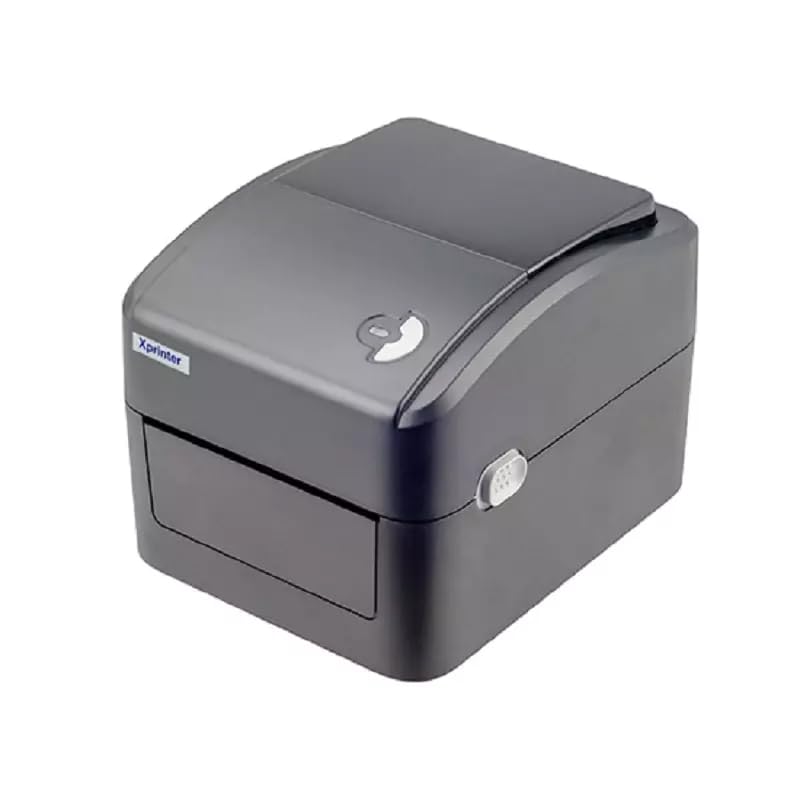
الشكل 1: الجبهة view of the Xprinter XP-420B thermal label printer.
2. دليل الإعداد
2.1 فك العبوة والفحص الأولي
- قم بإزالة الطابعة وجميع الملحقات من العبوة بعناية.
- Verify that all components are present: printer unit, power adapter, USB cable, and user manual.
- Inspect the printer for any visible damage that may have occurred during transit.
2.2 توصيل الطابعة
- قم بتوصيل محول الطاقة بمنفذ الطاقة الخاص بالطابعة ثم قم بتوصيله بمأخذ كهربائي.
- Connect one end of the provided USB cable to the printer's USB port and the other end to an available USB port on your computer.
- Power on the printer using the power switch, usually located on the side or rear.

Figure 2: Xprinter XP-420B showing USB connectivity.
2.3 تحميل الملصقات
- افتح الغطاء العلوي للطابعة بالضغط على مزاليج التحرير الموجودة على كلا الجانبين.
- Place the roll of thermal labels onto the label spindle, ensuring the labels feed from the bottom of the roll.
- Feed the leading edge of the labels through the label guide until it extends slightly past the print head.
- Adjust the movable label guides to fit the width of your labels snugly, without pinching them.
- Close the top cover firmly until it latches securely.
- The printer will automatically calibrate and detect the label size.
2.4 تثبيت برنامج التشغيل
Before printing, you must install the appropriate printer drivers on your computer. Drivers are typically provided on a CD included with the printer or can be downloaded from the official Xprinter website. The XP-420B supports both Windows and Mac operating systems.
- بالنسبة لنظام Windows: Run the setup executable from the driver CD or downloaded file واتبع التعليمات التي تظهر على الشاشة.
- بالنسبة لنظام التشغيل Mac: Download the Mac driver from the Xprinter website and follow the installation prompts.
3. تعليمات التشغيل
3.1 الطباعة الأساسية
- تأكد من تشغيل الطابعة وتوصيلها بجهاز الكمبيوتر الخاص بك.
- Open the document or application from which you wish to print (e.g., shipping software, word processor).
- حدد "طباعة" من قائمة التطبيق.
- Choose "Xprinter XP-420B" as your printer.
- In the printer settings or preferences, ensure the correct label size is selected. The printer supports adjustable label sizes.
- انقر فوق "طباعة" لإرسال المهمة إلى الطابعة.
3.2 Adjusting Label Size
The XP-420B allows for adjustable label sizes. This adjustment is primarily done through the printer driver settings on your computer and by physically adjusting the label guides within the printer.
- Software Adjustment: In your printing application or printer driver settings, navigate to the "Page Setup" or "Paper Size" options. Select or define the custom dimensions for your labels (e.g., 4x6 inches for shipping labels).
- التكيف البدني: As described in Section 2.3, ensure the internal label guides are set correctly to the width of your loaded labels.
4. الصيانة
4.1 تنظيف رأس الطباعة
Regular cleaning of the print head is crucial for maintaining print quality and extending the printer's lifespan. It is recommended to clean the print head after every roll of labels or if print quality degrades.
- أطفئ الطابعة وافصل سلك الطاقة.
- افتح الغطاء العلوي للطابعة.
- انتظر بضع دقائق حتى يبرد رأس الطباعة إذا تم استخدام الطابعة مؤخرًا.
- امسح سطح رأس الطباعة برفق باستخدام قطعة قطن مبللة بالكحول أو قطعة قماش خالية من الوبر.ampمخفف بالكحول الأيزوبروبيل.
- اترك رأس الطباعة يجف تمامًا قبل إغلاق الغطاء وإعادة توصيل الطاقة.
4.2 التنظيف العام
- استخدم قطعة قماش ناعمة وجافة لمسح الجزء الخارجي من الطابعة.
- Remove any dust or label debris from the inside of the printer using a soft brush or compressed air.
- لا تستخدم المنظفات أو المذيبات الكاشطة.
5. استكشاف الأخطاء وإصلاحها
| مشكلة | السبب المحتمل | حل |
|---|---|---|
| الطابعة لا تستجيب | Power off; USB cable disconnected; Driver issue. | Ensure power is on and connected. Check USB cable. Reinstall printer driver. |
| جودة طباعة رديئة (بهتان، خطوط) | رأس الطباعة متسخ؛ نوع الملصق غير صحيح؛ إعداد كثافة الطباعة منخفض. | Clean the print head (Section 4.1). Ensure you are using direct thermal labels. Adjust print density in driver settings. |
| عدم تغذية الملصقات بشكل صحيح | Labels improperly loaded; Label guides not adjusted; Sensor obstruction. | Reload labels correctly. Adjust label guides. Clean any dust or debris from sensors. |
| تقوم الطابعة بطباعة ملصقات فارغة | Labels loaded upside down; Not a direct thermal label. | Ensure labels are loaded with the printable side facing up. Verify labels are direct thermal. |
6. مواصفات المنتج
| ميزة | التفاصيل |
|---|---|
| ماركة | طابعة إكس برينتر |
| اسم الموديل | XP-420B |
| تكنولوجيا الاتصال | USB |
| تكنولوجيا الطباعة | حراري مباشر |
| دقة | 203 نقطة في البوصة |
| سرعة الطباعة القصوى | 152 مم/ث (6 بوصات/ثانية) |
| ذاكرة | ذاكرة وصول عشوائي (SDRAM) سعة 8 ميجابايت، وفلاش 8 ميجابايت |
| مخرجات الطابعة | أحادي اللون |
| وزن العنصر | 3 كيلوغرام |
| أبعاد المنتج | 20 عمق × 6 عرض × 10 ارتفاع سنتيمتر |
| التوافق | ويندوز، ماك |
7. الضمان والدعم
7.1 معلومات الضمان
تأتي طابعة Xprinter XP-420B مزودة بـ ضمان لمدة سنتين يسري هذا الضمان من تاريخ الشراء. ويغطي عيوب التصنيع والأعطال الناتجة عن الاستخدام العادي. يرجى الاحتفاظ بإثبات الشراء لتقديم مطالبات الضمان.
7.2 دعم العملاء
For technical assistance, troubleshooting beyond this manual, or warranty service, please contact Xprinter customer support. Refer to the contact information provided with your product packaging or visit the official Xprinter webالموقع للحصول على أحدث تفاصيل الدعم.


