مقدمة
The Surfans F28 is a high-fidelity portable music player designed to deliver an immersive audio experience. Featuring dual ESS9018 DACs, a 4.4mm balanced output, and comprehensive Bluetooth 5.2 support including LDAC and aptX HD, the F28 supports a wide range of lossless audio formats. This manual provides detailed instructions for setting up, operating, maintaining, and troubleshooting your device to ensure optimal performance and longevity.

الشكل 1: الأمامي والخلفي view of the Surfans F28 HiFi Music Player.
محتويات الحزمة
يرجى التأكد من أن جميع العناصر المدرجة أدناه موجودة في الحزمة الخاصة بك:
- 1x Surfans F28 HiFi Music Player
- 1x USB-C شحن كابل
- 1 × بطاقة Micro SD بسعة 128 جيجابايت (مثبتة مسبقًا أو متضمنة بشكل منفصل)
- 1x دليل المستخدم (هذه الوثيقة)

الشكل 2: رسم توضيحي لمحتويات العبوة النموذجية.
المنتج انتهىview
Familiarize yourself with the various components and controls of your F28 music player.
المميزات الرئيسية:
- Dual ESS9018 DACs: For high-resolution audio decoding and minimal distortion.
- 4.4 مللي متر الناتج المتوازن: Provides enhanced audio quality and power for demanding headphones.
- مخرج أحادي الطرف 3.5 مم: Standard audio output for common headphones.
- تقنية بلوتوث 5.2 ثنائية الاتجاه: Supports LDAC and aptX HD for high-quality wireless audio transmission and reception.
- شاشة لمس IPS مقاس 3.5 بوصة: For intuitive navigation and control.
- ALPS Analog Volume Knob: For precise volume adjustments.
- مساحة تخزين قابلة للتوسعة: يدعم بطاقات الذاكرة الصغيرة (Micro SD) بسعة تصل إلى 512 جيجابايت.
- منفذ USB-C: للشحن ونقل البيانات.

Figure 3: The F28 player showcasing its display and audio capabilities.

Figure 4: The dual ESS9018K2M DAC chips, central to the F28's high-fidelity audio.

Figure 5: Top panel with 4.4mm balanced and 3.5mm single-ended audio outputs, and the ALPS analog volume knob.
يثبت
1. شحن الجهاز
Before first use, fully charge the F28. Connect the included USB-C cable to the player's USB-C port and the other end to a USB power adapter (5V/1A recommended) or a computer's USB port. The charging indicator will show the charging status. A full charge typically takes several hours.
2. إدخال بطاقة Micro SD
The F28 supports Micro SD cards up to 512GB. Locate the Micro SD card slot on the bottom of the device. Gently insert the Micro SD card with the gold contacts facing down until it clicks into place. To remove, push the card in slightly until it springs out.

Figure 6: Inserting the Micro SD card and connecting via USB-C for data transfer.
3. نقل الموسيقى Files
Connect the F28 to your computer using the USB-C cable. The player will appear as a removable storage device. You can then drag and drop your music files directly into the Micro SD card's folders. The F28 supports various lossless formats including DSD (DSF/DFF), FLAC/WAV (up to 384kHz), AIFF/APE, as well as MP3/AAC.

Figure 7: Supported audio file formats for the F28 player.
تعليمات التشغيل
1. تشغيل/إيقاف التشغيل
- تشغيل الطاقة: اضغط مع الاستمرار على زر الطاقة (الموجود على الجانب) حتى تضيء الشاشة.
- إيقاف التشغيل: Press and hold the power button until a power-off prompt appears, then confirm.
2. التنقل الأساسي
The F28 features a 3.5-inch IPS touchscreen for primary navigation. Swipe gestures and taps are used to select options and move between menus. Physical buttons on the side provide additional control for playback (play/pause, next/previous track) and menu navigation.
3. تشغيل الموسيقى
From the main menu, select "My Music" or "Folder" to browse your audio files. Tap on a song to begin playback. The playback screen displays track information, progress, and playback controls.
4. التحكم في مستوى الصوت
Adjust the volume using the gold-colored ALPS analog knob located on the top right of the device. Rotate clockwise to increase volume and counter-clockwise to decrease. The volume level will be displayed on the screen.
5. اتصال البلوتوث
The F28 supports Bidirectional Bluetooth 5.2 with LDAC and aptX HD codecs for high-quality wireless audio. To pair with Bluetooth headphones or speakers:
- Go to "System Settings" and select "Bluetooth".
- قم بتشغيل Bluetooth.
- سيبحث المشغل عن الأجهزة المتاحة. اختر جهازك من القائمة لإقرانه.
The F28 can also act as a Bluetooth receiver, allowing you to stream audio from your phone or PC to the player.

Figure 8: The F28 features a Bluetooth 5.2 chip for stable and high-quality wireless connections.
6. إعدادات المعادل
The F28 includes an equalizer to customize your sound. Navigate to the "Equalizer" option in the settings. You can choose from various presets or create a custom sound profile by adjusting the frequency bands.
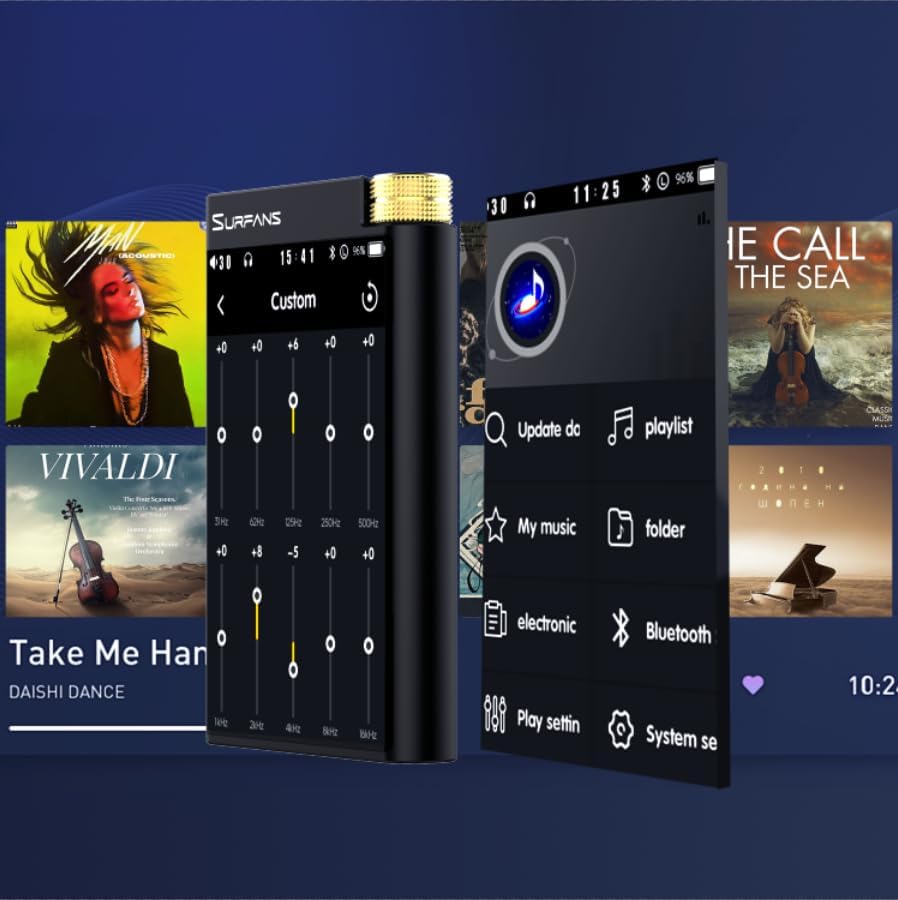
Figure 9: Customizing audio with the built-in equalizer.
7. الاتصال بالأجهزة الخارجية
Use the 4.4mm balanced or 3.5mm single-ended output to connect to headphones, amplifiers, or speakers. The USB-C port also supports USB DAC functionality, allowing the F28 to act as an external sound card for your computer.

Figure 10: The F28 can be connected to various audio systems, including acting as a USB DAC for computers.
صيانة
- تنظيف: استخدم قطعة قماش ناعمة وجافة لتنظيف الجهاز. تجنب استخدام المنظفات أو المذيبات الكاشطة.
- تخزين: قم بتخزين المشغل في مكان بارد وجاف بعيدًا عن أشعة الشمس المباشرة ودرجات الحرارة القصوى.
- العناية بالبطارية: لإطالة عمر البطارية، تجنب تفريغها بالكامل بشكل متكرر. في حال تخزينها لفترات طويلة، اشحنها إلى حوالي ٥٠٪ كل بضعة أشهر.
استكشاف الأخطاء وإصلاحها
| مشكلة | السبب المحتمل | حل |
|---|---|---|
| الجهاز لا يعمل. | بطارية منخفضة، الجهاز متجمد. | Charge the device for at least 30 minutes. If still unresponsive, try holding the power button for 10-15 seconds for a hard reset. |
| Touchscreen is unresponsive or slow. | خلل برمجي مؤقت؛ تداخل مع واقي الشاشة. | Restart the device. Ensure the screen is clean and free of debris. If using a screen protector, ensure it is properly applied and not too thick. |
| مشاكل اقتران البلوتوث. | Device not in pairing mode; distance; interference. | Ensure both devices are in pairing mode and within range. Turn off and on Bluetooth on both devices. Clear previous pairings if necessary. |
| Low volume via Bluetooth. | Volume settings on both devices; codec compatibility. | Increase volume on both the F28 and the connected Bluetooth device. Ensure optimal codec (LDAC/aptX HD) is selected if supported by the receiving device. |
| موسيقى files not recognized or played in incorrect order. | فاسد files; file system indexing issue. | يضمن files are in supported formats. Re-scan the music library from the player's settings. If issues persist, try reformatting the Micro SD card (backup data first) and re-transferring files. Note: Some players may sort by filename alphabetically rather than track number metadata. |
تحديد
| ميزة | التفاصيل |
|---|---|
| اسم الموديل | F28 128G |
| أبعاد المنتج | 0.7 × 2.6 × 4.7 بوصة |
| وزن العنصر | 9.6 أونصات |
| شريحة DAC | Dual ESS9018K2M |
| تنسيقات الصوت المدعومة | DSD (DSF/DFF), FLAC/WAV (up to 384kHz/32-bit), AIFF/APE, MP3/AAC, WMA Lossless |
| نسخة البلوتوث | 5.2 (Bidirectional, supports LDAC/aptX HD) |
| حجم الشاشة | شاشة لمس IPS مقاس 3.5 بوصات |
| التخزين الداخلي | 128GB (included Micro SD card) |
| تخزين قابل للتوسيع | تصل سعتها إلى 512 جيجابايت عبر بطاقة Micro SD |
| بطارية | 1x 12V battery (included), approx. 12-hour playback |
| منافذ الإخراج | 4.4mm Balanced, 3.5mm Single-Ended |
| تكنولوجيا الاتصال | Aux, Bluetooth 5.2, USB-C |
| ميزة خاصة | مُعادل الصوت |
الضمان والدعم
For warranty information and technical support, please refer to the official Surfans webالموقع أو تواصل مع خدمة العملاء مباشرةً. احتفظ بإيصال الشراء كإثبات للشراء في حال وجود أي مطالبات بالضمان.
You can visit the official Surfans Store on Amazon for more information and support: Surfans Audio Store


