مقدمة
This manual provides essential information for setting up, operating, maintaining, and troubleshooting your Thunderobot Zero 18 Pro 5070 Ti Gaming Laptop. Please read this guide thoroughly to ensure optimal performance and longevity of your device.
ماذا يوجد في الصندوق
عند فك العبوة، تأكد من وجود جميع العناصر المدرجة أدناه:
- THUNDEROBOT Zero Laptop
- محول الطاقة
- دليل المستخدم (هذا المستند)
- بطاقة الضمان
If any items are missing or damaged, contact your retailer or Thunderobot customer support immediately.
يثبت
التشغيل الأولي
- قم بتوصيل محول الطاقة بمنفذ إدخال الطاقة الخاص بالكمبيوتر المحمول، ثم قم بتوصيله بمأخذ الحائط.
- افتح غطاء الكمبيوتر المحمول.
- اضغط على زر الطاقة لتشغيل الكمبيوتر المحمول.
- اتبع التعليمات التي تظهر على الشاشة لإكمال تثبيت نظام التشغيل Windows 11 Home.
ربط الأجهزة الطرفية
Utilize the available ports to connect external devices such as a mouse, keyboard, external display, or other accessories. Refer to the "Connectivity (Ports)" section for port details.
تعليمات التشغيل
تشغيل/إيقاف الطاقة
- To power on: Press the power button located on the keyboard deck.
- To shut down: Click the Start button, then Power, and select "Shut down".
- To restart: Click the Start button, then Power, and select "Restart".
- To sleep: Close the laptop lid or click the Start button, then Power, and select "Sleep".
Keyboard and RGB Lighting
The laptop features a full-size keyboard with per-key customizable RGB backlighting and a dedicated numeric keypad.
- Per-Key RGB Backlight: Customize individual key lighting through the AI Intelligent Control Center software.
- مفاتيح الوظائف: استخدم Fn key in combination with other keys for various functions (e.g., volume control, screen brightness, keyboard backlight adjustment).
- Performance Mode Switching: Dedicated keys (Fn+Space) allow for quick toggling between performance profiles.
- One-Click Cooling: A dedicated key (often near the numeric keypad) can activate maximum cooling. Ensure cooling mode is exited before using the first three keys to switch modes.
مميزات العرض
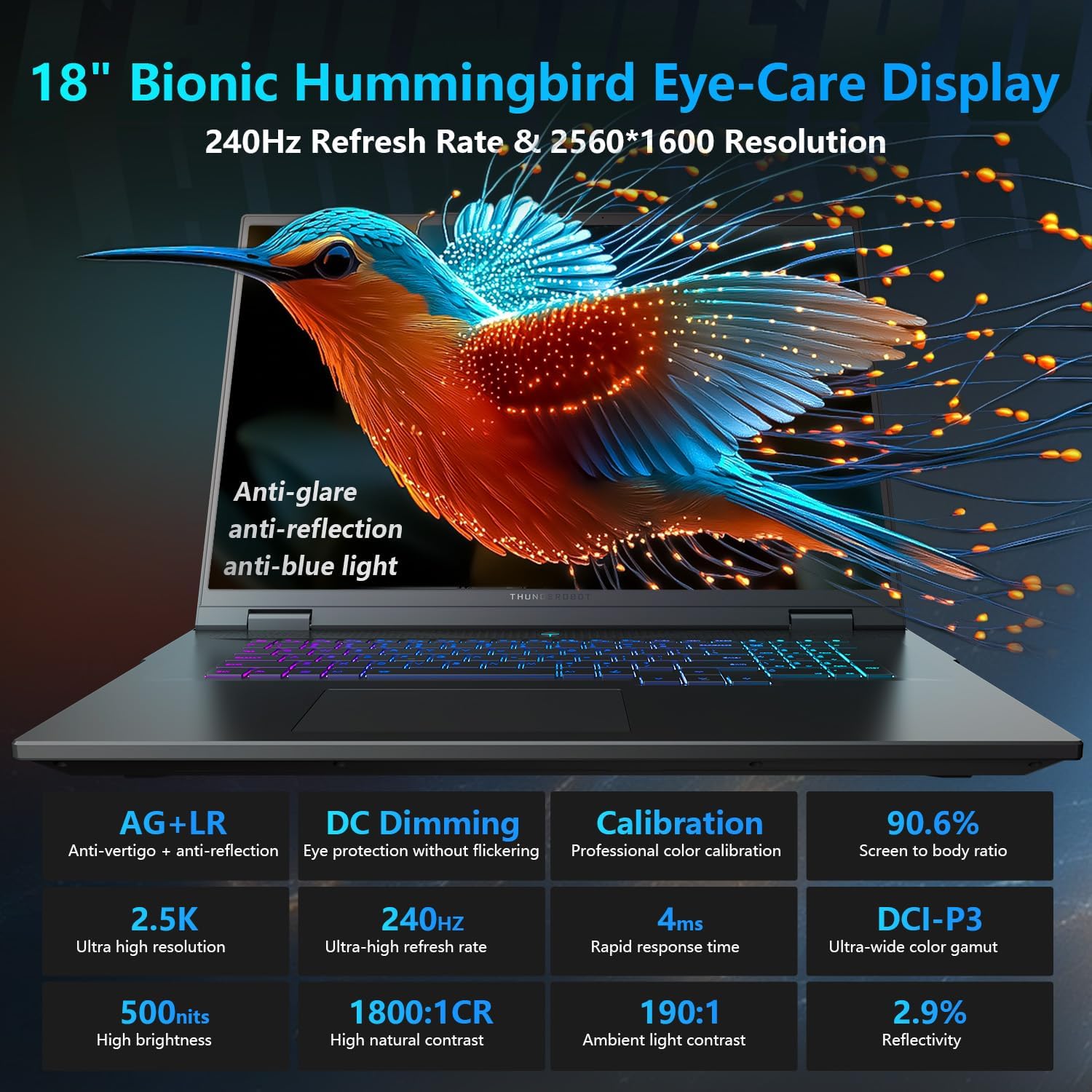
The 18-inch QHD+ (2560x1600) Bionic Hummingbird Eye-Care display offers a 240Hz refresh rate and 4ms response time for clear and fluid visuals. It includes anti-glare, anti-reflection, and anti-blue light technologies for eye comfort.

Connectivity (Ports)
The laptop is equipped with various ports for extensive connectivity:
- 3 x Superspeed USB Type-A ports
- 2 x Superspeed USB Type-C ports (including Thunderbolt 5 support)
- 1 x HDMI port (HDMI 2.1)
- 1 × منفذ إيثرنت RJ-45
- 1 x Audio Port (3.5mm)
- قارئ بطاقات SD UHS-II
- Wi-Fi 6E for high-speed wireless internet
- Bluetooth for wireless peripheral connections

نظام التبريد
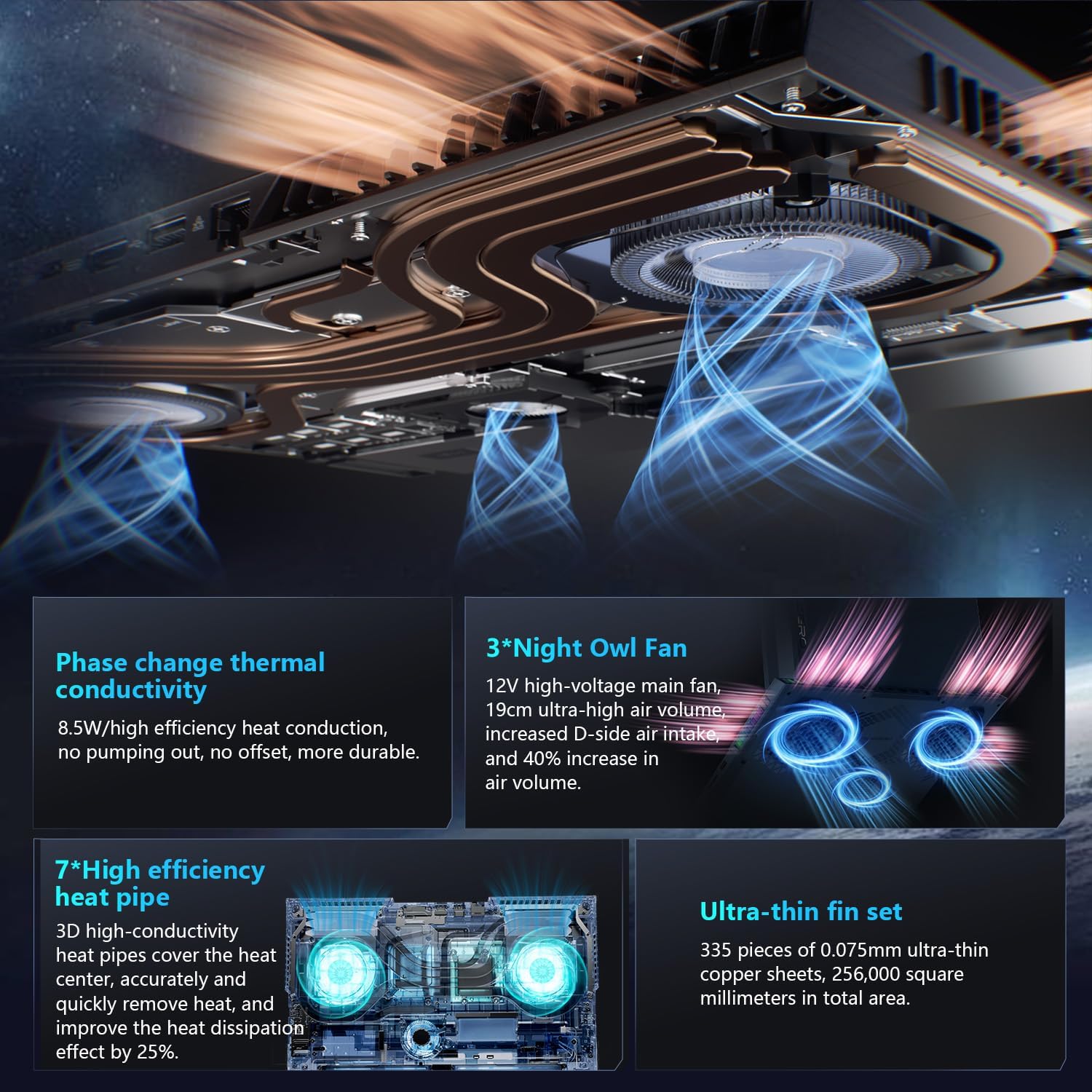
The advanced cooling system features 3 Night Owl fans, 7 high-efficiency heat pipes, and 338 ultra-thin copper fins to ensure optimal thermal management during intensive use, allowing for 270W super performance release.
AI Intelligent Control Center
The AI Intelligent Control Center software allows for comprehensive system management, including performance tuning, intelligent light adjustment, and personalized customization. This includes monitoring CPU/GPU temperatures and fan speeds.
- Performance Tuning: Adjust power settings for quiet, balanced, or turbo modes.
- Intelligent Light Adjustment: Customize keyboard, strip, and logo RGB lighting effects.
- مراقبة النظام: View real-time CPU and GPU status.
Note: System mode switching in Control Center requires the device to be connected to a power source.
صيانة
تنظيف الكمبيوتر المحمول
- شاشة: استخدم قطعة قماش ناعمة وخالية من الوبر برفق دampاغسلها بالماء أو بمنظف الشاشة. تجنب المواد الكيميائية القاسية.
- لوحة المفاتيح والهيكل: استخدم قطعة قماش ناعمة لمسح الأسطح. ولإزالة الغبار من الشقوق، استخدم الهواء المضغوط.
- الفتحات: قم بتنظيف فتحات التبريد بشكل دوري باستخدام الهواء المضغوط لمنع تراكم الغبار، الذي يمكن أن يؤثر على الأداء.
العناية بالبطارية
- تجنب تفريغ البطارية بالكامل بشكل متكرر.
- قم بتخزين الكمبيوتر المحمول في مكان بارد وجاف إذا لم تستخدمه لفترات طويلة.
- للحفاظ على صحة البطارية المثلى، تجنب درجات الحرارة القصوى.
تحديثات البرامج
Regularly check for and install operating system updates (Windows Update) and driver updates (via Thunderobot's official website or the AI Intelligent Control Center) to ensure system stability and performance.
استكشاف الأخطاء وإصلاحها
| مشكلة | السبب المحتمل | حل |
|---|---|---|
| الكمبيوتر المحمول لا يعمل. | لا يوجد طاقة، أو بطارية فارغة، أو مشكلة في الجهاز. |
|
| الشاشة فارغة أو سوداء. | إعدادات العرض، أو الشاشة الخارجية المتصلة، أو مشكلة في الجهاز. |
|
| ارتفاع درجة الحرارة أثناء الاستخدام. | Blocked vents, high performance settings, or dust buildup. |
|
| مشاكل في الاتصال بشبكة Wi-Fi. | تم تعطيل شبكة الواي فاي، أو مشاكل في برنامج التشغيل، أو مشاكل في جهاز التوجيه (الراوتر). |
|
For further assistance, please contact Thunderobot customer support.
تحديد
| ميزة | التفاصيل |
|---|---|
| اسم الموديل | Zero 18 Pro |
| المعالج | Intel Core Ultra 9 275HX (24 Cores, 24 Threads, up to 5.40GHz) |
| الرسومات | NVIDIA GeForce RTX 5070 Ti (8 GB GDDR6 Dedicated) |
| كبش | 32 جيجابايت DDR5 (4800 ميجاهرتز) |
| تخزين | محرك أقراص الحالة الصلبة PCIe M.2 بسعة 2 تيرابايت |
| عرض | 18-inch QHD+ (2560x1600) 240Hz Bionic Hummingbird Eye-Care Display |
| نظام التشغيل | ويندوز 11 هوم |
| الاتصال | Wi-Fi 6E, Bluetooth, 3x USB-A, 2x USB-C (Thunderbolt 5), HDMI 2.1, RJ-45, Audio Port |
| لوحة المفاتيح | Per-Key RGB Backlit, Numeric Keypad |
| الأبعاد (الطول × العرض × الارتفاع) | 16.04 × 11.78 × 1.41 بوصة |
| وزن العنصر | 15 رطل |
| مصدر الطاقة | بطارية وبطارية |
الضمان والدعم
Every Thunderobot laptop includes a ضمان لمدة 12 شهرًانقدم دعمًا متخصصًا، وتشخيصًا دقيقًا، وقطع غيار أصلية في حال الحاجة إلى إصلاح. بالإضافة إلى ذلك، ضمان لمدة 90 يومًا is provided on all warranty replacement parts, ensuring hassle-free repairs. Your complete satisfaction is our commitment.
For technical support, warranty claims, or service inquiries, please visit the official Thunderobot website or contact their customer service department. Keep your purchase receipt and serial number handy for faster service.