1. انتهى المنتجview
The Revopoint Auto Turntable is an accessory designed to enhance the 3D scanning process for small to medium-sized objects. It provides a stable, rotating platform, allowing for comprehensive object capture without manual repositioning of the scanner.
- Easier Scans: Facilitates quick and easy 3D scanning of small to medium-sized objects by rotating the object, eliminating the need to move the scanner.
- خفيفة الوزن وقابلة للحمل: Weighs approximately 315 g with a diameter of 125 mm, making it easy to transport. It supports a maximum load of 2.5 kg.
- Turntable Topper: Includes a topper with pre-placed marker points, which are crucial for scanning featureless objects by providing reference points for the 3D scanner.
- التوافق: Designed to work seamlessly with all Revopoint 3D scanners for small and medium objects.

Image: The Revopoint Auto Turntable, a black circular platform with white marker points, designed for 3D scanning.
2. ماذا يوجد في الصندوق
عند إخراج المنتج من الصندوق، تأكد من وجود جميع المكونات:
- قاعدة القرص الدوار
- Turntable Topper (with marker points)
- كبل USB (للطاقة)

Image: The components of the Revopoint Auto Turntable, including the base, two half-circle toppers with markers, and a USB cable.
3. تعليمات الإعداد
- فك مكونات الحزمة: Carefully remove the turntable base, turntable topper, and USB cable from the packaging.
- Assemble Turntable Topper: Place the turntable topper onto the turntable base. Ensure it is seated correctly and securely. The topper is designed to fit precisely.
- Position the Turntable: Place the assembled turntable on a stable, flat surface suitable for 3D scanning.
- توصيل الطاقة: Connect the provided USB cable to the turntable's power input port. Connect the other end of the USB cable to a suitable USB power source (e.g., computer USB port, USB wall adapter).
- وضع الكائن: Position the object to be scanned centrally on the turntable topper. For featureless objects, the pre-marked points on the topper will assist the scanner in tracking.
- Position 3D Scanner: Place your Revopoint 3D scanner on a stable tripod or stand next to the turntable, ensuring it has a clear view of the object and the turntable.
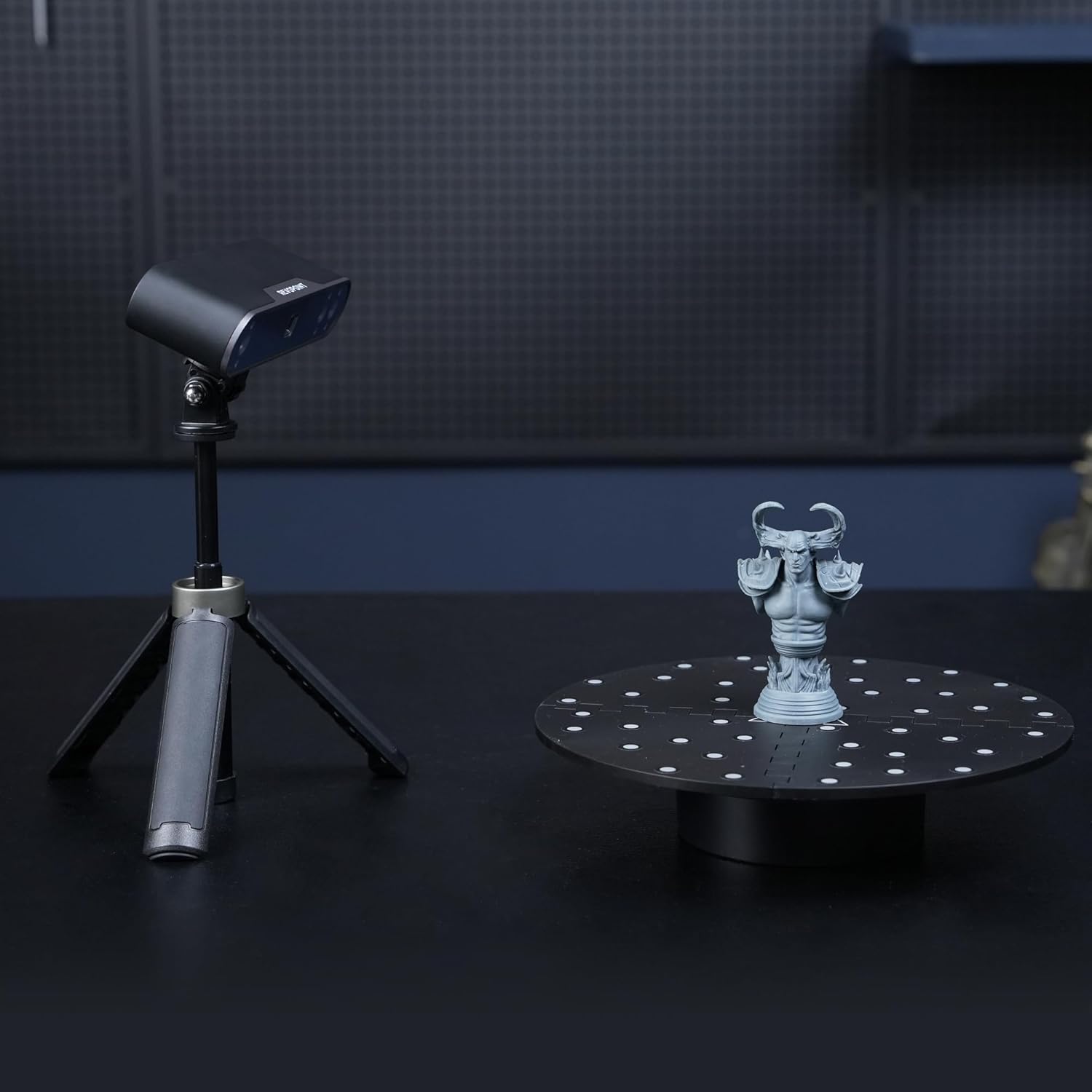
Image: A Revopoint 3D scanner on a tripod positioned next to the Auto Turntable, which holds a small statue, demonstrating a typical scanning setup.
4. تعليمات التشغيل
- تشغيل الطاقة: Once connected to power, the turntable should be ready for operation. Some models may have a power button or indicator light.
- بدء المسح: Launch your Revopoint 3D scanning software on your computer or mobile device.
- Select Turntable Mode: Within the scanning software, select the appropriate scanning mode that utilizes a turntable. This mode often optimizes the scanning process for rotating objects.
- ضبط الإعدادات: Configure scanner settings such as exposure, resolution, and scanning speed as recommended by your scanner's manual or the software interface.
- بدء المسح: Begin the scanning process through the software. The turntable will automatically rotate the object, allowing the scanner to capture data from all angles.
- مراقبة التقدم: Observe the scanning progress in the software. Ensure the scanner maintains tracking of the object and the turntable's marker points (if applicable).
- Complete Scan: Once the scan is complete, the turntable will stop rotating. You can then process the captured 3D data in your software.

Image: The Auto Turntable with a white bust placed on its marked surface, illustrating its use for scanning featureless objects.

Image: A Revopoint 3D scanner positioned to scan a red apple placed on the Auto Turntable, demonstrating its capability for small objects.
5. الصيانة
- تنظيف: Use a soft, dry cloth to wipe the turntable surface. Avoid abrasive cleaners or solvents that could damage the finish or marker points.
- تخزين: Store the turntable in a dry, dust-free environment when not in use.
- العناية بالكابلات: Ensure the USB cable is not bent sharply or subjected to excessive strain to prevent damage.
- Marker Points: Keep the marker points on the turntable topper clean and free from obstruction to ensure optimal tracking by the 3D scanner.
6. استكشاف الأخطاء وإصلاحها
- القرص الدوار لا يدور:
- Check if the USB cable is securely connected to both the turntable and the power source.
- تأكد من أن مصدر الطاقة نشط ويوفر طاقة كافية.
- Verify that the scanning software has initiated the turntable rotation.
- Scanning Tracking Issues:
- Ensure the object is placed centrally on the turntable.
- Clean the marker points on the turntable topper if they appear dirty or obscured.
- Adjust the lighting conditions in your scanning environment to avoid glare or shadows.
- Refer to your Revopoint 3D scanner's manual for specific tracking troubleshooting.
- ضوضاء غير عادية:
- Discontinue use and check for any obstructions or damage to the turntable mechanism.
- إذا استمرت المشكلة ، فاتصل بدعم العملاء.
7. المواصفات
| رقم موديل العنصر | RevoScan Small Turntable |
| أبعاد الحزمة | 5.75 × 4.96 × 2.68 بوصة |
| وزن العنصر | 10.86 أونصة (حوالي 308 جرامًا) |
| قطر القرص الدوار | 125 ملم (حوالي 4.92 بوصة) |
| الحد الأقصى لسعة التحميل | 2.5 كجم (حوالي 5.5 رطلاً) |
| الشركة المصنعة | ريفوبوينت |
| ASIN | B0F7LJ4MCP |
8. الضمان والدعم
Revopoint products are typically covered by a ضمان لمدة 2 سنوات. For any technical assistance, product inquiries, or warranty claims, please contact Revopoint customer support. دعم فني متوفر على مدار الساعة طوال أيام الأسبوع متاح.
For further information, you may visit the official Revopoint store or support channels:
- Revopoint Official Store on Amazon
- Refer to your product packaging or the official Revopoint webللحصول على أحدث معلومات الاتصال بالدعم، تفضل بزيارة الموقع.


