1. المقدمة
This manual provides essential information for setting up, operating, and maintaining your NIMO 15.6-inch FHD Laptop. Please read this guide thoroughly to ensure optimal performance and longevity of your device. Keep this manual for future reference.
2. ماذا يوجد في الصندوق
- جهاز كمبيوتر محمول واحد من طراز NIMO N155
- شاحن سريع من النوع C بقوة 65 واط بتقنية الشحن السريع PD
- 1 × دليل المستخدم
- ويندوز 11 هوم (مثبت مسبقًا)
- ضمان لمدة عامين، ومعلومات الإرجاع خلال 90 يومًا
3. انتهى المنتجview
The NIMO 15.6-inch FHD Laptop is designed for efficiency and convenience, featuring a robust AMD Ryzen 5 processor, ample memory, and fast storage. Its sleek design and comprehensive connectivity options make it suitable for various tasks.
3.1. مكونات الكمبيوتر المحمول

Figure 1: NIMO 15.6-inch FHD Laptop (Rose Gold variant)
This image displays the NIMO 15.6-inch FHD Laptop in Rose Gold, showcasing its full-size keyboard, large touchpad, and the vibrant display. Key features like fingerprint sensor, Type-C PD charger, and backlit keyboard are highlighted on the screen.
3.2. المنافذ والموصلات

Figure 2: NIMO Laptop Ports Diagram
This diagram illustrates the available ports on the NIMO laptop, including Micro SD card reader, USB 2.0, USB 3.2 Gen1, Audio Jack, Kensington Lock on one side, and Type-C, USB 3.2 Gen1 Full-function, HDMI 1.4, and a Charge LED on the other side.
- منافذ USB 3.0: For high-speed data transfer and connecting peripherals.
- منفذ USB 2.0: لتوصيل أجهزة USB القياسية.
- ميناء من النوع C: Supports 65W Power Delivery (PD) for fast charging and data transfer.
- HDMI 1.4: للاتصال بالشاشات الخارجية.
- قارئ بطاقة Micro SD: لتوسيع مساحة التخزين أو النقل fileمن بطاقات الذاكرة.
- مقبس الصوت: لتوصيل سماعات الرأس أو مكبرات الصوت الخارجية.
- فتحة قفل Kensington: For physical security of the device.
4. الإعداد
4.1. التشغيل الأولي
- قم بإخراج الكمبيوتر المحمول وجميع الملحقات من الصندوق.
- Connect the 65W Type-C PD Fast Charger to the laptop's Type-C port and a power outlet.
- Open the laptop lid. The laptop may power on automatically. If not, press the power button located on the top right of the keyboard.
- اتبع الإرشادات التي تظهر على الشاشة لإكمال إعداد Windows 11 Home، بما في ذلك اللغة والمنطقة واتصال الشبكة وإنشاء حساب المستخدم.
4.2. الاتصال بشبكة
During the initial setup or at any time, you can connect your NIMO laptop to a Wi-Fi network:
- انقر على أيقونة Wi-Fi في علبة النظام (الزاوية اليمنى السفلية من الشاشة).
- حدد شبكة Wi-Fi المطلوبة من القائمة.
- أدخل كلمة مرور الشبكة إذا طُلب منك ذلك، ثم انقر فوق "اتصال".
5. تعليمات التشغيل
5.1. إدارة الطاقة
- تشغيل الطاقة: اضغط على زر الطاقة.
- وضع السكون: أغلق الغطاء أو اضغط على زر الطاقة لفترة وجيزة.
- اغلق: انقر فوق زر البدء، ثم الطاقة > إيقاف التشغيل.
- إعادة تشغيل: انقر فوق زر البدء، ثم الطاقة > إعادة التشغيل.
5.2. لوحة المفاتيح ولوحة اللمس
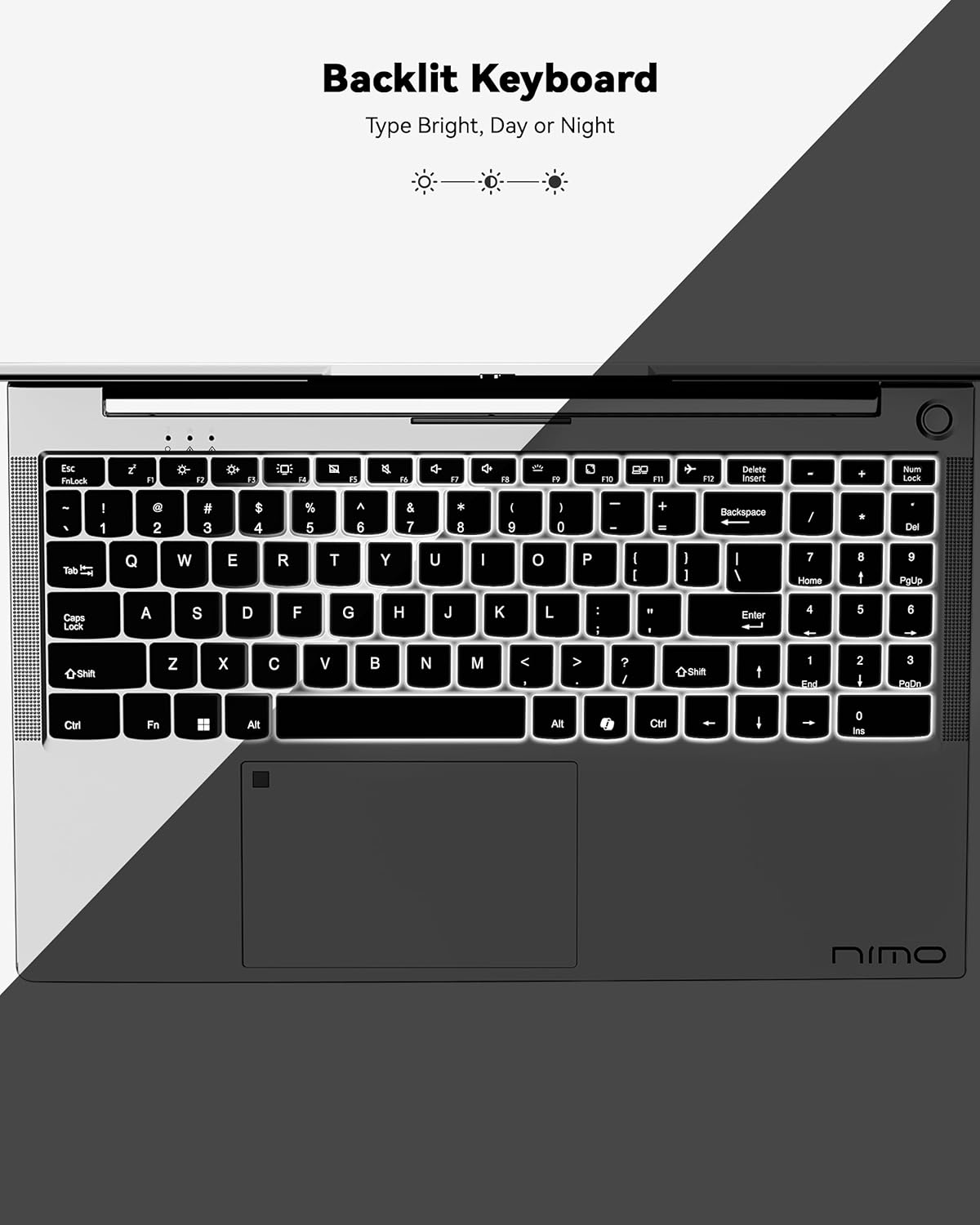
Figure 3: Backlit Keyboard
This image highlights the backlit keyboard feature of the NIMO laptop, demonstrating how the keys illuminate for typing in low-light conditions.
- لوحة مفاتيح ذات إضاءة خلفية: يضعط فن + F5 (or the key with the keyboard backlight icon) to toggle the backlight on/off or adjust brightness.
- لوحة اللمس: Supports multi-touch gestures for scrolling, zooming, and navigation. Refer to Windows settings for customization.
- ماسح البصمات: Located on the touchpad for secure and instant login. Set up your fingerprint in Windows Settings > Accounts > Sign-in options.

Figure 4: Fingerprint Sensor on Touchpad
This image shows a close-up of the NIMO laptop's touchpad, clearly indicating the integrated fingerprint sensor for quick and secure access.
5.3. Webكاميرا
The laptop features a 2MP webcam for video calls and conferences. Ensure proper lighting for best image quality.
5.4. سمعي
The integrated speakers provide clear audio. You can also connect headphones or external speakers via the audio jack.
6. الميزات الرئيسية
- Vivid 15.6" Full HD Display: Enjoy stunning visuals with the 15.6" Full HD (1920x1080) IPS anti-glare display, featuring an 85% screen-to-body ratio and micro-edge design.
- أداء قوي: Equipped with an AMD Ryzen 5 processor, 16GB DDR4 RAM, and a 1TB PCIe SSD for fast boot-ups, seamless multitasking, and efficient handling of applications.
- Upgradable Components: The RAM and SSD slots are expandable, allowing for future memory and storage upgrades.
- 65W USB-C PD Fast Charger: The included charger provides rapid power delivery, offering 2 hours of use from just 15 minutes of charging. It is also versatile for charging other compatible devices.
- Secure & Instant Login: Integrated fingerprint reader on the touchpad ensures quick and secure access to your device.
- Ergonomic Backlit Keyboard: Work comfortably in any environment with the backlit keyboard, featuring adjustable brightness.
- اتصال سلس: Features Wi-Fi 6 and Bluetooth 5.2 for stable, high-speed wireless connections, along with multiple USB 3.0 ports and HDMI for versatile peripheral connections.
Video 1: NIMO Laptop - Perfect for Work and Study, Anytime, Anywhere
This video demonstrates the NIMO laptop's versatility for various tasks, highlighting its portability and performance for work, study, and entertainment in different settings.
Video 2: NIMO 15.6 FHD Laptop for Students Home Work
This video showcases the NIMO 15.6 FHD laptop as an ideal device for students, home users, and professionals, emphasizing its suitability for educational and work-related tasks.
7. الصيانة
- تنظيف: استخدم قطعة قماش ناعمة وخالية من الوبر لتنظيف الشاشة والجزء الخارجي. تجنب المواد الكيميائية القاسية.
- العناية بالبطارية: لإطالة عمر البطارية، تجنب تفريغها بالكامل بشكل متكرر. خزّن الكمبيوتر المحمول في مكان بارد وجاف.
- تحديثات البرامج: قم بتحديث نظام التشغيل Windows وبرامج التشغيل الخاصة بك بانتظام لضمان الأداء والأمان الأمثل.
- تهوية: Ensure the laptop's ventilation openings are not blocked to prevent overheating. Use on a hard, flat surface.
8. استكشاف الأخطاء وإصلاحها
- الكمبيوتر المحمول لا يعمل: Ensure the charger is securely connected and the battery has sufficient charge. Try a different power outlet.
- الشاشة فارغة: Connect to an external monitor to check if the display is the issue. Restart the laptop.
- مشاكل الاتصال بشبكة Wi-Fi: Restart your router and the laptop. Check Wi-Fi settings and ensure airplane mode is off.
- الأداء البطيء: Close unnecessary applications, check for malware, and ensure sufficient free storage space. Consider upgrading RAM or SSD if performance remains an issue.
- لوحة المفاتيح أو لوحة اللمس لا تستجيب: أعد تشغيل الكمبيوتر المحمول. تحقق من تحديثات برامج التشغيل في إدارة الأجهزة.
For persistent issues, please refer to the support section or contact NIMO customer service.
9. المواصفات
| ميزة | مواصفة |
|---|---|
| حجم شاشة العرض الدائمة | 15.6 بوصة |
| دقة الشاشة | 1920 × 1080 بكسل (Full HD) |
| المعالج | معالج AMD Ryzen 5 (3.7 جيجاهرتز) |
| كبش | ذاكرة وصول عشوائي 16 جيجابايت من نوع DDR4 (قابلة للترقية) |
| سرعة الذاكرة | 4800 ميجا هرتز |
| القرص الصلب | 1024 GB SSD (Upgradable) |
| معالج الرسوميات المساعد | AMD Integrated graphics |
| نظام التشغيل | ويندوز 11 هوم |
| نوع لاسلكي | 802.11a/b/g/n/ac (Wi-Fi 6) |
| بلوتوث | بلوتوث 5.2 |
| عدد منافذ USB 2.0 | 1 |
| عدد منافذ USB 3.0 | 3 |
| متوسط عمر البطارية | 9 ساعة |
| وزن العنصر | 5 رطل |
| أبعاد المنتج | 14.07 × 8.98 × 0.76 بوصة |
| مؤخرة Webقرار الكاميرا | 2 ميجا بكسل |
| المميزات الخاصة | لوحة مفاتيح بإضاءة خلفية، قارئ بصمات الأصابع، صوت عالي الدقة، لوحة مفاتيح رقمية |
10. الضمان والدعم
Your NIMO laptop comes with a ضمان الشركة المصنعة لمدة عامين. Additionally, NIMO offers a 90-day hassle-free return and exchange policy. Our dedicated support team is available to assist with any issues or replacements.
10.1. اتصل بالدعم
- For product-related questions or technical assistance, please contact NIMO customer service via their official webالموقع أو البريد الإلكتروني أو الهاتف.
- Contact information can typically be found on the NIMO official webصفحة الموقع أو صفحة المنتج.
11. معلومات السلامة
- Use only original chargers and regularly inspect cables for damage.
- Handle the laptop by its base and consider using a protective case. Avoid placing heavy objects on it.
- Place the laptop on a hard, flat surface to ensure proper ventilation and prevent overheating. Keep it away from extreme temperatures and moisture.
- Do not overcharge the battery. Discontinue use if the battery swells or shows signs of damage.
- Set strong passwords, keep software updated, use antivirus protection, and regularly back up your data.
- In case of liquid spills, immediately unplug the laptop and allow it to dry completely before attempting to power it on.
- For any technical issues, consult qualified professionals. Do not attempt to disassemble or repair the device yourself.
12. إخلاء المسؤولية القانونية
This laptop is provided "as is," with no express or implied warranties except for the manufacturer's limited warranty (if applicable). Implied warranties of merchantability or fitness for a specific purpose are disclaimed. NIMO is not liable for damages resulting from misuse (e.g., non-approved chargers, unauthorized repairs), physical damage, or failure to follow safety guidelines, including data loss or business interruption. Users are responsible for regularly backing up their data. This disclaimer does not exclude liability for manufacturing defects or violations of mandatory local laws. By using the NIMO laptop, you accept these terms, which are governed by applicable jurisdiction laws.


