1. المقدمة
The IRRADIO IR-203 Sound+ is a compact and portable wireless speaker designed for high-quality audio playback. Featuring Bluetooth 5.0 connectivity and a USB port for external media, it offers versatile listening options. Its robust design and long-lasting battery make it ideal for both home use and on-the-go entertainment.

الشكل 1.1: IRRADIO IR-203 Sound+ Wireless Speaker. This image shows the speaker from an angled perspective, highlighting its compact size and fabric grille.
2. معلومات السلامة
يرجى قراءة جميع تعليمات السلامة بعناية قبل استخدام الجهاز. احتفظ بهذا الدليل للرجوع إليه مستقبلاً.
- لا تعرض السماعة للماء أو الرطوبة الزائدة. هذا المنتج غير مقاوم للماء.
- Avoid extreme temperatures. Do not place near heat sources or in direct sunlight.
- Do not disassemble, repair, or modify the device. This will void the warranty and may cause damage or injury.
- استخدم فقط مستوى الشحن المحددtagهـ (تيار مستمر 5 فولت/2 أمبير).
- يحفظ بعيدًا عن متناول الأطفال.
3. محتويات العبوة
تأكد من وجود جميع العناصر في العبوة:
- IRRADIO IR-203 Sound+ Wireless Speaker
- كابل شحن USB
- دليل المستخدم (هذا المستند)
4. انتهى المنتجview
4.1. عناصر التحكم والمنافذ

الشكل 4.1: جانب view of the speaker showing control buttons. From left to right: Mode button (M), Volume Down (-), Volume Up (+), Play/Pause/Next Track button (▶).

الشكل 4.2: خلف view of the speaker showing connectivity ports. From left to right: TF (MicroSD) card slot, USB-A port, ON/OFF switch, DC 5V charging port.
The speaker features intuitive controls on its top edge and essential connectivity ports on its rear panel.
- زر الوضع (M): اضغط للتبديل بين وضعي تشغيل البلوتوث وUSB.
- اخفض الصوت (-): اضغط لخفض مستوى الصوت.
- رفع الصوت (+): اضغط لرفع مستوى الصوت.
- Play/Pause/Next Track (▶): Press to play or pause audio. Long press to skip to the next track.
- فتحة بطاقة TF: Insert a MicroSD card for direct audio playback.
- منفذ USB-A: Insert a USB flash drive for direct audio playback.
- مفتاح تشغيل / إيقاف: قم بتحريكه لتشغيل أو إيقاف تشغيل السماعة.
- منفذ DC 5V: Connect the USB charging cable here to charge the speaker.
5. الإعداد
5.1. شحن مكبر الصوت
Before first use, fully charge the speaker. The battery capacity is 400 mAh.
- قم بتوصيل كابل الشحن USB المرفق بمنفذ التيار المستمر 5 فولت الموجود على السماعة.
- Connect the other end of the USB cable to a compatible USB power adapter (DC 5V/2A recommended) or a computer USB port.
- The charging indicator light will illuminate (color may vary) to show that the speaker is charging.
- Charging typically takes approximately 2 hours for a full charge. The indicator light will change or turn off once charging is complete.
A full charge provides approximately 2 hours and 40 minutes of continuous playback at 50% volume.
5.2. تشغيل / إيقاف التشغيل
To power on the speaker, slide the ON/OFF switch to the 'ON' position. You will hear an audible prompt. To power off, slide the switch to the 'OFF' position.
6. تعليمات التشغيل
6.1. اقتران بلوتوث
The speaker uses Bluetooth 5.0 for stable wireless connection up to 10 meters.
- Ensure the speaker is powered on and in Bluetooth mode. If not, press the 'M' (Mode) button to switch to Bluetooth mode. The speaker will enter pairing mode, indicated by a flashing LED light and an audible prompt.
- على جهازك (الهاتف الذكي، الجهاز اللوحي، الكمبيوتر المحمول)، قم بتمكين البلوتوث وابحث عن الأجهزة المتاحة.
- Select "IRRADIO IR-203 Sound+" from the list of found devices.
- بمجرد الاقتران، سيصدر مكبر الصوت تأكيدًا صوتيًا، وسيتوقف ضوء LED عن الوميض.
- يمكنك الآن تشغيل الصوت من جهازك عبر مكبر الصوت.
ملاحظة: سيحاول مكبر الصوت تلقائيًا إعادة الاتصال بآخر جهاز مقترن عند تشغيله.
6.2. تشغيل بطاقة USB/TF
The speaker supports direct audio playback from a USB flash drive or a MicroSD (TF) card.
- Insert a USB flash drive into the USB-A port or a MicroSD card into the TF card slot.
- The speaker will automatically switch to USB/TF card mode and begin playing audio files (MP3, WAV, etc.) from the inserted storage device. If it does not switch automatically, press the 'M' (Mode) button to select the correct mode.
- Use the Play/Pause/Next Track button (▶) to control playback.
6.3. التحكم في مستوى الصوت
Use the '+' and '-' buttons on the speaker to adjust the volume. You can also control the volume from your connected device.
7. الصيانة
لضمان طول عمر مكبر الصوت لديك وأدائه الأمثل، اتبع إرشادات الصيانة التالية:
- تنظيف: Use a soft, dry cloth to wipe the speaker's surface. Do not use abrasive cleaners, alcohol, or chemical solvents.
- تخزين: عند عدم الاستخدام لفترات طويلة، قم بتخزين مكبر الصوت في مكان بارد وجاف بعيدًا عن أشعة الشمس المباشرة ودرجات الحرارة القصوى.
- العناية بالبطارية: To preserve battery life, avoid fully discharging the battery frequently. Charge the speaker regularly, even if not in use.
8. استكشاف الأخطاء وإصلاحها
If you encounter issues with your IRRADIO IR-203 Sound+ speaker, refer to the following common problems and solutions:
| مشكلة | السبب المحتمل | حل |
|---|---|---|
| مكبر الصوت لا يعمل. | نفدت طاقة البطارية. | اشحن السماعة لمدة 30 دقيقة على الأقل. |
| لا يوجد صوت. | مستوى الصوت منخفض جدًا أو مكتوم. تم اختيار وضع غير صحيح. | Increase volume on both speaker and connected device. Press 'M' button to switch modes. |
| لا يمكن الاقتران عبر البلوتوث. | مكبر الصوت غير مُقترن. الجهاز بعيد جدًا. يوجد تداخل. | Ensure speaker is in Bluetooth pairing mode (flashing LED). Move device closer to speaker (within 10m). Turn off other Bluetooth devices. |
| بطاقة USB/TF لا تعمل. | غير صحيح file تهيئة. لم يتم إدخال البطاقة/محرك الأقراص بشكل صحيح. | ضمان الصوت files are in supported format (e.g., MP3). Reinsert the USB drive or TF card firmly. Press 'M' button to select USB/TF mode. |
إذا استمرت المشكلة بعد تجربة هذه الحلول، فيرجى الاتصال بدعم العملاء.
9. المواصفات
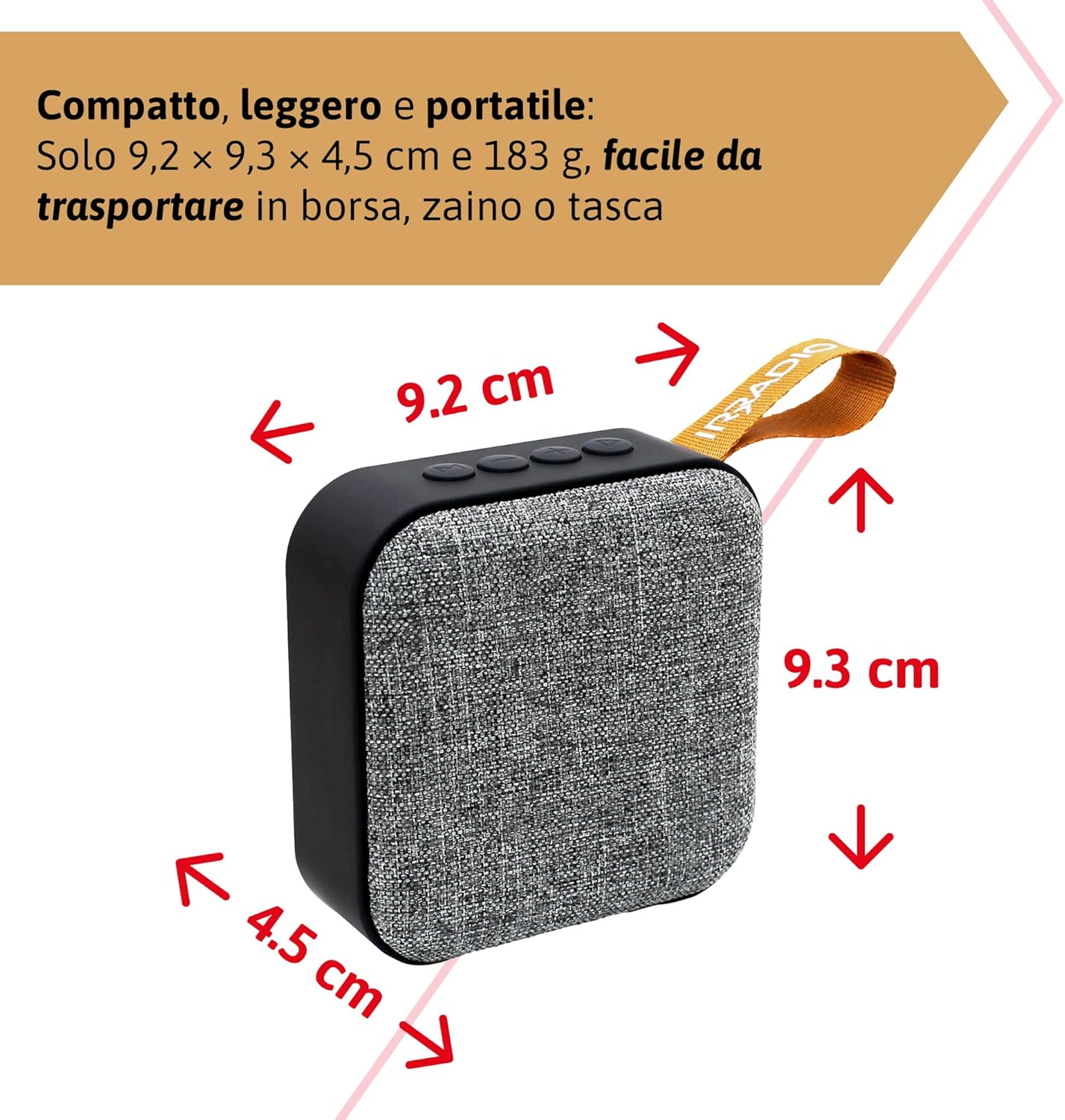
الشكل 9.1: Dimensions of the IRRADIO IR-203 Sound+ speaker: 9.2 cm (width) x 9.3 cm (height) x 4.5 cm (depth).
| ميزة | التفاصيل |
|---|---|
| اسم الموديل | IR-203 Sound+ |
| رقم موديل العنصر | 550922126 |
| ماركة | راديو |
| أبعاد المنتج | 9.2 × 9.3 × 4.5 سم |
| وزن | 183 جرام |
| نوع السماعة | Woofer (Full Range 50mm Driver + Passive Radiator) |
| أقصى طاقة خرج للسماعة | 3.5 واتس RMS |
| تكنولوجيا الاتصال | بلوتوث 5.0، يو اس بي |
| مسافة الإرسال اللاسلكي | يصل إلى 10 مترًا (بدون عوائق) |
| وضع إخراج الصوت | ستيريو |
| سعة البطارية | 400 مللي أمبير في الساعة (3.7 فولت، 1.48 واط في الساعة) |
| عمر البطارية | Approx. 2 hours 40 minutes (at 50% volume) |
| وقت الشحن | حوالي 2 ساعات |
| مدخل الشحن | تيار مستمر 5 فولت/2 أمبير |
| الأجهزة المتوافقة | Smartphones, Tablets, Laptops, Desktop Computers, MP3 Players, USB Flash Drives |
| لون | رمادي |
| ضد للماء | لا |
10. الضمان والدعم
10.1. معلومات الضمان
For information regarding warranty and returns, please refer to the purchase platform's policies. Typically, products purchased on Amazon.it can be returned within 30 days of receipt if you change your mind. For defective or damaged products, specific return policies apply.
For specific information on purchases made through the Marketplace, please consult the relevant help page on the platform.
10.2. دعم العملاء
For further assistance, technical support, or inquiries about your IRRADIO IR-203 Sound+ speaker, please visit the official IRRADIO store page:


