مقدمة
The ZWO ASI676MC is an advanced 12.6 MP CMOS color astronomy camera, specifically designed for all-sky surveillance and meteor recording. It features a unique square 1/1.6-inch image sensor with a super high resolution of 3552x3552 pixels, making it ideal for detailed observations of celestial bodies like the Sun and Moon. Its square format simplifies mosaic stitching and enhances compatibility with various lenses, including fisheye and wide-angle types. This camera offers low readout noise, minimal dark current, and high sensitivity, particularly in the near-infrared spectrum, ensuring high-quality imaging for your astronomical pursuits.
المنتج انتهىview
The ASI676MC camera is engineered for superior performance in astrophotography and surveillance. Its compact design houses a powerful sensor and advanced features to capture stunning images of the night sky.

أمام view of the ZWO ASI676MC camera, showcasing its compact red body and lens mount.

جانب view of the ZWO ASI676MC camera, highlighting the USB 3.0 port for high-speed data transfer.
المميزات الرئيسية:
- مستشعر الشكل المربع: The 1/1.6-inch square sensor simplifies mosaic construction and enhances compatibility with various lens types, including fisheye and wide-angle lenses, making it ideal for meteor recording and full sky surveillance.
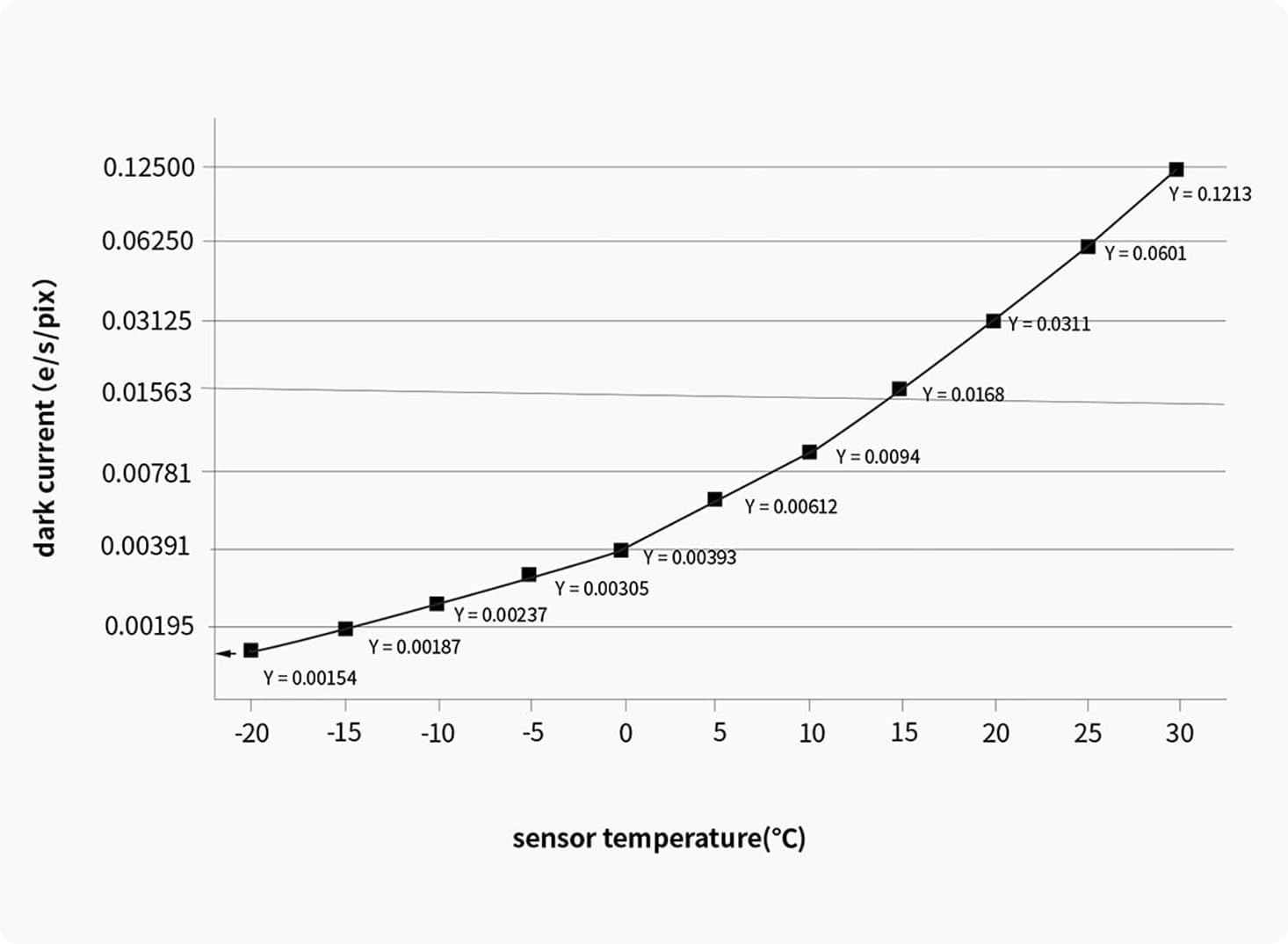
- Low Readout Noise & Dark Current: Exhibits significantly lower readout noise and dark current, improving the image signal-to-noise ratio, especially when photographing dark objects.
- لا Amp يشع: Designed with hardware-level technology to eliminate amp glow, ensuring clean images regardless of exposure length or gain settings.
- USB 3.0 Interface & DDR3 Cache: Equipped with a USB 3.0 transmission interface and a built-in 256MB DDR3 cache for stable and secure high-speed data transmission.
- وضع HCG: Features a built-in High Conversion Gain (HCG) mode that automatically activates at a gain of 180, reducing readout noise to as low as 0.56e while maintaining a high dynamic range (close to 11 stops).
- High QE: Offers an impressive Quantum Efficiency (QE) of 83%, crucial for improving the image signal-to-noise ratio.
- UV/IR-Cut Window: Includes an UV/IR-cut coated window (21mm diameter, 1.1mm thickness) in front of the sensor to effectively reduce infrared interference and enhance image quality.
ماذا يوجد في الصندوق
Upon unboxing your ZWO ASI676MC camera, please verify that all the following components are included:

An illustration showing all components included with the ZWO ASI676MC camera.
- ASI676MC Camera Body
- غطاء حماية
- دليل سريع
- كابل USB 3.0 (2 متر)
- كابل ST4
- 1.25" Nosepiece
يثبت
Follow these steps to set up your ZWO ASI676MC camera for first use:
- Software and Driver Installation: Before connecting the camera, download and install the latest drivers and software (e.g., ASIStudio, ASCOM Platform) from the official ZWO website. This ensures proper recognition and functionality of the camera with your computer and astronomy software.
- قم بتوصيل الكاميرا:
- Attach the provided USB 3.0 cable to the camera's USB 3.0 port and connect the other end to a compatible USB 3.0 port on your computer.
- If using for guiding, connect the ST4 cable from the camera to your mount's autoguiding port.
- تركيب الكاميرا:
- Attach the 1.25" nosepiece to the camera if you plan to use it with a standard 1.25" telescope focuser.
- Insert the camera into your telescope's focuser or imaging train. Ensure it is securely fastened.
- تكوين البرنامج: Launch your preferred astronomy imaging software (e.g., SharpCap, N.I.N.A., Astro Photography Tool) and select the ZWO ASI676MC from the list of available cameras. Configure settings such as exposure time, gain, and resolution as needed for your imaging session.
Operating the ASI676MC Camera
The ASI676MC is designed for ease of use while providing advanced control for various astronomical applications. Understanding its key operational features will help you maximize its performance.
Key Operational Considerations:
- التحكم في التعرض: Adjust exposure time based on the brightness of your target. For deep-sky objects, longer exposures are typically required, while planetary or lunar imaging uses shorter exposures.
- إعدادات الكسب: The camera's gain can be adjusted to increase signal amplification. The HCG (High Conversion Gain) mode automatically engages at a gain of 180, significantly reducing readout noise for improved image quality in low-light conditions.
- USB 3.0 Performance: Utilize the USB 3.0 connection for maximum frame rates (up to 31.2 FPS at full resolution) and efficient data transfer, especially important for planetary imaging or high-speed video capture.
- Amp Glow Elimination: The ASI676MC is designed to be amp-glow free, meaning you do not need to worry about artifacts caused by amplifier glow, even during long exposures.
- Cooling (if applicable): While the ASI676MC is an uncooled camera, managing ambient temperature can still help optimize performance.
Quantum Efficiency (QE) curve of the ASI676MC, illustrating its high sensitivity across various wavelengths, peaking at 83%.

Graph showing the dark current performance of the ASI676MC sensor at different temperatures, indicating low noise levels.

Transmission curve of the integrated UV/IR-cut filter, demonstrating its effectiveness in blocking unwanted infrared light.

A set of graphs detailing the camera's performance metrics including full well capacity, gain, dynamic range, and readout noise across different gain settings.
صيانة
Proper maintenance ensures the longevity and optimal performance of your ASI676MC camera.
- Cleaning the Sensor Window: If dust or smudges appear on the protective window in front of the sensor, use a specialized optical cleaning kit (blower, brush, lens cleaning solution, and microfiber cloth) designed for camera sensors. Always follow the cleaning kit's instructions carefully to avoid damage.
- التنظيف الخارجي: Wipe the camera's exterior with a soft, dry, lint-free cloth. Avoid using harsh chemicals or abrasive materials.
- تخزين: When not in use, store the camera in its original packaging or a padded case in a cool, dry, dust-free environment. Ensure the protective cover is on the lens mount.
- العناية بالكابلات: Handle USB and ST4 cables carefully. Avoid sharp bends or kinks that could damage the internal wires.
استكشاف الأخطاء وإصلاحها
This section addresses common issues you might encounter with your ASI676MC camera.
- لم يتم اكتشاف الكاميرا:
- تأكد من توصيل كافة الكابلات بشكل آمن.
- Verify that the correct drivers are installed. Reinstall them if necessary.
- جرب منفذ USB مختلف، ويفضل أن يكون منفذ USB 3.0.
- أعد تشغيل الكمبيوتر الخاص بك.
- No Image or Black Screen:
- Check exposure settings in your software; ensure exposure time is not too short for the light conditions.
- Verify that the camera is properly focused.
- Ensure the lens cap or protective cover is removed.
- Poor Image Quality (Noise, Artifacts):
- Adjust gain settings; higher gain increases noise. Utilize HCG mode for optimal noise reduction at higher gains.
- Ensure proper dark frames and bias frames are being used in your image processing workflow.
- Check for light pollution or stray light entering the telescope/camera.
- Connection Drops or Instability:
- Use the provided high-quality USB 3.0 cable.
- Ensure your computer's USB ports are providing sufficient power.
- Avoid using long, unpowered USB extension cables.
المواصفات الفنية
Detailed specifications for the ZWO ASI676MC camera:
| ميزة | مواصفة |
|---|---|
| المستشعر | IMX676, 1/1.6" (7.1 x 7.1mm) |
| دقة | 3552 × 3552 بكسل (12.6 ميجابكسل) |
| حجم البكسل | 2 ميكرومتر |
| محول تناظري رقمي | 12 بت |
| QE (Quantum Efficiency) | 83% (Peak) |
| قراءة الضوضاء | 0.56e (at HCG mode) |
| سعة البئر الكاملة | 10.55 Ke |
| FPS (إطارات في الثانية) | 31.2 (at full resolution) |
| الواجهة | يو اس بي 3.0 |
| DDR3 العازلة | 256 ميجا بايت |
| أبعاد | 15.24 × 12.7 × 12.7 سم |
| وزن | 300 جرام |
| UV/IR-Cut Window | قطر 21 مم، سمك 1.1 مم |
| رقم موديل العنصر | 676 ميجا بايت |
| ASIN | B0F6SWNPR1 |
| رمز المنتج الموحد | 741421784215 |

Technical drawing illustrating the dimensions of the ZWO ASI676MC camera in millimeters.
الضمان والدعم
For detailed warranty information and technical support, please refer to the official ZWO website or contact their customer service directly. Warranty terms typically cover manufacturing defects for a specified period from the date of purchase. Keep your proof of purchase for any warranty claims.
مسؤول ZWO Webموقع: www.zwoastro.com


