1. المقدمة
This manual provides detailed instructions for the setup, operation, and maintenance of your Transformers GK01 Wireless Mechanical Keyboard. The GK01 is a versatile keyboard featuring tri-mode connectivity (Bluetooth 5.0, 2.4GHz wireless, and USB-C wired), a 101-key layout, RGB backlighting, and hot-swappable switches for a customizable typing experience.

Figure 1.1: Transformers GK01 Wireless Mechanical Keyboard.
2. محتويات العبوة
يرجى التأكد من أن جميع العناصر المدرجة أدناه متضمنة في الحزمة الخاصة بك:
- Transformers GK01 Wireless Mechanical Keyboard
- كابل USB-C إلى USB-A
- دونجل USB لاسلكي بتردد 2.4 جيجاهرتز
- غطاء مفاتيح 2 في 1 ومفتاح سحب
- دليل المستخدم (هذا المستند)
- مفاتيح احتياطية (2 قطع)
- غطاء لوحة المفاتيح
3. الإعداد والاتصال
3.1. Tri-Mode Connection Overview
The GK01 keyboard supports three connection modes: USB-C wired, 2.4GHz wireless, and Bluetooth 5.0. You can connect to up to five devices simultaneously and switch between them seamlessly.

Figure 3.1: Tri-Mode Connection Capabilities.
3.2. اتصال سلكي USB-C
- حدد موقع منفذ USB-C على لوحة المفاتيح.
- قم بتوصيل أحد طرفي كابل USB-C المقدم بلوحة المفاتيح.
- Connect the other end of the USB-C cable to an available USB-A port on your computer.
- سيتم التعرف على لوحة المفاتيح تلقائيًا وستكون جاهزة للاستخدام.
3.3. اتصال لاسلكي بتردد 2.4 جيجاهرتز
- Locate the 2.4GHz wireless USB dongle.
- Plug the dongle into an available USB-A port on your computer.
- On the keyboard, ensure the mode switch (usually on the side or back) is set to 2.4GHz mode.
- يجب أن تتصل لوحة المفاتيح تلقائيًا. إذا لم يحدث ذلك، فاضغط على Fn + R لبدء الاقتران.

Figure 3.2: USB-C Port and 2.4GHz Dongle Location.
3.4. اتصال بلوتوث 5.0
The keyboard supports connecting to up to three Bluetooth devices (BT1, BT2, BT3).
- On the keyboard, set the mode switch to Bluetooth mode.
- للدخول إلى وضع الاقتران لقناة بلوتوث محددة، اضغط مع الاستمرار Fn + Q (بالنسبة لـ BT1)، Fn + W (بالنسبة لـ BT2)، أو Fn + E (for BT3) for 3-5 seconds until the indicator light flashes rapidly.
- On your device (PC, tablet, smartphone), open Bluetooth settings and search for new devices.
- Select "Transformers GK01" from the list of available devices.
- Once connected, the indicator light on the keyboard will stop flashing.
- للتبديل بين أجهزة البلوتوث المقترنة، اضغط ببساطة على Fn + Q, Fn + W، أو Fn + E.
4. التشغيل الأساسي
4.1. Keyboard Layout and Anti-Ghosting
The GK01 features a 101-key layout, providing a full set of keys including a numeric keypad. All keys are equipped with anti-ghosting technology, ensuring that every keystroke is registered accurately, even when multiple keys are pressed simultaneously.
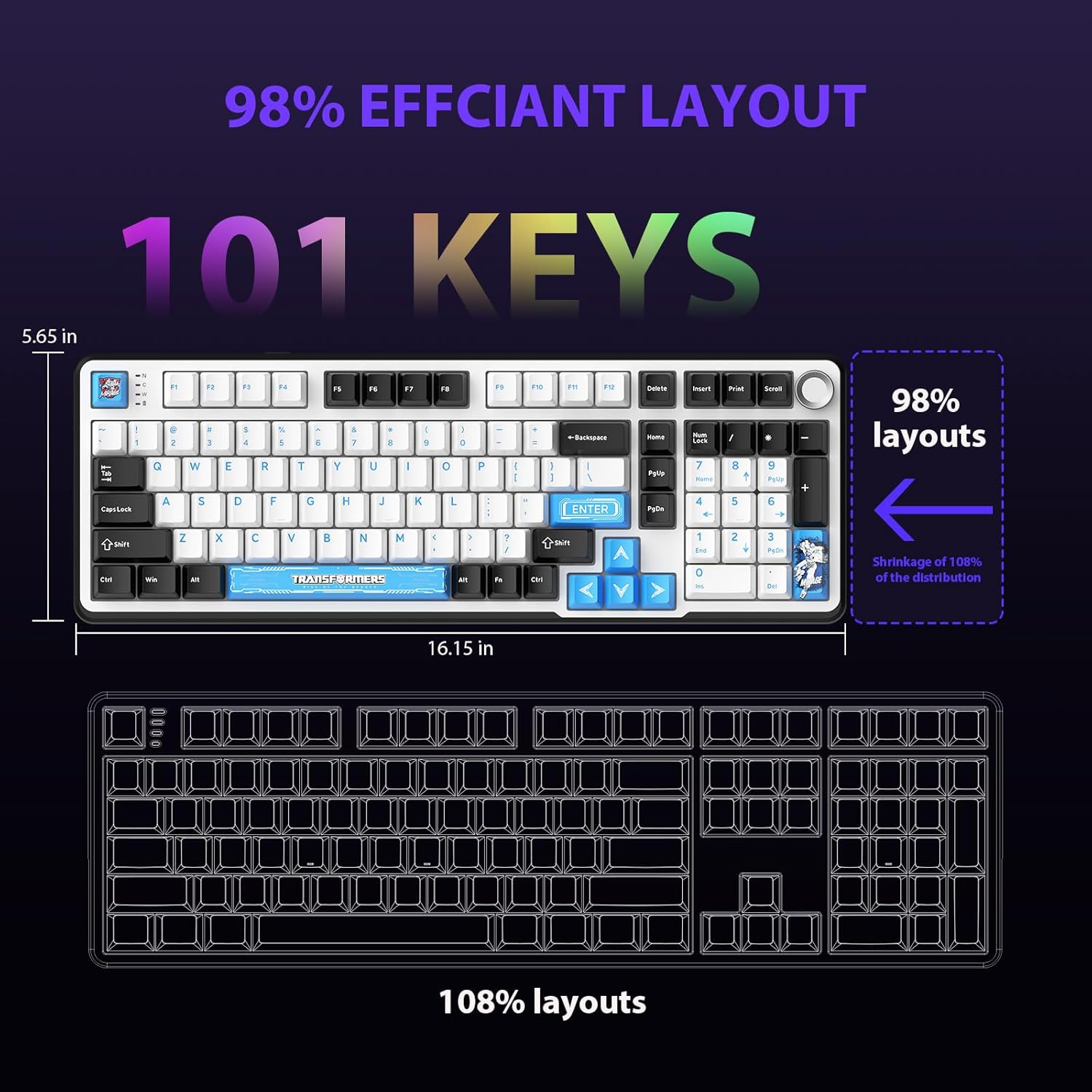
Figure 4.1: 101-Key Layout.
4.2. Multimedia Control Knob
The dedicated knob located on the top right of the keyboard provides convenient multimedia control:
- تدوير في اتجاه عقارب الساعة: زيادة الحجم.
- أدر عكس اتجاه عقارب الساعة: خفض مستوى الصوت.
- اضغط لأسفل: كتم/إلغاء كتم الصوت.
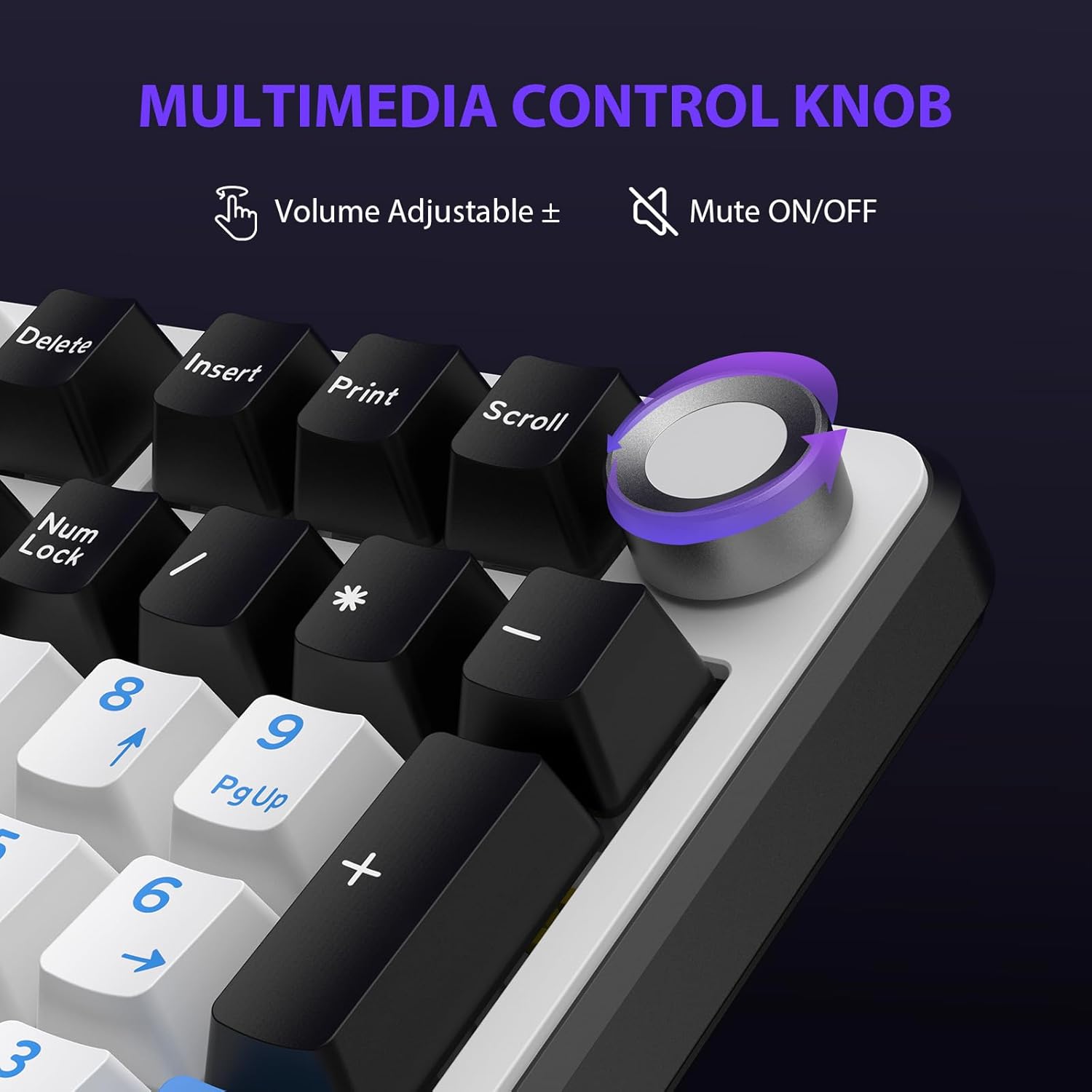
Figure 4.2: Multimedia Control Knob.
4.3. التحكم في الإضاءة الخلفية RGB
The GK01 keyboard features 16.8 million color RGB backlighting with various effects.
- فن + [Right Arrow]: Adjust 5 brightness levels.
- فن + [Left Arrow]: Adjust 5 speed levels for dynamic effects.
- فن + [إدراج]: يمكنك التبديل بين 20 وضعًا مختلفًا للإضاءة الخلفية.
- فن + [يدخل]: Switch color order within certain modes.
- فن + [X]: Turn off light / activate power-saving mode.
- فن + [مسافة للخلف]: Switch color order within certain modes.

Figure 4.3: RGB Backlight Controls.
5. الميزات المتقدمة
5.1. مفاتيح قابلة للتبديل السريع
The GK01 keyboard is equipped with pre-lubricated Cybertron linear switches and supports solder-free hot-swapping. This allows you to easily replace switches with compatible 3-pin or 5-pin mechanical switches without soldering.
لاستبدال مفتاح كهربائي:
- Using the provided 2-in-1 keycap and switch puller, gently remove the keycap from the desired switch.
- Insert the switch puller onto the switch, ensuring it grips the top and bottom clips of the switch.
- Gently pull the switch straight up to remove it from the PCB.
- قم بمحاذاة دبابيس المفتاح الجديد مع فتحات لوحة الدوائر المطبوعة. تأكد من استقامة الدبابيس لتجنب الانحناء.
- اضغط على المفتاح الجديد بقوة في مكانه حتى يصدر صوت نقرة.
- أعد تركيب غطاء المفتاح.

Figure 5.1: Hot-Swappable Switch Replacement.
5.2. البرمجيات القابلة للبرمجة
The GK01 supports custom software for advanced customization, including key remapping, macro creation, and detailed RGB lighting effects.
- The software is compatible only with the Windows operating system.
- The keyboard must be connected via USB-C wired mode to use the software.
- For driver download, please visit the official Transformers Keyboard website or refer to the link provided in the product packaging.
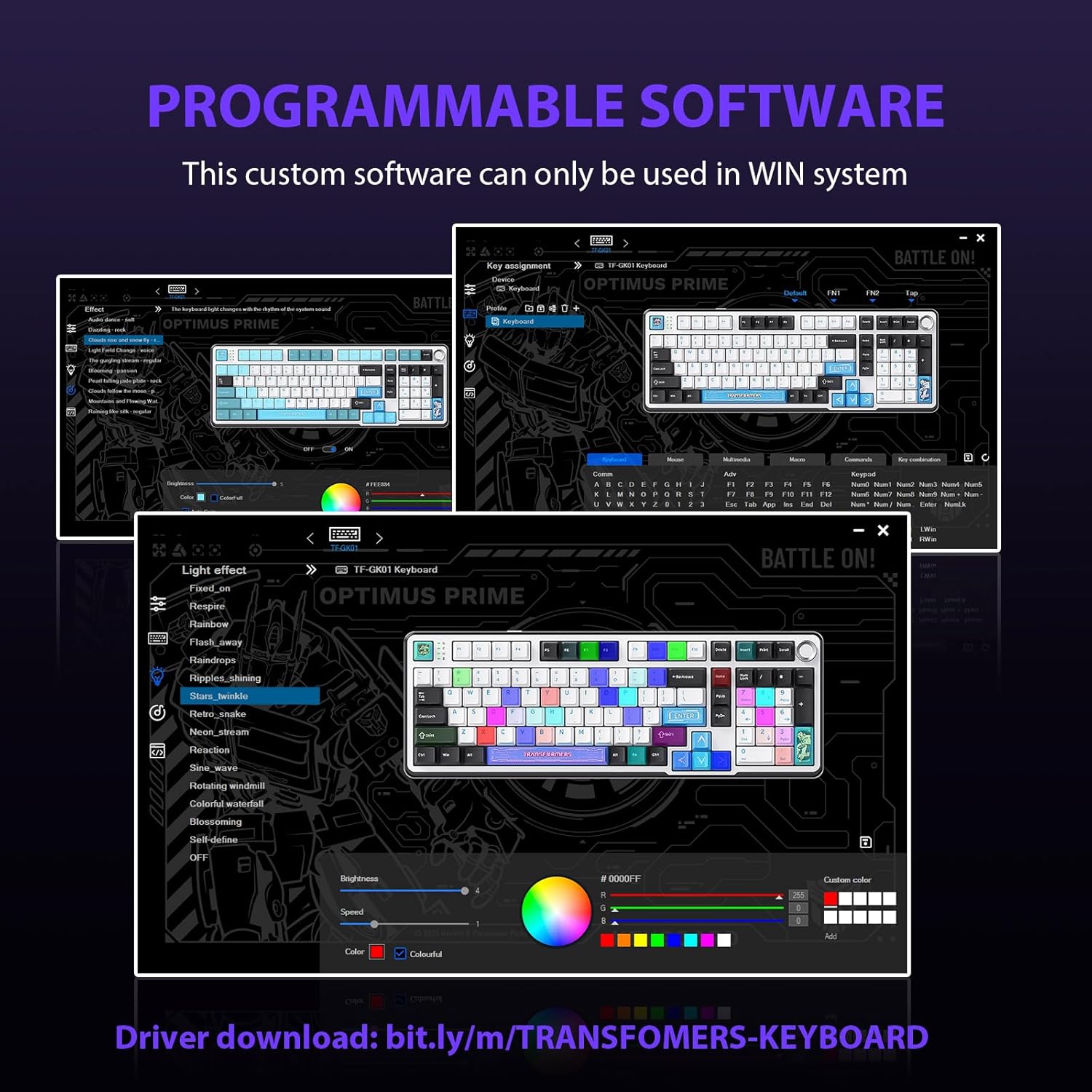
Figure 5.2: Programmable Software Interface.
5.3. Gasket Mounted Structure
The keyboard features a five-layer sound-absorbing and shock-absorbing gasket mounted structure. This design effectively reduces hollow noise and provides a softer, more consistent typing feel by isolating the plate from the case.
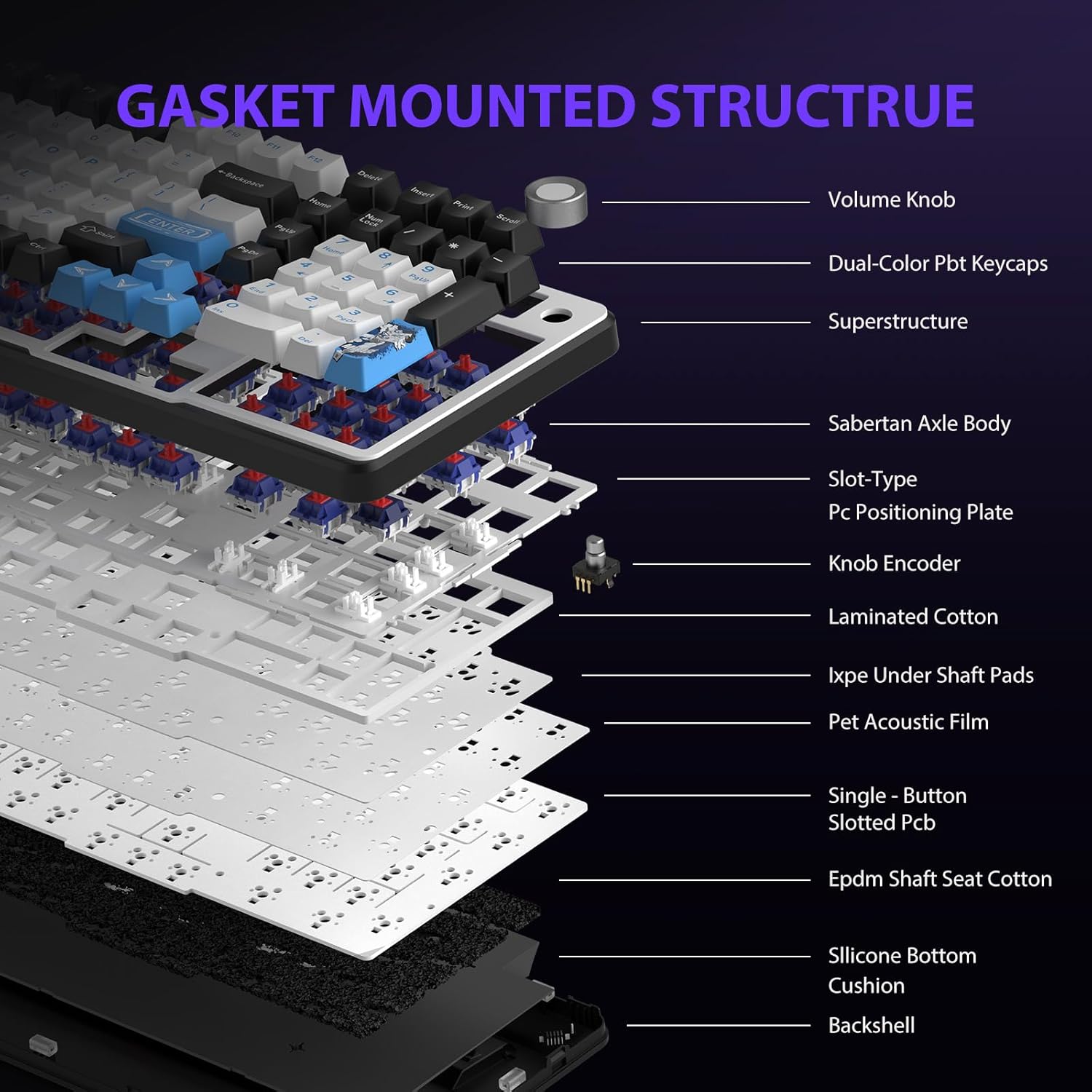
Figure 5.3: Gasket Mounted Structure Components.
6. إدارة البطارية
The GK01 keyboard is equipped with a 4000mAh rechargeable battery.
- الشحن: Connect the keyboard to a USB power source using the provided USB-C cable. The indicator light will show charging status.
- عمر البطارية: A fully charged battery provides extended usage time. Actual battery life may vary based on usage patterns and RGB lighting intensity.
- موفر طاقة: The keyboard will enter a power-saving sleep mode after a period of inactivity to conserve battery. Press any key to wake it up.
7. الصيانة
7.1. تنظيف لوحة المفاتيح
- افصل لوحة المفاتيح عن جميع مصادر الطاقة قبل التنظيف.
- استخدم قطعة قماش ناعمة وخالية من الوبر وامسحها برفق.ampاغسل أغطية المفاتيح والهيكل بالماء أو محلول التنظيف المعتدل.
- بالنسبة للغبار والحطام الموجود بين أغطية المفاتيح، استخدم الهواء المضغوط أو فرشاة صغيرة.
- تجنب استخدام المواد الكيميائية القاسية أو المواد الكاشطة.
7.2. Keycap and Switch Care
- The PBT keycaps are designed for durability and fade resistance.
- Refer to Section 5.1 for instructions on safely removing and replacing keycaps and switches.
- Ensure the keyboard feet are clean and free of debris for stable placement.

Figure 7.1: Adjustable Keyboard Feet.
8. استكشاف الأخطاء وإصلاحها
| مشكلة | السبب المحتمل | حل |
|---|---|---|
| لوحة المفاتيح لا تستجيب في الوضع اللاسلكي. | Low battery, incorrect mode selected, dongle not connected, Bluetooth not paired. | Charge the keyboard. Ensure the mode switch is set correctly (2.4GHz or BT). Re-insert the 2.4GHz dongle. Re-pair Bluetooth connection. Try wired mode to confirm keyboard functionality. |
| المفاتيح غير مسجلة أو مكتوبة مرتين. | Loose switch, software issue, debris under keycap. | Ensure switches are fully seated. Clean under keycaps. If using programmable software, ensure it's updated or try resetting keyboard settings. |
| الإضاءة الخلفية RGB لا تعمل أو عالقة. | تم إيقاف تشغيل الإضاءة الخلفية، تعارض في البرامج. | يضعط الجبهة الوطنية + X to toggle backlight. Check programmable software settings. |
| لا يمكن الاتصال عبر البلوتوث. | لوحة المفاتيح ليست في وضع الاقتران، وبلوتوث الجهاز معطل، وهناك تداخل. | Ensure keyboard is in Bluetooth pairing mode (Fn + Q/W/E long press). Ensure device Bluetooth is on and discoverable. Move closer to the device. |
9. المواصفات
| ميزة | التفاصيل |
|---|---|
| رقم الموديل | تي اف-جي كيه 01 |
| الاتصال | بلوتوث 5.0، 2.4 جيجاهرتز لاسلكي، USB-C سلكي |
| نوع لوحة المفاتيح | ميكانيكي |
| تَخطِيط | 101 مفتاح (حجم كامل) |
| المفاتيح | Pre-lubed Cybertron Linear Switches, Hot-Swappable (3-pin/5-pin compatible) |
| ازرار | Heat-sublimated PBT |
| الإضاءة الخلفية | RGB (16.8 Million Colors, 20 modes, music rhythm effects via driver) |
| سعة البطارية | 4000 مللي أمبير |
| أبعاد المنتج | 16.15 × 5.65 × 1.63 بوصة (41.02 × 14.35 × 4.14 سم) |
| وزن العنصر | 2.24 رطل (1.02 كجم) |
| الأجهزة المتوافقة | كمبيوتر محمول، كمبيوتر شخصي، هاتف ذكي، جهاز لوحي |
| المميزات الخاصة | Anti-Ghosting (all keys), Multimedia Control Knob, Programmable Keys (via software), Rechargeable |
10. الضمان والدعم
For information regarding warranty coverage, technical support, or service inquiries, please refer to the warranty card included with your product or visit the official Transformers Keyboard webموقع.
الشركة المصنعة: محولات


