1. معلومات السلامة
Please read and understand all safety instructions before installing or using the MONTECH HS02 PRO PC Case. Failure to follow these instructions may result in damage to the product, personal injury, or voiding of the warranty.
- السلامة الكهربائية: Ensure all power components are properly grounded and connected. Disconnect power before performing any installation or maintenance.
- التعامل: The case contains tempered glass panels. Handle with care to prevent breakage. Avoid dropping or subjecting the case to strong impacts.
- تهوية: Ensure adequate airflow around the case to prevent overheating. Do not block ventilation openings.
- بيئة: Operate the case in a dry, stable environment. Avoid extreme temperatures, humidity, and direct sunlight.
- الأطفال والحيوانات الأليفة: Keep the product and its components out of reach of children and pets. Small parts can be a choking hazard.
2. محتويات العبوة
Verify that all items listed below are present in your package. If any items are missing or damaged, please contact Montech customer support.
- MONTECH HS02 PRO ATX Mid-Tower PC Case
- صندوق الملحقات (البراغي، روابط بلاستيكية، الفواصل، وما إلى ذلك)
- دليل المستخدم (هذا المستند)
- Pre-installed GF120 V2 ARGB Fans (5x)
3. انتهى المنتجview
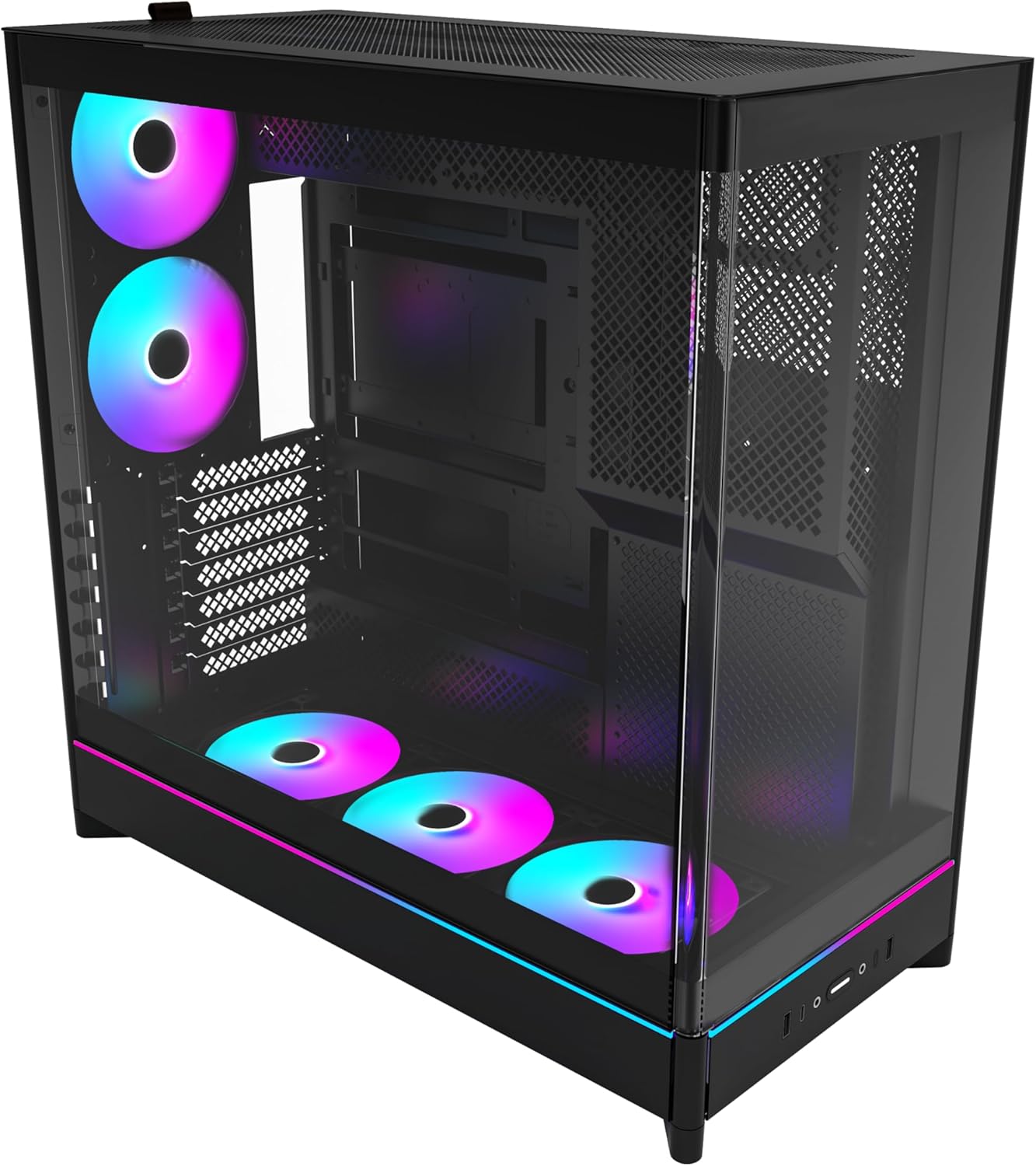
The MONTECH HS02 PRO is a high-airflow ATX mid-tower PC case designed for optimal thermal performance and aesthetic appeal. It features a unique reversible layout and a sturdy curved tempered glass front panel.
المميزات الرئيسية:
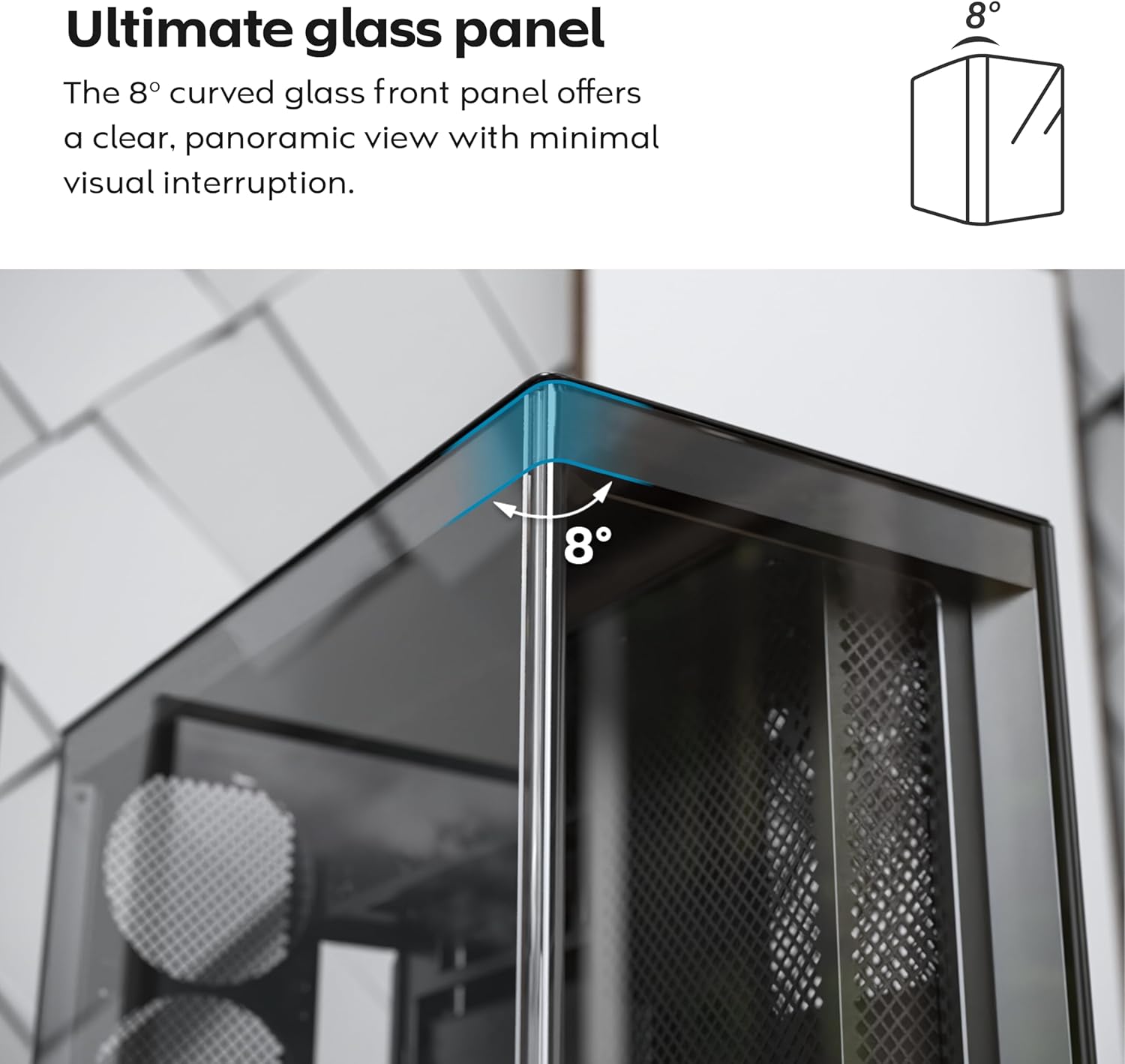
- 8-Degree Curved Glass Panel: The front tempered glass panel features a subtle 8-degree curved edge, offering a distinctive and refined view of the interior with minimal visual distortion.
- تصميم قابل للعكس: A top-down reversible layout allows the entire setup to be positioned on either the left or right side, showcasing your build from your preferred angle.
- التهوية العمودية: Bottom air intake and top exhaust create a natural chimney effect for efficient heat dissipation.
- جاهزية وحدة معالجة الرسومات العمودية: Rotatable PCIe slots enable an instant vertical GPU setup without requiring an extra holder or stand.
- تصميم حوض الغسيل: يساهم تصميم المروحة السفلية المدمجة ولوحة الأم في الحفاظ على جانب نظيف وغير معاق view.
- Pre-installed ARGB PWM Fans: Comes with 5 pre-installed GF120 V2 ARGB fans, fully syncable with motherboard lighting control.
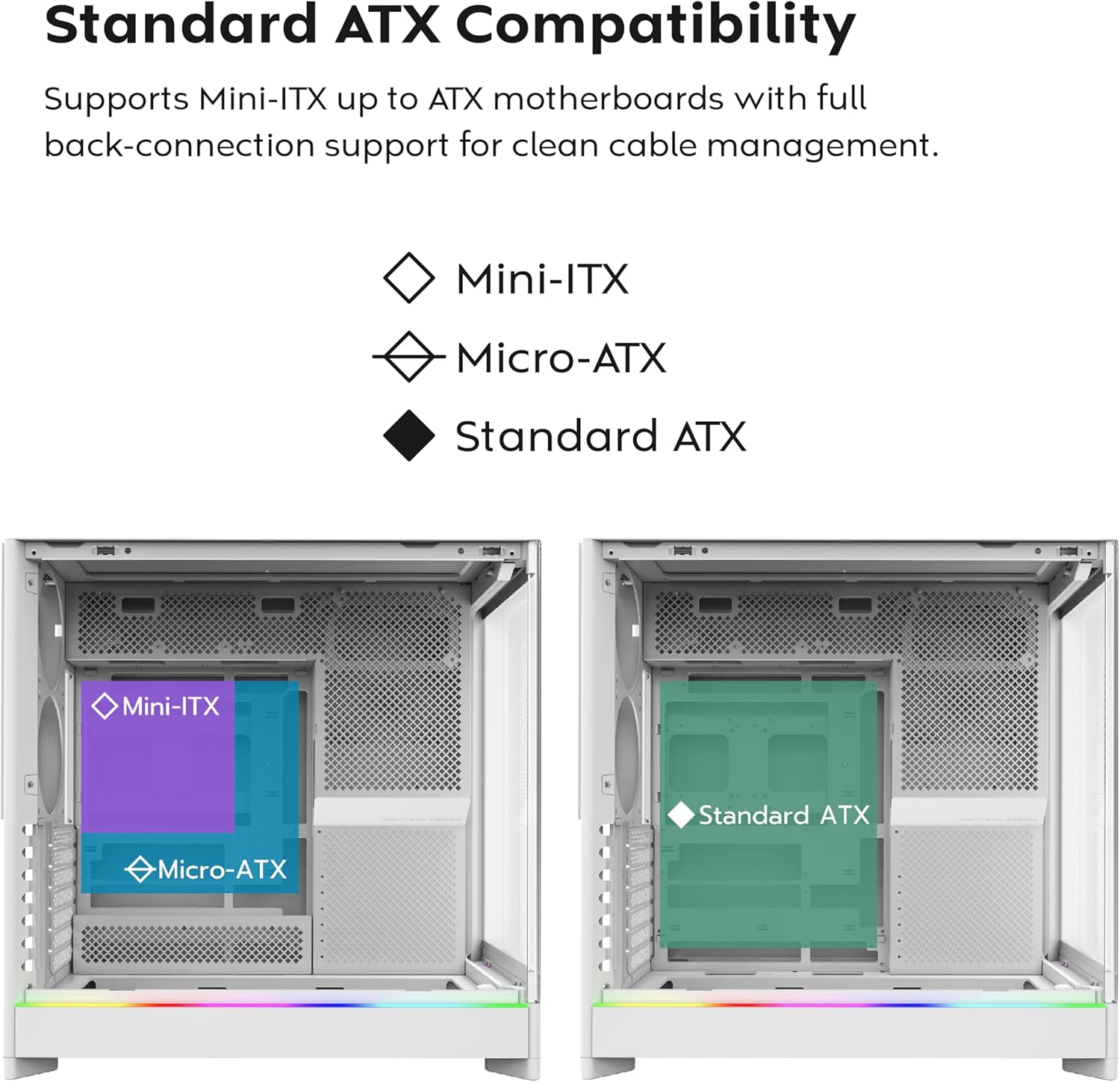
- Back-Connect Motherboard Ready: Supports standard and back-connect motherboards, including MSI Project Zero, ASUS BTF, and more.
- Ampسعة التخزين: Supports multiple storage drives (HDD/SSD) for flexible and expandable storage options.
تحديد المكون:





4. الإعداد والتثبيت
This section provides general guidelines for setting up your MONTECH HS02 PRO PC case. For detailed component-specific instructions, refer to your motherboard, GPU, and PSU manuals.
4.1 إعداد القضية
- فك التعبئة: Carefully remove the case from its packaging. Inspect for any shipping damage.
- إزالة اللوحة: Gently remove the tempered glass side panel and the rear metal side panel. The tempered glass panel is secured with toolless latches.
- صندوق الملحقات: حدد مكان صندوق الملحقات داخل العلبة، والذي يحتوي على جميع البراغي وأدوات التثبيت اللازمة.
4.2 تركيب اللوحة الأم
- Standoffs: Ensure the correct standoffs are installed for your motherboard form factor (Mini-ITX, Micro-ATX, or ATX). Adjust if necessary.
- I/O Shield: Install your motherboard's I/O shield into the rear opening of the case.
- التركيب: Carefully align your motherboard with the standoffs and gently lower it into place. Secure it with the provided screws.
- Back-Connect Motherboards: If using a back-connect motherboard, ensure proper alignment with the designated cutouts for cable routing.
4.3 تركيب وحدة إمداد الطاقة (PSU)
- التركيب: The PSU mounts at the bottom of the case. Slide the PSU into its designated bay from the rear.
- تأمين: قم بتأمين وحدة إمداد الطاقة باستخدام البراغي من الجزء الخلفي للعلبة.
- الكابلات: Route necessary power cables through the cable management cutouts to the motherboard and other components.
4.4 تثبيت محرك التخزين (HDD/SSD)
- حملة الخلجان: Utilize the designated drive bays for 3.5" HDDs and 2.5" SSDs.
- التركيب: Secure drives using the provided screws or toolless mechanisms where applicable.
4.5 تثبيت بطاقة الرسومات (GPU)
- فتحات PCIe: Remove the necessary PCIe slot covers.
- التثبيت الأفقي: Insert the GPU into the primary PCIe slot on your motherboard and secure it with screws.
- التركيب الرأسي (اختياري): The rotatable PCIe slots allow for vertical GPU mounting. Rotate the bracket and install your GPU vertically. A PCIe riser cable (not included) is required for vertical mounting.
4.6 تركيب نظام التبريد (المراوح/المشعات)
- مراوح مثبتة مسبقًا: The case comes with 5 pre-installed ARGB PWM fans. Connect their power and ARGB cables to your motherboard or a fan controller.
- Additional Fans/Radiators: The case supports additional fans and radiators at the top, rear, and bottom. Refer to the specifications for supported sizes.
- AIO Cooler: Install your All-in-One (AIO) liquid cooler radiator and fans according to the cooler's instructions, utilizing the available mounting points.
4.7 إدارة الكابلات
استخدم ample space behind the motherboard tray and the cable management cutouts to route and secure cables. This improves airflow and aesthetics.
5. تعليمات التشغيل
Once all components are installed and secured, you can power on your system.
5.1 التشغيل
- توصيل الأجهزة الطرفية: Connect your monitor, keyboard, mouse, and other peripherals to your system.
- سلك الطاقة: Connect the PSU power cable to a wall outlet and flip the PSU's power switch to the 'ON' position.
- زر الطاقة: اضغط على زر الطاقة الموجود على لوحة الإدخال/الإخراج الأمامية للعلبة.
5.2 وظائف لوحة الإدخال/الإخراج الأمامية
- منافذ USB 3.0: لتوصيل الأجهزة المتوافقة مع USB 3.0.
- منفذ USB من النوع C: For connecting USB Type-C compatible devices.
- مقبس الصوت: لسماعات الرأس أو مكبرات الصوت.
- مقبس ميكروفون: لتوصيل الميكروفون.
- زر الطاقة: لتشغيل النظام أو إيقافه.
- زر LED: To cycle through the 29 ARGB lighting modes for the pre-installed fans and integrated light strip.
6. الصيانة
تساعد الصيانة الدورية على ضمان الأداء الأمثل وطول عمر مكونات جهاز الكمبيوتر الخاص بك.
- تنظيف الغبار: Periodically clean dust filters (top, bottom, front) to maintain optimal airflow. Use compressed air to remove dust from internal components.
- تنظيف الألواح الزجاجية: استخدم قطعة قماش ناعمة وخالية من الوبر ومنظف زجاج غير كاشط لتنظيف ألواح الزجاج المقسى. تجنب استخدام المواد الكيميائية القاسية.
- إدارة الكابلات: قم بإجراء فحص دوري لمسار الكابلات للتأكد من عدم وجود كابلات تعيق تدفق الهواء أو شفرات المروحة.
- فحص المروحة: Ensure all fans are spinning freely and quietly. Clean fan blades if dust buildup is significant.
7. استكشاف الأخطاء وإصلاحها
This section addresses common issues you might encounter. For more complex problems, consult Montech customer support or a qualified technician.
المشاكل الشائعة والحلول:
| مشكلة | السبب المحتمل | حل |
|---|---|---|
| لا يتم تشغيل النظام. | PSU switch off, power cables loose, faulty PSU/motherboard. | Ensure PSU switch is ON. Check all power connections (24-pin, CPU, GPU). Test PSU if possible. |
| المراوح لا تدور أو إضاءة RGB لا تعمل. | Fan cables disconnected, ARGB cables disconnected, faulty fan/controller. | Verify fan power and ARGB headers are securely connected to motherboard/controller. Use the LED button to cycle modes. |
| تدفق الهواء ضعيف أو درجات الحرارة مرتفعة. | Dust buildup, obstructed vents, incorrect fan orientation. | Clean dust filters and internal components. Ensure fans are oriented correctly for intake/exhaust. Check for cable obstructions. |
| Front I/O ports not functioning. | Front panel connectors loose or incorrectly connected to motherboard. | Refer to your motherboard manual to ensure all front panel headers (USB, audio) are correctly connected. |
8. المواصفات
Detailed technical specifications for the MONTECH HS02 PRO ATX Mid-Tower PC Case.
| ميزة | مواصفة |
|---|---|
| اسم الموديل | HS02 PRO Glass Black with Fans |
| رقم الموديل | HS02PB |
| نوع الحالة | البرج الاوسط |
| التوافق مع اللوحة الأم | ATX, Micro-ATX, Mini-ITX (with back-connect support) |
| الأبعاد (الطول × العرض × الارتفاع) | 32 × 52.4 × 58.8 بوصة (حوالي 81.3 × 133.1 × 149.4 سم) |
| وزن العنصر | 24.2 رطل (حوالي 10.98 كجم) |
| اللوحة الأمامية | Curved Tempered Glass (8-degree) |
| مراوح مثبتة مسبقًا | 5x GF120 V2 ARGB PWM Fans |
| طريقة التبريد | Air (Vertical Ventilation / Chimney Effect) |
| نوع تركيب مصدر الطاقة | التركيب السفلي |
| منافذ الإدخال / الإخراج الأمامية | 2x USB 3.0, 1x USB Type-C, Audio, Mic, Power Button, LED Button |
| تخليص GPU | Up to 420mm (supports vertical GPU with rotatable PCIe slots) |
| حجرات التخزين | Multiple HDD/SSD support |
| لون | أسود |
9. الضمان والدعم
للحصول على معلومات الضمان والدعم الفني، يرجى الرجوع إلى موقع مونتيك الرسمي. webالموقع الإلكتروني أو تواصل مع خدمة العملاء مباشرةً. احتفظ بإثبات الشراء لطلبات الضمان.
- Montech Official Webموقع: www.montechpc.com
- خدمة العملاء: ارجع إلى webالموقع الإلكتروني مخصص لتفاصيل الاتصال، بما في ذلك الدعم عبر البريد الإلكتروني والهاتف.


