1. انتهى المنتجview
The DAYTECH WiFi Caregiver Call Bell System is designed to provide reliable and real-time assistance for individuals requiring care, such as the elderly, patients, or children. This system ensures that caregivers, whether in the same household or remotely, are immediately notified when assistance is needed. It combines a physical receiver unit with a wearable SOS button and integrates with a smartphone application for enhanced monitoring and control.
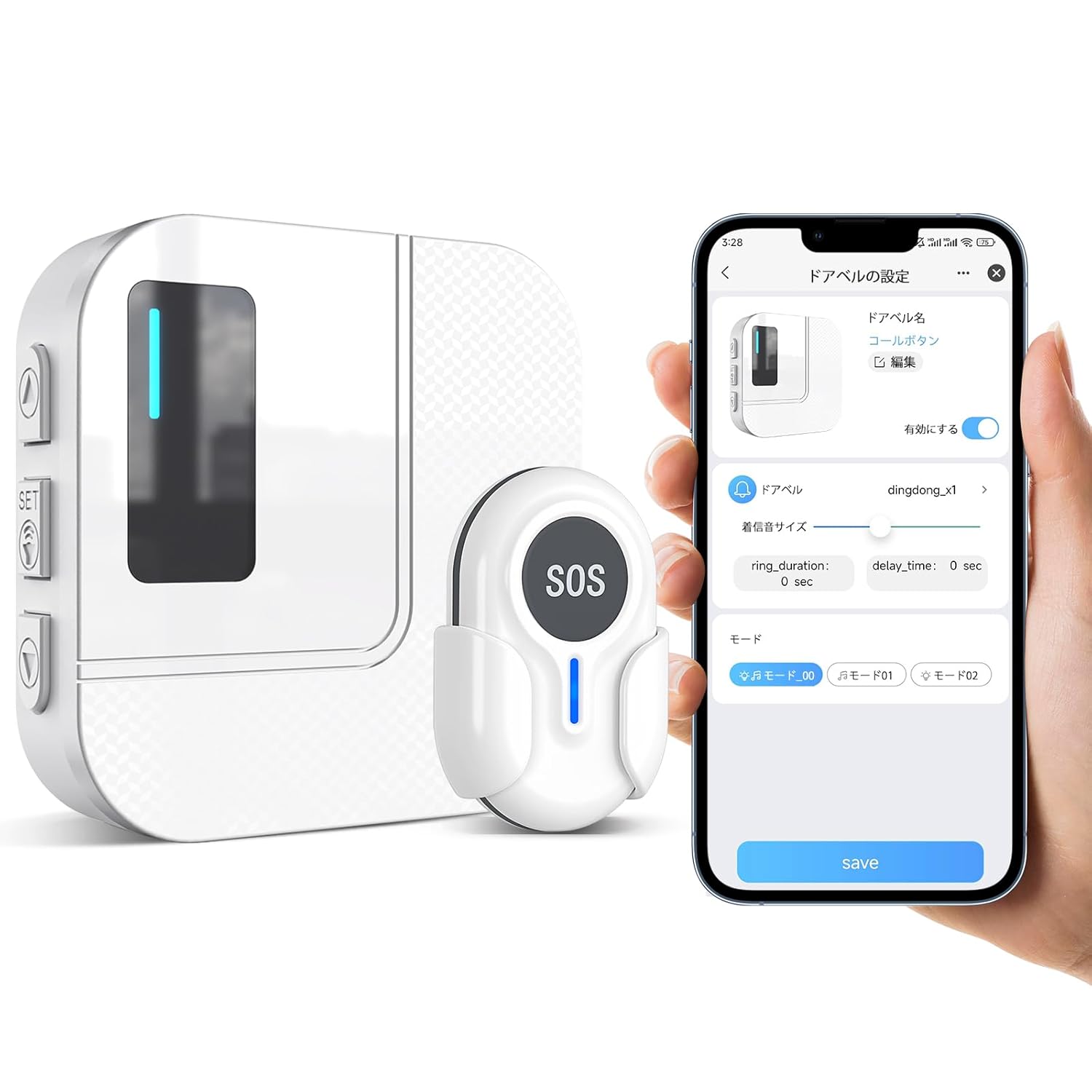
Figure 1: Main components of the DAYTECH WiFi Caregiver Call Bell System, including the receiver, SOS button, and a smartphone showing the Tuya Smart app interface.
2. مكونات النظام
- وحدة الاستقبال: The main unit that plugs into a power outlet. It emits an audible alert and flashes an LED light upon receiving a signal from the SOS button. It connects to your home's 2.4GHz WiFi network.
- SOS Button (Transmitter): A compact, wearable device that sends an alert signal to the receiver unit and connected smartphones when pressed. It can be worn as a wristband or hung around the neck. Features a low battery indicator.
- تطبيق Tuya الذكي: A dedicated smartphone application (available for iOS and Android) that allows for remote monitoring, system configuration, and receiving notifications from the call bell system.
- مُكَمِّلات: Includes double-sided tape for mounting the SOS button.

Figure 2: The SOS button can be worn around the neck or mounted on a wall using screws or the included double-sided tape for convenient access.
3. دليل الإعداد
3.1 الإعداد الأولي
- تشغيل جهاز الاستقبال: Plug the receiver unit into a standard electrical outlet. The LED indicator on the receiver will light up.
- Install Tuya Smart App: Download the "Tuya Smart" application from your smartphone's app store (Google Play Store for Android or Apple App Store for iOS).
- إنشاء حساب: Open the Tuya Smart app and register for a new account or log in if you already have one.
3.2 Connecting the Receiver to the App
Ensure your smartphone is connected to a 2.4GHz WiFi network. The system does not support 5GHz networks during the pairing process. If your router uses 5GHz, temporarily switch to 2.4GHz for pairing, then you can switch back.
- الدخول في وضع الاقتران: On the receiver unit, press and hold the "SET" button for 5-8 seconds until the LED indicator starts blinking rapidly. This indicates it's in pairing mode.
- إضافة جهاز في التطبيق: In the Tuya Smart app, tap "Add Device" or the "+" icon.
- حدد نوع الجهاز: Choose "Security & Sensor" or "Others" and then select "Caregiver Call Bell" or a similar option.
- تأكيد وضع الاقتران: Follow the in-app prompts to confirm the receiver's LED is blinking rapidly.
- أدخل كلمة مرور WiFi: Input your 2.4GHz WiFi network password when prompted.
- يتصل: The app will attempt to connect to the receiver. Once connected, the receiver's LED will stop blinking and remain solid, and the app will confirm successful pairing.

Figure 3: Visual guide for connecting the receiver unit to the Tuya Smart application on your smartphone.
3.3 Pairing SOS Button with Receiver
The SOS button is typically pre-paired with the receiver. If not, or if you are adding additional buttons:
- ادخل إلى وضع التعلم: On the receiver unit, briefly press the "SET" button once. The LED indicator will light up steadily.
- Press SOS Button: Within 5 seconds, press the SOS button on the transmitter. The receiver will chime or flash to confirm successful pairing.
- الخروج من وضع التعلم: The receiver will automatically exit learning mode after a few seconds, or you can press the "SET" button again.
4. تعليمات التشغيل
4.1 Initiating an Alert
- To send an alert, simply press the large "SOS" button on the transmitter.
- Upon pressing, the transmitter sends a signal to the receiver unit and simultaneously to all linked smartphones via the Tuya Smart app.
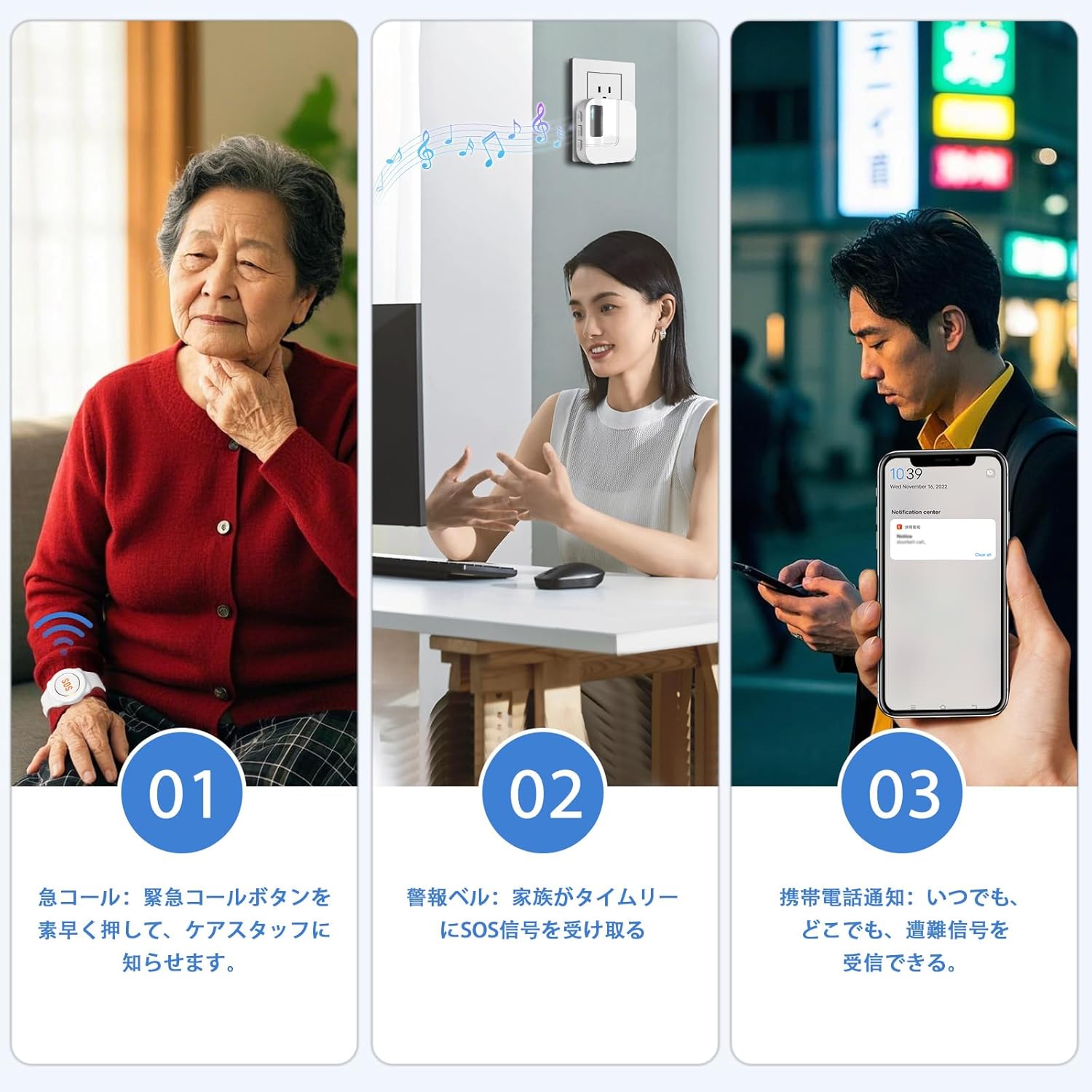
Figure 4: The alert process: (1) Pressing the SOS button, (2) Receiver unit alerts, (3) Smartphone notification.
4.2 تلقي التنبيهات
- وحدة الاستقبال: The receiver will emit an audible chime and its LED light will flash.
- تطبيق الهاتف الذكي: All smartphones linked to the system via the Tuya Smart app will receive a push notification. This notification is real-time and works even when you are away from home, provided your smartphone has an internet connection (WiFi or mobile data).

Figure 5: The mobile app allows for remote alert notifications, enabling caregivers to respond even when away from home.
4.3 App Functions (Tuya Smart)
- اختيار نغمة الرنين: Choose from 38 different ringtones for the receiver unit.
- ضبط مستوى الصوت: Adjust the receiver's alert volume (5 levels available, including mute).
- إدارة الأجهزة: Add or remove additional SOS buttons or other compatible devices.
- إعدادات الإشعارات: Configure app notifications, including "Do Not Disturb" mode.
- المشاركة العائلية: Share device access with multiple family members, allowing everyone to receive alerts and manage settings.

Figure 6: The Tuya Smart app provides comprehensive control over the call bell system, including ringtone and volume settings.
5. الصيانة
5.1 Battery Replacement (SOS Button)
The SOS button is powered by a CR2032 coin cell battery. When the battery is low, the LED indicator on the SOS button will flash to notify you. Replace the battery promptly to ensure continuous operation.
- افتح مفتاح Casing: Use a small screwdriver to carefully open the back casing of the SOS button.
- إزالة البطارية القديمة: Gently remove the old CR2032 battery.
- أدخل بطارية جديدة: قم بإدخال بطارية CR2032 جديدة مع توجيه الجانب الموجب (+) لأعلى.
- إغلاق جasing: أغلق الغطاء الخلفي بإحكامasing.

Figure 7: Instructions for replacing the CR2032 battery in the SOS button.
5.2 التنظيف
- Wipe the receiver unit and SOS button with a soft, dry cloth.
- Do not use abrasive cleaners or immerse the devices in water.
6. استكشاف الأخطاء وإصلاحها
6.1 Receiver Not Connecting to WiFi
- Check WiFi Frequency: Ensure your router is broadcasting a 2.4GHz WiFi signal. The device does not support 5GHz networks for initial pairing. If your router is dual-band, temporarily disable the 5GHz band or ensure your phone is connected to the 2.4GHz band during setup.
- قرب جهاز التوجيه: Place the receiver closer to your WiFi router during the setup process.
- إعادة تشغيل جهاز التوجيه: Try restarting your WiFi router.
- App Reinstallation: Uninstall and reinstall the Tuya Smart app.
- استقرار الشبكة: Ensure your WiFi network is stable. Unstable networks can affect device addition.

Figure 8: Common troubleshooting steps for WiFi connectivity problems.
6.2 SOS Button Not Triggering Alert
- فحص البطارية: Verify the SOS button's battery. If the LED indicator is flashing, replace the battery.
- الاقتران: Ensure the SOS button is properly paired with the receiver unit. Refer to Section 3.3 for pairing instructions.
- يتراوح: Check if the SOS button is within the effective wireless transmission range of the receiver (up to 150m in open areas, 0-70m indoors with obstacles).

Figure 9: Wireless transmission range of the DAYTECH system, indicating varying distances depending on environmental factors.
6.3 No Smartphone Notifications
- أذونات التطبيق: Ensure the Tuya Smart app has permission to send notifications on your smartphone.
- اتصال الانترنت: Verify your smartphone has an active internet connection (WiFi or mobile data).
- إعدادات التطبيقات: Check notification settings within the Tuya Smart app to ensure they are enabled.
- تحديث التطبيق في الخلفية: For iOS, ensure "Background App Refresh" is enabled for the Tuya Smart app. For Android, ensure the app is not restricted by battery optimization settings.
7. المواصفات
| ميزة | التفاصيل |
|---|---|
| رقم الموديل | TY01-CC02 |
| الاتصال | شنومكسغز واي فاي |
| SOS Button Battery | CR2032 Coin Cell (1 required) |
| قوة الاستقبال | قابس التيار المتردد |
| لاسلكي المدى | Up to 150 meters (open area), 0-70 meters (indoor with obstacles) |
| أبعاد جهاز الاستقبال | تقريبا. 10.8 x 8.3 x 7.9 cm |
| وزن المنتج | حوالي 160 جرام |
| توافق التطبيق | Tuya Smart (iOS و Android) |
| Ringtone Options | ألحان 38 |
| مستويات الصوت | 5 levels (including mute) |
8. الضمان والدعم
The DAYTECH WiFi Caregiver Call Bell System comes with an 18-month warranty from the date of purchase. This warranty covers manufacturing defects and malfunctions under normal use.
If you encounter any issues or require technical assistance, please contact DAYTECH customer support. Provide your model number (TY01-CC02) and a detailed description of the problem for prompt assistance.
For support, please visit the official DAYTECH store on Amazon or refer to the contact information provided with your product packaging.
متجر على الانترنت: DAYTECH Official Store on Amazon.co.jp


