1. المقدمة
This manual provides essential information for setting up, operating, and maintaining your DOOGEE Tab A9 Pro Android 15 Tablet. Please read it thoroughly to ensure proper usage and to maximize your device's capabilities.
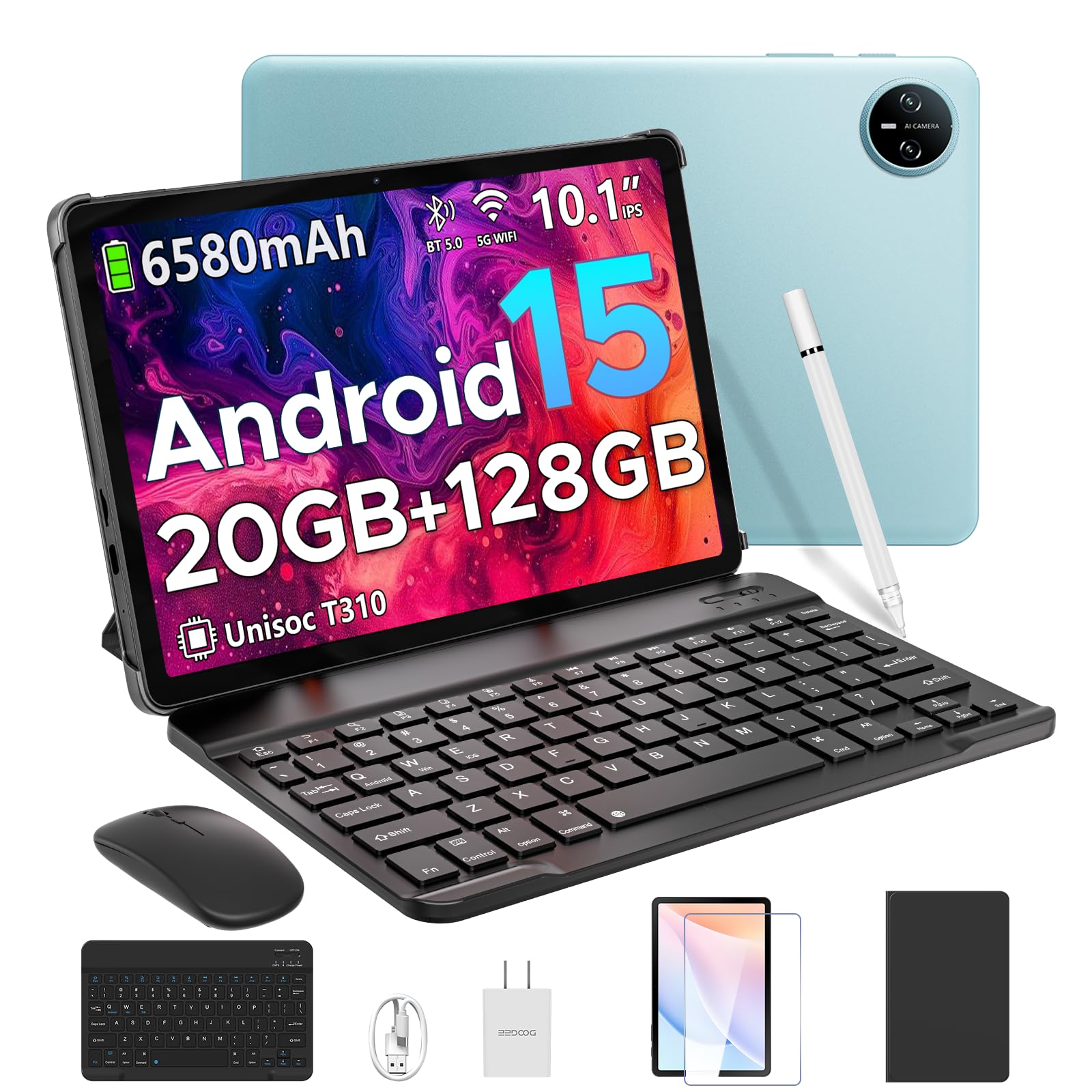
Image 1.1: The DOOGEE Tab A9 Pro Tablet.
2. ماذا يوجد في الصندوق
Your DOOGEE Tab A9 Pro package includes the following items:
- DOOGEE Tab A9 Pro Tablet (x1)
- كابل USB من النوع C (x1)
- الشاحن (x1)
- دليل (x1)
- بطاقة الضمان (x1)
- لوحة مفاتيح بلوتوث (إصدار كبار الشخصيات)
- ماوس بلوتوث (إصدار كبار الشخصيات)
- قلم اللمس (إصدار كبار الشخصيات)
- غطاء واقٍ من الجلد (إصدار كبار الشخصيات)
- فيلم مقوى (إصدار كبار الشخصيات)

Image 2.1: All items included in the DOOGEE Tab A9 Pro package.
3. انتهى المنتجview
The DOOGEE Tab A9 Pro features a sleek design with essential components for user interaction and connectivity.
3.1 الميزات المادية
- عرض: 10.1-inch IPS HD Ultra-Clear Display.
- الكاميرات: 8MP Main Camera (rear) and 5MP Front Camera.
- صوتي: High-Quality Dual Speakers and a 3.5mm Audio Jack.
- الموانئ: Type-C USB port for charging and data transfer.
- أزرار: Power button and volume controls located on the side.

الصورة 3.1: خلفي view of the DOOGEE Tab A9 Pro, highlighting the camera module.

الصورة 3.2: الجانب view of the tablet, illustrating the power button, volume controls, and ports.
الفيديو 3.1: فيديو قصير يعرضasing the ultra-thin body and design of the DOOGEE Tab A9 Pro.
4. الإعداد
4.1 الشحن الأولي
Before first use, fully charge your tablet using the provided Type-C USB cable and charger. The battery indicator on the screen will show charging progress.
4.2 تشغيل/إيقاف التشغيل
- لتشغيل: Press and hold the power button until the DOOGEE logo appears.
- لإيقاف التشغيل: اضغط مع الاستمرار على زر الطاقة، ثم حدد "إيقاف التشغيل" من الخيارات التي تظهر على الشاشة.
4.3 معالج الإعداد الأولي
Upon first power-on, follow the on-screen instructions to complete the initial setup, including language selection, Wi-Fi connection, and Google account login.
5. نظام التشغيل (أندرويد 15)
The DOOGEE Tab A9 Pro runs on the Android 15 operating system, offering a smart, fluid, and secure user experience with enhanced privacy features.

Image 5.1: Visual representation of the Android 15 system interface.
فيديو 5.1: أكثر منview of the DOOGEE Tab A9 Pro running Android 15.
6. الأداء والتخزين
The tablet is designed for smooth operation and ampلو سعة التخزين.
6.1 المعالج
Powered by the energy-efficient Unisoc T310 octa-core processor, the tablet ensures seamless performance for various tasks.

Image 6.1: Diagram illustrating the Unisoc T310 Quad-Core Processor.
6.2 ذاكرة الوصول العشوائي والتخزين
The tablet features 20GB of RAM (4GB physical + 16GB virtual) and 128GB of internal storage. Storage can be expanded up to 2TB using a microSD card (sold separately).

Image 6.2: Visual representation of the tablet's RAM and ROM configuration.
7. الشاشة والصوت
Experience vibrant visuals and clear sound with your tablet.
7.1 العرض
The 10.1-inch IPS HD display offers wide viewing angles and a resolution of 1280x800 for an immersive visual experience.

Image 7.1: The 10.1-inch IPS HD display with key specifications.
7.2 صوت
Built-in dual speakers deliver clear and dynamic sound for movies, music, and video calls.

Image 7.2: Illustration of the tablet's dual speaker system.
8. الكاميرات
Capture moments and conduct video calls with the integrated cameras.
8.1 كاميرا رئيسية
The 8MP main camera allows you to take sharp photos.

Image 8.1: Close-up of the 8MP main camera on the tablet's rear.
الكاميرا الأمامية 8.2
The 5MP front camera is suitable for selfies and video calls.

Image 8.2: The 5MP front camera in use for a video call.
9. الاتصال
Stay connected with various wireless options.
9.1 واي فاي
Supports 2.4G/5G dual-band Wi-Fi for smooth, high-speed internet access.

Image 9.1: Features of WiFi 5 connectivity on the tablet.
9.2 بلوتوث
Equipped with Bluetooth 5.0 for connecting wireless accessories.
9.3 نظام تحديد المواقع العالمي (جي بي إس)
Built-in GPS provides accurate navigation for travel and outdoor activities.
10. الملحقات
The DOOGEE Tab A9 Pro comes with a suite of accessories to enhance its functionality.
10.1 لوحة مفاتيح بلوتوث
Connect the Bluetooth keyboard for a desktop-like typing experience, ideal for productivity tasks.

Image 10.1: The tablet connected to its Bluetooth keyboard for efficient typing.
10.2 Mouse and Stylus
The included mouse and stylus further enhance navigation and interaction, especially for note-taking and creative tasks.

Image 10.2: The tablet shown with its accompanying keyboard and mouse.

Image 10.3: The tablet being used with the stylus for precise input.
10.3 حافظة واقية
The protective case shields your tablet from drops and scratches and can also function as a stand.

Image 10.4: The tablet securely placed within its protective case.
11. إدارة البطارية
The tablet is equipped with a high-capacity battery for extended use.
سعة البطارية 11.1
Features a long-lasting 6580mAh battery, providing hours of power for various activities without frequent recharging.

Image 11.1: Diagram showing the 6580mAh battery inside the tablet.
Video 11.1: A video highlighting the large battery capacity of the DOOGEE Tab A9 Pro.
12. ميزات الأمان
Protect your device and data with built-in security options.
12.1 فتح الوجه
Effortlessly unlock your tablet using facial recognition technology.

Image 12.1: Illustration of the facial recognition unlock feature.
12.2 Fortified Privacy Shield
Android 15 provides enhanced privacy controls, robust data encryption, timely security patches, and proactive app screening for unbreakable security.

الصورة 12.2: انتهىview of Android 15's privacy features.
13. Multitasking & Productivity
Optimize your workflow and entertainment with these features.
13.1 تعدد المهام بشاشة مقسمة
Run two applications simultaneously side-by-side for enhanced productivity.

Image 13.1: The tablet displaying two apps in split-screen mode.
13.2 مكتب WPS مدمج
The tablet comes with WPS Office pre-installed, providing PC-level productivity for documents, spreadsheets, and presentations (Note: WPS Office feature may be unavailable in certain regions).

الصورة 13.2: الجهاز اللوحي الموضحasing WPS Office applications.
Video 13.1: A video demonstrating the DOOGEE Tab A9 Pro's capabilities for learning and work.
14. الصيانة
14.1 التنظيف
استخدم قطعة قماش ناعمة وخالية من الوبر لتنظيف شاشة الجهاز اللوحي وجسمه. تجنب استخدام المواد الكيميائية القاسية أو المواد الكاشطة.
14.2 تحديثات البرامج
Regularly check for and install system updates to ensure optimal performance, security, and access to new features. Navigate to الإعدادات > النظام > تحديث النظام للتحقق من التحديثات.
15. استكشاف الأخطاء وإصلاحها
يتناول هذا القسم المشكلات الشائعة التي قد تواجهها مع جهازك اللوحي.
15.1 الجهاز اللوحي لا يعمل
- تأكد من شحن الجهاز اللوحي بشكل كافٍ. قم بتوصيله بالشاحن لمدة 30 دقيقة على الأقل.
- اضغط مع الاستمرار على زر الطاقة لمدة 10-15 ثانية لإجراء إعادة تشغيل قسرية.
15.2 الأداء البطيء
- أغلق التطبيقات الخلفية غير الضرورية.
- مسح بيانات ذاكرة التخزين المؤقت للتطبيقات المستخدمة بكثرة.
- تأكد من توفر مساحة تخزين كافية. احذف الملفات القديمة fileأو نقلها إلى وحدة تخزين خارجية.
- أعد تشغيل الجهاز اللوحي.
15.3 مشاكل اتصال Wi-Fi
- أعد تشغيل جهاز توجيه Wi-Fi والكمبيوتر اللوحي.
- انسَ شبكة الواي فاي وأعد الاتصال.
- تأكد من أنك ضمن نطاق إشارة Wi-Fi.
15.4 الملحقات لا تتصل
- Ensure Bluetooth is enabled on the tablet and the accessory.
- Check if the accessory is charged and in pairing mode.
- Refer to the accessory's individual manual for specific pairing instructions.
16. المواصفات
| ميزة | مواصفة |
|---|---|
| ماركة | دوجي |
| اسم الموديل | TABA9PRO |
| رقم موديل العنصر | تاب A9 برو |
| نظام التشغيل | أندرويد 15 |
| حجم شاشة العرض الدائمة | 10.1 بوصة |
| دقة الشاشة | 1280*800 عالية الدقة |
| أقصى دقة للشاشة | 1280*800 بكسل |
| ماركة المعالج | يونيسوك |
| معالج الرسوميات المساعد | مالي-G52 1-Core-2EE |
| سعة تخزين الذاكرة | 128 جيجابايت (قابلة للتوسيع حتى 2 تيرابايت عبر بطاقة microSD) |
| كبش | 20 جيجابايت (4 جيجابايت فعلي + 16 جيجابايت افتراضي) |
| نوع لاسلكي | 802.11ac, 802.11n (2.4G/5G Dual-band WiFi) |
| بلوتوث | 5.0 |
| سعة البطارية | بطارية ليثيوم بوليمر 6580 مللي أمبير في الساعة (متضمنة) |
| متوسط عمر البطارية | Up to 2 years (estimated lifespan) |
| وزن العنصر | 1.05 رطل |
| أبعاد المنتج | 9.55 × 6.33 × 0.31 بوصة |
| لون | Blue (other colors available) |
| تاريخ أول توفر | 23 أبريل 2025 |
17. الضمان والدعم
17.1 معلومات الضمان
Your DOOGEE Tab A9 Pro comes with a 2-Year Limited Warranty. Please refer to the included Warranty Card for detailed terms and conditions.
17.2 دعم العملاء
For any questions or technical assistance, please contact our support team. We aim to respond within 24 hours.
- الدعم عبر الإنترنت: متاح 24/7.
- الإرجاعات: ضمان استرداد الأموال لمدة 30 يومًا وإمكانية الإرجاع مجانًا.


