1. المقدمة
This manual provides detailed instructions for the installation, operation, and maintenance of the Shelly Wave 2PM US LR UL Z-Wave Long Range Smart Switch Relay. This device is a 2-channel smart relay designed for home automation, offering power metering capabilities and Z-Wave Long Range communication. It is UL certified for safety and quality assurance.
2. معلومات السلامة
احتياطات السلامة الهامة:
- Installation should only be performed by a qualified electrician or person with appropriate electrical knowledge.
- Always disconnect power to the circuit at the main breaker before performing any installation or maintenance.
- Ensure the device is installed in compliance with all local and national electrical codes.
- Do not exceed the maximum load specified for the device (14 A per channel, 16 A total).
- The device is designed for AC 120 V power supply.
- احفظ الجهاز بعيداً عن الرطوبة ودرجات الحرارة القصوى.
- هذا الجهاز مخصص للإستخدام الداخلي فقط.
3. انتهى المنتجview
The Shelly Wave 2PM US LR UL is a compact Z-Wave smart relay that allows you to control two independent electrical circuits and monitor their power consumption. Its small size enables installation within standard electrical boxes or behind existing switches.

Image 3.1: Shelly Wave 2PM US LR UL Smart Switch Relay and its retail packaging.
3.1 أبعاد الجهاز

Image 3.2: The Shelly Wave 2PM US LR UL device held in a hand, illustrating its compact dimensions of 42mm (1.65 inches) in width and 37mm (1.45 inches) in height.
The device measures approximately 42mm (1.65 inches) in width and 37mm (1.45 inches) in height, making it suitable for installation in confined spaces.
3.2 أوصاف المحطة الطرفية
- N: Neutral input.
- L: Live input.
- O1: Output 1 for controlled appliance/light.
- O2: Output 2 for controlled appliance/light.
- SW1: Switch input 1 for manual control of O1.
- SW2: Switch input 2 for manual control of O2.
4. الإعداد والتثبيت
4.1 قائمة التحقق قبل التثبيت
- Ensure you have a compatible Z-Wave gateway (hub) for device pairing and control.
- Verify that the electrical circuit is rated for the device's specifications.
- جهّز الأدوات اللازمة: مفك براغي، أداة تعرية الأسلاك، فولتtagه اختبار.
4.2 تعليمات الأسلاك
WARNING: Disconnect power at the circuit breaker before proceeding.
- قم بتوصيل محايد (ن) wire from your electrical supply to the 'N' terminal on the Shelly Wave 2PM.
- قم بتوصيل مباشر (L) wire from your electrical supply to the 'L' terminal on the Shelly Wave 2PM.
- Connect the load (e.g., light fixture, appliance) for the first channel to the الإخراج 1 (O1) terminal. The other side of the load should be connected to Neutral.
- Connect the load for the second channel to the الإخراج 2 (O2) terminal. The other side of the load should be connected to Neutral.
- If using external switches for manual control, connect the switch wires to س.و1 و س.و2 terminals. These switches should be connected to the Live (L) line.
4.3 التثبيت المادي

Image 4.1: A hand installing the compact Shelly Wave 2PM US LR UL device into a standard electrical wall box behind a switch, demonstrating its ease of fit.
The Shelly Wave 2PM is designed to fit into most standard electrical boxes and behind wall switches. After wiring, carefully place the device into the electrical box, ensuring no wires are pinched. Secure the cover plate.
4.4 تضمين شبكة Z-Wave
Once the device is physically installed and power is restored, you can include it into your Z-Wave network:
- Put your Z-Wave gateway into inclusion mode (refer to your gateway's manual for specific instructions).
- Triple-click the button connected to SW1 or SW2, or cycle the power to the device three times within 5 seconds.
- The device should now be detected and added to your Z-Wave network. Confirm successful inclusion via your gateway's interface.
5. تعليمات التشغيل
5.1 التحكم الأساسي
The Shelly Wave 2PM allows control of connected appliances or lights through multiple methods:
- التبديل اليدوي: Use the physical wall switches connected to SW1 and SW2.
- Z-Wave Gateway/App: Control the device remotely via your Z-Wave gateway's mobile application or web واجهة.
- Automation Systems: Integrate with various home automation platforms for advanced control and scene creation.
- التحكم الصوتي: If your Z-Wave gateway supports it, you can use voice assistants (e.g., Alexa, Google Home) to control the device.

Image 5.1: Illustration of a bedroom setting where two distinct lights are controlled by a single Shelly Wave 2PM device, highlighting its dual-channel capability.
5.2 قياس الطاقة
The Shelly Wave 2PM provides real-time power consumption data for each channel independently and combined. This data can be accessed through your Z-Wave gateway's interface, allowing you to monitor energy usage and identify opportunities for savings.

Image 5.2: A visual representation of the Shelly Wave 2PM monitoring energy consumption within a smart home environment, demonstrating its ability to track usage and potentially reduce utility costs.
5.3 Smart Schedules and Automation
Leverage your Z-Wave gateway to create personalized schedules and automation rules for the Shelly Wave 2PM. This allows for automatic control of lights and appliances based on time, sensor input, or other conditions, enhancing convenience and energy efficiency.

Image 5.3: A smartphone screen displaying various smart home controls and schedules, indicating how users can manage lighting and other devices with Shelly products.
6. الصيانة
The Shelly Wave 2PM US LR UL is designed for maintenance-free operation. However, consider the following:
- تنظيف: If necessary, gently wipe the device with a dry, soft cloth. Do not use liquid cleaners or solvents.
- تحديثات البرامج الثابتة: Periodically check your Z-Wave gateway's interface or Shelly's official support channels for available firmware updates to ensure optimal performance and security.
- التفتيش الكهربائي: For safety, it is recommended to have electrical installations periodically inspected by a qualified professional.
7. استكشاف الأخطاء وإصلاحها
If you encounter issues with your Shelly Wave 2PM, refer to the following common problems and solutions:
| مشكلة | السبب المحتمل | حل |
|---|---|---|
| Device not pairing with Z-Wave gateway | Gateway not in inclusion mode, device too far, incorrect pairing procedure. | Ensure gateway is in inclusion mode. Move device closer to gateway. Repeat pairing steps (triple-click switch or power cycle). |
| Connected appliance/light not responding | Incorrect wiring, power issue, device malfunction. | Verify wiring according to Section 4.2 (disconnect power first). Check power supply to the device. Perform a factory reset if necessary. |
| Inaccurate power metering | Device not calibrated (unlikely for Shelly), electrical interference. | Ensure stable power supply. If issue persists, contact support. |
| Device frequently disconnects from network | Weak Z-Wave signal, interference. | Ensure device is within range of the Z-Wave gateway or a Z-Wave repeater. Check for sources of interference. |
7.1 إعادة ضبط المصنع
To perform a factory reset, press and hold the button connected to SW1 or SW2 for 10 seconds. The device will reset to its factory default settings and be removed from the Z-Wave network.
8. المواصفات
| ميزة | مواصفة |
|---|---|
| رقم الموديل | 3800238070946 |
| أبعاد المنتج | 0.63 × 1.65 × 1.46 بوصة (16 × 42 × 37 مم) |
| التقييم الحالي | 13.99 Amps (per channel) |
| نوع الاتصال | مفتوح عادة |
| مواد الاتصال | فُولاَذ |
| نوع الموصل | محطات المسمار |
| نوع التركيب | Wall Mount (behind switch/in electrical box) |
| تردد Z- الموجة | 912MHz (ZWLR) and 908.4MHz (Z-Wave Plus) |
| القنوات | 2 |
| قياس القوة | نعم |
| الشهادات | حاصل على شهادة UL |
9. الضمان والدعم
9.1 معلومات الضمان
تقدم شيلي ضمان الجهاز لمدة 3 سنوات for the Shelly Wave 2PM US LR UL. Please retain your proof of purchase for warranty claims.
9.2 دعم العملاء
For technical assistance, product information, or troubleshooting not covered in this manual, please utilize the following resources:
- Shelly Customer Service: Contact Shelly's professional support team.
- قاعدة المعرفة: Access detailed product specifications and guidelines online.
- Technical Support & Community: Join Facebook Support Groups and Reddit communities for peer and expert assistance.
- أكاديمية شيلي: استكشف الدروس التعليمية المصورة و webinars for further guidance.
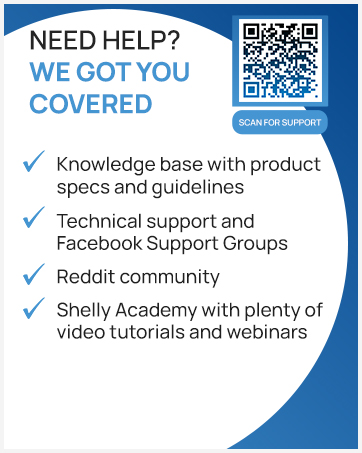
Image 9.1: A graphic detailing Shelly's support options, including a QR code for direct access to their support portal. Resources include a knowledge base, technical support, Facebook groups, Reddit community, and Shelly Academy.
For direct access to support, visit: https://support.shelly.cloud/en/support/home


