1. انتهى المنتجview
The JUSTONE A1 is an 11.3-inch portable touch screen designed to bring wireless CarPlay and Android Auto functionality to your vehicle. It features an in-Cell fully laminated display, 1920x720 resolution, and supports up to 60 frames per second for a smooth user experience. Control is available via the capacitive touchscreen or a wireless button knob. It also includes a BT Display Only Mode for audio streaming and offers multiple mounting options.
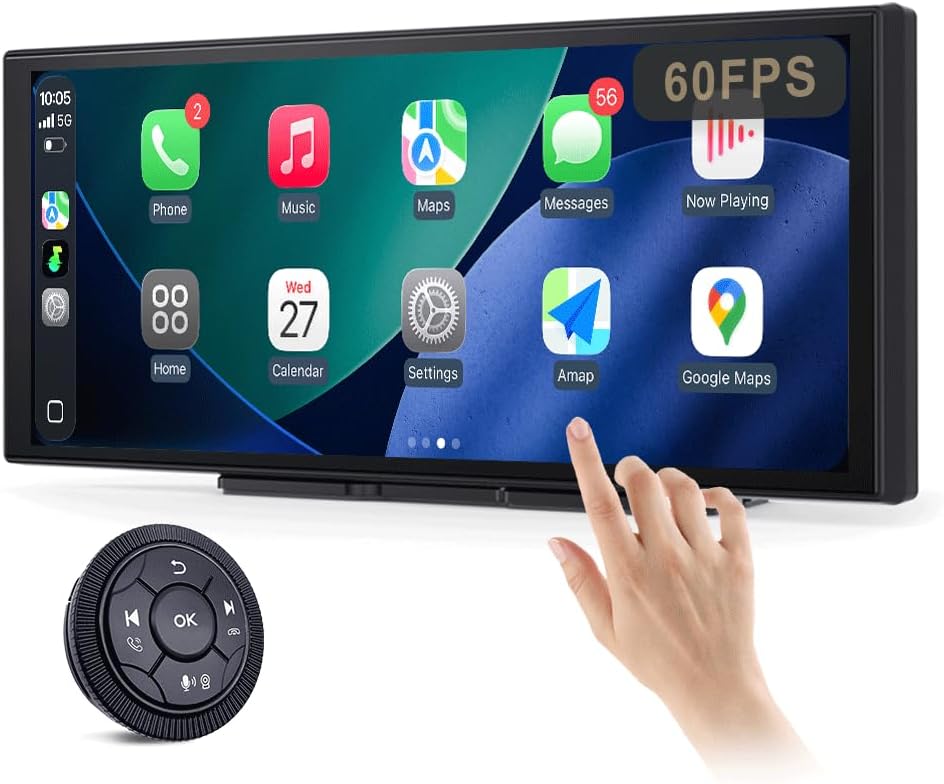
Figure 1: JUSTONE A1 Portable Touch Screen with CarPlay interface and wireless control knob.
2. محتويات العبوة
تأكد من تضمين جميع العناصر المذكورة أدناه في طردك. في حال وجود أيٍّ منها مفقودًا أو تالفًا، يُرجى التواصل مع خدمة العملاء.

Figure 2: Included accessories for the JUSTONE A1.
- Screen Host
- 4 Clip Bracket
- شريط لاصق مزدوج الوجهين
- قوس الالتصاق
- Control Button (Wireless Knob)
- محول طاقة السيارة
- Ball Shaped Bracket Converter
- TYPE-C Power Cable
- كابل صوت AUX
- Base for Suction Cup
- Camera Input Cable (Camera optional)
- دليل المستخدم
3. الإعداد
3.1 خيارات التركيب
The JUSTONE A1 offers two primary mounting methods to suit various vehicle dashboards. Ensure the screen is securely mounted and does not obstruct your view من الطريق.

الشكل 3: مثالamples of suction cup and dashboard mounting.
- 4-Clip Vertical Base: Use this bracket to rest the bottom of the screen directly on your dashboard. Secure it with the provided double-sided tape for stability.
- 17mm Ball-Joint Extendable Arm Mount (Suction Cup Bracket): This option allows for more flexible positioning, typically on the windshield or a smooth dashboard surface. Ensure the suction cup is firmly attached.
ملحوظة: Always ensure the chosen mounting location complies with local traffic laws regarding windshield obstructions.
3.2 توصيل الطاقة
- Connect the TYPE-C Power Cable to the screen host.
- Plug the Car Power Adapter into your vehicle's 12V power outlet (cigarette lighter socket).
- The screen will power on automatically when the vehicle's ignition is turned on.
3.3 Initial Wireless Connection (CarPlay/Android Auto)
- تأكد من تمكين Bluetooth وWi-Fi على هاتفك الذكي.
- On the JUSTONE A1 screen, select either 'CarPlay' or 'Android Auto' from the main menu.
- Follow the on-screen instructions to pair your phone via Bluetooth.
- Once Bluetooth is paired, the system will automatically establish a Wi-Fi connection for wireless CarPlay or Android Auto.
- The device is designed to auto-connect to your paired phone when you start your car after the initial setup.
4. تعليمات التشغيل
4.1 ميزات العرض

Figure 4: Display features including 11.3-inch size and in-cell full lamination.
- 11.3" In-Cell Full-Laminated Display: Provides a premium look and feel, appearing darker when off compared to standard lamination. The actual panel size is approximately 10.5" x 4.13".
- دقة العرض: 1920 × 720 Delivers clear and sharp visuals.
- معدل تحديث 60 هرتز: Ensures smoother performance, especially for CarPlay.
طرق التحكم 4.2
The device offers two ways to interact with its interface:

Figure 5: Touchscreen and wireless knob control options.
- Capacitive Touchscreen: Directly interact with the display by touching icons and swiping.
- Wireless Button Knob: For safer operation while driving, especially if the screen is difficult to reach. This knob allows navigation, volume control, and other functions without direct screen interaction.
4.3 ميزات الاتصال

Figure 6: Supported phone connectivity options.
- كاربلاي لاسلكي: Access navigation, music, messages, and more from your iPhone.
- لاسلكي Android Auto: Access navigation, music, and communication features from your Android phone.
- اير بلاي: Mirror content from your Apple devices.
- ميراكاست: Mirror content from compatible Android devices.
4.4 أوضاع إخراج الصوت
The JUSTONE A1 supports multiple ways to output audio to your vehicle's sound system:
- BT Display Only Mode: When your phone is connected to the JUSTONE A1, audio streams directly from your phone to your vehicle's built-in Bluetooth audio system. This requires your vehicle to have its own Bluetooth audio input.
- إخراج AUX: Connect the provided AUX Audio Cable from the JUSTONE A1 to your vehicle's AUX input port.
- وزير الخارجية الارسال: The device can transmit audio via an FM frequency. Tune your car radio to the same frequency set on the JUSTONE A1.
4.5 Automatic Day/Night Mode

Figure 7: Automatic brightness adjustment for day and night conditions.
The built-in light sensor automatically detects ambient light conditions and switches between dark and light themes, adjusting screen brightness for optimal visibility and glare resistance during both day and night driving.
5. الصيانة
- تنظيف: استخدم قطعة قماش ناعمة وخالية من الوبر لتنظيف الشاشة. لإزالة البقع العنيدة، افركها برفق.ampامسح القماش بالماء أو بمنظف آمن للشاشات. تجنب المواد الكيميائية القاسية أو المواد الكاشطة.
- درجة حرارة: Avoid exposing the device to extreme temperatures, both hot and cold, for extended periods.
- تخزين: في حال تخزين الجهاز لفترة طويلة، افصله عن مصدر الطاقة وخزنه في مكان بارد وجاف.
- الكابلات: Regularly check power and audio cables for any signs of wear or damage. Replace if necessary.
6. استكشاف الأخطاء وإصلاحها
- الجهاز لا يعمل:
- Ensure the car power adapter is securely plugged into the vehicle's 12V outlet and the TYPE-C cable is firmly connected to the screen.
- تحقق مما إذا كان منفذ 12 فولت في السيارة يتلقى الطاقة (على سبيل المثال، عن طريق الاختبار بجهاز آخر).
- Wireless CarPlay/Android Auto fails to connect:
- Verify Bluetooth and Wi-Fi are enabled on your smartphone.
- Ensure your phone is not connected to another CarPlay/Android Auto device.
- حاول نسيان الجهاز في إعدادات البلوتوث الخاصة بهاتفك وإعادة إقرانه.
- Restart both your phone and the JUSTONE A1 device.
- لا يوجد مخرج صوتي:
- If using BT Display Only Mode, ensure your phone is connected to your car's native Bluetooth audio system.
- If using AUX, check that the AUX cable is properly connected to both the JUSTONE A1 and your car's AUX input, and your car's audio source is set to AUX.
- If using FM transmitter, ensure the frequency on the JUSTONE A1 matches your car radio's frequency and there is no strong interference on that frequency.
- Check the volume levels on both the JUSTONE A1 and your car's audio system.
- الشاشة لا تستجيب أو متجمدة:
- Disconnect the power cable from the JUSTONE A1 for 10 seconds, then reconnect it to perform a restart.
- Wireless control knob is not working:
- Ensure the knob's battery is not depleted. Replace if necessary.
- Re-pair the knob with the main unit if it has become disconnected.
7. المواصفات
| ميزة | مواصفة |
|---|---|
| اسم الموديل | A1 |
| ماركة | JUSTONE |
| حجم العرض | 11.3 Inches (10.5" x 4.13" actual panel) |
| نوع العرض | In-Cell Full-Laminated Touch Screen |
| دقة | 1920×720 |
| معدل التحديث | Up to 60Hz (for CarPlay) |
| تكنولوجيا الاتصال | Bluetooth, Wi-Fi (for Wireless CarPlay/Android Auto) |
| وضع إخراج الصوت | BT Display Only, AUX, FM Transmitter |
| واجهة التحكم | Touchscreen, Wireless Button Knob |
| نوع التركيب | Panel Mount (4-clip vertical base), Dashboard Mount (17mm ball-joint extendable arm) |
| ميزة خاصة | Portable, Auto Day/Night Mode (Light Sensor) |
| وزن العنصر | 14.8 أونصة (420 جرامًا) |
| أبعاد الحزمة | 12.01 × 5.51 × 3.98 بوصة |
8. الضمان والدعم
8.1 معلومات الضمان
The JUSTONE A1 portable touch screen comes with a ضمان الشركة المصنعة لمدة عام واحد يسري هذا الضمان من تاريخ الشراء. ويغطي عيوب المواد والتصنيع في ظل الاستخدام العادي. ولا يغطي الأضرار الناجمة عن سوء الاستخدام أو الحوادث أو التعديلات غير المصرح بها أو التركيب غير الصحيح.
يرجى الاحتفاظ بإثبات الشراء الخاص بك لمطالبات الضمان.
8.2 دعم العملاء
For technical assistance, troubleshooting, or warranty inquiries, please contact JUSTONE customer support through the retailer's platform where the product was purchased or visit the official JUSTONE webموقع لمعلومات الاتصال.
When contacting support, please have your product model (A1) and purchase details ready.


