1. المقدمة
This manual provides essential information for the safe and effective operation of your SOOMFON SK2 Mini Projector. Please read this manual thoroughly before using the product and retain it for future reference.
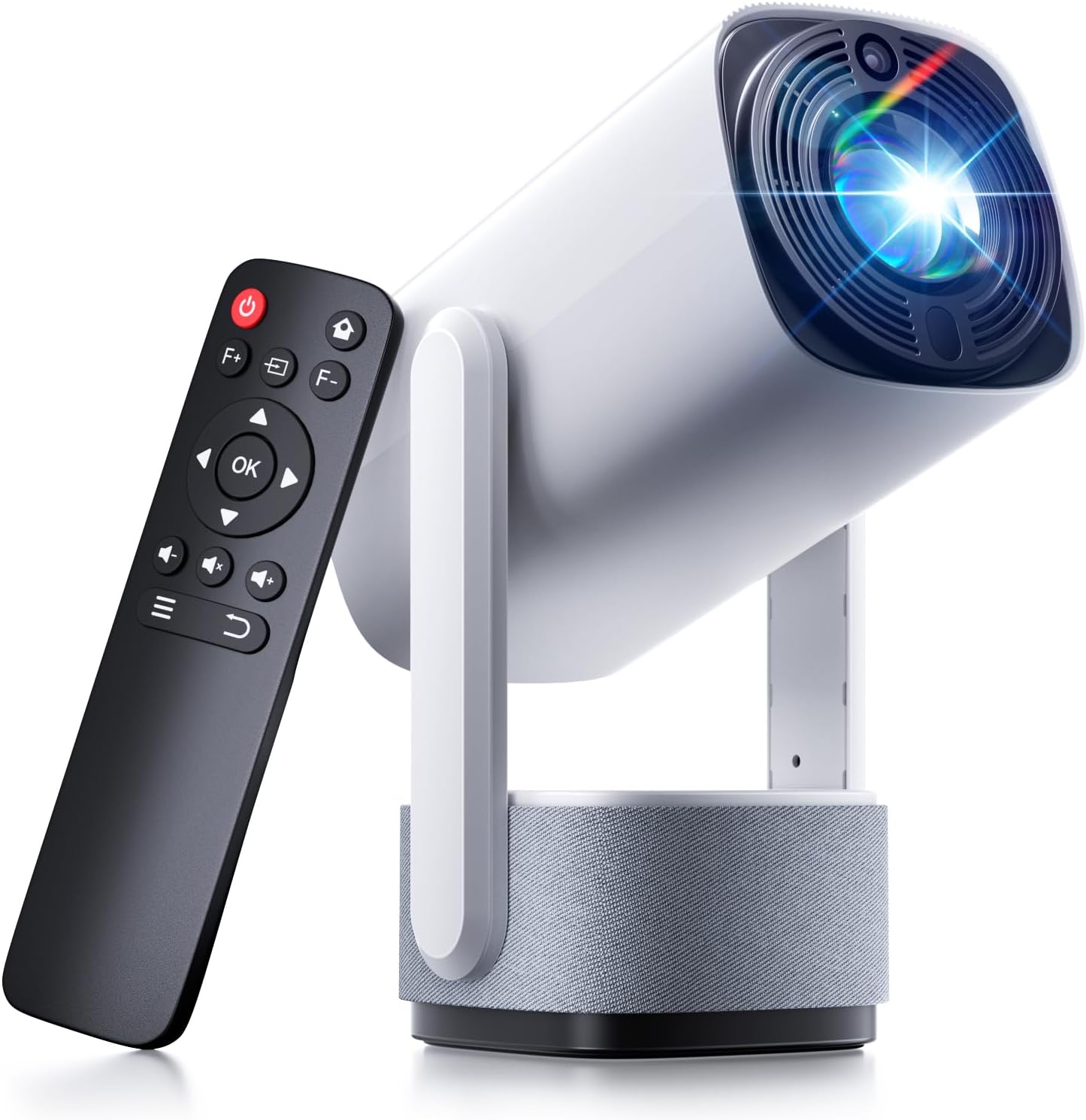
Image: The SOOMFON SK2 Mini Projector shown with its remote control.
2. محتويات العبوة
تأكد من تضمين جميع العناصر المدرجة أدناه في الحزمة الخاصة بك:
- SOOMFON SK2 Projector
- كابل HDMI (1.5 م)
- سلك الطاقة (1.5 م)
- دليل المستخدم
- جهاز تحكم عن بعد (لا يشمل بطاريتين AAA)

Image: Contents of the SOOMFON SK2 Mini Projector package.
3. انتهى المنتجview
The SOOMFON SK2 Mini Projector is designed for versatile media projection, featuring a compact form factor and multiple connectivity options.
المميزات الرئيسية:
- تكنولوجيا العرض: Advanced LCD with uniform illumination.
- دقة: Native 720p (1280 x 720), supports 4K and 1080p input.
- سطوع: 260 ANSI Lumens.
- حجم العرض: Up to 150 inches.
- قابلية النقل: Compact design (7.5 x 4 x 4 inches) and lightweight (1.3 lbs).
- تناوب: 270° rotatable stand for flexible projection angles (wall-to-ceiling).
- صوتي: Integrated dual 3W high-fidelity speakers.
- الاتصال: HDMI, USB, Audio ports, Wi-Fi, Bluetooth (two-way for input/output).
- شاشة النسخ المتطابق: Supports Miracast and AirPlay for wireless screen sharing.
- تصحيح الصورة: تصحيح الانحراف التلقائي.
- حماية العين: Diffuse reflection imaging technology.
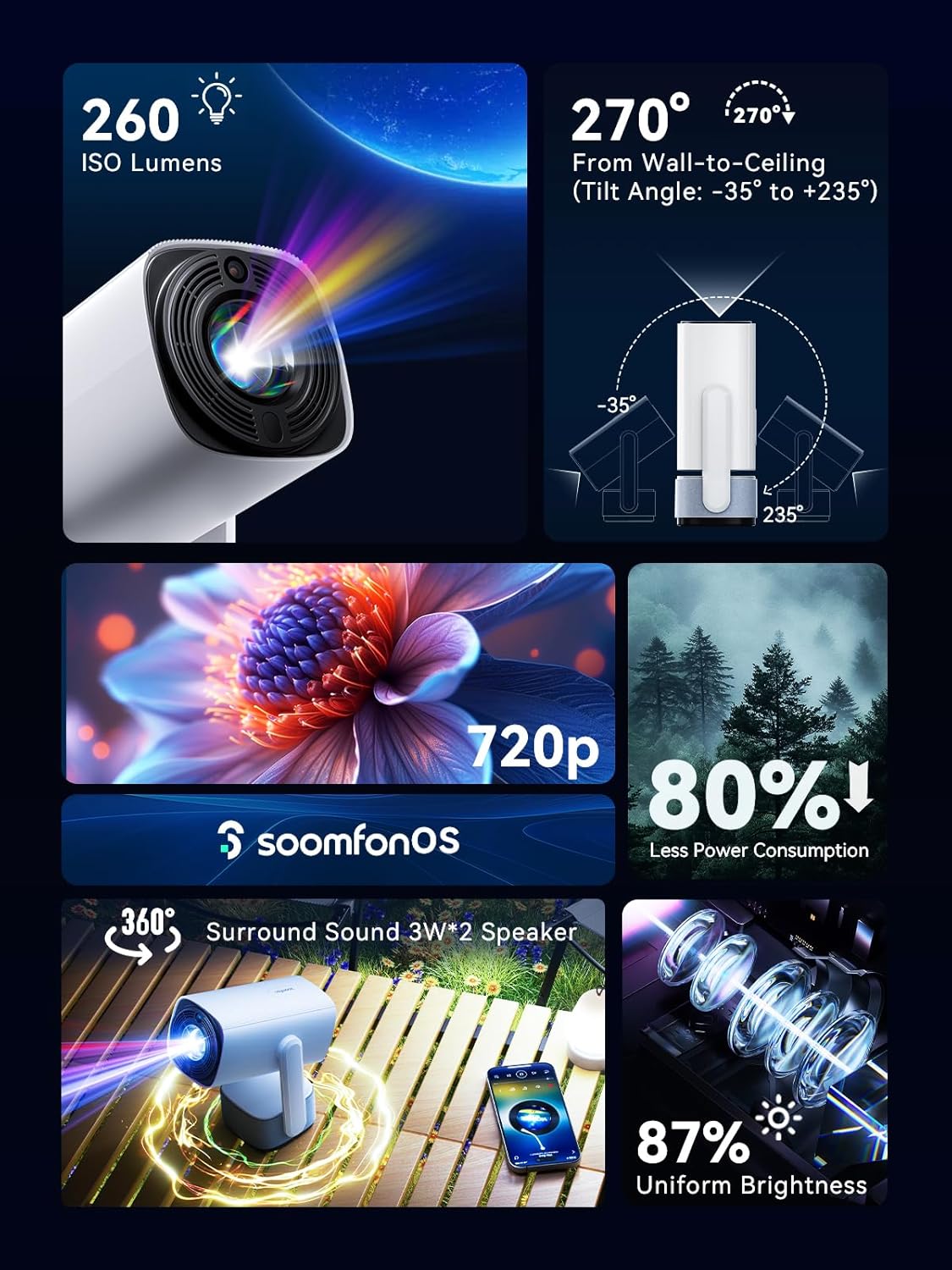
الصورة: أكثر منview من أهم ميزات جهاز العرض.
4. الإعداد
4.1 توصيل الطاقة
- قم بتوصيل سلك الطاقة المرفق بمدخل الطاقة الخاص بجهاز العرض.
- قم بتوصيل الطرف الآخر من سلك الطاقة بمأخذ كهربائي مناسب.
4.2 التنسيب
Position the projector on a stable, flat surface. The 270° rotatable stand allows for flexible projection angles, including wall and ceiling projection.

Image: Projector positioned for wall-to-ceiling projection.
4.3 التشغيل المبدئي
- اضغط على زر الطاقة الموجود على جهاز العرض أو جهاز التحكم عن بعد لتشغيل الجهاز.
- The projector will boot up and display the main interface (SoomfonOS).
5. تعليمات التشغيل
5.1 تعديل التركيز
Adjust the image clarity using the F+ and F- buttons on the remote control. This is a manual adjustment.
5.2 تصحيح الانحراف
The projector features automatic keystone correction. It will automatically adjust the image to be rectangular even if the projector is placed at an angle. Manual adjustments may also be available in the settings menu if needed.

Image: Automatic keystone correction in action.
5.3 الاتصال
5.3.1 اتصال HDMI
Connect an HDMI cable from your source device (e.g., laptop, game console, TV stick) to the HDMI port on the projector. Select the HDMI input source from the projector's menu.
5.3.2 اتصال USB
Insert a USB flash drive into the USB port. The projector supports FAT32 formatted drives up to 32GB. Navigate to the USB section in the SoomfonOS to access media files.
5.3.3 Wi-Fi and Screen Mirroring
Connect the projector to your Wi-Fi network via the settings menu. Once connected, you can use Miracast (for Android) or AirPlay (for iOS) to wirelessly mirror your smartphone or tablet screen to the projector.

Image: Streaming content from a phone to the projector.
5.3.4 اتصال البلوتوث
The projector supports two-way Bluetooth functionality:
- Bluetooth Input (Audio Mode): Connect your smartphone or other Bluetooth audio device to the projector to use it as a Bluetooth speaker. Access this mode from the homepage.
- مخرج بلوتوث: Connect the projector to external Bluetooth speakers or headphones for enhanced audio. Access this in the settings menu.

Image: Two-way Bluetooth connectivity options.
5.4 SoomfonOS Navigation
The projector operates on SoomfonOS, a user-friendly interface. Use the remote control's directional buttons and OK button to navigate through menus and select options. The main screen provides access to input sources, settings, and media playback options.

Image: The SoomfonOS user interface.
6. الصيانة
6.1 التنظيف
- عدسة: استخدم قطعة قماش ناعمة وخالية من الوبر، مُخصصة للعدسات البصرية. لا تستخدم منظفات أو مذيبات كاشطة.
- الخارج: امسح الجزء الخارجي لجهاز العرض بقطعة قماش ناعمة وجافة. لإزالة البقع الصعبة، امسحه بقطعة قماش جافة قليلاً.amp يمكن استخدام قطعة قماش، ثم قطعة قماش جافة.
- تهوية: تأكد من أن فتحات التهوية خالية من الغبار والعوائق لمنع ارتفاع درجة الحرارة.
6.2 التخزين
When not in use, store the projector in a cool, dry place away from direct sunlight and extreme temperatures. If possible, use the original packaging or a protective case to prevent dust accumulation and damage.
7. استكشاف الأخطاء وإصلاحها
- لا توجد صورة/جودة الصورة رديئة:
- تأكد من توصيل سلك الطاقة بإحكام وتشغيل جهاز العرض.
- Check the input source selection (HDMI, USB, etc.) matches your connected device.
- Adjust the focus using the F+ and F- buttons on the remote.
- تأكد من أن الغرفة مظلمة بما يكفي لتحقيق أفضل النتائج viewing, especially for larger screen sizes.
- لا يوجد صوت:
- تحقق من مستوى الصوت على كل من جهاز العرض وجهاز المصدر.
- If using external speakers, ensure they are properly connected via Bluetooth or audio cable.
- For HDMI sources, verify the audio output settings on your source device.
- Cannot Stream from Netflix/Prime Video via Screen Mirroring:
- Due to HDCP (High-bandwidth Digital Content Protection) restrictions, direct screen mirroring of certain streaming services (like Netflix, Prime Video, Hulu) may not work or may only provide audio.
- حل: Use an external streaming device (e.g., Amazon Fire Stick, Roku, Google TV) connected to the projector's HDMI port for these services.
- مشكلات الاتصال بشبكة Wi-Fi:
- تأكد من إدخال كلمة مرور Wi-Fi بشكل صحيح.
- If experiencing issues with long Wi-Fi passwords, check the SOOMFON official website for potential firmware updates.
- ضوضاء المروحة:
- The projector's fan noise is noticeable during operation. This is normal for cooling the internal components.
- For a more immersive audio experience, consider connecting external Bluetooth speakers.
8. المواصفات
| ميزة | مواصفة |
|---|---|
| ماركة | سومفون |
| رقم الموديل | SK2 |
| وزن العنصر | 1.69 رطل |
| أبعاد المنتج | 9.65 × 4.53 × 3.74 بوصة |
| دقة العرض الأصلية | 1280 × 720 بكسل |
| دقة الإدخال المدعومة | حتى 4K |
| سطوع | شموم شمعة أنسي |
| تكنولوجيا الاتصال | HDMI, USB, Audio, Wi-Fi, Bluetooth |
| المميزات الخاصة | Built-In Speaker, Built-In Wi-Fi, Portable, 270° Rotatable Stand, Automatic Keystone Correction |
| الاستخدامات الموصى بها | الأعمال، التعليم، الألعاب، السينما المنزلية |
9. الضمان والدعم
SOOMFON is committed to providing quality products and customer satisfaction.
9.1 الدعم الفني
Lifetime technical support is available for your SOOMFON SK2 Mini Projector.
معلومات الاتصال 9.2
- بريد إلكتروني: service@soomfon.com
- الدردشة المباشرة: Available on the official SOOMFON website, Monday-Friday, 9 AM - 5 PM (PST).


