1. المقدمة
This manual provides essential information for the proper use and maintenance of your HOTWAV R9 Pro Rugged Tablet. Please read it thoroughly before operating the device to ensure optimal performance and longevity.

الصورة: الأمامية والخلفية view of the HOTWAV R9 Pro Rugged Tablet, highlighting its robust design and 11-inch display.
2. ماذا يوجد في الصندوق
تأكد من وجود جميع العناصر في العبوة:
- جهاز لوحي متين HOTWAV R9 Pro واحد
- 1x Manual (this document)
- 1 × صندوق التعبئة والتغليف
- غشاء واحد مقاوم للانفجار
- 1 × كابل USB من النوع C
- كابل OTG واحد
3. انتهى المنتجview والميزات الرئيسية
3.1. تصميم متين ومتانة
The HOTWAV R9 Pro is engineered for extreme environments, featuring IP68/IP69K waterproof and dustproof ratings, and MIL-STD-810H certification for shock resistance. Its construction includes a double-shot TPU+PC+glass fiber back cover for enhanced protection.

Image: Visual representation of the tablet's ruggedness, showing it submerged in water, covered in dust, and surviving a drop, alongside its LED camping light in use.
3.2. البطارية والشحن
Equipped with a large 20080mAh battery, the R9 Pro offers extended usage times. It supports 20W fast charging to quickly replenish power.

Image: Diagram illustrating the 20080mAh battery capacity and 20W fast charging capability of the tablet.
3.3. العرض
The tablet features an 11-inch FHD+ display with a resolution of 1200x1920 pixels and 450cd/m² brightness. It is protected by Corning Glass 3 and supports glove touch functionality, making it suitable for outdoor use.

Image: The tablet's 11-inch display showing various applications, alongside icons indicating FHD+ resolution, 60Hz refresh rate, and dual SIM support.
3.4. الأداء والتخزين
Powered by an Octa-Core Unisoc T606 processor, the R9 Pro includes 20GB RAM (6GB physical + 14GB virtual) and 256GB internal storage. Storage can be expanded up to 2TB using a T-flash card.

Image: A visual representation of the Unisoc T606 octa-core chipset, detailing 20GB RAM and 256GB ROM with 2TB expandable memory.
3.5. نظام الكاميرا
The tablet features a 64MP rear camera with PDAF and f/1.8 aperture, and a 16MP front camera for photography and video calls.

الصورة: السابقamples of photos taken with the 64MP rear camera and the 16MP front camera, demonstrating their capabilities.
3.6. لغة C المتكاملةampالضوء
A unique 6W camping light with 350 lumens and 246 LEDs is integrated into the tablet, providing illumination for various outdoor activities or emergencies.
4. الإعداد
4.1. شحن الجهاز اللوحي
Before first use, fully charge the tablet using the provided USB Type-C cable and a compatible 20W power adapter (not included). Connect the cable to the tablet's USB-C port and the adapter to a power outlet. The charging indicator will show the charging status.
4.2. Installing SIM and T-flash Cards
The tablet supports dual SIM cards and a T-flash (microSD) card for expandable storage.
- حدد مكان درج بطاقة SIM/SD على جانب الجهاز اللوحي.
- استخدم أداة إخراج بطاقة SIM المتوفرة لفتح الدرج.
- Carefully place your Nano-SIM cards and/or T-flash card into the designated slots. Ensure correct orientation.
- ادفع الدرج برفق إلى داخل الجهاز اللوحي حتى يستقر في مكانه.
4.3. تشغيل / إيقاف التشغيل
- لتشغيل: اضغط مع الاستمرار على زر التشغيل حتى يظهر شعار HOTWAV.
- لإيقاف التشغيل: Press and hold the Power button until the power options menu appears, then select "Power Off".
- لإعادة التشغيل: اضغط مع الاستمرار على زر الطاقة حتى تظهر قائمة خيارات الطاقة، ثم حدد "إعادة التشغيل".
5. تعليمات التشغيل
5.1. نظام التشغيل أندرويد 14
The HOTWAV R9 Pro runs on Android 14, offering a user-friendly interface and access to a wide range of applications via the Google Play Store.
5.2. الملاحة
Navigate the tablet using touch gestures:
- مقبض: حدد عنصرا.
- انتقاد: التمرير عبر الشاشات أو القوائم.
- قرصة: تكبير أو تصغير الصور و web الصفحات.
- ضغطة طويلة: الوصول إلى القوائم السياقية أو نقل الأيقونات.
5.3. Glove Touch Mode
The display supports glove touch, allowing you to operate the tablet while wearing gloves. This feature is automatically enabled.
5.4. فتح القفل بالوجه
لفتح القفل بسهولة وأمان، قم بإعداد خاصية فتح القفل بالوجه:
- اذهب الى إعدادات > الأمن والخصوصية > فتح الوجه.
- اتبع التعليمات التي تظهر على الشاشة لتسجيل وجهك.
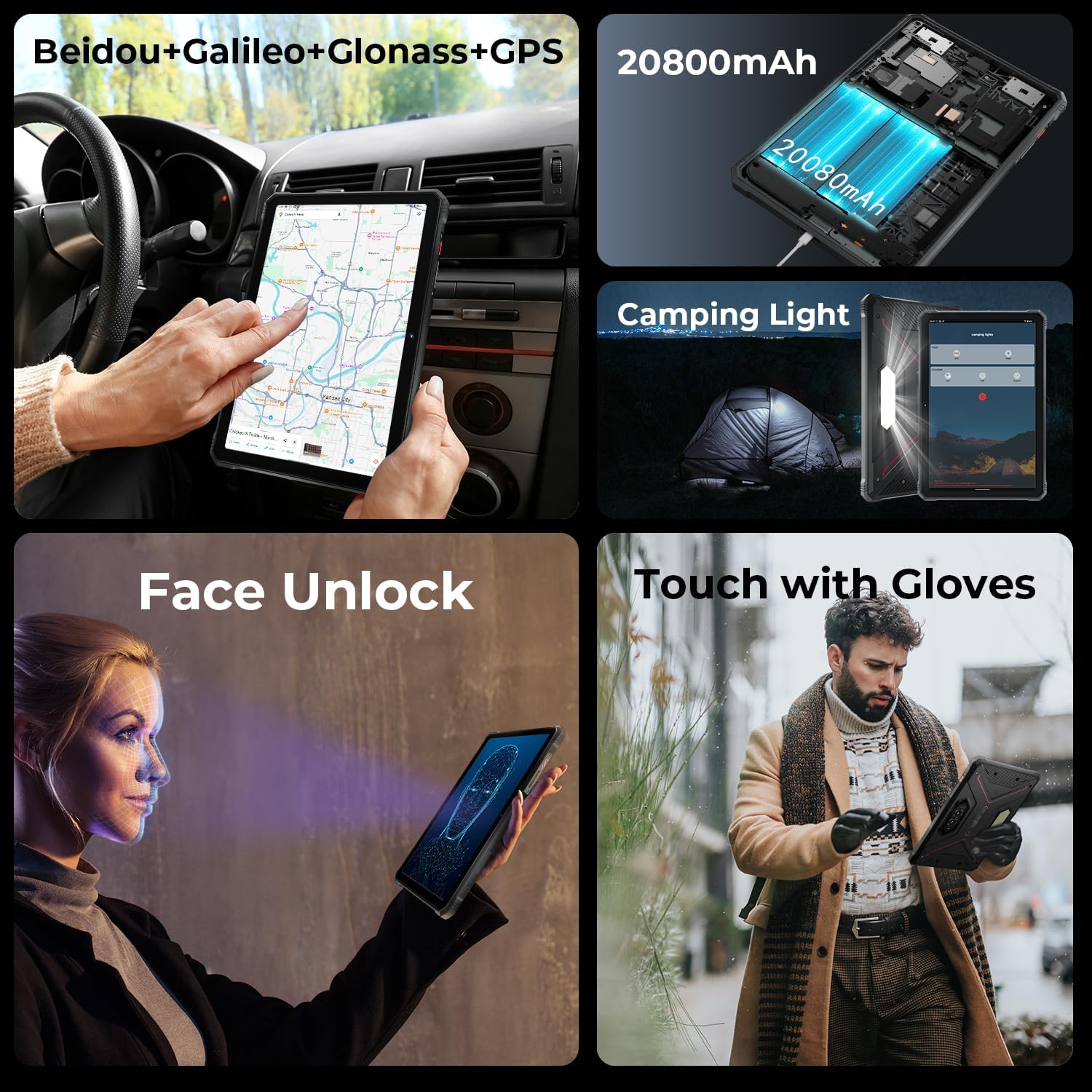
Image: A collage showing the tablet's GPS navigation, camping light in action, face unlock in progress, and a user operating the tablet with gloves.
5.5. خاصية الشريحة المزدوجة
The tablet supports two SIM cards, allowing you to manage two different phone numbers or network providers simultaneously. You can configure preferred SIM for calls, messages, and data in إعدادات > الشبكات والانترنت > بطاقات SIM.
6. استخدام الكاميرا
The HOTWAV R9 Pro is equipped with a 64MP rear camera and a 16MP front camera.
- فتح الكاميرا: Tap the Camera icon on the home screen or app drawer.
- تبديل الكاميرات: انقر على أيقونة تبديل الكاميرا للتبديل بين الكاميرا الأمامية والخلفية.
- التقاط الصور: اضغط على زر الغالق لالتقاط صورة.
- تسجيل مقاطع الفيديو: انتقل إلى وضع الفيديو واضغط على زر التسجيل لبدء/إيقاف التسجيل.
- إعدادات الكاميرا: Access various settings like resolution, flash, and modes from within the camera app.
7. جamping Light Functionality
The integrated 6W camping light provides powerful illumination.
- Activating the Light: جamping light can typically be activated via a dedicated button (if present) or through a quick settings toggle in the notification panel.
- Adjusting Brightness/Modes: Some models may offer adjustable brightness levels or different lighting modes. Refer to the on-screen controls once the light is activated.
8. الاتصال
- واي فاي: الاتصال بالشبكات اللاسلكية عبر إعدادات > الشبكات والانترنت > إنترنت.
- بلوتوث: قم بإقران الجهاز مع أجهزة البلوتوث (سماعات الرأس، مكبرات الصوت) عبر إعدادات > الأجهزة المتصلة > تفضيلات الاتصال > بلوتوث.
- نظام تحديد المواقع العالمي (GPS): The tablet supports Beidou, Galileo, Glonass, and GPS for accurate location services. Ensure location services are enabled in إعدادات > موقع.
9. الصيانة
- تنظيف: استخدمي قطعة قماش ناعمةamp cloth to clean the tablet's surface. Avoid harsh chemicals or abrasive materials.
- التعرض للماء: While waterproof, ensure all ports are securely closed before exposing the tablet to water. After water exposure, dry the tablet thoroughly, especially the charging port, before charging.
- درجة حرارة: Avoid exposing the tablet to extreme temperatures (hot or cold) for prolonged periods.
- تخزين: عند عدم استخدام القرص لفترات طويلة، يجب تخزينه في مكان بارد وجاف.
10. استكشاف الأخطاء وإصلاحها
| مشكلة | الحل المحتمل |
|---|---|
| الجهاز اللوحي لا يعمل. | تأكد من شحن البطارية. قم بتوصيل الجهاز بالشاحن لمدة 30 دقائق على الأقل. إذا استمر الجهاز في عدم الاستجابة، فأعد تشغيله قسراً بالضغط مع الاستمرار على زر التشغيل لمدة 10-15 ثانية. |
| الأداء بطيء. | Close unused applications. Clear cache regularly. Consider uninstalling unnecessary apps. Restart the tablet. |
| مشاكل في الاتصال بشبكة Wi-Fi. | قم بإيقاف تشغيل الواي فاي ثم أعد تشغيله. أعد تشغيل جهاز التوجيه (الراوتر). احذف الشبكة وأعد الاتصال بها. |
| يتم استنزاف البطارية بسرعة. | Reduce screen brightness. Close background apps. Disable unused features like GPS, Bluetooth, or Wi-Fi when not needed. Check battery usage in settings to identify power-hungry apps. |
| الكاميرا لا تعمل. | Ensure the camera app has necessary permissions. Restart the tablet. Clear the camera app's cache and data in إعدادات > التطبيقات. |
11. المواصفات
| ميزة | التفاصيل |
|---|---|
| نموذج | ار9 برو |
| نظام التشغيل | أندرويد 14 |
| حجم العرض | 11 بوصة |
| دقة الشاشة | 1200 × 1920 بكسل (FHD+) |
| المعالج | معالج Unisoc T606 ثماني النواة (1.6 جيجاهرتز) |
| معالج الرسوميات المساعد | Mali G57 MP1@650MHz |
| كبش | 20 جيجابايت (6 جيجابايت فعلي + 14 جيجابايت افتراضي) |
| التخزين الداخلي | 256 جيجا بايت |
| تخزين قابل للتوسيع | Up to 2TB (T-flash card) |
| الكاميرا الخلفية | 64MP (PDAF, f/1.8 aperture) |
| الكاميرا الأمامية | 16 ميجا بكسل |
| سعة البطارية | 20080 مللي أمبير |
| الشحن | 20W Fast Charge |
| غلظة | مقاوم للماء والغبار بمعيار IP68/IP69K، ومتوافق مع معيار MIL-STD-810H |
| الاتصال | Dual SIM, Wi-Fi, Bluetooth, GPS (Beidou, Galileo, Glonass) |
| Campالضوء | 6W (350 lumens, 246 LEDs) |
| الأبعاد (الطول × العرض × الارتفاع) | 10.61 × 0.7 × 7.16 بوصة |
| وزن | 2.35 رطل |
12. الضمان والدعم
HOTWAV offers comprehensive after-sales service for the R9 Pro Rugged Tablet:
- سياسة العائدات: 30-day no-reason return.
- ضمان: ضمان مجاني لمدة سنة واحدة.
- الدعم الفني: دعم فني مدى الحياة.
- الخدمة عبر الإنترنت: خدمة العملاء عبر الإنترنت 24/7.
For support, please contact HOTWAV customer service through their official channels or visit their webموقع.


