1. المقدمة
Thank you for choosing the TCL 32V4C 32-inch HD Smart QLED Android TV. This manual provides essential information for setting up, operating, and maintaining your new television. Please read it thoroughly before use and keep it for future reference.
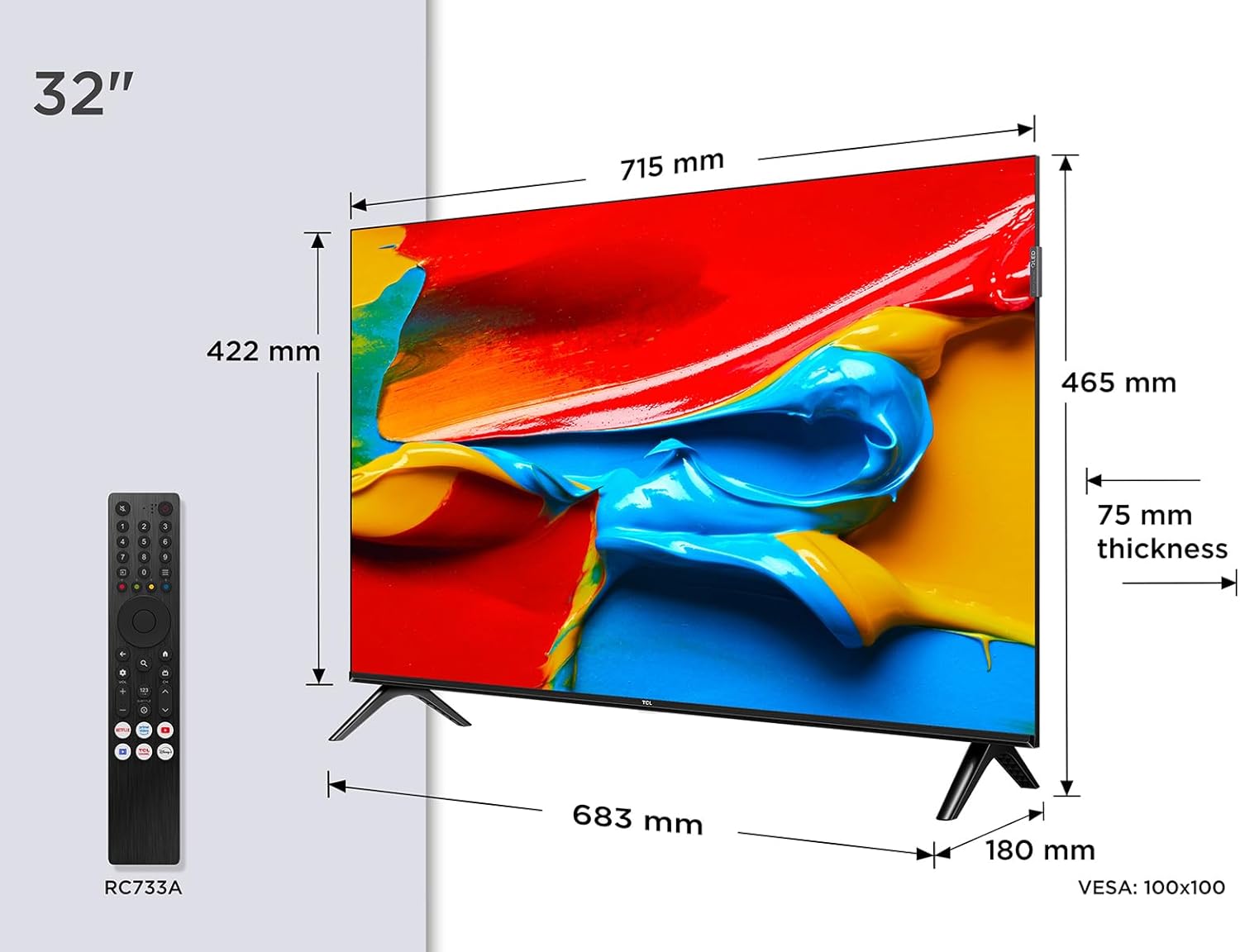
الصورة: الجبهة view of the TCL 32V4C 32-inch HD Smart QLED Android TV.
2. معلومات السلامة
اتبع دائمًا احتياطات السلامة الأساسية عند استخدام هذا المنتج لتقليل خطر الحريق والصدمة الكهربائية والإصابة.
- لا تعرض التلفزيون للمطر أو الرطوبة.
- لا تسد فتحات التهوية.
- تأكد من التوصيل الأرضي المناسب لسلك الطاقة.
- أبقِ التلفاز بعيداً عن أشعة الشمس المباشرة ومصادر الحرارة واللهب المكشوف.
- استخدم فقط المرفقات/الملحقات المحددة من قبل الشركة المصنعة.
- افصل التلفاز أثناء العواصف الرعدية أو عند عدم استخدامه لفترات طويلة.
3. ماذا يوجد في الصندوق
عند تفريغ الأمتعة، يرجى التأكد من وجود جميع العناصر التالية:
- TCL 32V4C 32-inch HD Smart QLED Android TV
- جهاز التحكم عن بعد
- كابل الطاقة
- حامل (مع براغي)
- دليل المستخدم (هذا المستند)
4. الإعداد
4.1. تركيب الحامل
Place the TV screen-down on a soft, flat surface. Attach the stand bases to the bottom of the TV using the provided screws. Ensure the stand is securely fastened.
4.2. التركيب على الحائط (اختياري)
If you choose to wall-mount your TV, please refer to the instructions provided with your wall-mount bracket. The TV supports VESA 100x100mm mounting. Ensure the wall mount is installed by qualified personnel.

Image: TCL 32V4C TV placed on its stand.
4.3. توصيل الأجهزة
Connect your external devices (e.g., cable box, Blu-ray player, gaming console) to the TV's ports. The TCL 32V4C features multiple connectivity options including HDMI, USB, Ethernet, and Wi-Fi.

Image: Close-up of the TCL 32V4C TV's connectivity ports, including HDMI, USB, Optical, Cable, Satellite, AV Input, Headphone, and CI Slot.
- HDMI: قم بتوصيل الأجهزة عالية الدقة.
- USB: لتشغيل الوسائط من محركات أقراص USB.
- إيثرنت/واي فاي: For internet connection and Smart TV features.
- الهوائي/القمر الصناعي: Connect your antenna or satellite dish for broadcast TV.
4.4. التشغيل الأولي والتكوين
Plug the power cable into the TV and a power outlet. Press the power button on the remote control. Follow the on-screen instructions to select your language, connect to a network, and complete the initial setup of Android TV.
5. تعليمات التشغيل
5.1. مميزات تلفزيون أندرويد
Your TCL 32V4C TV comes with Android TV, providing access to a vast library of content. You can stream from popular services, use Google Cast to mirror content from your smart devices, and utilize Google Home compatibility for voice control.

Image: Screenshot of the Android TV interface displaying various streaming applications and content.
5.2. Picture Quality (QLED & HDR)
The QLED technology uses quantum dots to deliver intense, vibrant colors and exceptional visual perception. Combined with Direct LED backlighting, this ensures improved image quality and brightness. HDR (High Dynamic Range) further enhances contrast and detail, especially in bright and dark scenes.

Image: Visual explanation of TCL QLED technology, highlighting vibrant colors compared to traditional displays.

Image: Demonstrates the enhanced detail and contrast provided by HDR 10 technology.
5.3. جودة الصوت (دولبي أوديو)
Experience high-quality, immersive sound thanks to the integrated Dolby Audio processing. This technology ensures clear and detailed audio for all your entertainment, from movies to sports.

Image: Visual representation of immersive Dolby Audio technology.
5.4. Multiple Viewوسائط جي
The TV offers personalized viewing modes to optimize your experience for different content types:
- وضع اللعبة: يقلل من تأخير الإدخال لتجربة لعب أكثر استجابة.
- الوضع الرياضي: Enhances motion clarity and color for live sports.
- وضع الفيلم: Optimizes picture settings for cinematic viewعمل.

Image: Depiction of various viewing modes (Game, Sports, Movie) available on the TV.
5.5. فيديو المنتج الرسمي
Video: An official TCL video showcasing features like QLED, HDR, Android TV, and Slim Design. This video provides a visual overview of the TV's capabilities and user experience.
6. الصيانة
6.1. تنظيف الشاشة
امسح الشاشة برفق بقطعة قماش ناعمة وخالية من الوبر. لإزالة البقع الصعبة، امسح برفقampاغسل قطعة القماش بالماء أو بمنظف شاشات متخصص. لا ترش السائل مباشرةً على الشاشة.
6.2. تنظيف الخزانة
Wipe the TV cabinet with a soft, dry cloth. Avoid using abrasive cleaners or solvents that may damage the finish.
6.3. إدارة الكابلات
Ensure all cables are neatly organized and not tangled to prevent damage or accidental disconnections.
7. استكشاف الأخطاء وإصلاحها
إذا واجهت مشكلات مع التلفزيون الخاص بك، فراجع المشكلات والحلول الشائعة التالية:
| مشكلة | الحل المحتمل |
|---|---|
| لا يوجد طاقة | تأكد من توصيل كابل الطاقة بإحكام وأن مأخذ الطاقة يعمل. |
| لا توجد صورة/صوت | Verify input source, check cable connections, and ensure volume is not muted. |
| جهاز التحكم عن بعد لا يعمل | Replace batteries, ensure no obstructions between remote and TV, and check remote sensor. |
| جودة الصورة رديئة | Adjust picture settings (brightness, contrast, sharpness), check antenna/cable signal. |
| لا يمكن الاتصال بشبكة Wi-Fi | Restart your router, check Wi-Fi password, or try a wired Ethernet connection. |
8. المواصفات
المواصفات الفنية التفصيلية لتلفزيون TCL 32V4C:
| ميزة | وصف |
|---|---|
| ماركة | تي سي إل |
| رقم الموديل | 5901292526764 |
| حجم الشاشة | 32 بوصة |
| تكنولوجيا الشاشة | تلفزيون كيو إل إي دي |
| دقة | 2K (HD) |
| معدل التحديث | 60 هرتز |
| المميزات الخاصة | QLED, Android TV, HDR |
| تكنولوجيا الاتصال | بلوتوث، إيثرنت، HDMI، USB، واي فاي |
| نسبة العرض إلى الارتفاع | 16:9 |
| أبعاد المنتج | 18 × 71.5 × 46.5 سم |
| وزن | 5 كجم |
| تقييم كفاءة الطاقة | F |
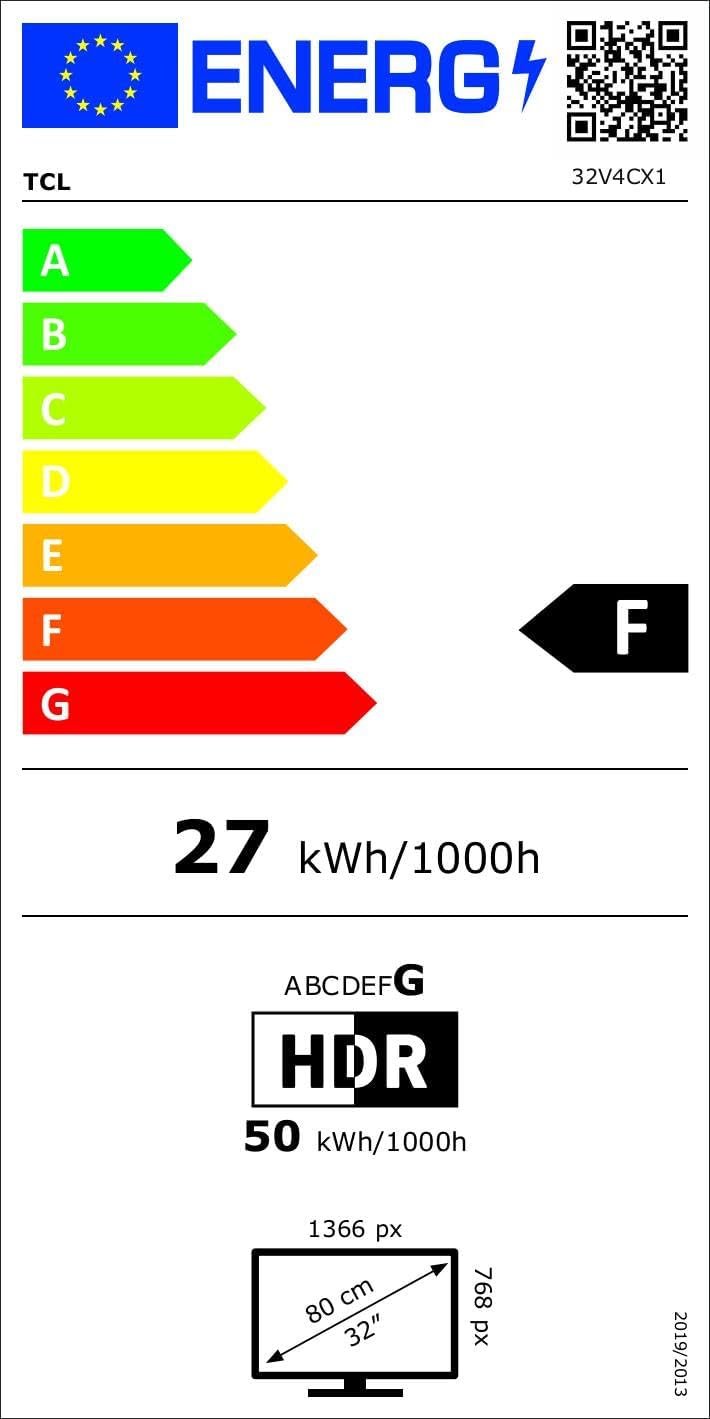
Image: Energy efficiency label for the TCL 32V4C TV, showing a rating of F and energy consumption details. For more details, visit the قاعدة بيانات EPREL.
9. الضمان والدعم
Your TCL 32V4C TV comes with a 2-year general warranty from the manufacturer. For specific warranty terms, service, or technical support, please refer to the warranty card included with your product or visit the official TCL support webموقع.
For spare parts and software/firmware updates, availability is guaranteed for 8 years from the date of market introduction.


