1. المقدمة
Thank you for choosing the Ewent EW3295 Backlit Wireless Keyboard. This full-size keyboard offers versatile connectivity options, including Bluetooth 5.0 and 2.4GHz wireless, allowing you to connect up to three devices simultaneously. Its slim design, silent keys, and adjustable backlight provide a comfortable and efficient typing experience. This manual provides detailed instructions for setup, operation, and maintenance to ensure optimal performance of your keyboard.

Figure 1.1: Slim and sturdy design of the EW3295 keyboard.
2. الميزات الرئيسية
- Wireless Multi-Device Connection: Connect up to 3 devices simultaneously via Bluetooth 5.0 (x2) or wireless 2.4 GHz. Easily switch between devices with just one button.
- إضاءة خلفية قابلة للتعديل: The keyboard's backlight is dimmable and can be turned off completely, ideal for various lighting conditions.
- Flat & Quiet Design: Flat, silent keys ensure a comfortable and low-noise typing experience, suitable for quiet environments.
- 12 مفاتيح الوسائط المتعددة: Quick access to functions like volume control, email, and other operations.
- بطارية قابلة للشحن تدوم طويلاً: Equipped with a 300mAh lithium battery and intelligent energy-saving function for extended use.
- التوافق الواسع: Compatible with Windows (XP, 7, 8.1, 10, 11) and Android, suitable for PCs, laptops, and tablets.
- تصميم قوي ودائم: Made of high-density polycarbonate, lightweight yet durable, with a compact design.
- Italian Layout: Features an Italian QWERTY keyboard layout.
3. محتويات العبوة
يرجى التحقق من محتويات العبوة عند فتح الصندوق:
- Ewent EW3295 Backlit Wireless Keyboard
- USB-A 2.4GHz Wireless Receiver
- كابل شحن USB-C إلى USB-A
- دليل المستخدم (هذا المستند)
4. دليل الإعداد
4.1 شحن لوحة المفاتيح
The EW3295 keyboard is equipped with a built-in rechargeable 300mAh lithium battery. Before first use, it is recommended to fully charge the keyboard.
- Locate the USB Type-C charging port on the rear panel of the keyboard.
- Connect one end of the provided USB-C charging cable to the keyboard's USB-C port.
- Connect the other end of the USB-A cable to a USB power source (e.g., computer USB port, USB wall adapter).
- The charging indicator light (if present) will illuminate during charging and turn off when fully charged. A full charge takes less than 1 hour and provides over 1 month of use.

Figure 4.1: Rear panel of the keyboard with charging port and receiver compartment.
4.2 توصيل لوحة المفاتيح
The EW3295 keyboard supports three connection modes: 2.4GHz wireless and two Bluetooth 5.0 channels (BT1, BT2). You can connect up to three devices and switch between them.
اتصال لاسلكي 4.2.1 2.4 جيجاهرتز
- Locate the USB-A wireless receiver, typically stored in a compartment on the rear panel of the keyboard.
- قم بتوصيل جهاز استقبال USB-A بمنفذ USB متاح على جهاز الكمبيوتر أو الجهاز الخاص بك.
- اضغط على Fn + 1 keys on the keyboard to switch to 2.4GHz mode. The indicator light for channel 1 will illuminate.
- يجب أن تتصل لوحة المفاتيح بجهازك تلقائيًا.

Figure 4.2: Ewent EW3295 keyboard and its USB wireless receiver.
4.2.2 اتصال البلوتوث (BT1 / BT2)
- اضغط على Fn + 2 keys to select Bluetooth channel 1 (BT1) or Fn + 3 keys to select Bluetooth channel 2 (BT2). The corresponding indicator light will flash, indicating pairing mode.
- على جهازك (الكمبيوتر الشخصي، الكمبيوتر المحمول، الجهاز اللوحي)، قم بتمكين البلوتوث وابحث عن أجهزة جديدة.
- Select "EW3295" or a similar name from the list of available Bluetooth devices.
- Follow any on-screen prompts to complete the pairing process. Once connected, the indicator light will stop flashing and remain solid.
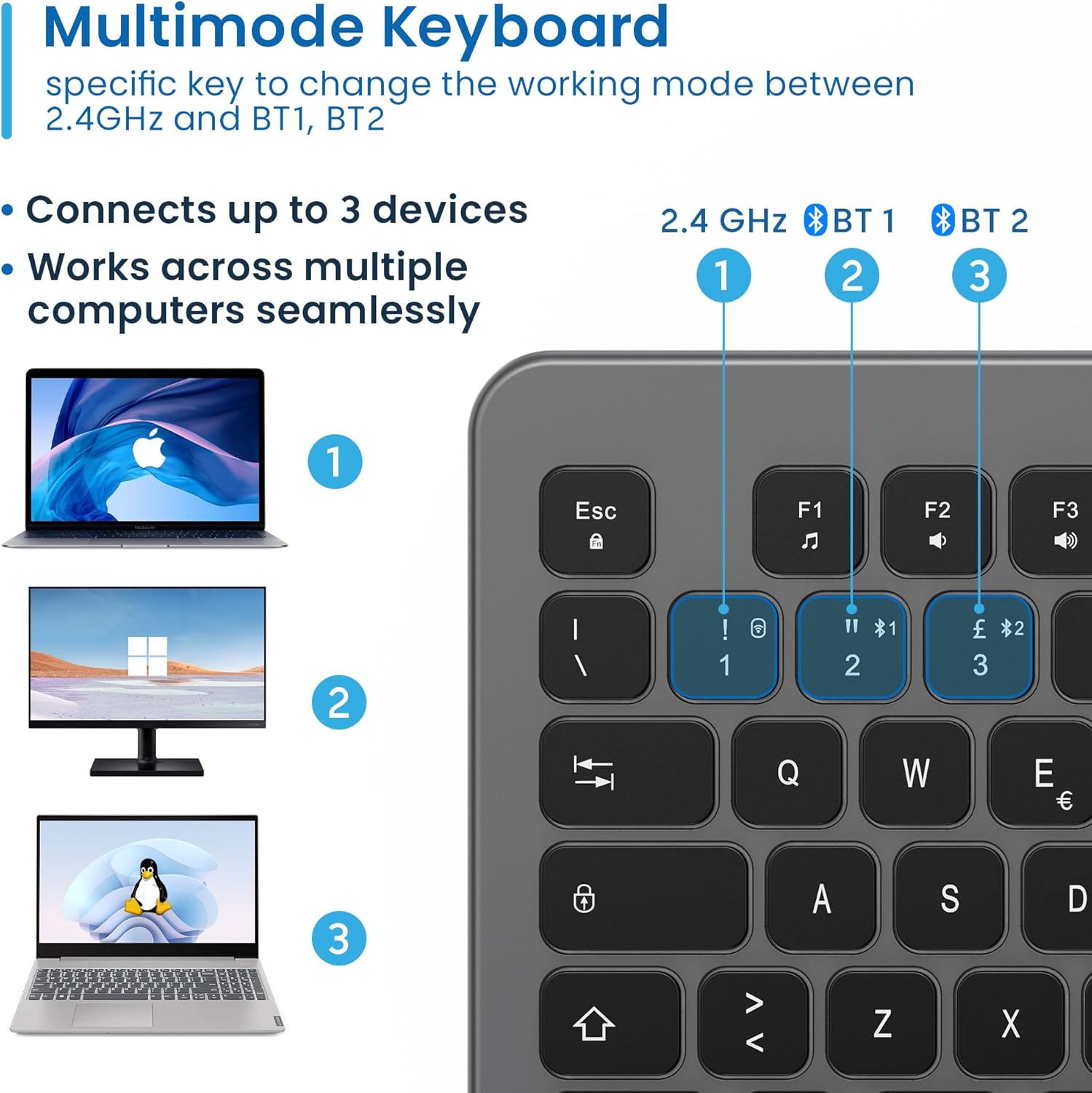
Figure 4.3: Multi-device connectivity options for the EW3295 keyboard.
4.2.3 التبديل بين الأجهزة المتصلة
Once multiple devices are paired, you can easily switch between them:
- يضعط Fn + 1 to switch to the 2.4GHz connected device.
- يضعط Fn + 2 to switch to the Bluetooth 1 connected device.
- يضعط Fn + 3 to switch to the Bluetooth 2 connected device.
5. تعليمات التشغيل
5.1 الطباعة الأساسية
The EW3295 features a full-size Italian QWERTY layout. Its flat and silent keys provide a comfortable and precise typing experience, reducing noise in quiet environments.

Figure 5.1: Illuminated Italian QWERTY Keyboard Layout.

Figure 5.2: Silent keys for reduced noise.
5.2 التحكم في الإضاءة الخلفية
The keyboard features an adjustable backlight for improved visibility in low-light conditions.
- تشغيل / إيقاف الإضاءة الخلفية: اضغط على كتلة سكور key (often labeled with a lightbulb icon) to toggle the backlight on or off.
- Backlight Brightness Up: يضعط Fn + Pag ↑ لزيادة سطوع الإضاءة الخلفية.
- Backlight Brightness Down: يضعط Fn + Pag ↓ لتقليل سطوع الإضاءة الخلفية.
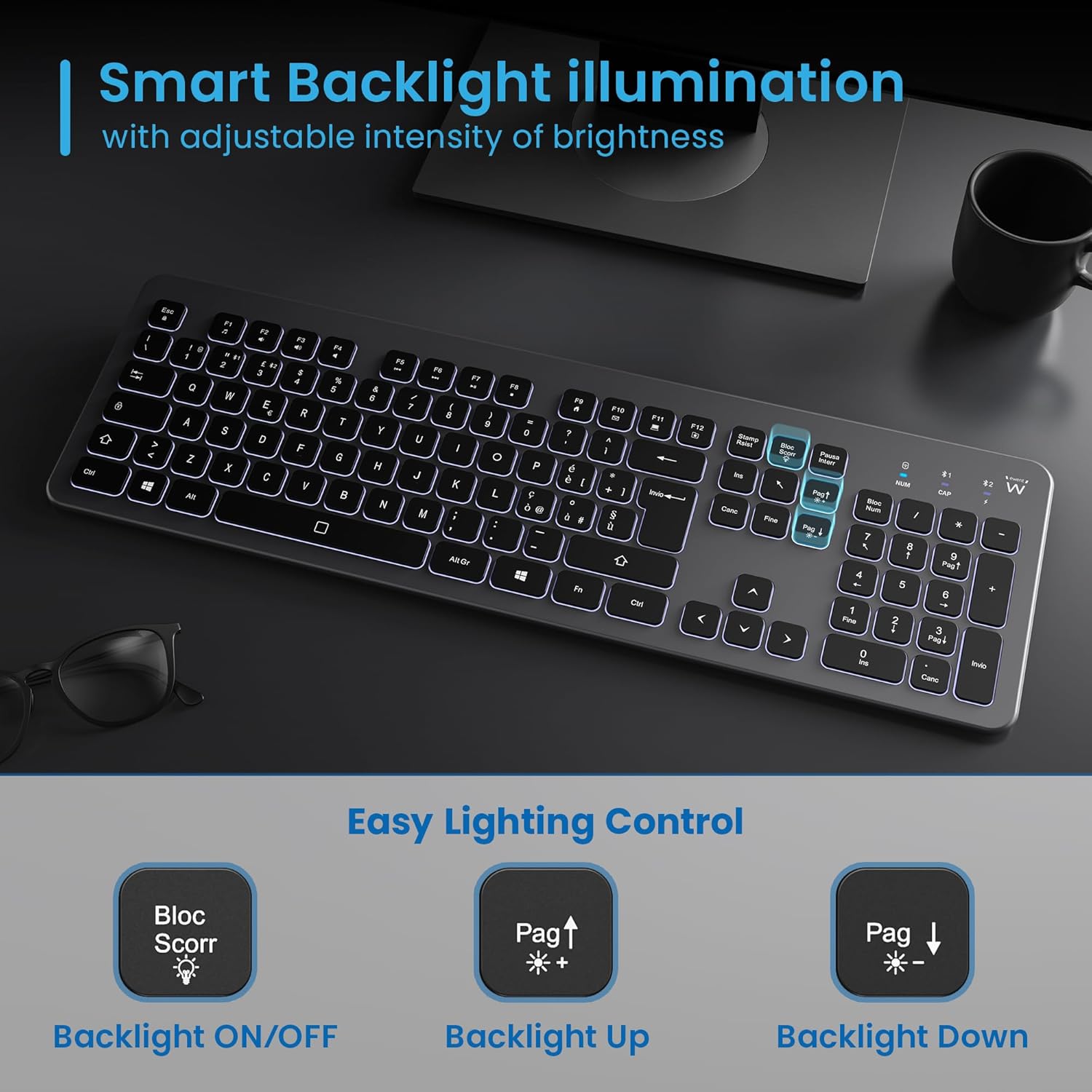
Figure 5.3: Backlight control keys.
5.3 مفاتيح الوسائط المتعددة
The keyboard includes 12 dedicated multimedia keys (F1-F12) that provide quick access to various functions. To use these functions, press the Fn اضغط على المفتاح بالتزامن مع مفتاح الوظائف المطلوب.
| مجموعة المفاتيح | وظيفة |
|---|---|
| فن + F1 | مشغل الوسائط |
| فن + F2 | خفض الصوت |
| فن + F3 | رفع الصوت |
| فن + F4 | صامت |
| فن + F5 | المسار السابق |
| فن + F6 | المسار التالي |
| فن + F7 | تشغيل/إيقاف مؤقت |
| فن + F8 | قف |
| فن + F9 | الصفحة الرئيسية |
| فن + F10 | بريد إلكتروني |
| فن + F11 | جهاز الكمبيوتر الخاص بي |
| فن + F12 | آلة حاسبة |
6. الصيانة والعناية
تضمن الصيانة المناسبة طول عمر لوحة المفاتيح لديك وأدائها الأمثل.
- تنظيف: استخدم قطعة قماش ناعمة وجافة وخالية من الوبر لتنظيف سطح لوحة المفاتيح. لإزالة الأوساخ المستعصية، افركها برفق.ampاغسل القماش بالماء أو بمنظف لطيف غير كاشط. تجنب الرطوبة الزائدة.
- تجنب السوائل: Do not spill liquids on the keyboard. In case of accidental spills, immediately disconnect the keyboard and allow it to dry completely before re-using.
- تخزين: عند عدم الاستخدام لفترات طويلة، قم بتخزين لوحة المفاتيح في مكان بارد وجاف بعيدًا عن أشعة الشمس المباشرة ودرجات الحرارة القصوى.
- العناية بالبطارية: To prolong battery life, avoid fully discharging the battery frequently. Charge the keyboard when the low battery indicator appears.
- مساحة تخزين جهاز الاستقبال: When transporting the keyboard, store the USB wireless receiver in its dedicated compartment on the rear panel to prevent loss.
7. استكشاف الأخطاء وإصلاحها
If you encounter issues with your EW3295 keyboard, please refer to the following common solutions:
| مشكلة | السبب المحتمل | حل |
|---|---|---|
| Keyboard not responding (2.4GHz) | Low battery; Receiver not plugged in; Incorrect channel selected. | Charge the keyboard; Ensure USB receiver is securely plugged in; Press Fn + 1 to select 2.4GHz mode. |
| لوحة المفاتيح لا تستجيب (بلوتوث) | Low battery; Bluetooth not enabled on device; Not paired; Incorrect channel selected. | Charge the keyboard; Enable Bluetooth on your device; Re-pair the keyboard (see Section 4.2.2); Press Fn + 2 or Fn + 3 to select the correct Bluetooth channel. |
| الإضاءة الخلفية لا تعمل | تم إيقاف تشغيل الإضاءة الخلفية؛ انخفاض مستوى البطارية. | يضعط كتلة سكور to turn on/off; Increase brightness with Fn + Pag ↑; Charge the keyboard. |
| المفاتيح ملتصقة أو لا تستجيب | Dirt or debris under keys; Physical damage. | Clean the keyboard (see Section 6); If physical damage, contact support. |
| عمر البطارية قصير | Frequent backlight use; Battery degradation over time. | Reduce backlight brightness or turn it off when not needed; Ensure full charge cycles. |
8. المواصفات
| ميزة | التفاصيل |
|---|---|
| اسم الموديل | Tastiera Wireless Retroilluminata EW3295 |
| رقم موديل العنصر | EW3295 |
| ماركة | Ewent |
| تكنولوجيا الاتصال | Bluetooth 5.0 (x2), 2.4GHz Wireless |
| وصف لوحة المفاتيح | Multimedia, Full-size, Italian Layout |
| الأجهزة المتوافقة | PC (Windows XP, 7, 8.1, 10, 11), Android |
| نوع البطارية | بطارية ليثيوم قابلة للشحن 300mAh |
| الإضاءة الخلفية | شدة قابلة للتعديل |
| الأبعاد (الطول × العرض × الارتفاع) | تقريبا. شنومكسم x شنومكسم x شنومكسم |
| وزن | حوالي 390 جرام |
| مادة | High-density Polycarbonate |

Figure 8.1: Keyboard dimensions and weight.
9. معلومات الضمان
Ewent products are designed and manufactured to the highest quality standards. This product is covered by a limited warranty from the date of purchase. Please refer to the warranty card included with your product or visit the official Ewent webللاطلاع على شروط وأحكام الضمان التفصيلية الخاصة بمنطقتك، يرجى زيارة الموقع الإلكتروني. يغطي الضمان عادةً عيوب المواد والتصنيع في ظل الاستخدام العادي.
10. دعم العملاء
For technical support, troubleshooting assistance, or any questions regarding your Ewent EW3295 keyboard, please contact Ewent customer support. You can typically find contact information (phone, email, support portal) on the official Ewent webالموقع أو في عبوة المنتج.
Please have your product model number (EW3295) and purchase details ready when contacting support.


