1. المقدمة
Thank you for choosing the Infiniity DM56 Sport Smartwatch. This device is designed to enhance your active lifestyle with advanced fitness tracking, health monitoring, and smart connectivity features. Equipped with a vibrant 1.43-inch AMOLED display, built-in GPS, and comprehensive health sensors, the DM56 is your reliable companion for both daily wear and intense workouts.
This manual provides detailed instructions on how to set up, operate, maintain, and troubleshoot your smartwatch to ensure optimal performance and longevity.

الصورة 1.1: الجبهة view of the Infiniity DM56 Sport Smartwatch, showcasing its round AMOLED display and rugged design.
2. ماذا يوجد في الصندوق
Upon opening your Infiniity DM56 Sport Smartwatch package, please ensure all the following items are present:
- Infiniity DM56 Sport Smartwatch
- كابل الشحن
- دليل المستخدم (هذا المستند)
3. الإعداد
3.1 شحن الساعة الذكية
Before first use, fully charge your DM56 smartwatch. A full charge typically takes approximately 2 hours.
- Connect the magnetic charging cable to the charging contacts on the back of the smartwatch. Ensure the pins align correctly.
- قم بتوصيل الطرف USB الخاص بكابل الشحن بمحول طاقة USB قياسي (يوصى بـ 5 فولت/1 أمبير) أو منفذ USB الخاص بالكمبيوتر.
- The watch display will show a charging indicator. Once fully charged, the indicator will change or disappear.
3.2 الاقتران بهاتفك الذكي
To unlock the full potential of your DM56 smartwatch, you need to pair it with your smartphone via Bluetooth using the dedicated companion application. The DM56 is compatible with Android 5.0+ and iOS 11 and above.
- تنزيل التطبيق: بحث عن the official Infiniity companion app (refer to the packaging or quick start guide for the exact app name) on the Google Play Store (for Android) or Apple App Store (for iOS) and install it.
- تمكين البلوتوث: تأكد من تمكين Bluetooth على هاتفك الذكي.
- افتح التطبيق: Launch the companion app on your smartphone and follow the on-screen instructions to create an account or log in.
- إضافة جهاز: Within the app, navigate to the 'Add Device' or 'Pair Device' section. The app will search for available smartwatches.
- Select DM56: Select 'DM56' from the list of found devices. A pairing request may appear on both your phone and the watch. Confirm the pairing on both devices.
- الإعداد الكامل: Once paired, the app will guide you through initial settings, such as profile information, notification permissions, and data synchronization.
4. تشغيل الساعة الذكية
4.1 الملاحة الأساسية
The DM56 features a responsive touchscreen and physical buttons for intuitive control.
- شاشة تعمل باللمس: اسحب لأعلى أو لأسفل أو لليسار أو لليمين للتنقل بين القوائم والإشعارات. انقر لتحديد العناصر.
- الأزرار المادية: The watch has multiple buttons, typically labeled 'SPORT', 'SEL', 'BACK', and a dedicated 'GPS' button. Their functions may vary depending on the current screen or mode.
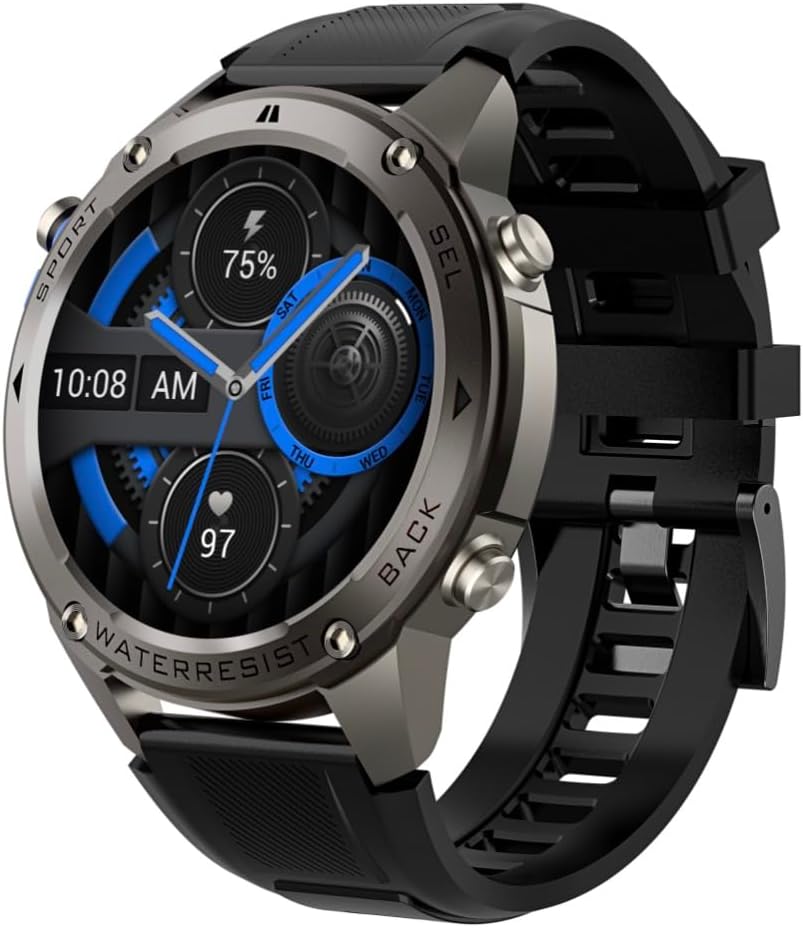
الصورة 4.1: الجانب view of the Infiniity DM56 Sport Smartwatch, highlighting the physical control buttons.
4.2 ميزات العرض
The 1.43-inch AMOLED display offers vibrant colors and deep blacks with a resolution of 466x466 pixels.
- شاشة عرض دائمة التشغيل: The DM56 supports Always-On Display functionality, allowing you to see the time and essential information at a glance without needing to raise your wrist or press a button. This feature can be configured in the watch settings.

Image 4.2: The Infiniity DM56 Sport Smartwatch display, showcasing a typical watch face with various data points.
4.3 Built-in GPS & Compass
The DM56 features dual-frequency GPS (L1+L5) and supports multiple satellite systems (GPS, GLONASS, BDS, Galileo, NAVIC, QZSS) for precise outdoor tracking. A built-in compass further aids navigation.
- تتبع نظام تحديد المواقع: When starting an outdoor activity (e.g., running, cycling), the watch will automatically attempt to acquire a GPS signal. Ensure you are in an open area for faster signal acquisition. Your route, distance, and pace will be recorded.
- بوصلة: Access the compass feature from the watch's menu to get real-time directional information.

Image 4.3: The Infiniity DM56 Sport Smartwatch from an angle, highlighting the dedicated GPS button on the side.

الصورة 4.4: لقطة مقربة view of the GPS button on the Infiniity DM56 Sport Smartwatch, indicating its function.
4.4 مراقبة الصحة على مدار اليوم
The DM56 is equipped with the VC30F sensor for continuous health monitoring.
- رصد معدل ضربات القلب: Track your heart rate in real-time throughout the day. View your current heart rate on the watch face or in the dedicated heart rate app.
- مراقبة الأكسجين في الدم (SpO2): قم بقياس مستويات تشبع الأكسجين في الدم.
- تتبع النوم: The watch automatically monitors your sleep patterns, including deep sleep, light sleep, and awake times. View تحليل مفصل للنوم في التطبيق المصاحب.
- تتبع الإجهاد: راقب مستويات التوتر لديك على مدار اليوم.
- عداد الخطى: Counts your daily steps, distance, and estimated calories burned.
Note: The Infiniity DM56 Smartwatch is NOT A MEDICAL DEVICE. All health monitoring data is for reference only and should not be used for medical diagnosis or treatment.
4.5 وضعًا رياضيًا
The DM56 offers over 170 customizable sports modes, with 14 built-in modes such as outdoor running, cycling, and swimming. You can add up to 10 additional modes manually via the companion app.
- بدء النشاط: Navigate to the 'Workout' or 'Sports' menu on the watch, select your desired activity, and tap to start.
- أثناء النشاط: The watch will display real-time metrics such as duration, distance, heart rate, and calories burned.
- Ending Activity: Swipe or press the designated button to pause or end the activity. Your workout data will be saved and synchronized with the app.
4.6 Smart Notifications & Calls
Once paired with your smartphone, the DM56 can receive notifications and handle calls directly on your wrist.
- إشعارات: Receive alerts for incoming calls, SMS messages, and app notifications (e.g., social media, email). Configure which app notifications you want to receive in the companion app.
- Make/Answer Call: The DM56 allows you to make and answer calls directly from the watch, utilizing its built-in microphone and speaker. Ensure the watch is connected to your phone via Bluetooth.
5. الصيانة
5.1 تصنيف مقاومة الماء
The DM56 has a 5ATM waterproof rating, meaning it can withstand water pressures equivalent to a depth of 50 meters. This makes it suitable for swimming, showering, and other water-based activities. However, it is not recommended for diving or high-pressure water activities.
- Avoid exposing the watch to hot water, steam, or strong detergents.
- بعد تعرض الساعة للماء المالح، اشطفها بالماء العذب وجففها جيداً.
5.2 التنظيف والعناية
للحفاظ على مظهر ووظائف ساعتك الذكية:
- نظف جسم الساعة وسوارها بانتظام بقطعة قماش ناعمة.amp قطعة قماش.
- تأكد من أن نقاط التلامس الخاصة بالشحن الموجودة في الجزء الخلفي من الساعة نظيفة وجافة قبل الشحن.
- تجنب استخدام المنظفات الكاشطة أو المذيبات.
5.3 تحسين عمر البطارية
The DM56 is powered by a 500mAh high-voltage battery, offering extended usage. To maximize battery life:
- اضبط سطوع الشاشة على مستوى أقل.
- Limit the use of Always-On Display if not essential.
- قم بإيقاف تشغيل الإشعارات غير الضرورية.
- قم بتعطيل مراقبة معدل ضربات القلب المستمرة إذا لم تكن هناك حاجة لذلك على مدار الساعة طوال أيام الأسبوع.
6. استكشاف الأخطاء وإصلاحها
If you encounter issues with your Infiniity DM56 smartwatch, try the following common solutions:
- الساعة لا تعمل: تأكد من شحن الساعة بالكامل. وصّلها بالشاحن وانتظر بضع دقائق قبل إعادة تشغيلها.
- لا يمكن الاقتران بالهاتف:
- تأكد من تمكين البلوتوث على هاتفك والساعة.
- تأكد من أن الساعة موجودة ضمن نطاق البلوتوث الخاص بهاتفك.
- أعد تشغيل كل من الساعة والهاتف.
- قم بمسح ذاكرة التخزين المؤقت للبلوتوث على هاتفك (أندرويد) أو قم بحذف الجهاز وإعادة إقرانه.
- تأكد من تحديث التطبيق المصاحب إلى أحدث إصدار.
- بيانات صحية غير دقيقة:
- تأكد من ارتداء الساعة بشكل مريح على معصمك، وليس ضيقًا جدًا أو فضفاضًا جدًا.
- قم بتنظيف المستشعر الموجود على الجزء الخلفي من الساعة.
- Note that environmental factors and individual physiology can affect readings. Remember, it is not a medical device.
- الإشعارات غير المستلمة:
- تحقق من إعدادات الإشعارات في التطبيق المصاحب.
- Ensure the app has necessary permissions on your phone (e.g., notification access).
- Verify that the watch is connected to your phone.
- عمر بطارية قصير: راجع القسم 5.3 للحصول على نصائح لتحسين البطارية.
إذا استمرت المشكلة بعد تجربة هذه الخطوات، يرجى الاتصال بدعم العملاء للحصول على مزيد من المساعدة.
7. المواصفات
| ميزة | مواصفة |
|---|---|
| رقم الموديل | د م 56 |
| عرض | 1.43-inch AMOLED, 466x466 pixels |
| أجهزة الاستشعار | Heart Rate (VC30F), Accelerometer (STK8321), Magnetometer (Compass), Barometer+Altitude (SPL07-03) |
| الاتصال | بلوتوث 5.3 |
| سعة البطارية | 500 مللي أمبير |
| مستوى مقاومة الماء | 5 أجهزة الصراف الآلي |
| التوافق | Android 5.0+ and iOS 11 and above |
| وزن العنصر | 3 أونصات |
| أبعاد الحزمة | 4.25 × 4.25 × 2.8 بوصة |
| نظام التشغيل | Android Wear 2.7 (Note: This refers to the underlying OS, not necessarily full Android Wear functionality) |
| نظام تحديد المواقع العالمي (جي بي اس) | Built-in GPS (L1+L5 dual-frequency) |
| شكل | دائري |
| نوع البطارية | Nonstandard Battery, Lithium Ion |
8. الضمان والدعم
The Infiniity DM56 Sport Smartwatch comes with a standard manufacturer's warranty. Please refer to the warranty card included in your product packaging for specific terms and conditions, including warranty duration and coverage details.
For technical support, troubleshooting assistance beyond what is covered in this manual, or warranty claims, please contact Infiniity customer service through the contact information provided on the product packaging or the official Infiniity webموقع.
يرجى الاحتفاظ بإثبات الشراء لأغراض الضمان.


