مقدمة
This user manual provides detailed instructions for the FREEWOLF T96 Smart Display Wireless Gaming Keyboard and Mouse Combo. This combo is designed for a seamless and responsive experience across various devices and applications, from gaming to office work.
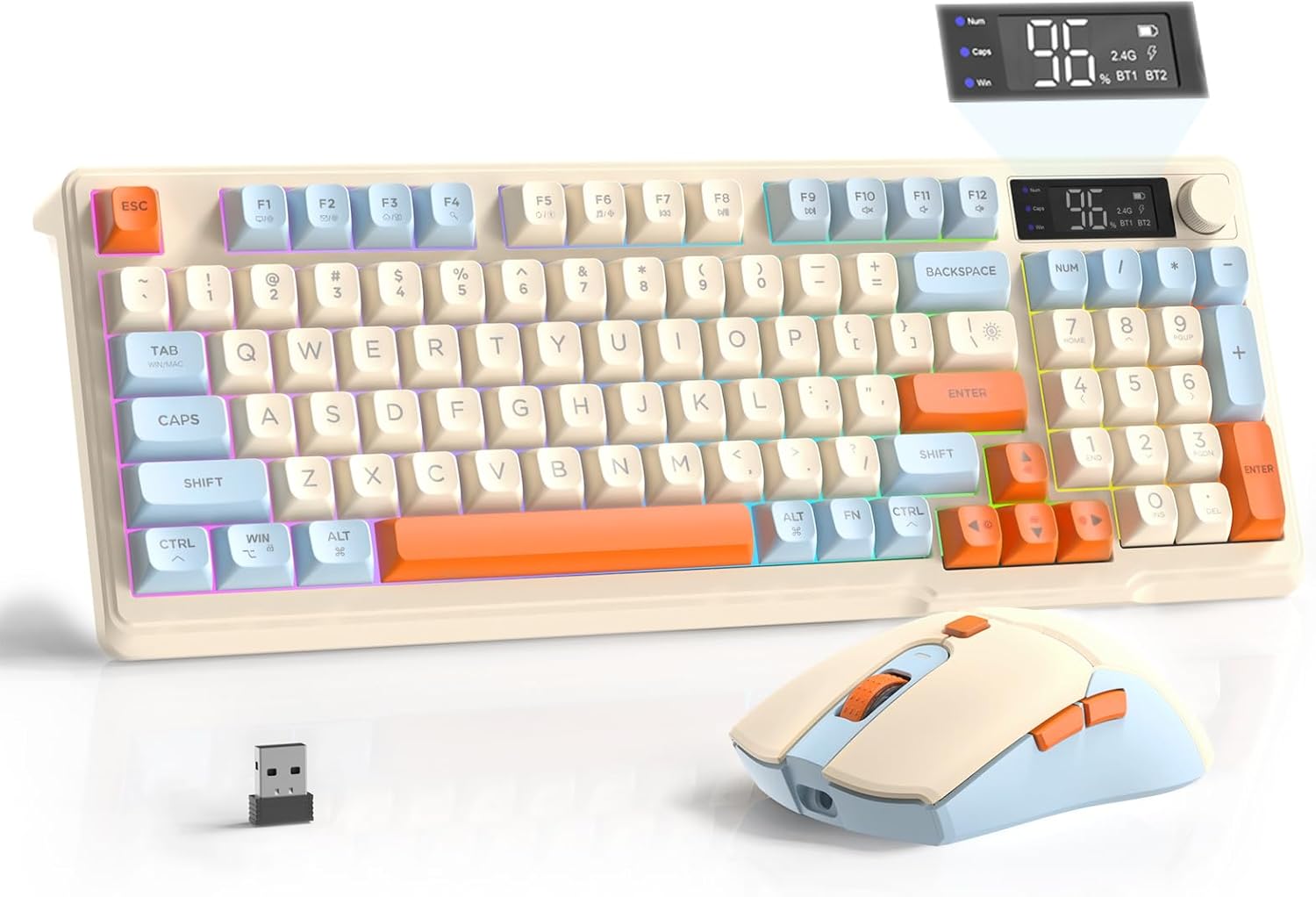
Image: The FREEWOLF T96 Wireless Gaming Keyboard and Mouse Combo, featuring the keyboard, mouse, and USB receiver.
محتويات الحزمة
تأكد من وجود جميع العناصر في العبوة:
- 1 x T96 Membrane Keyboard
- 1 x T96 Wireless Mouse
- 1 × كابل USB-C
- 1 x USB Receiver (stored in mouse bottom slot)
- 1 × دليل المستخدم
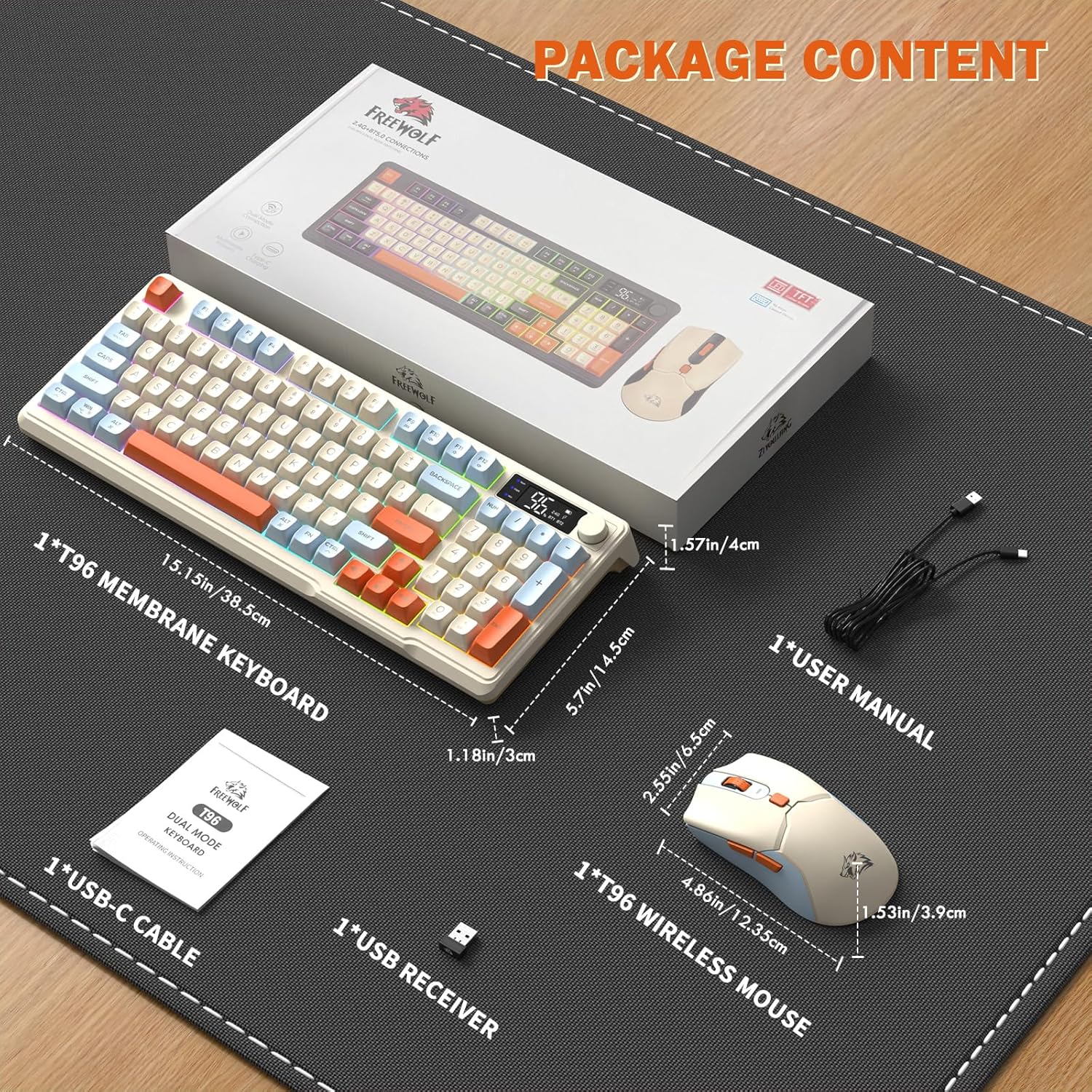
Image: A visual representation of the package contents, including the keyboard, mouse, USB-C cable, USB receiver, and user manual.
يثبت
خيارات الاتصال
The T96 combo supports dual-mode wireless connectivity:
- اتصال لاسلكي 2.4G: Utilizes the included USB receiver for a stable, plug-and-play connection.
- Bluetooth Connections (BT1/BT2): Allows pairing with up to two Bluetooth-enabled devices, enabling seamless switching.
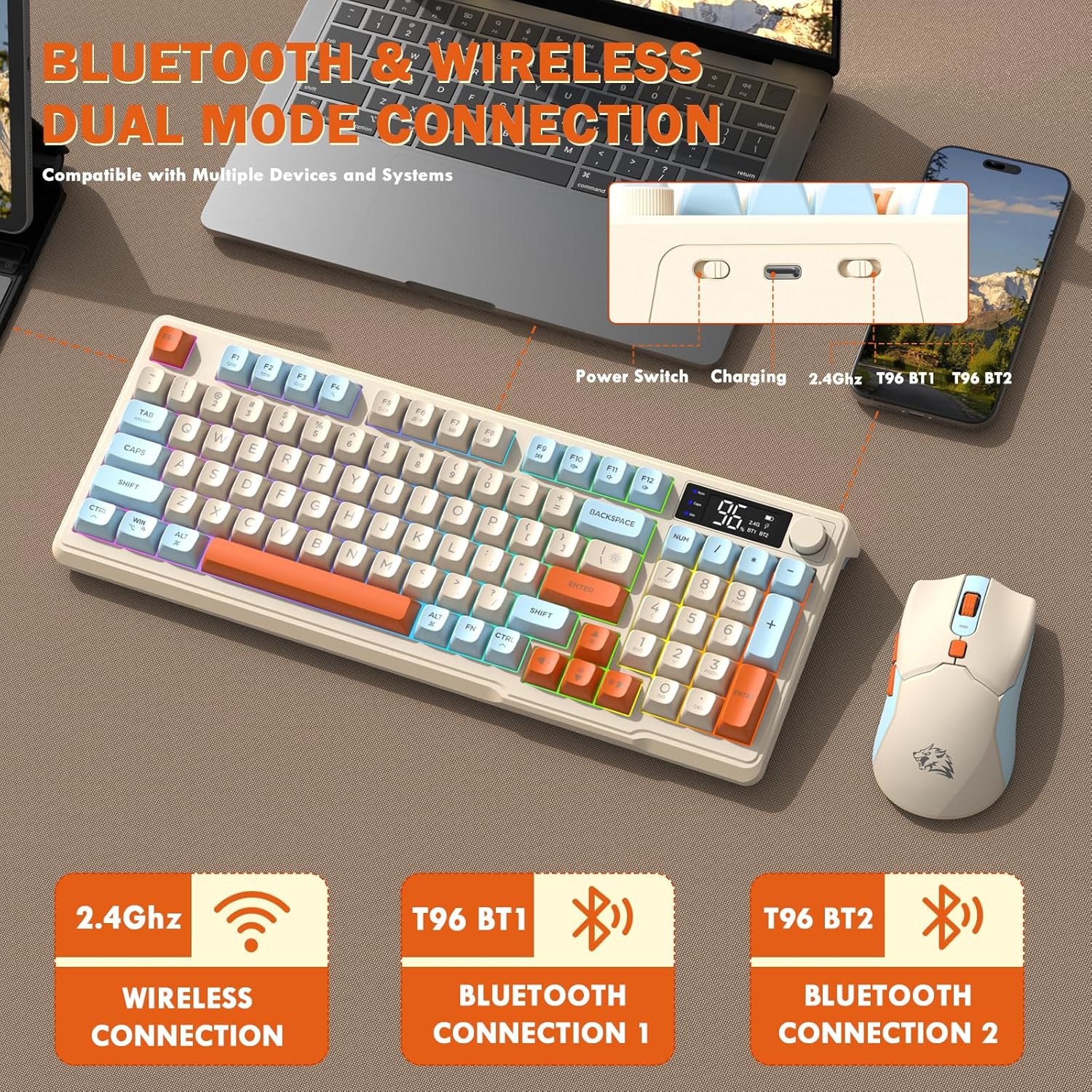
Image: Diagram illustrating the dual-mode connection options (2.4GHz, Bluetooth 1, Bluetooth 2) and the location of the power switch, charging port, and connection indicators on the keyboard.
خطوات الإعداد الأولية
- أجهزة الشحن: Before first use, fully charge both the keyboard and mouse using the provided USB-C cable. The keyboard has a 2000mAh battery, and the mouse has a 500mAh battery. The smart display on the keyboard will show charging progress.
- تحديد موقع جهاز استقبال USB: The USB receiver for 2.4G wireless connection is stored in a slot on the bottom of the mouse. Remove it for use.
- تشغيل الطاقة: قم بتشغيل لوحة المفاتيح والماوس باستخدام مفاتيح الطاقة الخاصة بكل منهما.
- Connect via 2.4G Wireless:
- أدخل مستقبل USB في منفذ USB متاح على جهاز الكمبيوتر الخاص بك.
- Ensure the keyboard and mouse are set to 2.4G mode (indicated on the keyboard's smart display). They should connect automatically.
- الاتصال عبر البلوتوث:
- Switch the keyboard and mouse to BT1 or BT2 mode.
- On your device (PC, laptop, tablet, smartphone), open Bluetooth settings.
- بحث عن "T96 Keyboard" and "T96 Mouse" in the list of available devices and pair them.
- The smart display will indicate the active Bluetooth connection (BT1 or BT2).
تعليمات التشغيل
تشغيل لوحة المفاتيح
The T96 keyboard features a 94-key compact layout with various functions to enhance your experience.
Smart Display Functions
The intelligent LED display provides real-time information:
- حالة البطارية: يظهر نسبة البطارية المتبقيةtage.
- وضع الاتصال: Indicates active connection (2.4G, BT1, BT2).
- تقدم الشحن: Displays charging status when connected to power.
- Caps Lock/Num Lock/Win Lock Indicators: Shows status of these keys.
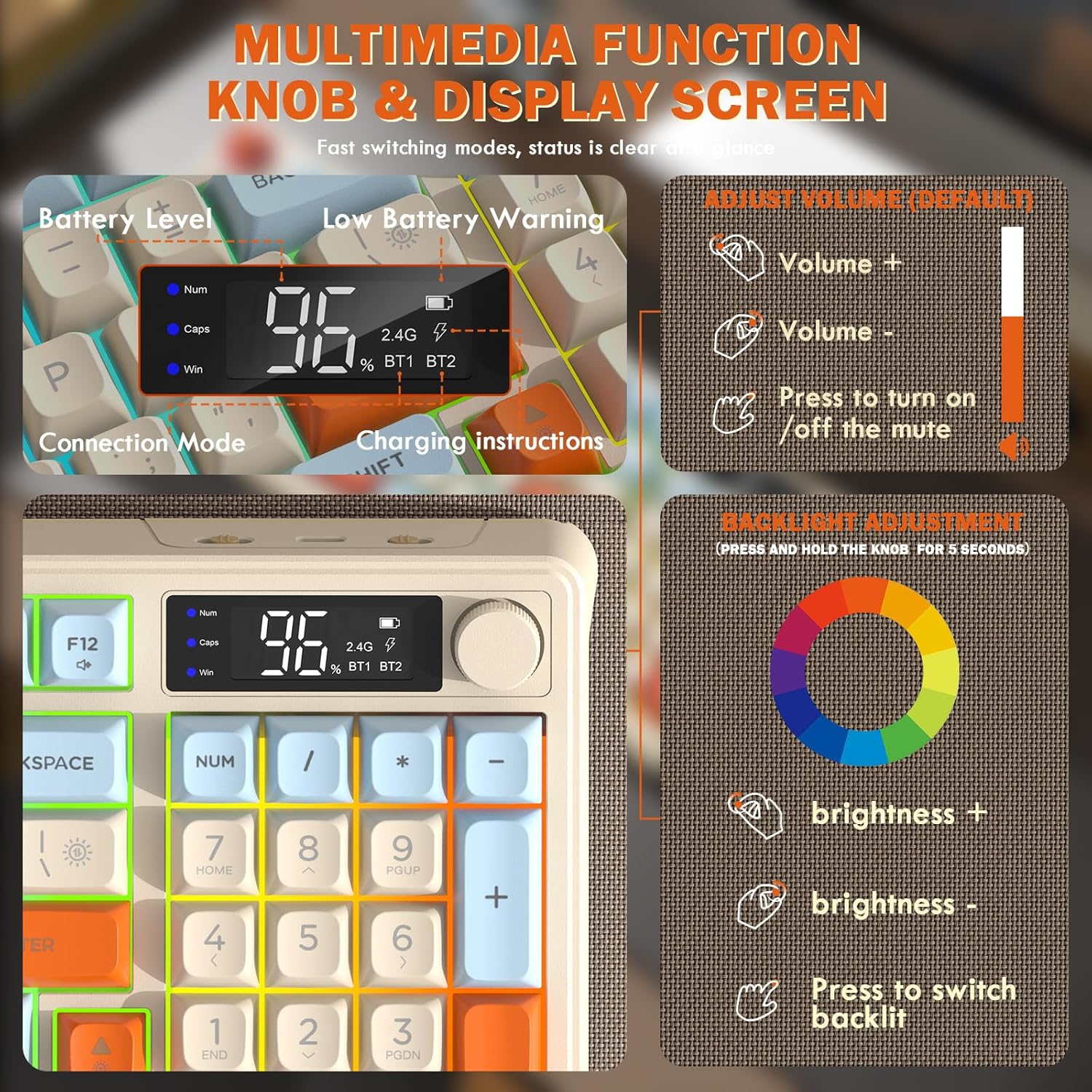
Image: Close-up of the keyboard's smart display showing battery level, connection mode, and charging instructions. Also details the multimedia knob's functions for volume and backlight control.
Multimedia Control Knob
Located on the top right of the keyboard, this knob offers quick control:
- تناوب: Adjusts system volume (clockwise for volume up, counter-clockwise for volume down).
- يضعط: Toggles mute on/off.
- اضغط مع الاستمرار (5 ثواني): Activates backlight adjustment mode. Rotate to change brightness, press to switch light effects.
Multimedia Hotkeys (FN Combinations)
The keyboard includes 12 dedicated multimedia hotkeys accessible via the FN مفتاح:
- FN + F1-F12: Access various multimedia and system functions (e.g., media playback, volume, browser, email). Refer to keycap legends for specific functions.
التحكم في الإضاءة الخلفية
The keyboard features vibrant rainbow LED backlighting. Control it using the following combinations:
- الجبهة الوطنية + سهم لأعلى: زيادة سطوع الإضاءة الخلفية.
- الجبهة الوطنية + سهم لأسفل: تقليل سطوع الإضاءة الخلفية.
- الجبهة الوطنية + السهم الأيمن: زيادة سرعة الإضاءة الخلفية.
- FN + السهم الأيسر: تقليل سرعة الإضاءة الخلفية.
- ف ن + \|: Switch between different lighting modes (e.g., always on, breathing, off).
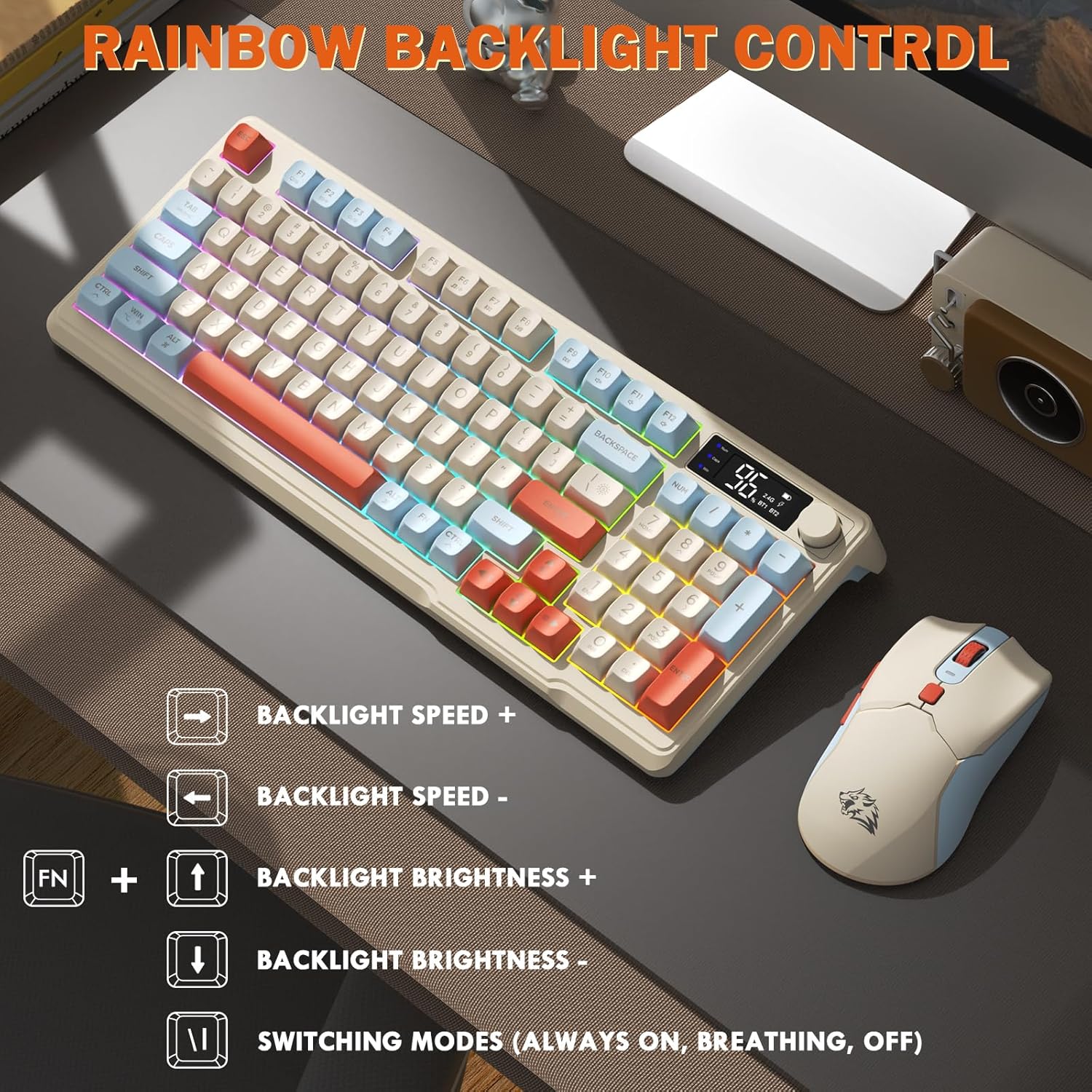
Image: Visual guide for controlling the rainbow LED backlight, showing key combinations for brightness, speed, and mode switching.
مكافحة التظليل
The keyboard supports 26-key rollover anti-ghosting technology, ensuring accurate registration of multiple simultaneous key presses, crucial for gaming.
تشغيل الماوس
The T96 gaming mouse is designed for precision and comfort.
ضبط DPI
Adjust the mouse sensitivity (DPI) to suit your preference:
- اضغط على زر DPI (located behind the scroll wheel) to cycle through available DPI settings: 800 / 1600 / 2400 / 4000 DPI.
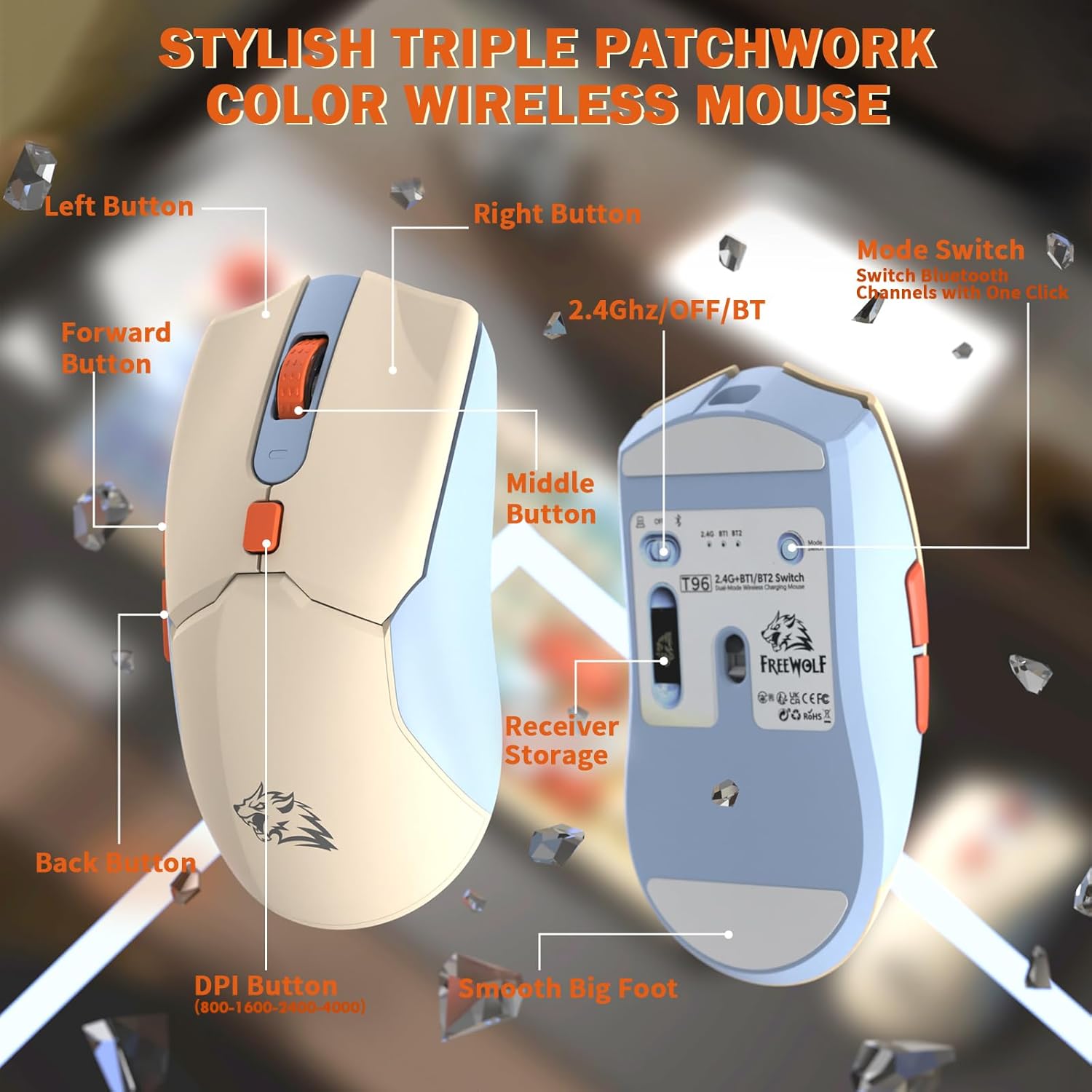
الصورة: مفصلة view of the T96 wireless mouse, highlighting its buttons (Left, Right, Middle, Forward, Back, DPI) and the receiver storage compartment on the bottom.
أزرار قابلة للبرمجة
The mouse features six programmable buttons. Refer to specific software (if applicable, not mentioned in data) or operating system settings for customization options.
معدلات الاقتراع
The mouse operates at different polling rates depending on the connection mode:
- البلوتوث (BT): 115 هرتز
- 2.4G لاسلكي: 125 هرتز
صيانة
تنظيف
- Use a soft, dry cloth to clean the surfaces of the keyboard and mouse.
- بالنسبة للأوساخ العنيدة، قم بإزالة الأوساخ برفق.ampاغمر قطعة القماش بالماء أو بمنظف معتدل غير كاشط.
- تجنب استخدام المواد الكيميائية القاسية أو المذيبات أو المواد الكاشطة، لأنها قد تتلف الطبقة النهائية.
- لا تغمر الأجهزة في الماء أو أي سائل آخر.
العناية بالبطارية
لتعظيم عمر البطارية والأداء:
- Recharge the devices when the low battery indicator appears on the keyboard's smart display.
- تجنب تفريغ البطارية بالكامل بشكل متكرر.
- قم بتخزين الأجهزة في مكان بارد وجاف عندما لا تكون قيد الاستخدام لفترات طويلة.
- The devices feature smart power-saving modes: the keyboard enters sleep mode after 3 minutes of inactivity, and the mouse after 2 minutes. They wake instantly upon touch.

Image: Illustration showing the 2000mAh battery capacity of the keyboard and 500mAh battery capacity of the mouse, emphasizing long-lasting power.
استكشاف الأخطاء وإصلاحها
If you encounter issues with your T96 combo, refer to the following common solutions:
| مشكلة | السبب المحتمل | حل |
|---|---|---|
| لوحة المفاتيح/الماوس لا يستجيب | Low battery; Incorrect connection mode; USB receiver not connected (2.4G); Bluetooth not paired. |
|
| تأخر أو انقطاع في الاتصال | التداخل؛ المسافة من جهاز الاستقبال/الجهاز؛ انخفاض مستوى البطارية. |
|
| الإضاءة الخلفية لا تعمل أو خافتة | Backlight turned off; Brightness set too low; Low battery. |
|
| Mouse DPI not changing | لم يتم الضغط على زر DPI بشكل صحيح. |
|
تحديد
| ميزة | التفاصيل |
|---|---|
| ماركة | فري وولف |
| نموذج | ت96 |
| تكنولوجيا الاتصال | 2.4Ghz Wireless, Bluetooth (BT1, BT2) |
| نوع لوحة المفاتيح | Membrane, 94-Key Compact Layout |
| ازرار | PBT Triple-Tone Spherical Keycaps |
| الإضاءة الخلفية | Rainbow LED Backlight |
| مكافحة التظليل | 26-Key Rollover |
| سعة بطارية لوحة المفاتيح | 2000 مللي أمبير |
| مؤشر الماوس DPI | 800 / 1600 / 2400 / 4000 DPI (Adjustable) |
| Mouse Polling Rate (BT) | 115 هرتز |
| Mouse Polling Rate (2.4G) | 125 هرتز |
| سعة بطارية الماوس | 500 مللي أمبير |
| الأجهزة المتوافقة | Laptop, Gaming Console, PC, Tablet, Smartphone |
| أنظمة التشغيل | ويندوز، ماك أو إس، لينكس، آي أو إس، أندرويد |
| وزن العنصر | 2.12 رطل (حوالي 0.96 كجم) |
| أبعاد الحزمة | 16.26 × 8.78 × 1.85 بوصة (حوالي 41.3 × 22.3 × 4.7 سم) |
الضمان والدعم
Information regarding product warranty and customer support was not provided in the available data. Please refer to the product packaging or the manufacturer's official webللحصول على تفاصيل حول تغطية الضمان وكيفية الاتصال بدعم العملاء للحصول على المساعدة، يرجى زيارة الموقع الإلكتروني.


