1. المقدمة
Thank you for choosing LIVIKEY Clip-On Earbuds. These open-ear headphones are designed for ultimate comfort and a secure fit, perfect for daily use, sports, and workouts. Featuring Bluetooth 5.4, long battery life, and IPX5 water resistance, they provide a superior audio experience while keeping you aware of your surroundings. Please read this manual carefully before using the product to ensure proper operation and maintenance.

Image: LIVIKEY Clip-On Earbuds in their charging case, with one earbud shown separately. The earbuds are black with a sleek, open-ear clip design.
2. محتويات العبوة
يرجى التحقق من الحزمة للعناصر التالية:
- LIVIKEY Clip-On Earbuds (Left & Right) x 1 pair
- علبة شحن × 1
- كابل شحن USB من النوع C × 1
- دليل المستخدم × 1

Image: A visual representation of the package contents, including the open-ear earbuds, charging case, user manual, and Type-C charging cable.
3. الإعداد
3.1 شحن سماعات الأذن والعلبة
قبل الاستخدام الأول، اشحن سماعات الأذن وعلبة الشحن بالكامل. وصّل كابل USB-C المرفق بمنفذ الشحن في العلبة ومصدر الطاقة. سيُظهر مؤشر الشحن على العلبة حالة الشحن.
- A single charge provides up to 10 hours of playback.
- The charging case provides an additional 40 hours, totaling up to 50 hours of listening time.
- Fast-charging: 5 minutes of charging provides 1 hour of playback.

Image: A graphic showing the battery performance: 10 hours on a single charge, 50 hours with the charging case, and 100 days of standby time.
3.2 الاقتران بجهازك
- Open the charging case. The earbuds will automatically enter pairing mode, and the indicator lights will flash.
- على جهازك (الهاتف الذكي، الجهاز اللوحي، الكمبيوتر)، قم بتمكين البلوتوث.
- بحث عن "LIVIKEY T20" in the list of available Bluetooth devices.
- Select "LIVIKEY T20" to connect. Once connected, the earbud indicator lights will turn off.
سيتم إعادة توصيل سماعات الأذن تلقائيًا بالجهاز المقترن الأخير عند إخراجها من العلبة، إذا تم تمكين البلوتوث على الجهاز.
3.3 How to Wear the Earbuds
The LIVIKEY Clip-On Earbuds are designed for a comfortable and secure fit. Follow these steps for optimal wearing:
- Identify the small and big parts of the earbud.
- Place the small part on your ear, with the big part positioned behind your earlobe.
- Adjust the earbud downward until it sits comfortably and securely on your ear.

Image: A three-step diagram illustrating how to properly wear the clip-on earbuds: identifying parts, placing on the ear, and adjusting for comfort.

Image: A comparison graphic highlighting the benefits of the ear clip design over traditional in-ear, ear hook, and headset designs, emphasizing comfort and stability.
4. تعليمات التشغيل
4.1 الضوابط التي تعمل باللمس
The LIVIKEY Clip-On Earbuds feature smart touch controls for easy management of music and calls.

Image: A visual guide to the touch controls on the earbuds, showing actions for single tap, double tap, triple tap, and long press.
| فعل | وظيفة | سماعة الأذن (يسار / يمين) |
|---|---|---|
| Tap X1 | تشغيل/إيقاف الموسيقى مؤقتًا | يسار/يمين |
| Tap X1 | الرد على المكالمة/إنهائها | يسار/يمين |
| Tap X2 | Access Voice Assistant | يسار/يمين |
| Tap X3 | الأغنية السابقة | L |
| Tap X3 | الأغنية التالية | R |
| الضغط لفترة طويلة | خفض الصوت | L |
| الضغط لفترة طويلة | رفع الصوت | R |
4.2 تشغيل/إيقاف التشغيل
- تشغيل الطاقة: افتح حافظة الشحن ، وسيتم تشغيل سماعات الأذن تلقائيًا.
- إيقاف التشغيل: أعد وضع سماعات الأذن في علبة الشحن وأغلق الغطاء. ستتوقف تلقائيًا وتبدأ عملية الشحن.
5. الصيانة
5.1 التنظيف
- قم بتنظيف سماعات الأذن وعلبة الشحن بانتظام باستخدام قطعة قماش ناعمة وجافة وخالية من الوبر.
- لا تستخدم المنظفات الكاشطة أو الكحول أو المذيبات الكيميائية.
- تأكد من أن نقاط اتصال الشحن الموجودة على سماعات الأذن والعلبة نظيفة وجافة.
5.2 التخزين
- قم بتخزين سماعات الأذن في علبة الشحن الخاصة بها عند عدم استخدامها لحمايتها وإبقائها مشحونة.
- تجنب التخزين في درجات حرارة قصوى (ساخنة أو باردة) أو رطوبة عالية.

Image: A close-up of a man wearing an earbud while it's raining, illustrating the IPX5 water resistance feature. While the earbuds are water-resistant, they should not be submerged.
6. استكشاف الأخطاء وإصلاحها
| مشكلة | السبب المحتمل | حل |
|---|---|---|
| سماعات الأذن لا تقترن | البطارية منخفضة، خارج النطاق، وضع الاقتران غير نشط | Charge earbuds and case. Ensure earbuds are in pairing mode. Move closer to the device. |
| لا يوجد صوت من سماعة أذن واحدة | Low battery, not properly connected, individual earbud issue | Ensure both earbuds are charged. Re-pair the earbuds. Try resetting the earbuds (refer to manufacturer's webموقع للحصول على تعليمات إعادة الضبط المحددة إذا لزم الأمر). |
| جودة الصوت سيئة | Weak Bluetooth signal, interference, dirty earbuds | Move closer to the device. Avoid strong electromagnetic interference. Clean earbuds. |
| سماعات الأذن لا تشحن | نقاط توصيل الشحن متسخة، كابل/شاحن معيب | Clean charging contacts on earbuds and case. Try a different USB-C cable and charger. |
7. المواصفات
| ميزة | وصف |
|---|---|
| اسم الموديل | ت20 |
| تكنولوجيا الاتصال | لاسلكي (بلوتوث 5.4) |
| وزن ياربود | 4.3 جم (لكل سماعة أذن) |
| حجم السماعة | 12 ملم |
| وقت اللعب (شحنة واحدة) | تصل إلى 10 ساعة |
| إجمالي وقت اللعب (مع الحقيبة) | تصل إلى 50 ساعة |
| منفذ الشحن | يو إس بي من النوع سي |
| مقاومة الماء | IPX5 |
| طريقة التحكم | يلمس |
| التحكم في الضوضاء | Passive Noise Cancellation (CVC for calls) |
| نطاق التردد | 20 هرتز - 20,000 هرتز |
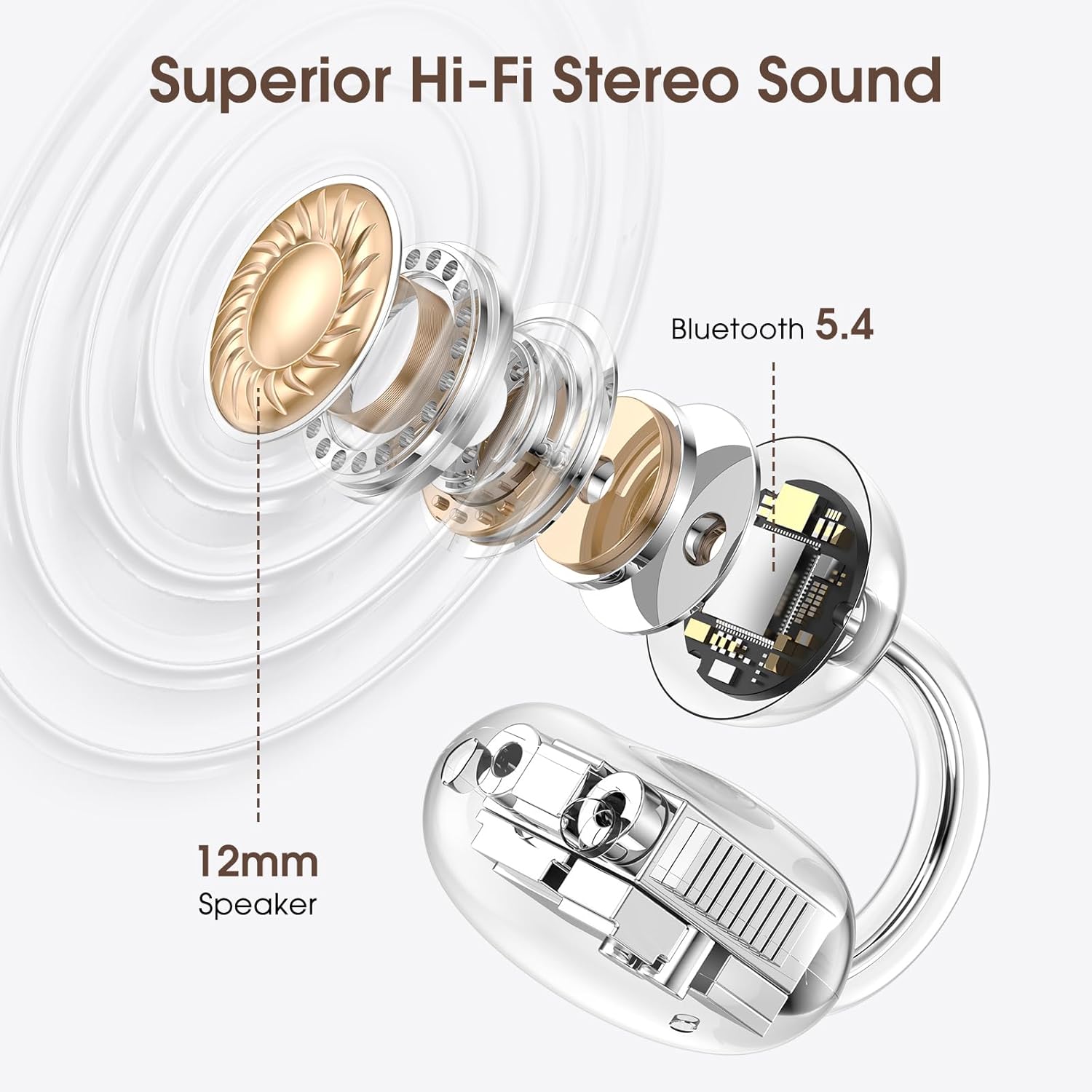
الصورة: انفجار view diagram highlighting the 12mm speaker for superior Hi-Fi stereo sound and the integrated Bluetooth 5.4 chip for stable connectivity.

الصورة: تفصيلية view of a Bluetooth 5.4 chip, emphasizing its role in providing faster transmission speeds and more stable connections for the earbuds.
8. الضمان والدعم
LIVIKEY products are designed and manufactured to the highest quality standards. This product is covered by a standard manufacturer's warranty. For detailed warranty information, please refer to the warranty card included in your package or visit the official LIVIKEY webموقع.
If you encounter any issues or have questions regarding your LIVIKEY Clip-On Earbuds, please contact our customer support team:
- بريد إلكتروني: [Refer to product packaging or official webموقع]
- Webموقع: LIVIKEY Official Store on Amazon
Please have your product model (T20) and purchase information ready when contacting support.


