1. المقدمة
Thank you for choosing the TABWEE T80 10-inch Android Tablet. This manual provides essential information for setting up, operating, and maintaining your device. Please read it thoroughly before use to ensure optimal performance and safety.
The TABWEE T80 is a versatile Wi-Fi tablet featuring the latest Android 15 operating system with integrated AI capabilities. It boasts a vibrant 10.5-inch Incell IPS display, ample storage with 12GB RAM and 64GB ROM (expandable up to 2TB), and a long-lasting 6000mAh battery. With GMS certification, dual-band Wi-Fi, Bluetooth 5.0, and GPS, it is designed for both productivity and entertainment.
2. معلومات السلامة
- لا تعرض الجهاز لدرجات حرارة عالية، أو أشعة الشمس المباشرة، أو الرطوبة العالية.
- تجنب إسقاط الجهاز اللوحي أو تعريضه لصدمات قوية.
- استخدم فقط الشاحن والملحقات المتوفرة.
- لا تحاول تفكيك الجهاز أو إصلاحه بنفسك. اتصل بدعم العملاء للحصول على المساعدة.
- أبقِ الجهاز اللوحي بعيداً عن متناول الأطفال والحيوانات الأليفة لمنع التلف أو الإصابة.
3. محتويات العبوة
يرجى التحقق من الحزمة للعناصر التالية:
- TABWEE T80 Tablet
- محول التيار المتردد
- كابل USB Type-C
- دليل المستخدم
4. انتهى المنتجview
Familiarize yourself with the components of your TABWEE T80 tablet.

الشكل 4.1: الأمامي والخلفي view of the TABWEE T80 tablet, highlighting its sleek design and rear camera module.
المكونات المادية:
- 10.5-inch Incell IPS Display: High-definition screen for vivid visuals.
- الكاميرا الأمامية (2 ميجابكسل): يوجد في الحافة العلوية للشاشة لإجراء مكالمات الفيديو والتقاط صور السيلفي.
- الكاميرا الخلفية (5 ميجابكسل): Located on the back for capturing photos and videos.
- زر الطاقة: On the side, used to turn the tablet on/off or wake/sleep the screen.
- أزرار التحكم في الصوت: On the side, to adjust audio volume.
- منفذ USB من النوع C: للشحن ونقل البيانات.
- مقبس سماعة رأس مقاس 3.5 ملم: لتوصيل سماعات الرأس السلكية أو مكبرات الصوت الخارجية.
- منفذ كارت الذاكرة الصغيرة: For storage expansion up to 2TB.
- مكبرات صوت مزدوجة: Located on the bottom edge for enhanced audio experience.
5. الإعداد
5.1 الشحن الأولي
Before first use, fully charge your tablet. Connect the USB Type-C cable to the tablet's charging port and the AC adapter to a power outlet. The battery indicator on the screen will show charging status.
5.2 تشغيل/إيقاف التشغيل
- لتشغيل: Press and hold the Power button until the TABWEE logo appears.
- لإيقاف التشغيل: اضغط مع الاستمرار على زر الطاقة حتى تظهر قائمة خيارات الطاقة، ثم حدد "إيقاف التشغيل".
- للنوم/الاستيقاظ: اضغط لفترة وجيزة على زر الطاقة.
5.3 اتصال واي فاي
للاتصال بالإنترنت:
- اذهب الى إعدادات > الشبكات والانترنت > واي فاي.
- قم بتشغيل الواي فاي. سيقوم الجهاز اللوحي بالبحث عن الشبكات المتاحة.
- حدد الشبكة المطلوبة من القائمة.
- أدخل كلمة المرور إذا طُلب منك ذلك، ثم انقر فوق يتصل.
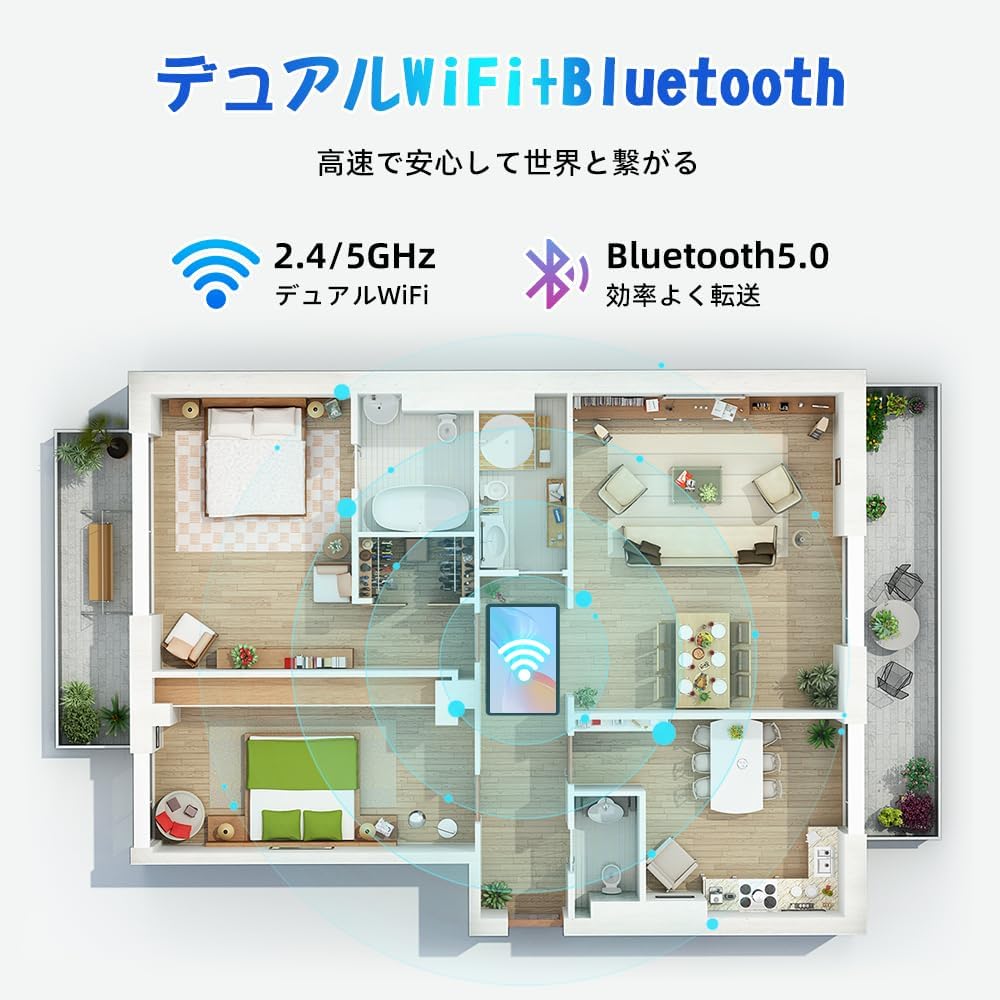
Figure 5.1: Diagram illustrating the tablet's dual-band 2.4G/5G Wi-Fi and Bluetooth 5.0 connectivity, ensuring fast and reliable connections throughout your home or office.
5.4 إعداد حساب Google
As a GMS certified device, you can access Google Play Store and other Google services. During initial setup, you will be prompted to sign in with your Google account or create a new one. This is essential for downloading apps and syncing data.
5.5 تركيب بطاقة MicroSD
To expand storage up to 2TB:
- حدد موقع فتحة بطاقة MicroSD على جانب الجهاز اللوحي.
- Insert the MicroSD card into the slot with the gold contacts facing down until it clicks into place.
- You may be prompted to format the card for use with the tablet.

Figure 5.2: Visual representation of the tablet's 12GB RAM and 64GB ROM, with support for up to 2TB MicroSD card expansion, allowing for vast storage of photos, videos, and music.
6. تعليمات التشغيل
6.1 مميزات نظام أندرويد 15
Your tablet runs on Android 15, offering an intuitive and enhanced user experience with improved security, customization, and AI capabilities.

الشكل 6.1: انتهىview of Android 15 features, including enhanced security and privacy, expanded customization options, improved AI functions, and new gesture controls for a smoother operation.
6.2 العرض و Viewوسائط جي
The 10.5-inch Incell IPS display provides vibrant colors and wide viewing angles. Optimize your viewing experience and reduce eye strain with various display modes:

Figure 6.2: The 10.5-inch Incell IPS display offers a 1280x800 resolution and a 16:10 aspect ratio for a wide and efficient viewتجربة رائعة.

Figure 6.3: The tablet supports 1080P Full HD content, providing an immersive visual experience for movies and dramas from platforms like YouTube, Prime Video, Hulu, and HBO.

الشكل 6.4: المثال البصريamples of different screen modes: Night mode for reduced blue light, Dark mode for eye comfort in low light, and Reader mode for a black-and-white paper-like display.
- الوضع الليلي: Reduces blue light emissions for comfortable viewing in low light conditions. Access via Quick Settings or Display settings.
- الوضع المظلم: Changes the system UI and supported apps to a dark theme, reducing eye strain and saving battery on OLED screens. Access via Display settings.
- وضع القارئ: Optimizes the display for reading, often by converting to grayscale and adjusting contrast. Access via Display settings or specific reading apps.
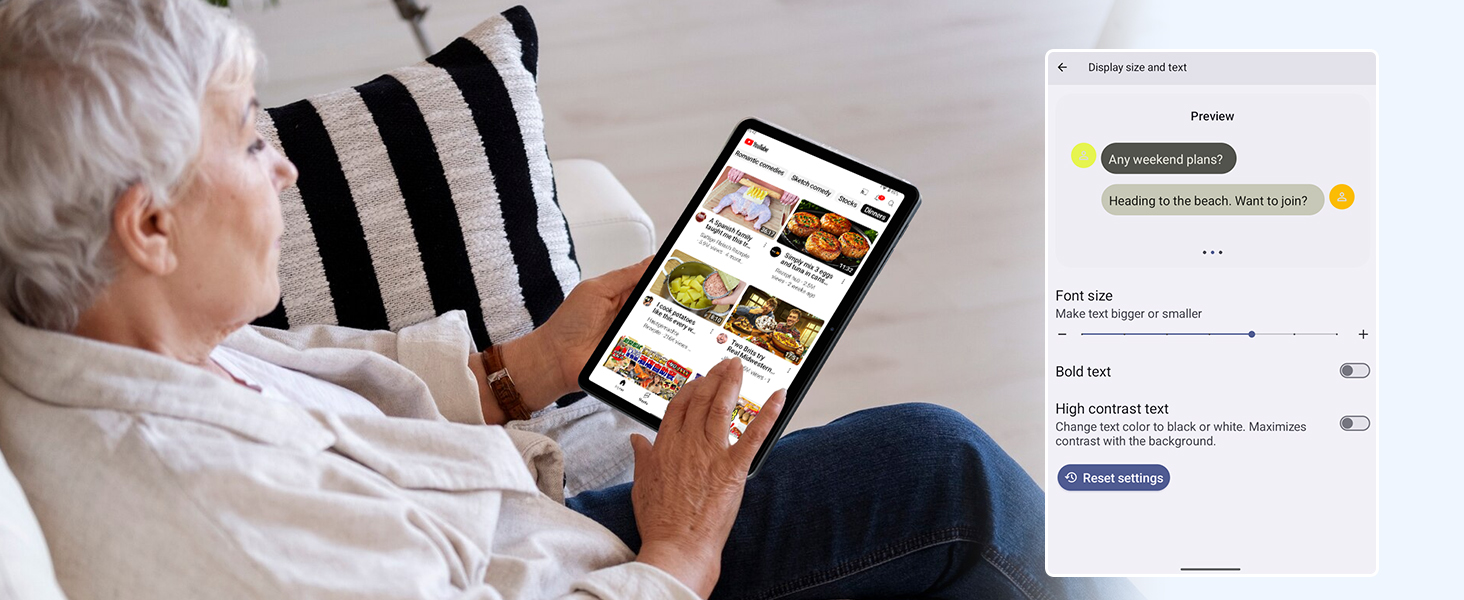
Figure 6.5: Screenshot showing display settings for adjusting text size and bold text, allowing users to customize readability.
أداء 6.3
The TABWEE T80 is powered by a Unisoc T310 processor, ensuring smooth operation for daily tasks and multimedia consumption.
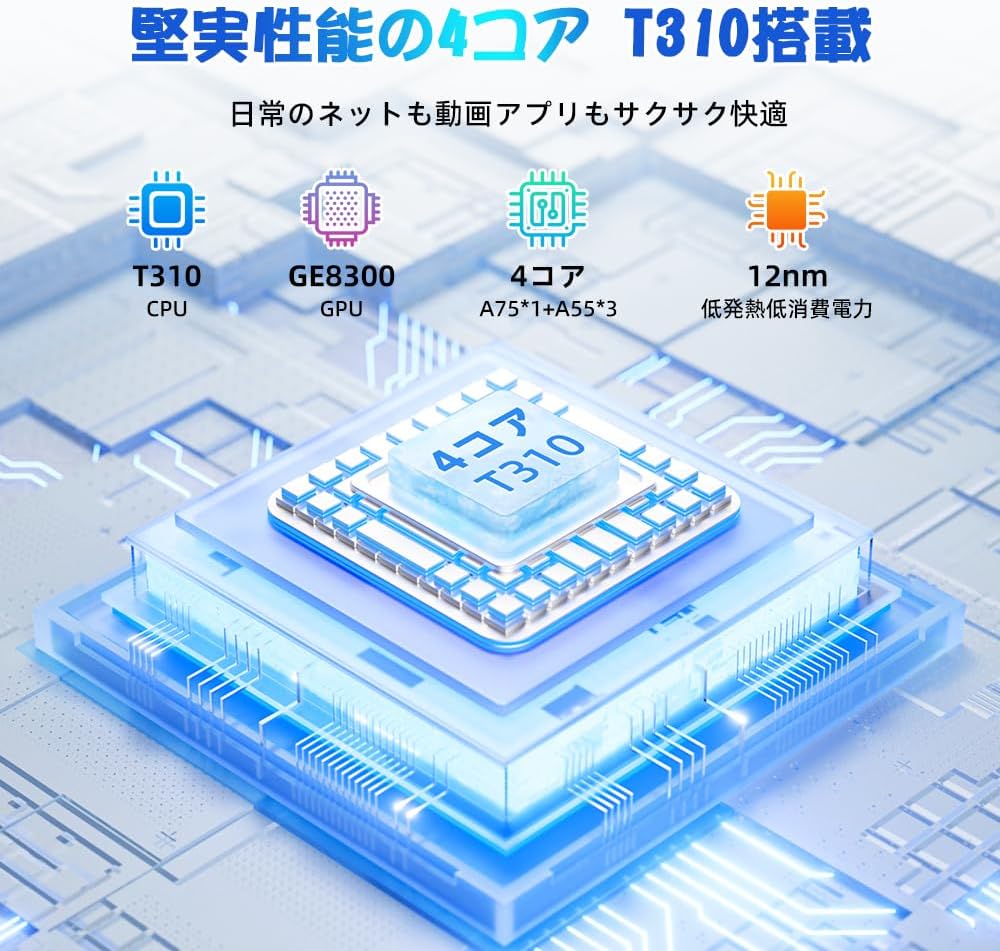
Figure 6.6: Diagram illustrating the T310 quad-core CPU architecture, featuring A75 and A55 cores, designed for efficient performance and low power consumption.

Figure 6.7: Comparison showing the Unisoc T310 processor's improved speed (up to 2.0 GHz) and lower power consumption compared to previous generation products.
6.4 تعدد المهام وتقسيم الشاشة
For enhanced productivity, the tablet supports split-screen mode, allowing you to run two applications side-by-side.

Figure 6.8: Demonstration of the split-screen feature, allowing users to comfortably multitask by viewing two applications simultaneously, such as reading an e-book while checking messages.
- To activate split screen: Open an app, then swipe up slightly from the bottom and hold to reveal recent apps. Drag one app to the top or bottom of the screen, then select another app for the remaining space.
6.5 AI Features (Gemini AI)
Leverage the power of Gemini AI for enhanced productivity and convenience.

Figure 6.9: Visuals demonstrating Gemini AI 2.0 capabilities, including AI text-to-image generation, AI voice response, AI smart control, AI real-time conversation, and AI full-screen smart assistance.
Gemini AI can assist with real-time translation, smart text suggestions, and optimizing performance based on your usage habits. Explore AI-enhanced multi-tasking for learning, office work, and entertainment.
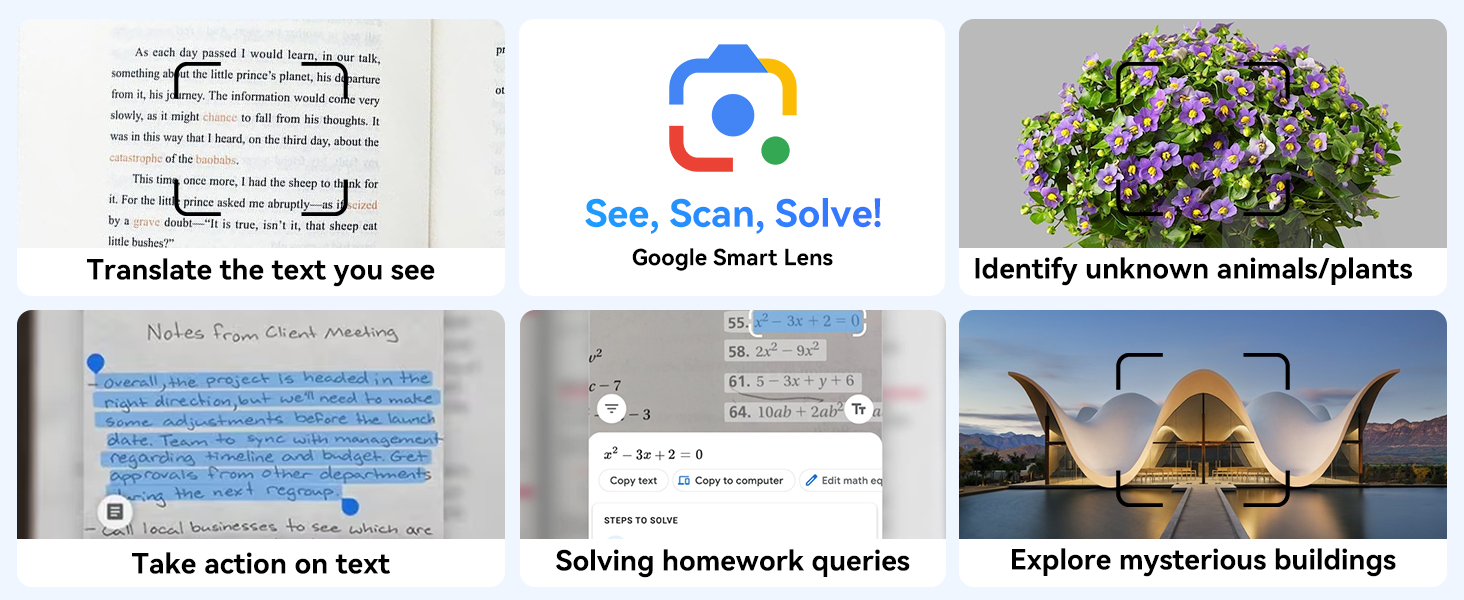
الشكل 6.10: مثالamples of Google Smart Lens functions: translating text, identifying unknown objects/plants, taking action on text, solving homework queries, and exploring mysterious buildings.
6.6 Parental Controls (Kids Mode)
The tablet includes parental control features to ensure a safe environment for children.

Figure 6.11: Icons representing parental control features: usage time limits, break time settings, app usage restrictions, and content restrictions, all designed to protect children.
You can set time limits, restrict app access, and filter content. Navigate to إعدادات > الرفاهية الرقمية والضوابط الأبوية to configure these features.
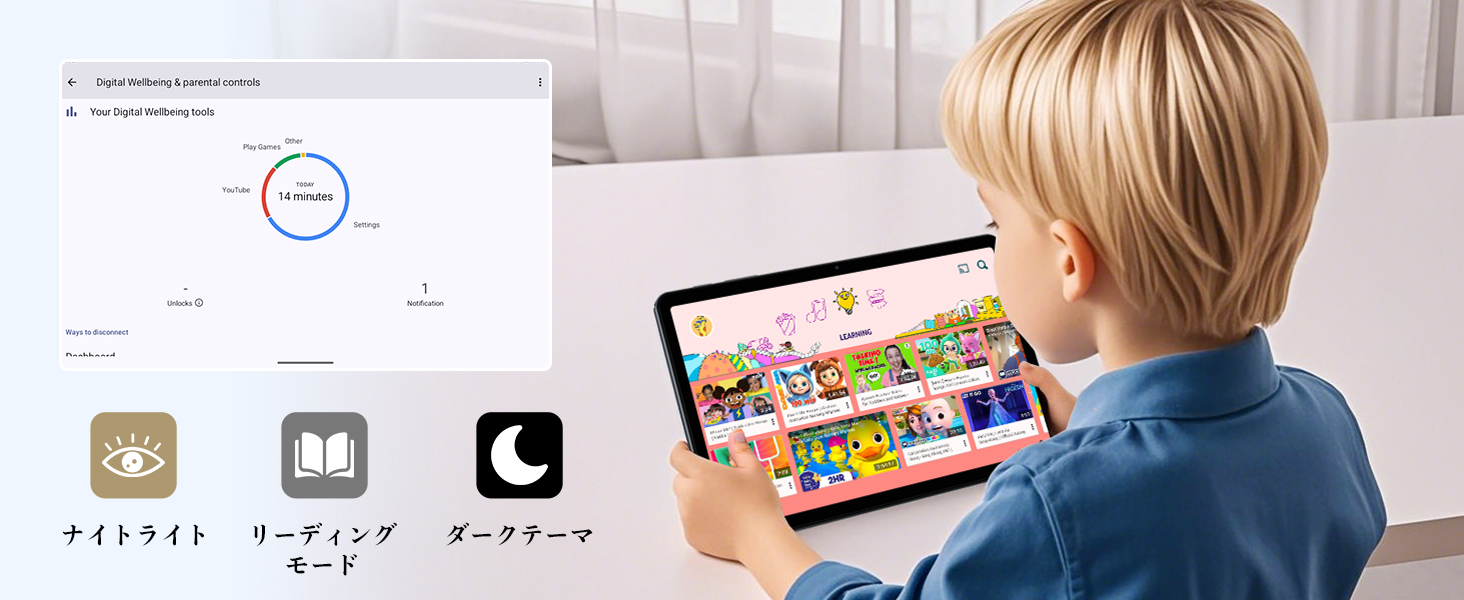
Figure 6.12: Screenshot of the Digital Wellbeing and parental controls interface, showing usage statistics and options for managing screen time and app access for children.
6.7 الإسقاط اللاسلكي
Mirror your tablet's screen to a compatible TV or monitor wirelessly.
- Ensure your TV/monitor supports wireless display (e.g., Miracast, Chromecast built-in).
- على جهازك اللوحي، انتقل إلى إعدادات > الأجهزة المتصلة > تفضيلات الاتصال > يقذف.
- Select your display device from the list to begin mirroring.
6.8 استخدام الكاميرا
The tablet is equipped with a 2MP front camera and a 5MP rear camera.

Figure 6.13: Illustration of the tablet's 2-megapixel front camera and 5-megapixel rear camera, capable of autofocus for clear photos and video calls.
Open the Camera app to take photos or record videos. Tap the shutter button to capture an image or the record button to start/stop video recording. You can switch between front and rear cameras using the camera switch icon.
6.9 صوت
The tablet features dual speakers for an immersive audio experience and a 3.5mm headphone jack for private listening.

Figure 6.14: Diagram showing the location of the two powerful speakers on the TABWEE T80, providing a deep and immersive audio experience.
Adjust volume using the physical volume buttons on the side of the tablet or through the on-screen volume slider.
6.10 ملاحة GPS
The integrated GPS system allows for accurate location tracking and navigation. Use pre-installed map applications or download your preferred navigation app from the Google Play Store.
7. الصيانة
7.1 التنظيف
Use a soft, lint-free cloth to clean the screen and body of the tablet. Do not use abrasive cleaners or solvents, as they may damage the surface.
7.2 تحديثات البرامج
تحقق بانتظام من وجود تحديثات للنظام لضمان حصول جهازك اللوحي على أحدث الميزات والتصحيحات الأمنية. انتقل إلى إعدادات > نظام > تحديث النظام.
7.3 العناية بالبطارية
لإطالة عمر البطارية:
- تجنب تفريغ البطارية بالكامل بشكل متكرر.
- لا تترك الجهاز اللوحي يشحن لفترات طويلة بعد امتلاء بطاريته.
- Store the tablet in a cool, dry place when not in use for long periods.

Figure 7.1: Battery life estimates for the 6000mAh battery: 5 hours of web browsing, 4 hours of video playback, 4 hours of gaming, 21 hours of music, and 648 hours of standby time, supported by AI power-saving algorithms.
8. استكشاف الأخطاء وإصلاحها
| مشكلة | السبب المحتمل | حل |
|---|---|---|
| الجهاز اللوحي لا يعمل. | انخفاض مستوى البطارية؛ تعطل النظام. | اشحن الجهاز اللوحي لمدة 30 دقيقة على الأقل. اضغط مع الاستمرار على زر التشغيل لمدة 10-15 ثانية لإعادة التشغيل القسري. |
| لا يمكن الاتصال بشبكة Wi-Fi. | كلمة مرور خاطئة؛ مشكلة في جهاز التوجيه؛ خارج نطاق التغطية. | Verify Wi-Fi password. Restart your router. Move closer to the Wi-Fi router. |
| التطبيقات بطيئة أو تتعطل. | عدد كبير جدًا من التطبيقات قيد التشغيل؛ مساحة تخزين منخفضة. | أغلق التطبيقات التي تعمل في الخلفية. امسح ذاكرة التخزين المؤقت للتطبيقات. حرر مساحة تخزين. |
| الشاشة لا تستجيب. | خلل مؤقت في البرنامج. | أعد تشغيل الجهاز اللوحي بالقوة عن طريق الضغط باستمرار على زر الطاقة. |
9. المواصفات
| ميزة | التفاصيل |
|---|---|
| ماركة | TABWEE |
| اسم الموديل | T80 Tablet Tabwee |
| نظام التشغيل | أندرويد 15 (معتمد من GMS) |
| حجم العرض | 10.5 inches Incell IPS |
| دقة العرض | 1280 × 800 بكسل |
| العلامة التجارية وحدة المعالجة المركزية | يونيسوك |
| سرعة وحدة المعالجة المركزية | 2 جيجاهرتز |
| GPU Brand | ARM Mali-G57 |
| كبش | 12GB (4GB+8GB expansion) |
| التخزين الداخلي | 64 جيجا بايت |
| تخزين قابل للتوسيع | يدعم حتى 2 تيرابايت عبر بطاقة MicroSD |
| سعة البطارية | بطارية ليثيوم أيون بوليمر 6000 مللي أمبير |
| الكاميرا الأمامية | 2 ميجا بكسل |
| الكاميرا الخلفية | 5 ميجا بكسل |
| الاتصال | 2.4G/5G Wi-Fi (802.11ac), Bluetooth 5.0, GPS |
| الموانئ | منفذ USB من النوع C، منفذ سماعة رأس 3.5 ملم |
| أبعاد | 32.79 × 19.9 × 4.1 سم |
| وزن | 910 جرام |
10. الضمان والدعم
Your TABWEE T80 tablet comes with a ضمان الشركة المصنعة لمدة عامين.
If you encounter any issues with your product, please contact us via email. We strive to respond promptly to ensure your satisfaction.
كيفية الاتصال بالدعم:
- Through your Amazon account: Go to سجل الطلبات > Select the relevant order > Click تواصل مع البائع.
- Through the product page: On the product page, click on the seller's name (TABWEE Official Store) below the "Add to Cart" button, then click "Ask a question" on the top right.
Support hours: 9:00 AM - 6:00 PM (excluding holidays). We will reply as soon as possible.

Figure 10.1: Image representing customer support availability for assistance.