مقدمة
This manual provides detailed instructions for the safe and effective operation, setup, and maintenance of your Dasqua 8400-0020 Digital Levelling Box. Please read this manual thoroughly before using the device to ensure proper handling and to prevent damage or injury.
تعليمات السلامة
احتياطات السلامة العامة:
- Always handle the device with care to avoid dropping or impact, which can affect its accuracy.
- Keep the device away from strong magnetic fields, except for its integrated magnet, to prevent interference with internal components.
- لا تعرض الجهاز لدرجات حرارة شديدة أو رطوبة أو أشعة الشمس المباشرة.
- نظّف الجهاز بقطعة قماش ناعمة وجافة. لا تستخدم منظفات أو مذيبات كاشطة.
- هذا الجهاز غير مقاوم للماء. تجنب ملامسته للسوائل.
- يحفظ بعيدًا عن متناول الأطفال.
المنتج انتهىview
The Dasqua 8400-0020 is a compact digital levelling box designed for precise angle measurements. It features a clear digital display, intuitive controls, and a magnetic base for secure attachment to ferrous surfaces.
المكونات والضوابط
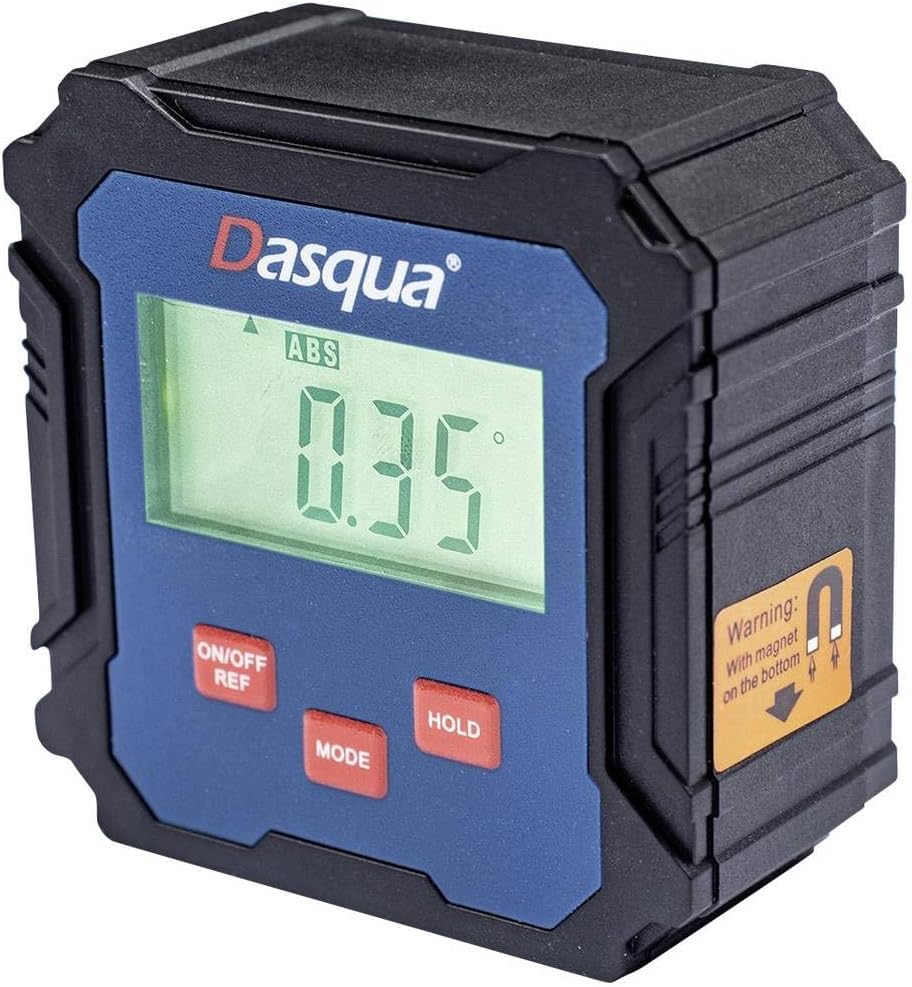
Figure 1: Dasqua 8400-0020 Digital Levelling Box. This image shows the front face of the device, highlighting the digital display, control buttons, and a warning label for the magnetic base.
- 1. العرض الرقمي: Shows angle readings in degrees, absolute (ABS) or relative (REF) mode, and battery indicator.
- 2. ON/OFF REF Button: Powers the unit on or off. Also used to set a relative zero point (REF).
- 3. MODE Button: Switches between absolute (ABS) and relative (REF) measurement modes.
- 4. HOLD Button: تجميد القراءة الحالية على الشاشة.
- 5. Magnetic Base: Located on the bottom of the unit, allows for secure attachment to metal surfaces for hands-free operation.
يثبت
Before first use, ensure the device has sufficient power. The Dasqua 8400-0020 typically uses standard AAA batteries. Open the battery compartment, insert batteries with correct polarity, and close the compartment securely.
تركيب البطارية:
- حدد موقع غطاء حجرة البطارية في الجزء الخلفي أو الجانبي من الوحدة.
- افتح الغطاء.
- Insert [Number] AAA batteries (not included) observing the correct polarity (+/-).
- أغلق غطاء حجرة البطارية بإحكام.
Note: The exact battery type and quantity should be confirmed from the product packaging or device itself.
تعليمات التشغيل
1. تشغيل / إيقاف تشغيل الطاقة:
اضغط على ON/OFF REF اضغط مع الاستمرار على الزر لتشغيل الجهاز. ON/OFF REF button for a few seconds to turn it off.
2. Absolute Measurement (ABS Mode):
When the device is powered on, it typically defaults to Absolute (ABS) mode. In this mode, the display shows the angle relative to a true horizontal (0°) or vertical (90°) plane. The "ABS" indicator will be visible on the display.
3. Relative Measurement (REF Mode):
To measure an angle relative to a specific surface (e.g., to find the difference between two angles), use the Relative (REF) mode:
- Place the device on the first surface you wish to set as your reference.
- اضغط على ON/OFF REF button briefly. The display will show "0.00°" and the "REF" indicator will appear, indicating that this position is now your zero reference.
- Move the device to the second surface. The display will now show the angle difference between the first and second surfaces.
- To exit REF mode and return to ABS mode, press the وضع زر.
4. وظيفة الانتظار:
اضغط على يمسك button to freeze the current reading on the display. This is useful when taking measurements in hard-to-see areas. Press the يمسك اضغط على الزر مرة أخرى لتحرير القراءة واستئناف القياس المباشر.
5. Calibration (Self-Calibration):
For optimal accuracy, it is recommended to perform a self-calibration periodically or if you suspect the readings are inaccurate. Refer to the device's specific instructions for calibration, which usually involves placing the unit on a flat, level surface and following a sequence of button presses.
Note: Consult the manufacturer's full instructions for detailed calibration procedures if available.
صيانة
تنظيف:
Wipe the device with a soft, dry, lint-free cloth. Do not use liquid cleaners, aerosols, or solvents. Ensure no dust or debris accumulates around the display or buttons.
تخزين:
When not in use, store the digital levelling box in a dry, cool place, away from direct sunlight and extreme temperatures. If storing for an extended period, remove the batteries to prevent leakage and potential damage to the device.
استكشاف الأخطاء وإصلاحها
| مشكلة | السبب المحتمل | حل |
|---|---|---|
| الجهاز لا يعمل. | Low or dead batteries. Incorrect battery polarity. | استبدل البطاريات بأخرى جديدة. تأكد من إدخال البطاريات بالقطبية الصحيحة. |
| قراءات غير دقيقة. | Device not calibrated. Device exposed to strong magnetic fields (other than its base magnet). Physical damage. | Perform self-calibration. Move device away from other magnetic sources. Inspect for damage; if damaged, contact support. |
| العرض خافت أو وميض. | انخفاض طاقة البطارية. | استبدال البطاريات. |
| الأزرار لا تستجيب. | Device frozen. Low battery. | Remove and reinsert batteries to reset. Replace batteries. |
تحديد
| ميزة | التفاصيل |
|---|---|
| رقم الموديل | 8400-0020 |
| ماركة | داسكوا |
| نطاق القياس | 90° x 4 (360°) |
| دقة | 0.1° |
| أبعاد المنتج | 13.3 × 12.5 × 5.5 سم |
| وزن | 140 جرام |
| سمات | Digital display, Magnetic base, ABS/REF mode, Hold function |
الضمان والدعم
For warranty information and technical support, please contact Dasqua customer service or refer to the official Dasqua webالموقع. احتفظ بإيصال الشراء الخاص بك كإثبات للشراء في حالة وجود أي مطالبات بالضمان.
Manufacturer: Dasqua


