1. انتهى المنتجview
The MAHANCRIS PSHR170E01 Plant Stand is an 8-tiered indoor plant shelf designed to display various potted plants and small gardening items. It features a vertical, S-shaped design suitable for corners and includes integrated grow lights to support healthy plant growth.
- أبعاد: 19.7 بوصة (طول) × 11.8 بوصة (عرض) × 59.8 بوصة (ارتفاع)
- سعة: 6 top shelves for plants, 1 hanging ring, 2 lower layers for storage.
- Grow Lights: 3-head sunlight LED strip with USB adapter, 9 brightness levels, 3 timer modes (3/9/12H) with memory function.
- بناء: Premium particleboard and reinforced metal frame with EVA pads for stability.
- أمان: Equipped with an anti-tip mechanism.

Figure 1: Assembled MAHANCRIS PSHR170E01 Plant Stand with plants.
2. الإعداد والتجميع
Assembly of the MAHANCRIS PSHR170E01 Plant Stand is designed to be straightforward. All parts are labeled, and a detailed, illustrated guide is included in the packaging. No specialized tools are required beyond those provided.
2.1 فك التغليف وتحديد الأجزاء
Carefully unpack all components and verify against the parts list in your included manual. Ensure all pieces are present and undamaged before proceeding.
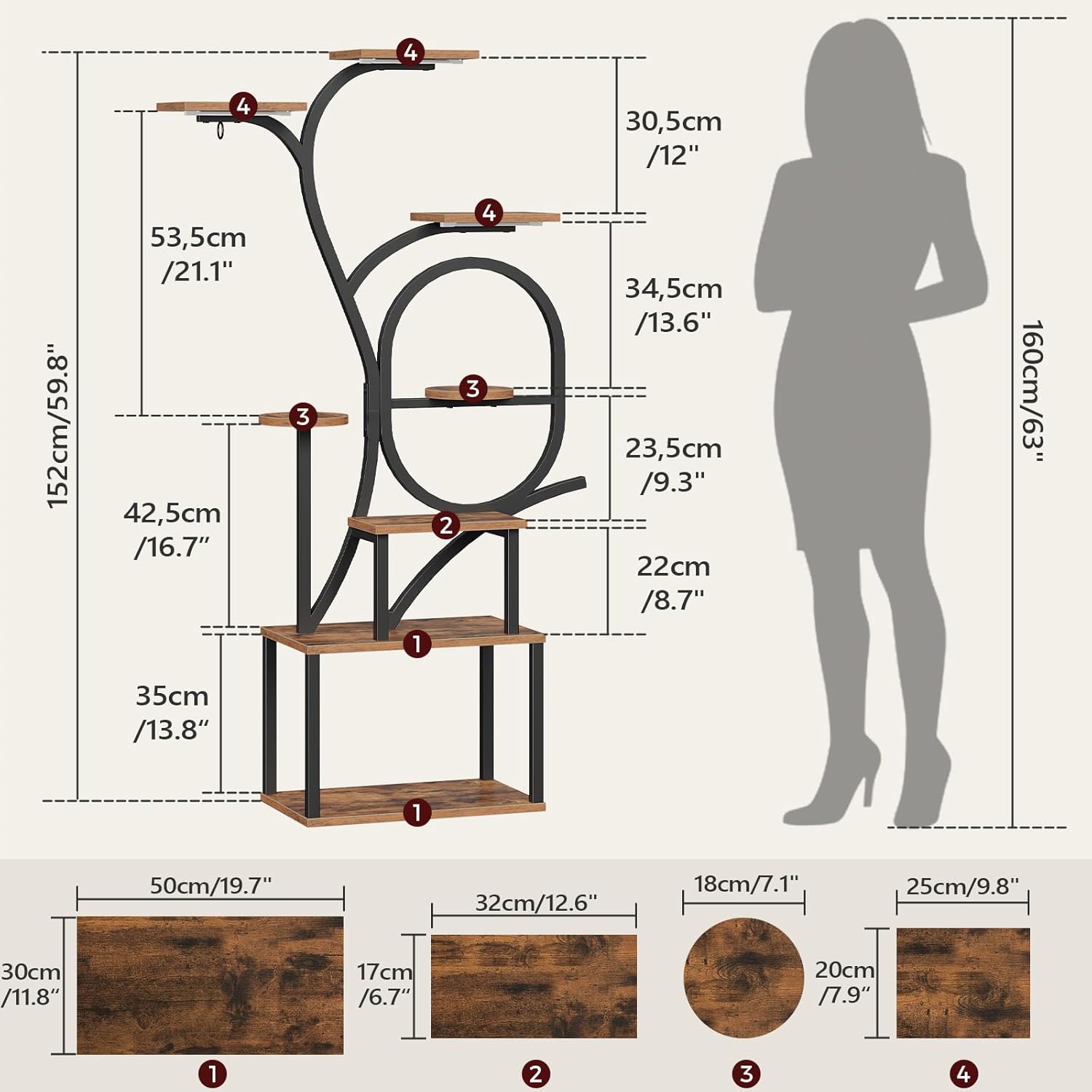
Figure 2: Product dimensions and labeled components for assembly.
2.2 خطوات التجميع
- Follow the step-by-step instructions provided in the included assembly manual. Each part is labeled to correspond with the diagrams.
- Ensure all screws and fasteners are tightened securely, but do not overtighten to avoid damaging the materials.
- Attach the EVA pads to the base of the stand for added stability and floor protection.
- Install the anti-tip mechanism to a wall for enhanced safety, especially in households with children or pets.

Figure 3: Anti-tip device installation for safety.
2.3 Grow Light Installation
The plant stand includes a 3-head LED grow light strip. Install the light strips to the underside of the designated shelves using the provided adhesive or screws. Connect the USB adapter to a suitable power source.

Figure 4: Grow light strip and USB adapter connection.
3. Operating Instructions (Grow Lights)
The integrated grow lights are designed to provide optimal lighting conditions for your indoor plants. The control unit allows for brightness adjustment and timer settings.
3.1 تشغيل/إيقاف التشغيل
- قم بتوصيل محول USB بمصدر طاقة.
- Press the power button on the control unit to turn the lights on or off.
3.2 ضبط السطوع
The grow lights offer 9 brightness levels. Use the '+' and '-' buttons on the control unit to increase or decrease the light intensity.
3.3 وظيفة المؤقت
Select from three timer modes: 3 hours, 9 hours, or 12 hours. Once a timer is set, the lights will automatically turn off after the selected duration and turn back on at the same time the next day, thanks to the memory function.

Figure 5: Grow light control unit with timer and brightness options.

Figure 6: Close-up of the grow light controller.
4. الصيانة
Proper maintenance will ensure the longevity and appearance of your plant stand.
- تنظيف: Wipe the engineered wood shelves and metal frame with a soft, damp القماش. تجنب المنظفات الكاشطة أو المواد الكيميائية القاسية التي قد تلحق الضرر بالطبقة النهائية.
- الانسكابات: Promptly clean any water spills from plants to prevent water damage to the wood surfaces.
- التحقق من الاستقرار: افحص جميع البراغي والوصلات دوريًا للتأكد من إحكامها. أعد ربطها إذا لزم الأمر.
- Grow Lights: Keep the LED light strips free from dust and debris to maintain optimal light output.

Figure 7: Cleaning the engineered wood panels.
5. استكشاف الأخطاء وإصلاحها
If you encounter issues with your plant stand or grow lights, refer to the following common solutions:
| مشكلة | السبب المحتمل | حل |
|---|---|---|
| Plant stand is wobbly or unstable. | Loose connections; uneven floor; uneven weight distribution. | Ensure all screws are tightened. Place on a level surface. Distribute plant weight evenly across shelves. Install the anti-tip device. |
| Grow lights do not turn on. | No power; loose USB connection; faulty light strip. | Check if the USB adapter is properly plugged into a working power outlet. Ensure the USB cable is securely connected to the light strip controller. If issues persist, contact customer support. |
| Grow lights flicker or only some heads work. | Loose connection; damaged light strip. | Verify all connections are secure. If flickering or partial failure continues, the light strip may be damaged. Contact customer support for assistance. |
| وظيفة المؤقت لا تعمل بشكل صحيح. | Incorrect setting; power interruption. | Re-set the timer according to the operating instructions. Ensure continuous power supply to maintain the memory function. |
6. المواصفات
| ميزة | التفاصيل |
|---|---|
| رقم الموديل | PSHR170E01 |
| ماركة | ماهانكريس |
| أبعاد المنتج (الطول × العرض × الارتفاع) | 19.7 × 11.8 × 59.8 بوصة (50 × 30 × 152 سم) |
| وزن العنصر | 21.4 رطل (9.7 كجم) |
| مادة | الخشب الهندسي، المعدن |
| لون | بني ريفي، أسود |
| مطلوب التجميع | نعم |
| نوع القاعدة | قاعدة التمثال |
| Grow Light Type | 3-head Sunlight LED Strip |
| Grow Light Features | 9 Brightness Levels, 3/9/12H Timer with Memory Function |
| مصدر الطاقة | USB Adapter (No Batteries Required) |
7. الضمان والدعم
For any questions, concerns, or issues not covered in this manual, please contact MAHANCRIS customer support. Please have your model number (PSHR170E01) and purchase information ready when contacting support.
While specific warranty details are not provided in this document, MAHANCRIS is committed to customer satisfaction. Refer to your purchase documentation or the MAHANCRIS official webموقع للحصول على معلومات الضمان.
الشركة المصنعة: ماهانكريس
اتصال: Please visit the MAHANCRIS store on Amazon or their official webموقع لمعلومات الاتصال.


