1. المقدمة
This manual provides detailed instructions for the installation, operation, and maintenance of your ESX Vision VMX900DAB Universal 1-DIN Multimedia Receiver. Please read this manual thoroughly before using the device to ensure proper functionality and to maximize your user experience.
The ESX Vision VMX900DAB is a versatile 1-DIN multimedia receiver featuring a 9-inch multi-angle touchscreen display. It integrates advanced connectivity options including wireless Apple CarPlay and Android Auto, DAB+ digital radio, Bluetooth hands-free calling and audio streaming, and a comprehensive media player. The unit is designed for universal compatibility and offers a removable monitor for enhanced security.
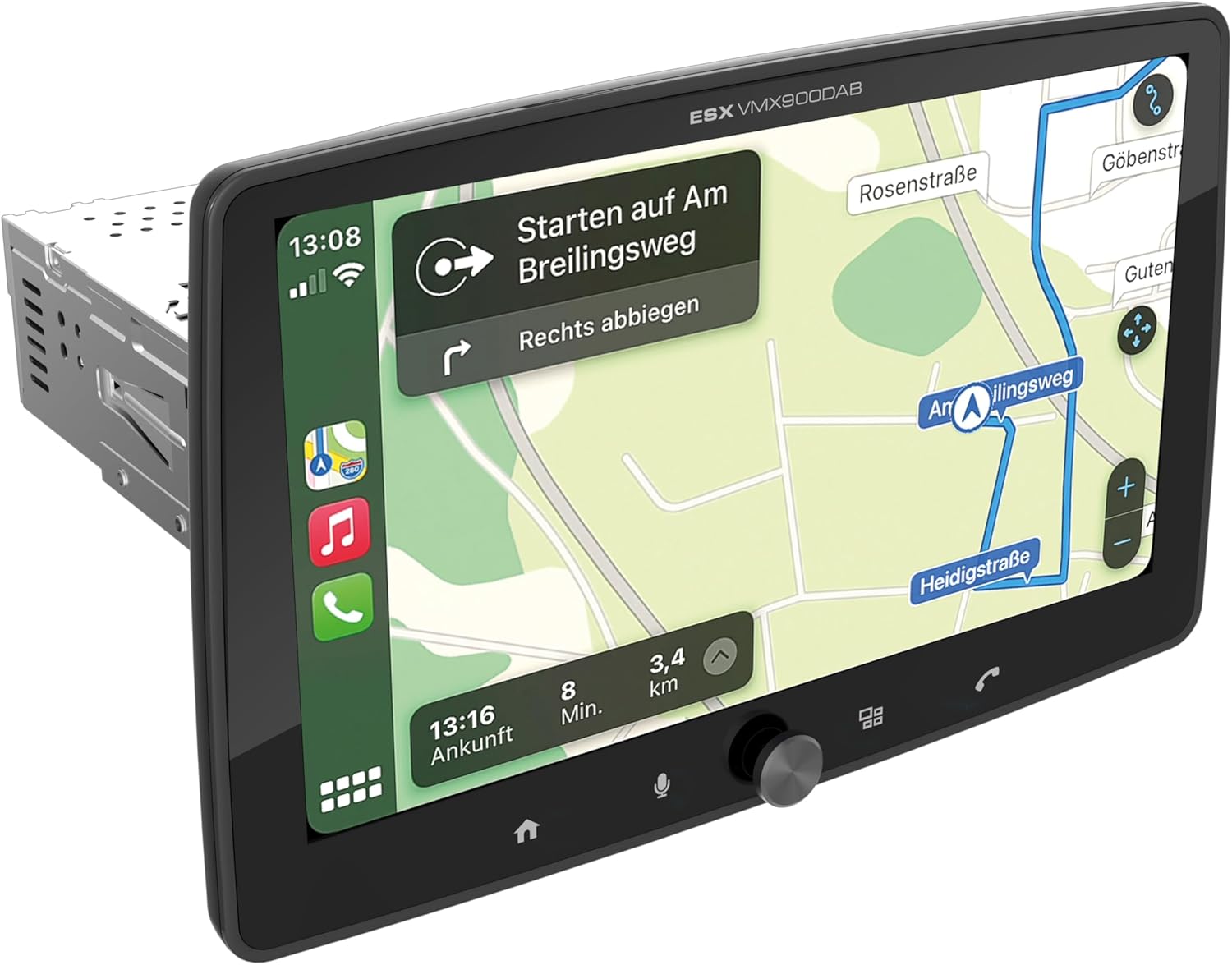
Figure 1.1: ESX Vision VMX900DAB with navigation interface.
2. الإعداد والتثبيت
2.1 محتويات العبوة
قبل التثبيت، تأكد من وجود جميع المكونات:
- ESX Vision VMX900DAB Main Unit
- Detachable 9-inch Touchscreen Monitor
- مجموعة أسلاك الطاقة/مكبرات الصوت
- ميكروفون خارجي
- هوائي نظام تحديد المواقع العالمي (GPS)
- هوائي DAB+
- كابلات تمديد USB
- أدوات التثبيت (الأقواس، البراغي)
- دليل المستخدم (هذا المستند)

الشكل 2.1: الملحقات والمكونات المرفقة.
2.2 تركيب الوحدة الرئيسية
- تأكد من فصل بطارية السيارة قبل البدء في التثبيت.
- Insert the 1-DIN main unit into the vehicle's dashboard opening.
- Secure the main unit using the provided mounting brackets and screws.
2.3 توصيل الشاشة
The 9-inch monitor is detachable and connects to the main unit via a click system.
- Align the monitor's connector with the slot on the main unit.
- Gently push the monitor until it clicks securely into place.
- To remove, press the release button (if applicable) and pull the monitor away.

Figure 2.2: Detachable monitor with click system.
2.4 توصيلات الأسلاك
Refer to the wiring diagram provided with the unit for specific connections. Key connections include:
- Power and Speakers: Connect the main wiring harness to the vehicle's power supply and speakers.
- ميكروفون خارجي: قم بتوصيل الميكروفون الخارجي بمدخله المخصص للحصول على جودة مكالمات مثالية بدون استخدام اليدين.
- هوائي GPS: قم بتوصيل هوائي نظام تحديد المواقع العالمي (GPS) وثبته في مكان واضح view من السماء لتحديد الموقع الدقيق.
- هوائي DAB+: Connect the DAB+ antenna for digital radio reception.
- منافذ USB: Two USB-A ports are available. One for media playback and charging (1.5A), and another specifically for Apple CarPlay/Android Auto and charging (1.5A).
- RCA قبلampالمخرجات المُحددة: Six 4V RCA outputs (FL/FR/RL/RR/SUB1/SUB2) are available for connecting external ampالقاتلون.
- AUX RCA Inputs: Stereo audio and video inputs (L/R/VIDEO) for external audio/video sources.
- Camera RCA Inputs: Dedicated inputs for front and rear cameras.
- التحكم في عجلة القيادة: Analog steering wheel remote control input (learnable) for integration with vehicle controls.
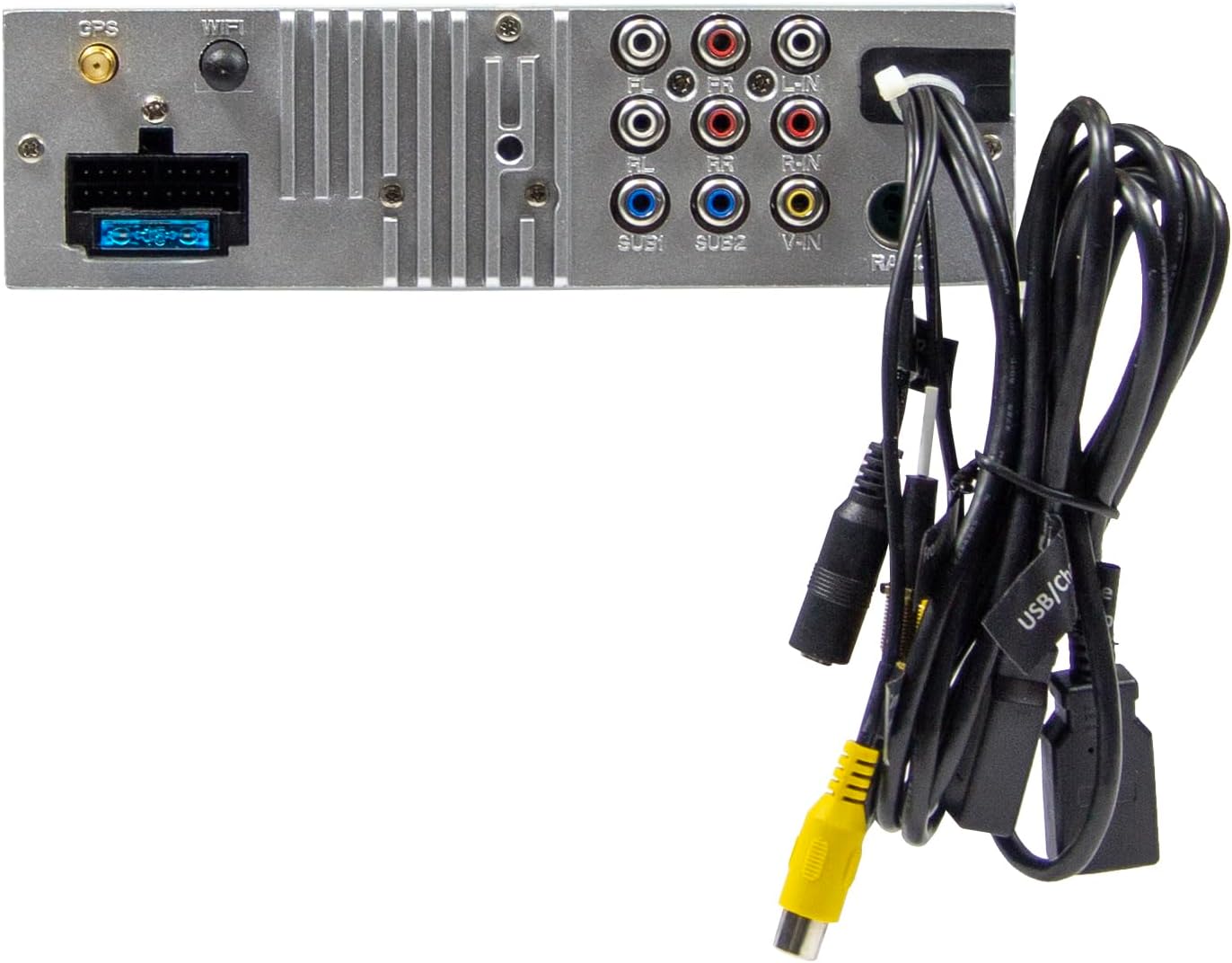
الشكل 2.3: التوصيلات الخلفية للوحدة الرئيسية.
3. تعليمات التشغيل
3.1 تشغيل/إيقاف التشغيل وعناصر التحكم الأساسية
- تشغيل الطاقة: The unit will power on automatically with the vehicle's ignition.
- إيقاف التشغيل: The unit will power off automatically with the vehicle's ignition.
- التحكم في مستوى الصوت: Use the large rotary knob on the front panel to adjust the volume.
- مفاتيح الوظائف: Four function keys on the front panel provide quick access to common features.
- شاشة تعمل باللمس: All primary functions are controlled via the 9-inch touchscreen.
3.2 الشاشة الرئيسية والتنقل
The home screen provides access to all main functions and applications.

Figure 3.1: Main menu/home screen.
3.3 Apple CarPlay وAndroid Auto
The VMX900DAB supports both wireless and wired (via USB) Apple CarPlay and Android Auto.
- الاتصال اللاسلكي: Enable Bluetooth and Wi-Fi on your smartphone and follow the on-screen prompts to connect.
- الاتصال السلكي: Connect your smartphone to the dedicated USB-A port using a compatible USB cable.
- Once connected, your smartphone's compatible apps (navigation, music, calls, messages) will be mirrored on the receiver's display.

Figure 3.2: Apple CarPlay interface.
3.4 Radio Functions (DAB+/FM/AM)
- راديو DAB+: Select the DAB+ icon from the home screen. The unit will scan for available digital radio stations.
- راديو FM/AM: Select the Radio icon. Use the touchscreen to tune to stations, save presets, and access RDS functions.
3.5 Bluetooth Hands-Free and Audio Streaming
- الاقتران: Enable Bluetooth on your smartphone and search for the VMX900DAB. Select the device and confirm pairing.
- الاتصال بدون استخدام اليدين: Once paired, you can make and receive calls directly through the receiver. The external microphone ensures clear voice transmission. Your phonebook can be synchronized.
- تدفق الصوت: Stream music wirelessly from your smartphone to the receiver.
3.6 تشغيل الوسائط
The unit supports various audio, video, and photo formats via USB.
- مدعوم File التنسيقات: AVI, FLV, MOV, MKV, WMV, WMA, MP3, FLAC, JPEG, PNG, BMP.
- Insert a USB drive into the media USB-A port. Select the USB icon from the home screen to browse and play media files.
3.7 Monitor Adjustment
The monitor can be tilted and adjusted in height to achieve the optimal viewing angle and prevent obstruction of vehicle controls.

Figure 3.3: Adjustable monitor mechanism.
أبدا التخصيص
- Startup Logo: Customize the startup logo in the settings menu.
- RGB Key Illumination: Select from various RGB colors and animation effects for the key illumination.
- لغات القائمة: Supported languages include DEU, ENG, SWE, ITA.
4. الصيانة
4.1 تنظيف الوحدة
- Use a soft, dry cloth to wipe the display and unit surfaces.
- بالنسبة للعلامات العنيدة على الشاشة، استخدم منظف الشاشة المصمم خصيصًا للشاشات الإلكترونية وقطعة قماش من الألياف الدقيقة.
- Do not use abrasive cleaners, solvents, or harsh chemicals, as these can damage the finish or screen.
4.2 العناية العامة
- تجنب تعريض الوحدة لدرجات حرارة عالية، أو أشعة الشمس المباشرة لفترات طويلة، أو الرطوبة العالية.
- تأكد من التهوية المناسبة حول الوحدة لمنع ارتفاع درجة الحرارة.
- When removing the monitor, handle it carefully to avoid damage to the connectors.
5. استكشاف الأخطاء وإصلاحها
If you encounter issues with your VMX900DAB, refer to the following common problems and solutions:
| مشكلة | السبب المحتمل | حل |
|---|---|---|
| لا يوجد طاقة | توصيلات كهربائية خاطئة؛ فيوز محترق؛ إيقاف تشغيل محرك السيارة | افحص توصيلات الطاقة؛ استبدل الفيوز؛ شغّل محرك السيارة |
| لا يوجد صوت | مستوى الصوت منخفض جدًا؛ تم تفعيل كتم الصوت؛ مشكلة في توصيلات السماعات | ارفع مستوى الصوت؛ ألغِ كتم الصوت؛ تحقق من توصيلات السماعات |
| البلوتوث غير متصل | Bluetooth off on phone/unit; Incorrect pairing process | Ensure Bluetooth is on; Re-attempt pairing process |
| Apple CarPlay/Android Auto not starting | Incorrect USB port; Faulty USB cable; Phone not compatible/configured | Use the dedicated USB port; Try a different USB cable; Check phone settings for CarPlay/Android Auto |
| استقبال الراديو ضعيف | Antenna not connected; Poor antenna placement; Weak signal area | Check antenna connection; Adjust antenna position; Try in a different location |
| الشاشة لا تعرض البيانات | Monitor not securely attached; Connector issue | Ensure monitor is fully clicked into place; Check for debris in connector |
If the problem persists after attempting these solutions, please contact ESX customer support or your authorized dealer.
6. المواصفات
| ميزة | مواصفة |
|---|---|
| رقم الموديل | في ام اكس 900 داب |
| عرض | 9-inch Multi-angle Touchscreen |
| عامل الشكل | 1-DIN Universal |
| الاتصال | USB, Bluetooth, Auxiliary |
| المميزات الخاصة | Wireless Apple CarPlay, Wireless Android Auto, Detachable Monitor with Click System |
| موالف الراديو | DAB+ (Digital Radio), FM/AM with RDS |
| بلوتوث | Hands-free function, Audio Streaming |
| منافذ USB | 2x USB-A (1.5A charging, one dedicated for CarPlay/Android Auto) |
| Max Music Power | 4 × 80 واط |
| قبل-ampالمخرجات المُحددة | 6x RCA (4V) (FL/FR/RL/RR/SUB1/SUB2) |
| مدخلات AUX | RCA (L/R/VIDEO) |
| مدخلات الكاميرا | RCA (Front/Rear) |
| مدعوم File التنسيقات | AVI, FLV, MOV, MKV, WMV, WMA, MP3, FLAC, JPEG, PNG, BMP |
| ميكروفون خارجي | متضمن |
| التحكم في عجلة القيادة | Analog (learnable) |
| جهاز إستقبال نظام تحديد المواقع العالمي (GPS) | متضمن |
| لغات القائمة | DEU, ENG, SWE, ITA |
| إجمالي الطاقة الناتجة | 320 واط |
| تكوين قناة الصوت المحيطي | 4.2 |
| وضع إخراج الصوت | ستيريو |
7. الضمان والدعم
For warranty information, please refer to the documentation provided at the time of purchase or contact your authorized ESX dealer. Warranty terms and conditions may vary by region and retailer.
For technical support or further assistance, please contact ESX customer service or visit the official ESX webموقع لموارد الدعم.


