1. المقدمة
Thank you for choosing the Hama Ultimate Pro Portable Bluetooth Speaker. This manual provides essential information for the safe and efficient use of your device. Please read it carefully before use and keep it for future reference.
محتويات الحزمة:
- 1x Hama Ultimate Pro Portable Bluetooth Speaker
- 1x USB-C شحن كابل
- 1x Carrying Strap
- 1 × دليل المستخدم
2. تعليمات السلامة
- Do not open the device. Incorrect assembly can lead to electric shock, fire, or damage.
- Keep the device away from extreme temperatures, direct sunlight, and humidity.
- This speaker is rated IPX6, meaning it is protected against strong continuous rain and splashing water. Do not submerge the speaker in water.
- استخدم فقط كابل USB-C المقدم للشحن.
- لا تستخدم الجهاز إذا كان تالفًا بشكل واضح.
- Protect the battery from overheating.
3. انتهى المنتجview
Familiarize yourself with the speaker's features and connections.

The Hama Ultimate Pro speaker highlights its key features: 24-hour battery life, IPX6 waterproof rating, Bluetooth connectivity, and 120W sound output.
لوحة التحكم:

مفصل view of the speaker's top control panel, showing buttons for power, volume adjustment, play/pause, mode selection, and equalizer settings.
- زر الطاقة: Press and hold to turn on/off. Short press to check battery status.
- اخفض الصوت (-): خفض مستوى الصوت.
- زر التشغيل/الإيقاف المؤقت: تشغيل الصوت أو إيقافه مؤقتًا.
- رفع الصوت (+): زيادة الحجم.
- زر الوضع (M): Switch between input modes (Bluetooth, AUX, USB).
- Equalizer Button (EQ): Cycle through equalizer presets (Bass Sound, Power Sound, Balanced Sound).
المنافذ والاتصالات:

The speaker's rear port panel includes a USB-C charging port, a USB-A port for external devices, a reset button, and a 6.3mm jack input.
- منفذ USB-C: For charging the speaker and for Power Bank output.
- منفذ USB-A: For playing music from USB storage devices or for Power Bank output.
- مدخل AUX (مقبس 3.5 مم): لتوصيل أجهزة الصوت الخارجية عبر كابل صوت مقاس 3.5 ملم.
- Microphone/Guitar Input (6.3mm Jack): لتوصيل الميكروفون أو الجيتار.
- زر إعادة الضبط: Use a thin object to press and reset the speaker if needed.
4. الإعداد
4.1 شحن السماعة
- Connect the supplied USB-C charging cable to the USB-C port on the speaker.
- Connect the other end of the USB-C cable to a suitable USB power adapter (not included). A 30W charger is recommended for fast charging.
- The charging indicator will show the charging status. The speaker is fully charged in approximately 2.5 hours.
4.2 تشغيل/إيقاف التشغيل
- To turn on: Press and hold the Power button for a few seconds until you hear an audible prompt.
- To turn off: Press and hold the Power button for a few seconds until you hear an audible prompt.
4.3 اقتران بلوتوث
- Ensure the speaker is powered on and in Bluetooth mode (indicated by a flashing blue LED). If not, press the Mode button (M) to switch to Bluetooth mode.
- على جهازك (الهاتف الذكي، الجهاز اللوحي، الكمبيوتر المحمول)، قم بتمكين البلوتوث وابحث عن الأجهزة المتاحة.
- Select "Hama Ultimate Pro" from the list of devices.
- بمجرد الاقتران، سيتحول مؤشر LED إلى اللون الأزرق الثابت، وسوف تسمع صوت تأكيد.
4.4 التوصيل عبر مدخل AUX
- قم بتوصيل أحد طرفي كابل الصوت 3.5 ملم (غير مرفق) بمنفذ إدخال AUX الموجود على السماعة.
- Connect the other end to the audio output of your external device.
- Press the Mode button (M) on the speaker to switch to AUX mode.
4.5 Connecting USB Storage
- أدخل محرك أقراص فلاش USB يحتوي على الصوت fileقم بتوصيلها بمنفذ USB-A الموجود على السماعة.
- Press the Mode button (M) to switch to USB mode. The speaker will automatically begin playing audio from the USB drive.
4.6 Connecting Microphone or Guitar
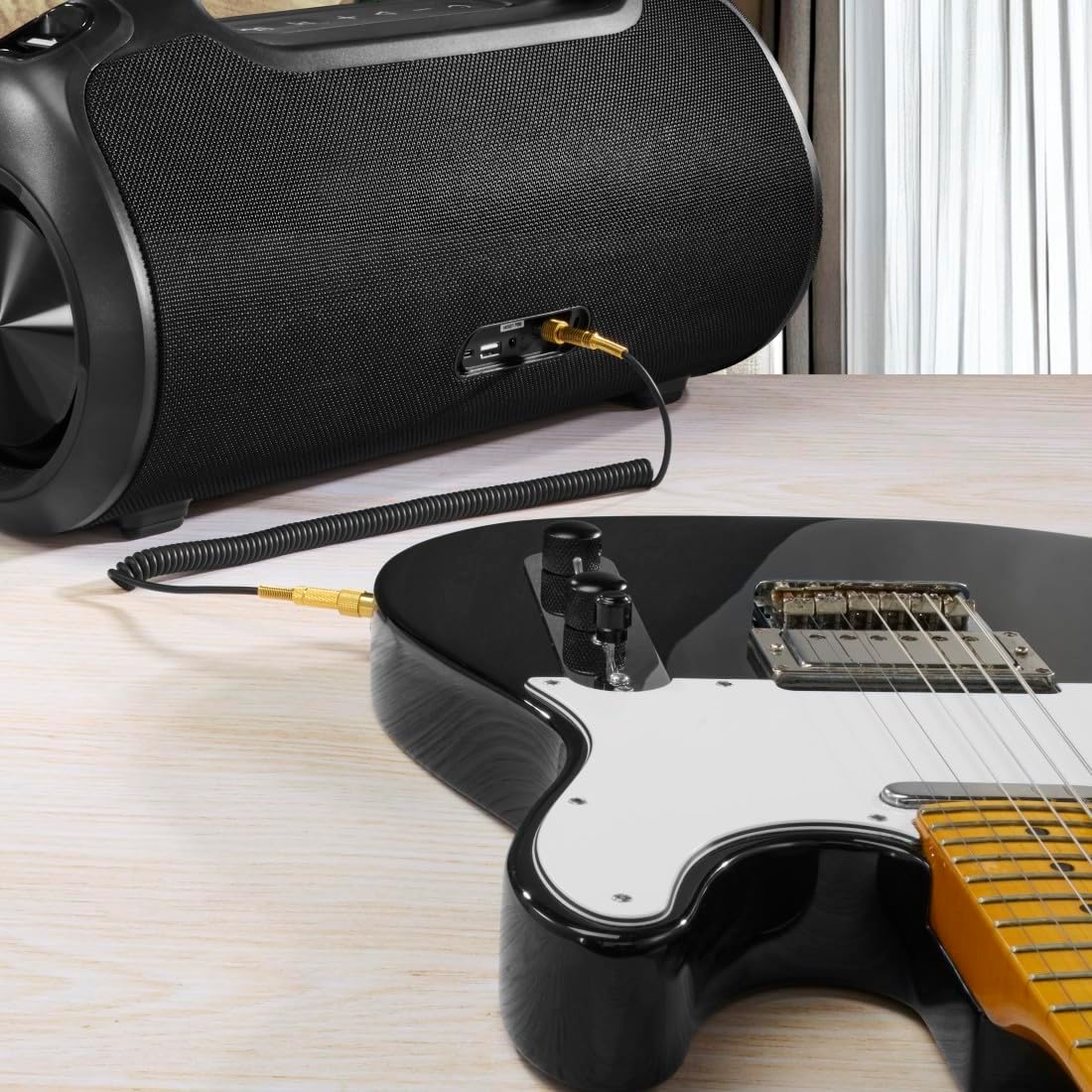
The speaker can be used as an amplifier by connecting an electric guitar via its 6.3mm jack input.

A microphone can be connected to the speaker's 6.3mm jack input for karaoke or public speaking.
- Connect your microphone or guitar to the 6.3mm jack input on the speaker.
- Adjust the volume on your connected device and the speaker as needed.
4.7 إقران ستيريو لاسلكي حقيقي (TWS)
The Hama Ultimate Pro supports TWS for connecting two speakers for a stereo sound experience. Refer to the specific TWS pairing instructions in the full manual if available, as this feature typically involves pressing a dedicated TWS button on both speakers simultaneously.
5. تشغيل مكبر الصوت
5.1 عناصر التحكم الأساسية في التشغيل
- تشغيل/إيقاف مؤقت: اضغط قصيرًا على زر التشغيل / الإيقاف المؤقت.
- رفع الصوت: اضغط لفترة قصيرة على زر رفع الصوت (+).
- اخفض الصوت: اضغط لفترة قصيرة على زر خفض الصوت (-).
- المسار التالي: اضغط لفترة طويلة على زر رفع الصوت (+).
- المسار السابق: اضغط لفترة طويلة على زر خفض الصوت (-).
5.2 أوضاع المعادل
The speaker offers three distinct equalizer modes to optimize your listening experience:
- صوت الجهير: Enhances low frequencies for a deeper bass response.
- Power Sound: Provides a balanced, powerful sound profile.
- صوت متوازن: Offers a neutral and clear audio output.
To switch between modes, short press the EQ button on the control panel.
5.3 Hama Smart Home App Control

The Hama Smart Home app allows for convenient control and customization of the speaker, including battery status and sound settings.
Download the "Hama Smart Home" app from your device's app store to access additional features:
- Custom equalizer settings.
- Change the speaker's name.
- View precise battery status in percentage.
- Remote control of playback and settings.
5.4 وظيفة بنك الطاقة

The speaker's integrated power bank allows you to charge external devices like smartphones via its USB-C or USB-A ports.
The Hama Ultimate Pro speaker features an integrated power bank function, allowing you to charge other devices:
- Connect your smartphone, tablet, or other USB-powered device to the USB-C or USB-A port on the speaker using a compatible charging cable.
- ستبدأ البطارية الداخلية للسماعة بشحن جهازك المتصل.
6. الصيانة
6.1 التنظيف
The speaker has a resistant and washable surface. To clean:
- Ensure the speaker is turned off and all cables are disconnected.
- استخدمي قطعة قماش ناعمةamp cloth to wipe the surface. Do not use harsh cleaning agents or solvents.
- لإزالة الأوساخ المستعصية، يمكن استخدام محلول صابون خفيف، ثم مسحها بقطعة قماش نظيفة.amp قطعة قماش.
- Allow the speaker to dry completely before use.
6.2 التخزين
- قم بتخزين مكبر الصوت في مكان بارد وجاف بعيدًا عن أشعة الشمس المباشرة ودرجات الحرارة القصوى.
- في حالة التخزين لفترة طويلة، اشحن البطارية إلى حوالي 50% كل بضعة أشهر للحفاظ على صحة البطارية.
6.3 العناية بالبطارية
- تجنب تفريغ البطارية بالكامل بشكل متكرر.
- لا تعرض البطارية لمصادر الحرارة أو اللهب المباشر.
- التخلص من البطاريات وفقا للقوانين المحلية.
7. استكشاف الأخطاء وإصلاحها
إذا واجهت مشكلات مع مكبر الصوت الخاص بك، فراجع الحلول الشائعة التالية:
- لا يوجد طاقة: تأكد من شحن السماعة. قم بتوصيلها بمصدر طاقة باستخدام كابل USB-C.
- لا يمكن الاقتران عبر البلوتوث:
- تأكد من أن السماعة في وضع الاقتران عبر البلوتوث (وميض مؤشر LED الأزرق).
- Make sure Bluetooth is enabled on your device and it is within 10 meters of the speaker.
- قم بإزالة مكبر الصوت من قائمة البلوتوث الخاصة بجهازك وحاول الاقتران مرة أخرى.
- أعد تشغيل كل من مكبر الصوت وجهازك.
- لا يوجد صوت:
- تحقق من مستويات الصوت على كل من مكبر الصوت والجهاز المتصل به.
- Ensure the correct input mode (Bluetooth, AUX, USB) is selected on the speaker.
- إذا كنت تستخدم AUX، فتأكد من إدخال الكابل بالكامل ووظيفته.
- مشاكل الشحن:
- Verify the USB-C cable is not damaged and is properly connected.
- جرب محول طاقة USB مختلف.
- Speaker Unresponsive: If the speaker becomes unresponsive, use a thin object (like a paperclip) to press the Reset button located on the port panel.
8. المواصفات

Physical dimensions of the Hama Ultimate Pro speaker for reference.
| رقم الموديل | 00188232 |
| ماركة | حماه |
| لون | أسود |
| تكنولوجيا الاتصال | بلوتوث 5.3 |
| أقصى مدى | 10 متر |
| نظام الصوت | ستيريو |
| Max Music Power | 120 واط |
| نوع البطارية | بطارية ليثيوم أيون متكاملة |
| سعة البطارية | 4500 مللي أمبير |
| حجم البطاريةtage | 11.4 فولت |
| طاقة البطارية | 51.3 واط |
| أقصى عمر للبطارية | 24 ساعات |
| وقت الشحن | حوالي 2.5 ساعات |
| دعم USB PD | نعم |
| تصنيف IP | IPX6 (Protection against strong continuous rain) |
| الأبعاد (الطول × العرض × الارتفاع) | 46.5 × 19.2 × 25.4 سم |
| وزن | 5200 جرام (5.2 كجم) |
| الأجهزة المتوافقة | MP3 Player, Personal Computer, Smartphone, Tablet, Television |
9. الضمان
Hama GmbH & Co KG provides a warranty for this product. Please refer to the warranty card included in your package or visit the official Hama webالموقع للحصول على شروط وأحكام الضمان التفصيلية الخاصة بمنطقتك.
10. الدعم
For technical support, troubleshooting assistance, or further inquiries, please contact Hama customer service. Contact details can typically be found on the official Hama webالموقع أو على عبوة المنتج.
You can also visit the Hama webموقع للأسئلة الشائعة ومعلومات إضافية عن المنتج: www.hama.com


