مقدمة
Thank you for choosing the Macap MI40 Touch Instant Burr Coffee Grinder. This manual provides essential information for the safe and efficient operation, maintenance, and troubleshooting of your new coffee grinder. Please read this manual thoroughly before using the appliance and retain it for future reference.
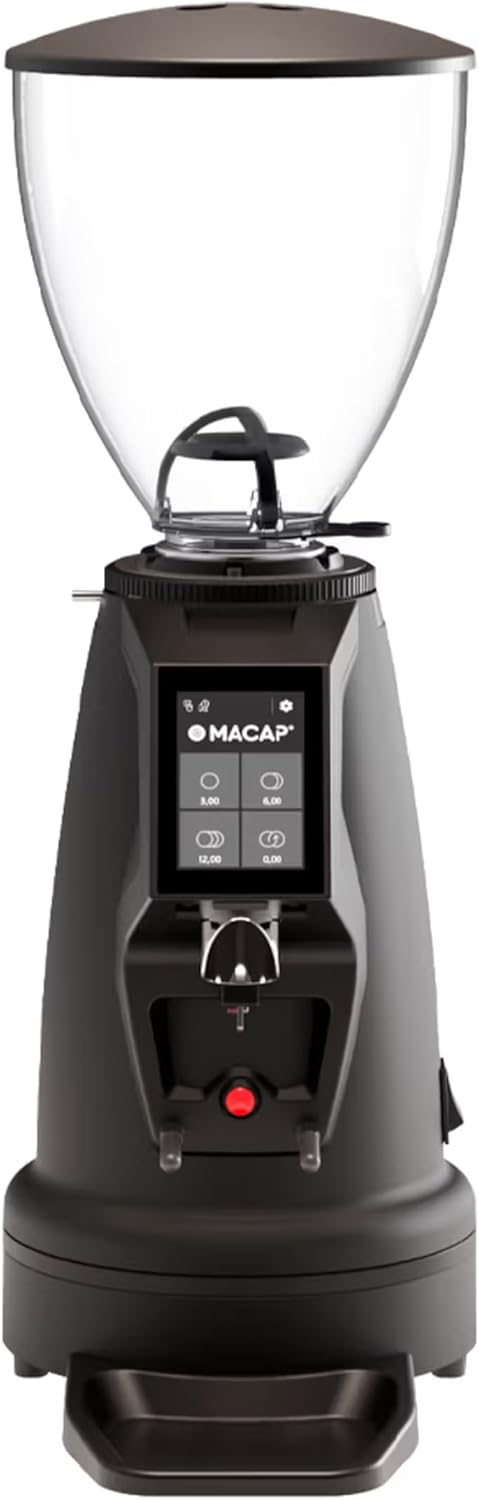
الشكل 1: الجبهة view of the Macap MI40 Touch Instant Burr Coffee Grinder, showcasing its compact design and touchscreen interface.
تعليمات السلامة الهامة
اتبع دائمًا احتياطات السلامة الأساسية عند استخدام الأجهزة الكهربائية لتقليل خطر نشوب حريق أو التعرض لصدمة كهربائية و/أو إصابة الأشخاص، بما في ذلك ما يلي:
- اقرأ كافة التعليمات.
- لا تغمر الجهاز أو السلك أو القابس في الماء أو السوائل الأخرى.
- من الضروري المراقبة الدقيقة عند استخدام أي جهاز بواسطة الأطفال أو بالقرب منه.
- افصل الجهاز عن المقبس عند عدم استخدامه، وقبل تركيب أو خلع الأجزاء، وقبل التنظيف.
- تجنب ملامسة الأجزاء المتحركة.
- لا تقم بتشغيل أي جهاز به سلك أو قابس تالف أو بعد تعطل الجهاز أو تعرضه للسقوط أو التلف بأي شكل من الأشكال.
- قد يؤدي استخدام الملحقات غير الموصى بها أو المباعة من قبل الشركة المصنعة إلى نشوب حريق أو حدوث صدمة كهربائية أو إصابة.
- لا تستخدمه في الهواء الطلق.
- لا تترك السلك يتدلى على حافة الطاولة أو المنضدة، أو يلامس الأسطح الساخنة.
- تحقق من القادوس بحثًا عن وجود أجسام غريبة قبل الاستخدام.
- هذا الجهاز مخصص للاستخدام المنزلي فقط.
مكونات المنتج
Familiarize yourself with the main components of your MI40 Touch coffee grinder:
- حبوب هوبر: Transparent container for whole coffee beans (1.2 kg capacity).
- غطاء القادوس: يغطي قمع الفاصوليا للحفاظ على نضارة الفاصوليا.
- Grind Adjustment Collar: Stepless micrometric adjustment for precise grind size control.
- 3.5'' Touchscreen Display: User interface with programmable doses and built-in LED light.
- متجر الطحن: Where ground coffee is dispensed.
- Portafilter Fork: Adjustable support for holding portafilters during grinding, with anti-vibration coating.
- صينية التنقيط: Removable tray to catch excess coffee grounds.
- مفتاح التشغيل: Located on the side/rear of the unit.
- 65mm Flat Burrs: High-efficiency burrs for consistent grinding.

الشكل 2: الجانب view illustrating the hopper, grind adjustment collar, and portafilter fork.

Figure 3: Close-up of the bean hopper interior, showing the bean flow mechanism.
الإعداد والاستخدام الأول
- فك التعبئة: أزل جميع المكونات من العبوة بعناية. احتفظ بالعبوة للنقل أو التخزين مستقبلًا.
- الموقع: Place the grinder on a stable, flat, and dry surface. Ensure adequate ventilation around the unit.
- تجميع القادوس: Securely place the bean hopper onto the grinder body. Ensure it clicks into place if applicable.
- توصيل الطاقة: قم بتوصيل سلك الطاقة بمأخذ كهربائي أرضي.
- التنظيف الأولي: قبل الاستخدام الأول، امسح السطح الخارجي بـamp cloth. The burrs and grind path are typically clean from the factory, but a small amount of sacrificial coffee can be ground through to season the burrs.
تعليمات التشغيل
The MI40 Touch offers intuitive operation through its 3.5'' touchscreen and multiple grinding modes.
1. ملء القادوس
Lift the hopper lid and pour whole coffee beans into the hopper. Replace the lid securely.
2. ضبط حجم الطحن
The MI40 Touch features stepless micrometric grind adjustment. To adjust, rotate the grind adjustment collar located below the hopper. Rotate clockwise for finer grinds and counter-clockwise for coarser grinds. Make small adjustments and test the grind to achieve the desired consistency for your brewing method (e.g., espresso, drip, moka pot, cold brew).

Figure 4: Grind adjustment collar for stepless precision control, allowing fine-tuning of particle size.
3. استخدام واجهة شاشة اللمس
The 3.5'' touchscreen allows for programming up to 4 doses and selecting operating modes. The built-in LED light improves visibility in low-light conditions.

Figure 5: Close-up of the 3.5'' touchscreen display, showing programmable dose options.
Dose Programming:
- From the home screen, tap on a dose button (e.g., single shot, double shot) to select it.
- To program a dose, press and hold the desired dose button until the programming interface appears.
- Adjust the grinding time using the '+' and '-' buttons.
- Press the checkmark or save icon to confirm and save the new dose setting.
4. أوضاع التشغيل
The MI40 Touch supports three primary operating modes, automating workflow for various needs:
- الوضع القياسي: Select a pre-programmed dose, place your portafilter on the fork, and press the corresponding dose button to start grinding. The grinder will stop automatically after the set time.
- وضع الدفع والطحن: Place your portafilter on the fork. The grinder will start grinding when the portafilter activates the switch and will continue as long as the portafilter is held in place. Release the portafilter to stop grinding.
- Barista Hands-Free Mode: Designed for continuous grinding without holding the portafilter. The grinder will start when the portafilter is inserted and stop when removed. This mode is ideal for high-volume use in cafes or busy home settings.
Refer to the video below for a visual guide on the interface and operating modes:
Video 1: MACAP MI Series Interface Specifications. This video demonstrates the touchscreen interface, dose customization, and different operating modes (Standard, Push and Grind, Barista) for the MI series grinders, providing a comprehensive overview of user interaction.
الصيانة والتنظيف
Regular cleaning and maintenance ensure optimal performance, consistent grind quality, and longevity of your grinder.
التنظيف اليومي
- صينية التنقيط: Empty and wipe the drip tray daily to remove accumulated coffee grounds and maintain cleanliness.
- الخارج: امسح الجزء الخارجي من المطحنة بقطعة قماش ناعمة.amp cloth. Do not use abrasive cleaners or immerse the unit in water, as this can damage electronic components.
- متجر الطحن: Use a brush or vacuum to clear any visible coffee grounds from the grind outlet to prevent blockages.
Weekly / Bi-Weekly Cleaning (Burr Cleaning)
To maintain grind consistency and prevent clogging, clean the burrs regularly. Frequency depends on usage and coffee bean oiliness.
- افصل: Always unplug the grinder from the power outlet before performing any cleaning or maintenance on the burrs.
- Remove Hopper: Empty the bean hopper and remove it from the grinder body.
- إزالة النتوء العلوي: Carefully unscrew or unlock the upper burr assembly according to the grinder's design. Refer to specific diagrams in the full product manual if available.
- تنظيف الفرشاة: Use a stiff brush (a dedicated grinder brush is recommended) to brush away all coffee grounds and oils from both the upper and lower burrs, as well as the burr chamber.
- إعادة التجميع: Reassemble the burr components and hopper, ensuring all parts are securely in place. Test the grind adjustment after reassembly.
- Grinder Cleaning Tablets (Optional): For a deeper clean, you can use specialized grinder cleaning tablets (e.g., Grindz). Follow the product instructions for these tablets, typically by grinding them through the machine.
استكشاف الأخطاء وإصلاحها
This section addresses common issues you might encounter with your MI40 Touch grinder and provides potential solutions.
| مشكلة | السبب المحتمل | حل |
|---|---|---|
| المطحنة لا تعمل. | Not plugged in; Power switch off; Circuit breaker tripped; Internal fuse. | Ensure power cord is securely plugged in; Turn power switch to ON; Reset circuit breaker; If problem persists, contact support. |
| No coffee grounds dispensed. | Hopper empty; Grind chute clogged; Burrs jammed by foreign object (e.g., stone). | Fill hopper with beans; Clean grind chute thoroughly; Unplug and inspect burrs for obstructions, then carefully remove. |
| حجم الطحن غير متناسق. | Burrs are dirty or worn; Grind setting too coarse/fine for desired brew method; Beans are stale or oily. | Clean burrs thoroughly; Adjust grind setting incrementally; Use fresh, quality beans. Consider burr replacement if wear is evident. |
| Grinder is unusually loud or makes grinding noise without beans. | Foreign object in burrs; Loose components; Burrs misaligned. | Unplug and inspect burrs for foreign objects; Ensure all components are securely fastened; Contact customer support if noise persists or burrs seem misaligned. |
| Touchscreen unresponsive or displaying errors. | Temporary software glitch; Power fluctuation. | Unplug the grinder for 30 seconds, then plug back in and restart. If the issue persists, contact customer support. |
If the problem persists after attempting these solutions, please contact Macap customer support for further assistance.
تحديد
| ميزة | التفاصيل |
|---|---|
| نموذج | MI40 Touch |
| ماركة | Macap |
| نوع النتوء | 65mm Flat Burrs |
| تعديل الطحن | ميكرومتري بدون خطوات |
| سعة القادوس | 1.2 كيلوغرام |
| عرض | 3.5'' Touchscreen with LED Light |
| أوضاع التشغيل | Standard, Push and Grind, Barista Hands-Free |
| أبعاد المنتج (الطول × العرض × الارتفاع) | 12 بوصة طول × 7.63 بوصة عرض × 22 بوصة ارتفاع |
| وزن العنصر | 19.58 رطل |
| لون | أسود |
| الشركة المصنعة | ماكاب |
| أول تاريخ متاح | 19 مارس 2025 |
الضمان والدعم
For detailed warranty information and customer support, please refer to the official documentation included with your purchase or visit the official Macap website. Ensure you have your product's model number (MI40 Touch) and purchase date available when contacting support for efficient service.
الشركة المصنعة: ماكاب
Official U.S. Branch: Pro Coffee Gear LLC


