1. المقدمة
شكرا لك على الشراءasing the Karlsson Vogue Alarm Clock. This versatile device combines a digital alarm clock, a wireless induction charger, and a Bluetooth speaker, designed to enhance your daily routine. Please read this manual carefully before using the product to ensure proper operation and to maximize its lifespan. Keep this manual for future reference.
احتياطات السلامة
- لا تعرض الجهاز للماء أو الرطوبة الزائدة.
- تجنب درجات الحرارة القصوى.
- لا تقم بتفكيك الجهاز أو محاولة إصلاحه بنفسك.
- Use only the provided or recommended USB adapter for power.
- تأكد من التهوية المناسبة حول الجهاز أثناء التشغيل.
2. انتهى المنتجview
The Karlsson Vogue Alarm Clock features a sleek design with a fabric-covered front and intuitive controls. Below is an overview من مكوناتها الرئيسية وأدوات التحكم الخاصة بها.
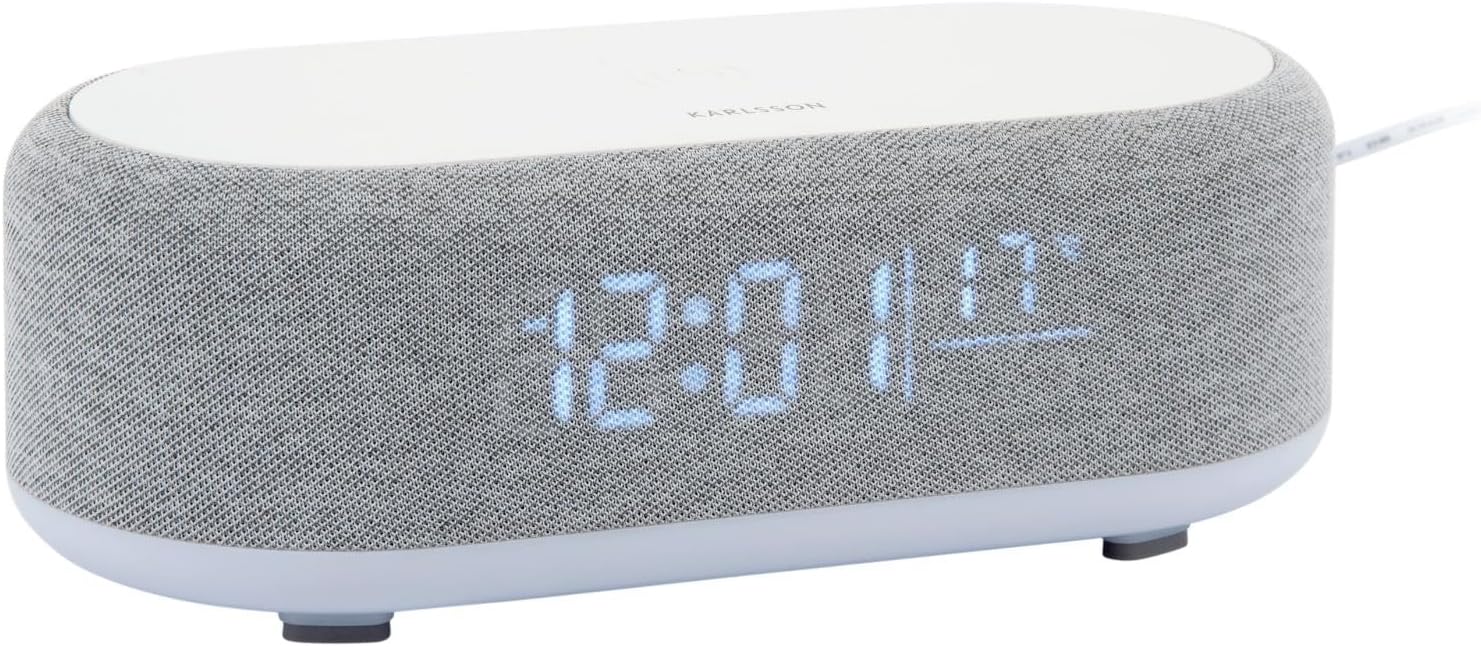
الشكل 2.1: الجبهة view of the Karlsson Vogue Alarm Clock, displaying the digital time and temperature.
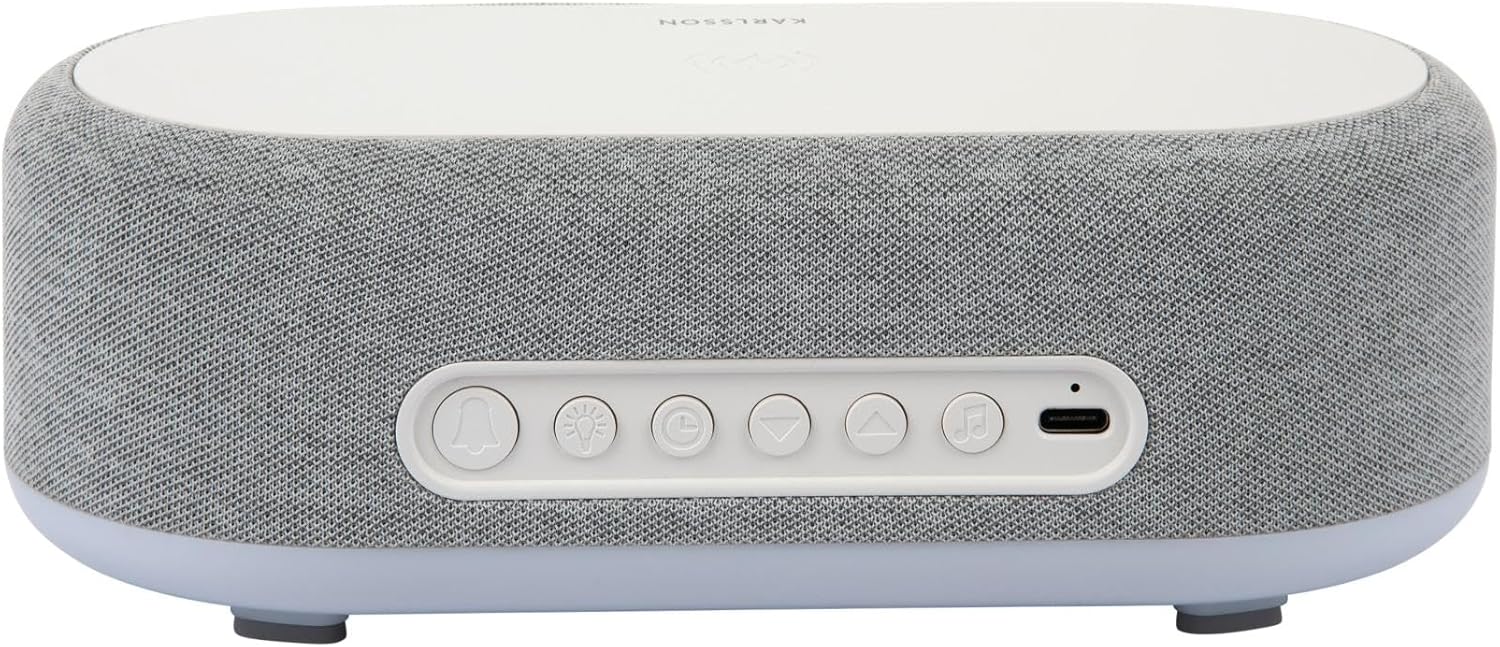
الشكل 2.2: خلفي view of the alarm clock, highlighting the control buttons and USB-C power input.
Control Buttons (from left to right on rear panel):
- زر التنبيه 1: Press to activate/deactivate Alarm 1. Long press to set Alarm 1 time.
- زر التنبيه 2: Press to activate/deactivate Alarm 2. Long press to set Alarm 2 time.
- Brightness/Snooze Button: Press to adjust display brightness. When alarm sounds, press to snooze.
- زر ضبط الوقت: اضغط لفترة طويلة للدخول إلى وضع ضبط الوقت.
- زر لأسفل: Decrease values during setting, navigate menus.
- زر لأعلى: Increase values during setting, navigate menus.
- زر البلوتوث/التشغيل/الإيقاف المؤقت: Long press to enter Bluetooth pairing mode. Press to play/pause music.
- مدخلات الطاقة USB-C: قم بتوصيل محول الطاقة هنا.
اللوحة العلوية:
- وسادة الشحن اللاسلكي: Place compatible devices here for wireless charging.
3. الإعداد
3.1 توصيل الطاقة
- Connect the provided USB adapter to the USB-C Power Input port on the rear of the alarm clock.
- Plug the USB adapter into a standard wall outlet.
- ستضيء الشاشة، مما يشير إلى أن الجهاز قيد التشغيل.
3.2 ضبط الوقت الأولي
- اضغط لفترة طويلة على زر ضبط الوقت (clock icon) on the rear panel. The hour digits will start flashing.
- استخدم Up و الأزرار السفلية لضبط الساعة.
- اضغط على زر ضبط الوقت اضغط مرة أخرى لتأكيد الساعة والانتقال إلى إعداد الدقائق. ستومض أرقام الدقائق.
- استخدم Up و الأزرار السفلية لضبط الدقيقة.
- اضغط على زر ضبط الوقت one more time to confirm the minute and exit time setting mode.
4. تعليمات التشغيل
4.1 ضبط المنبهات
يدعم الجهاز إنذارين مستقلين (الإنذار 1 والإنذار 2).
- To set Alarm 1: اضغط لفترة طويلة على زر التنبيه 1 (bell icon with '1'). The hour digits for Alarm 1 will flash.
- استخدم Up و الأزرار السفلية لضبط ساعة التنبيه.
- اضغط على زر التنبيه 1 مرة أخرى لتأكيد الساعة والانتقال إلى ضبط الدقائق.
- استخدم Up و الأزرار السفلية لضبط دقيقة التنبيه.
- اضغط على زر التنبيه 1 one more time to confirm and exit alarm setting. The alarm icon will appear on the display.
- To set Alarm 2: اتبع نفس الخطوات باستخدام زر التنبيه 2 (bell icon with '2').
4.2 تفعيل/إلغاء تفعيل أجهزة الإنذار
- اضغط على الزر المناسب زر التنبيه 1 or زر التنبيه 2 briefly to toggle the alarm on or off. The alarm icon on the display will indicate its status.
4.3 وظيفة الغفوة
- عندما يصدر صوت التنبيه، اضغط على Brightness/Snooze Button (light bulb icon) to activate snooze. The alarm will temporarily stop and sound again after approximately 9 minutes.
- To turn off the alarm completely, press any other button on the rear panel.
4.4 Bluetooth Speaker Operation
- الاقتران: اضغط لفترة طويلة على زر البلوتوث/التشغيل/الإيقاف المؤقت (music note icon) until the display shows "BT" and starts flashing, indicating pairing mode.
- On your mobile device, enable Bluetooth and search for "Karlsson Vogue". Select it to connect.
- Once connected, the "BT" indicator will stop flashing. You can now play audio through the alarm clock's speaker.
- التشغيل: اضغط على زر البلوتوث/التشغيل/الإيقاف المؤقت briefly to play or pause music.
- Volume control is managed via your connected mobile device.
4.5 Wireless Induction Charging
The top surface of the alarm clock features a wireless charging pad compatible with Qi-enabled devices.
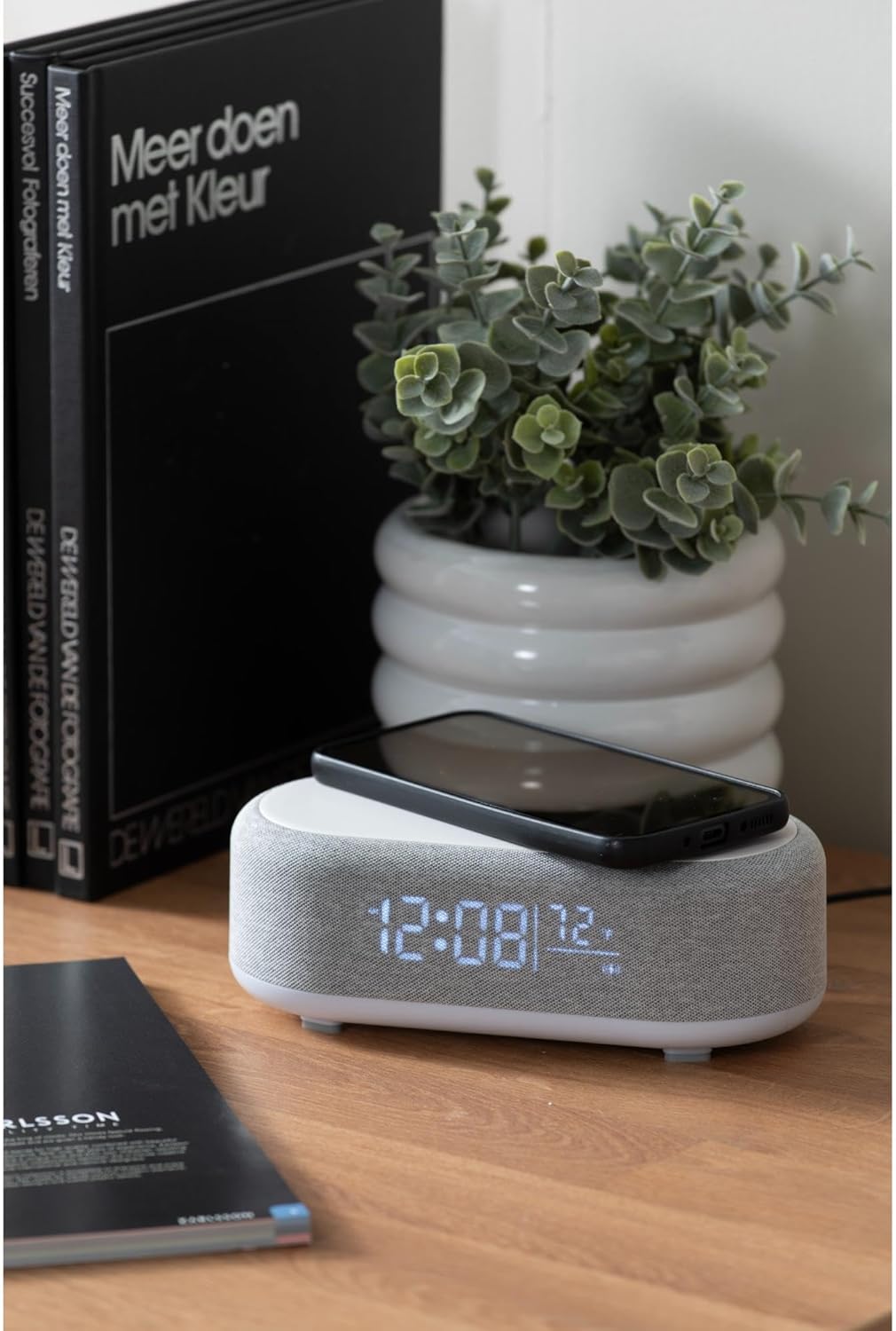
Figure 4.1: A smartphone placed on the wireless charging pad of the alarm clock.
- Place your Qi-compatible smartphone or other device directly onto the center of the top charging pad.
- Ensure the device is properly aligned. A charging indicator (usually on your phone screen) will confirm charging has begun.
- قم بإزالة جهازك بعد شحنه بالكامل.
4.6 ضبط سطوع الشاشة
- اضغط على Brightness/Snooze Button (light bulb icon) repeatedly to cycle through different brightness levels for the display.
5. الصيانة
5.1 التنظيف
- Before cleaning, disconnect the power adapter.
- Wipe the surface of the alarm clock with a soft, dry, or slightly damp قطعة قماش.
- لا تستخدم المنظفات الكاشطة أو المذيبات أو المواد الكيميائية القوية، لأنها قد تؤدي إلى إتلاف السطح.
5.2 التخزين
- If storing the device for an extended period, disconnect it from power.
- يُخزن في مكان بارد وجاف بعيدًا عن أشعة الشمس المباشرة ودرجات الحرارة القصوى.
6. استكشاف الأخطاء وإصلاحها
| مشكلة | السبب المحتمل | حل |
|---|---|---|
| الجهاز لا يعمل. | لا يوجد اتصال بالكهرباء أو أن المحول معطل. | Ensure the USB-C cable is securely connected and the adapter is plugged into a working outlet. Try a different outlet. |
| البلوتوث غير قادر على الاتصال. | Device not in pairing mode; already connected to another device; mobile device Bluetooth off. | Long press the Bluetooth button to enter pairing mode. Ensure no other device is connected. Turn off and on Bluetooth on your mobile device. |
| الشحن اللاسلكي لا يعمل. | الهاتف غير متوافق مع تقنية Qi؛ الهاتف غير محاذٍ؛ غطاء الهاتف سميك جدًا. | Ensure your device supports Qi wireless charging. Re-position the device on the center of the pad. Remove thick phone cases. |
| التنبيه لا يصدر صوتا. | Alarm deactivated; volume too low (for Bluetooth alarm). | Check if the alarm icon is displayed. Ensure the alarm time is set correctly. If using Bluetooth audio for alarm, ensure phone volume is adequate. |
7. المواصفات
| ميزة | التفاصيل |
|---|---|
| ماركة | كارلسون |
| رقم الموديل | KA6033GY |
| لون | رمادي |
| مادة | البلاستيك (ABS) |
| الأبعاد (الطول × العرض × الارتفاع) | 19.8 x 9.8 x 7 cm (7.8 x 3.86 x 2.76 inches) |
| وزن | 0.46 كجم (1.01 رطل) |
| مدخلات الطاقة | USB (Adapter included) |
| الشحن اللاسلكي | Induction (Qi-compatible) |
| الاتصال | بلوتوث |
8. الضمان والدعم
For warranty information and customer support, please refer to the documentation provided with your purchase or contact your retailer. You may also visit the official Karlsson webالموقع للحصول على مزيد من المساعدة.
Webموقع: Karlsson Official Store


