1. المقدمة
شكرا لك على الشراءasing the FiiO SA1 High-Fidelity Desktop Speaker. This manual provides essential information for the proper setup, operation, and maintenance of your device. Please read it thoroughly before use to ensure optimal performance and longevity of your speakers.
2. معلومات السلامة
- مزود الطاقة: Use only the provided power cable and adapter. Ensure the power source matches the voltage requirements specified on the device.
- تهوية: لا تسد أي فتحات تهوية. ثبّت المنتج وفقًا لتعليمات الشركة المصنعة.
- الماء والرطوبة: لا تعرض هذا الجهاز للمطر أو الرطوبة. لا تضع أشياء مملوءة بالسوائل، مثل المزهريات، على الجهاز.
- حرارة: لا تقم بالتثبيت بالقرب من أي مصادر للحرارة مثل المشعات أو فتحات التدفئة أو المواقد أو أي أجهزة أخرى (بما في ذلك ampالمُضخِّمات) التي تنتج الحرارة.
- تنظيف: نظف فقط بقطعة قماش جافة.
- الخدمة: أحل جميع أعمال الصيانة إلى موظفي الصيانة المؤهلين. يلزم إجراء الصيانة عند تعرض الجهاز للتلف بأي شكل من الأشكال، مثل تلف سلك مصدر الطاقة أو القابس، أو انسكاب السوائل أو سقوط الأشياء داخل الجهاز، أو تعرض الجهاز للمطر أو الرطوبة، أو عدم تشغيله بشكل طبيعي، أو سقوطه.
3. محتويات العبوة
يرجى التأكد من وجود جميع العناصر في الحزمة الخاصة بك:
- FiiO SA1 Desktop Speaker (Pair)
- كابل الطاقة
- جهاز التحكم عن بعد
- دليل المستخدم (هذا المستند)
4. انتهى المنتجview
The FiiO SA1 is a high-fidelity desktop active speaker system designed for a superior audio experience. It features a robust construction with wood and aluminum-magnesium alloy, offering versatile connectivity and advanced sound customization.
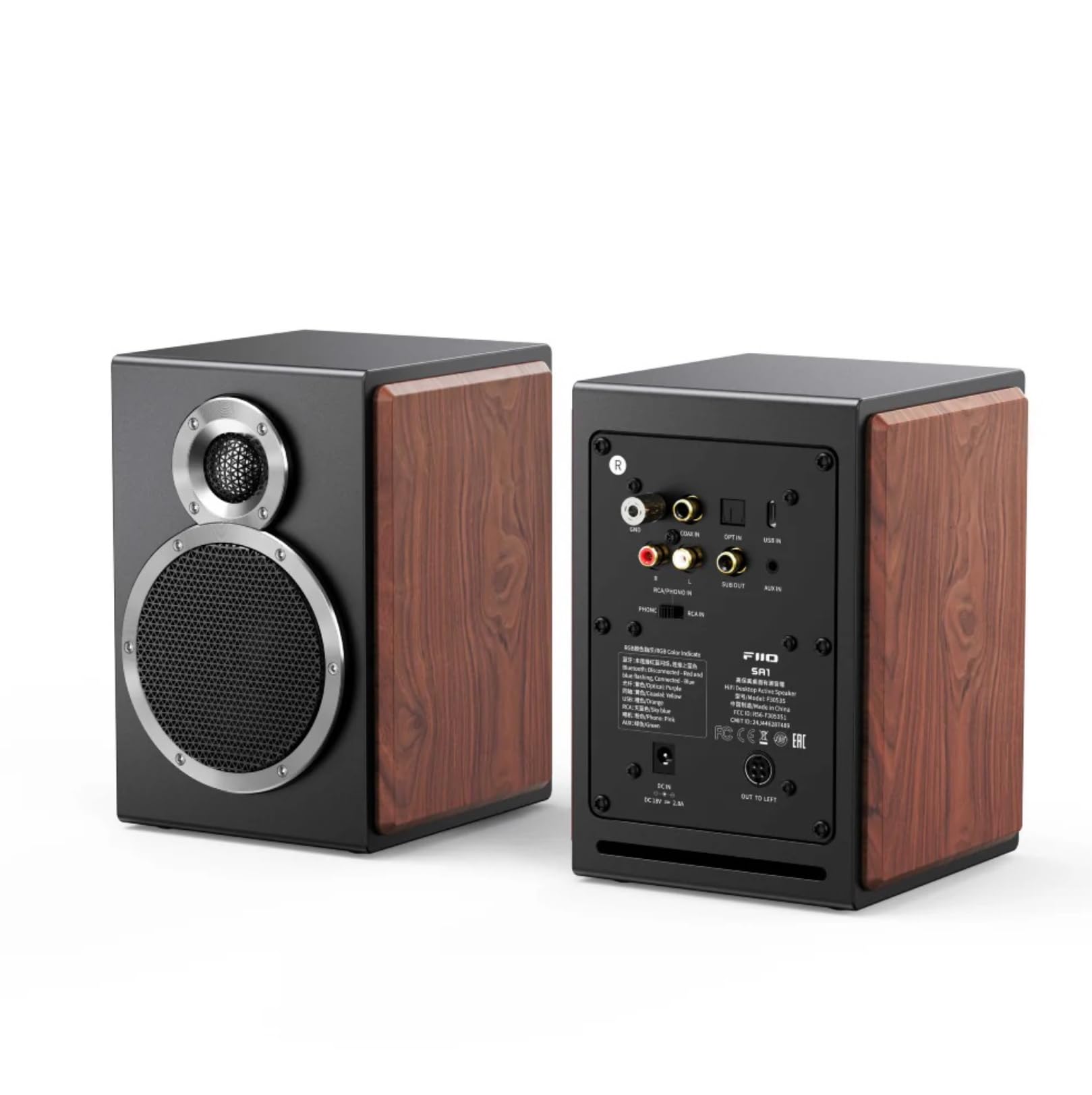
الشكل 1: الامامي والخلفي view of the FiiO SA1 Desktop Speakers. The image displays the speaker's elegant design with wood side panels and the various input/output ports on the rear.

الشكل 2: Close-up of the physical control knobs on the FiiO SA1 speaker. Two large physical knobs are visible, one with an RGB light indicator, and a large button on the right side of the main speaker for convenient operation.
المكونات الرئيسية:
- 3.5-inch Wood Fiber Woofer: Provides lush vocals and warm sound.
- 3/4 inch Aluminum-Magnesium Alloy Dome Tweeter: Delivers crisp, clear sound with rich detail.
- Physical Knobs: For convenient control of volume and other settings.
- جهاز التحكم عن بعد: Included for full-featured control from a distance.
5. الإعداد
5.1 توصيل الطاقة
Connect the provided power cable to the DC 12V input port on the rear of the main speaker, then plug it into a wall outlet.
5.2 وضع السماعات
Place the speakers on a stable, flat surface, such as a desktop or bookshelf. For optimal stereo imaging, position them equidistant from your listening position and angled slightly inward.

الشكل 3: FiiO SA1 speakers integrated into a desktop gaming setup, demonstrating ideal placement beside a monitor.
5.3 اتصالات الصوت
The FiiO SA1 offers a variety of input and output options:

الشكل 4: Rear panel of the FiiO SA1, highlighting the diverse range of input and output ports available for connectivity.
- RCA and 3.5mm Analog Inputs: Connect traditional audio sources.
- USB, Coaxial, and Optical Digital Inputs: For high-resolution digital audio.
- بلوتوث شنومكس: For wireless high-bit-rate audio (LDAC supported).
- فونو مدمجamp: Connect a turntable directly (switch to PHONO setting if your turntable lacks a built-in preamp).
- Subwoofer Output (RCA): Connect an active subwoofer to create a 2.1 system.
6. التشغيل
6.1 تشغيل/إيقاف التشغيل
Use the power button on the speaker or the remote control to turn the device on or off.
6.2 اختيار المدخلات
Cycle through the available inputs (RCA, 3.5mm, USB, Coaxial, Optical, Bluetooth, Phono) using the input selector button on the speaker or remote control.
6.3 التحكم في مستوى الصوت
Adjust the volume using the main knob on the speaker or the volume buttons on the remote control.
6.4 31-Band Lossless PEQ (Parametric Equalizer)
The SA1 supports a 31-band high-precision lossless PEQ for all input modes. This allows for fine-tuning and calibration of the frequency response curve to optimize sound for your listening environment. PEQ adjustment is currently supported only via the FiiO Control app.

الشكل 5: A smartphone screen showing the FiiO Control app's 31-band PEQ interface, allowing users to customize the sound profile of the SA1 speakers.
6.5 اتصال البلوتوث
The SA1 supports LDAC high-definition Bluetooth decoding and Bluetooth version 5.4, enabling wireless high-bit-rate audio up to 990kbps. This ensures high-quality wireless sound, certified for Hi-Res Audio and Hi-Res Audio Wireless.

الشكل 6: An illustration of the Bluetooth 5.4 chip, emphasizing the SA1's advanced wireless audio capabilities.
6.6 App Control and Sound Presets
The FiiO Control app allows fine-tune settings and offers eight built-in sound presets (e.g., pop, jazz, classical, R&B, dance). You can also save up to three custom PEQ setups. A specially-tuned monitoring-style curve compensates for frequency response, transforming the SA1 into active desktop studio monitor speakers.

الشكل 7: A hand holding a smartphone showing the FiiO Control app with various sound presets and customization options for the SA1 speakers.
6.7 Automatic Standby and Wake-up
If the SA1 does not detect any input for 20 minutes, it will enter standby mode. The RGB light indicator will turn red and turn off after 20 minutes. When a signal input is detected, the device will automatically wake up, and the RGB light indicator will return to its original color.

الشكل 8: An illustration depicting the FiiO SA1 speaker's automatic standby and wake-up functionality, indicated by changing light colors.
7. المواصفات
| ميزة | التفاصيل |
|---|---|
| اسم الموديل | س أ 1 |
| نوع السماعة | رئيس المحمولة |
| مادة | Wood, Aluminum-Magnesium Alloy |
| لون | أسود |
| أبعاد المنتج | 6.3 بوصة عمق × 5.51 بوصة عرض × 7.48 بوصة ارتفاع |
| وزن العنصر | 9.68 جنيه (4.4 كيلوجرام) |
| الحد الأقصى لقوة خرج السماعة | 20 Watts (Woofer: 20W*2, Tweeter: 5W*2) |
| تكنولوجيا الاتصال | Bluetooth, Coaxial, Optical, RCA, USB |
| وضع إخراج الصوت | ستيريو |
| نوع التركيب | جبل منضدية |
| ميزة خاصة | Hi-Res Audio, 31-Band Lossless PEQ, Phono Preamp |
| طريقة التحكم | بعيد |
8. الصيانة
- تنظيف: Use a soft, dry cloth to clean the exterior of the speakers. Avoid using abrasive cleaners, waxes, or solvents.
- تراب: Regularly dust the speaker grilles and surfaces to prevent accumulation that could affect sound quality or ventilation.
- بيئة: Keep the speakers in a cool, dry place away from direct sunlight, extreme temperatures, and high humidity.
9. استكشاف الأخطاء وإصلاحها
- لا يوجد صوت: Check power connection, input selection, volume levels on both the speaker and source device, and ensure cables are securely connected.
- الصوت المشوه: Reduce volume, check audio source quality, ensure cables are not damaged, and verify speaker placement.
- مشكلات الاقتران بالبلوتوث: Ensure the speaker is in Bluetooth pairing mode, disable and re-enable Bluetooth on your source device, and clear previous pairings if necessary.
- جهاز التحكم عن بعد لا يعمل: Check battery in the remote control and ensure there are no obstructions between the remote and the speaker.
10. الضمان والدعم
The FiiO SA1 Desktop Speaker comes with a ضمان محدود. Please refer to the warranty card included in your package for specific terms and conditions. For technical support, troubleshooting assistance, or service inquiries, please contact FiiO customer support through their official webالموقع أو بائع التجزئة الذي اشتريت منه المنتج.
الموارد المتاحة على الإنترنت: For the latest firmware updates, FAQs, and additional support, please visit the official FiiO webموقع.


