1. المقدمة
This manual provides comprehensive instructions for the DAREU EK87PROTKL Wireless Mechanical Gaming Keyboard and the DAREU A950 4K Polling Rate Wireless Gaming Mouse. Please read this manual carefully before using the products to ensure proper setup and operation. Keep this manual for future reference.
2. Keyboard Features Overview (EK87PROTKL)
- Gasket Mount & PCB Single Key Slotting: Features a gasket structure with a 1.2mm thick FR4 PCB and single key slotted design for enhanced resilience, stability, and a softer, more responsive feel. Six-layer padding reduces noise and provides a focused, crisp sound.
- اتصال ثلاثي الأوضاع: Supports Bluetooth 5.1, 2.4GHz wireless, and USB-C wired connections. Connects to up to five devices simultaneously.
- قابلة للتبديل السريع: Equipped with a hot-swappable PCB supporting almost all 3-pin or 5-pin mechanical switches on the market. Comes with pre-lubed Cloud linear switches.
- إضاءة RGB مواجهة للجنوب: Offers up to 26 backlight modes and 16.8 million colors. Brightness and speed are adjustable via the driver software.
- عمر بطارية طويل: Features a 4000mAh battery, providing up to 45 days of playtime in lights-off mode.

Figure 2.1: Keyboard Gasket Structure Diagram. This image details the layered construction of the keyboard, highlighting components that contribute to its sound and feel.

Figure 2.2: Keyboard Tri-Mode Connection. This image illustrates the three available connection methods and how to switch between them using Fn key combinations.

Figure 2.3: Keyboard RGB Lighting Controls. This image shows various RGB lighting modes and the Fn key combinations for adjusting brightness and color.
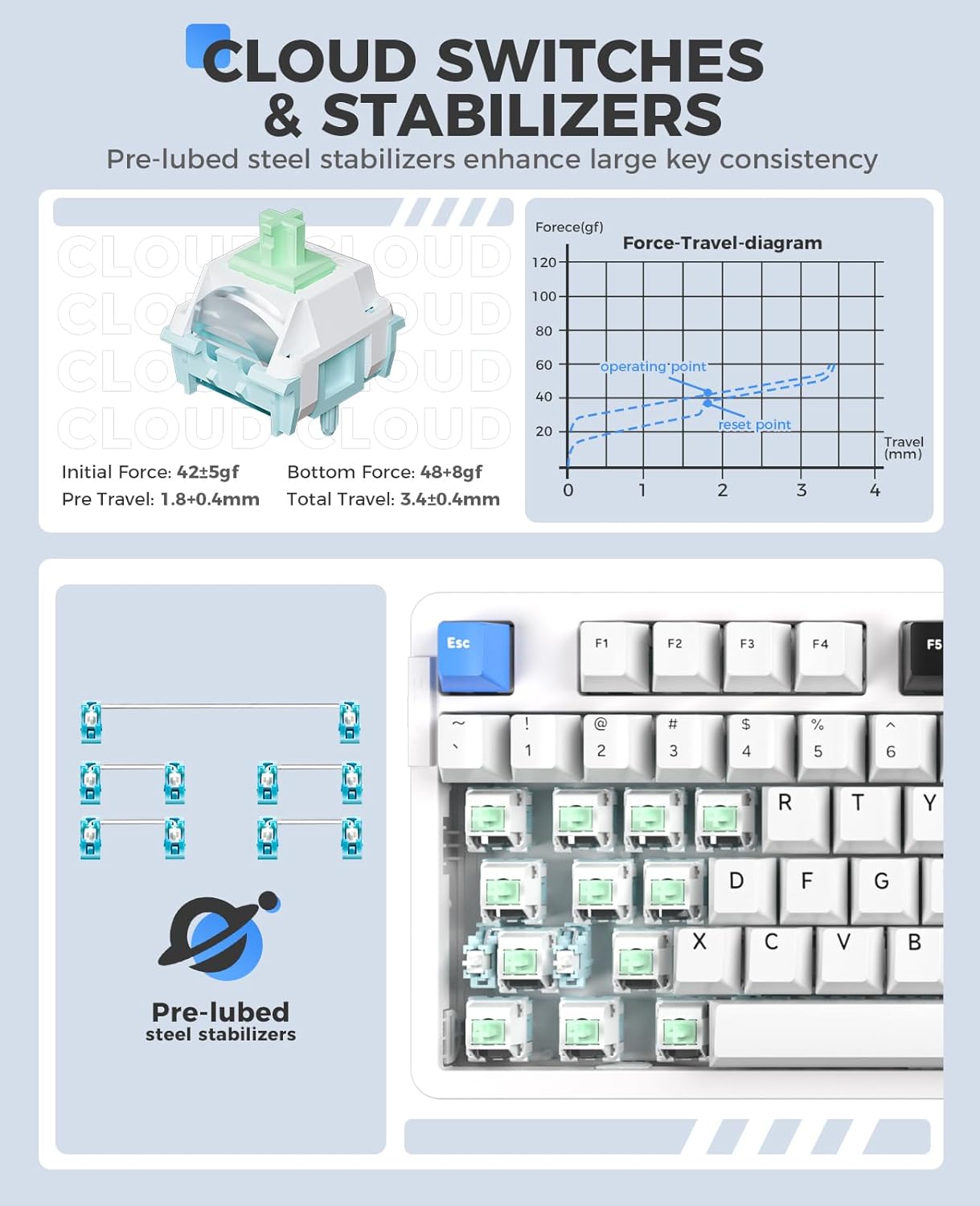
Figure 2.4: Cloud Switches and Stabilizers. This image details the characteristics of the pre-lubed Cloud linear switches and steel stabilizers.

Figure 2.5: Hot-Swappable PCB Socket. This image illustrates the hot-swappable design, allowing users to easily change switches.
3. Mouse Features Overview (أ950)
- معدل استطلاع 4K: Equipped with a 4KHz receiver, sending signals to the computer in 0.25ms, which is four times faster than standard gaming mice.
- مستشعر بصري PAW 3395: Features a high-precision PAW 3395 sensor with up to 26000 DPI, 650 IPS tracking speed, and 50G acceleration for accurate tracking.
- Kailh Black GM8.0 Switches: Utilizes durable Kailh black GM8.0 mouse switches, rated for 80 million clicks.
- Tri-Mode Connection & Programmable: Supports multiple connection methods and offers programmable buttons via software.
- تصميم خفيف الوزن: Weighs 54g for comfortable and agile use.
- الشحن السريع: 300mAh battery with 30-minute fast charging to reach 90% power. Provides approximately 37 days of use in BT5.1 mode and 6 days in 2.4G mode (based on 4 hours of connection per day).

Figure 3.1: Mouse 4K Report Rate. This image shows the mouse and its 4K receiver, emphasizing the high report rate for responsiveness.

Figure 3.2: Mouse PAW3395 Optical Sensor. This image focuses on the mouse's sensor capabilities, including its high DPI and tracking speed.

Figure 3.3: Mouse Fast Charging Technology. This image provides details on the mouse's battery life and quick charging feature.
4. تعليمات الإعداد
4.1 Keyboard (EK87PROTKL)
- الاتصال السلكي: قم بتوصيل لوحة المفاتيح بجهاز الكمبيوتر الخاص بك باستخدام كابل USB-C المرفق. سيتم التعرف على لوحة المفاتيح تلقائيًا.
- اتصال لاسلكي 2.4 جيجا هرتز:
- حدد موقع جهاز الاستقبال USB 2.4 جيجا هرتز.
- قم بتوصيل جهاز الاستقبال بمنفذ USB متاح على جهاز الكمبيوتر الخاص بك.
- Turn on the keyboard and switch it to 2.4GHz mode (refer to the keyboard's mode switch or Fn key combination). The keyboard should connect automatically.
- اتصال بلوتوث 5.1:
- Ensure the keyboard is in Bluetooth mode (refer to the keyboard's mode switch or Fn key combination, typically الجبهة الوطنية + 1/2/3).
- على جهاز الكمبيوتر الخاص بك أو جهازك، انتقل إلى إعدادات البلوتوث وابحث عن أجهزة جديدة.
- Select "DAREU EK87PROTKL" from the list of available devices to pair.
- The keyboard can store up to three Bluetooth connections. Switch between them using Fn + 1, Fn + 2، أو Fn + 3.
4.2 Mouse (A950)
- الاتصال السلكي: Connect the mouse to your computer using the provided USB-C cable. The mouse will function immediately.
- اتصال لاسلكي 2.4 جيجا هرتز:
- Plug the 4K USB receiver into an available USB port on your computer.
- Turn on the mouse and switch it to 2.4GHz mode. The mouse should connect automatically.
- اتصال بلوتوث:
- Ensure the mouse is in Bluetooth mode.
- على جهاز الكمبيوتر الخاص بك أو جهازك، انتقل إلى إعدادات البلوتوث وابحث عن أجهزة جديدة.
- Select "DAREU A950" from the list of available devices to pair.
- الشحن: Connect the mouse to a computer USB port using the USB-C cable for charging. The mouse supports fast charging.
5. تعليمات التشغيل
5.1 Keyboard (EK87PROTKL)
- التحكم في إضاءة RGB:
- Fn + السهم لأعلى: زيادة السطوع.
- Fn + السهم لأسفل: تقليل السطوع.
- Fn + { : تغيير لون الإضاءة الخلفية.
- Fn + } : تغيير وضع الإضاءة الخلفية.
- تبديل نظام التشغيل: يستخدم Fn + 1 (لنظام التشغيل Windows) أو Fn + 2 (for Mac) to switch between operating system layouts.
- برامج التشغيل: For advanced customization of RGB lighting, macros, and key assignments, download and install the official DAREU driver software from the DAREU webموقع.
5.2 Mouse (A950)
- تعديل DPI: The mouse typically has a dedicated DPI button or can be adjusted via software. Refer to the DAREU driver software for precise DPI settings.
- الأزرار القابلة للبرمجة: Utilize the DAREU driver software to customize button functions, create macros, and adjust other performance settings.
6. الصيانة
6.1 التنظيف العام
- Disconnect both the keyboard and mouse from your computer before cleaning.
- استخدم قطعة قماش ناعمة وخالية من الوبر وامسحها برفق.ampيُنظف بالماء أو بمحلول تنظيف خفيف لمسح الأسطح.
- بالنسبة للوحة المفاتيح، استخدم الهواء المضغوط لإزالة الغبار والحطام من بين أغطية المفاتيح.
- تجنب استخدام المواد الكيميائية القاسية أو المنظفات الكاشطة أو رش السوائل مباشرة على الأجهزة.
6.2 Keyboard Switch Replacement
- Ensure the keyboard is disconnected from power.
- Use a keycap puller to carefully remove the desired keycap.
- Use a switch puller to gently grip and pull the switch vertically out of the PCB.
- قم بمحاذاة دبابيس المفتاح الميكانيكي الجديد ذي 3 أو 5 دبابيس مع الثقوب الموجودة على لوحة الدوائر المطبوعة.
- اضغط على المفتاح الجديد بقوة في مكانه حتى تسمع صوت طقطقة. تأكد من تثبيته بشكل صحيح وعدم انحنائه.
- استبدال غطاء المفتاح.
7. استكشاف الأخطاء وإصلاحها
7.1 مشاكل لوحة المفاتيح
| مشكلة | الحل المحتمل |
|---|---|
| لوحة المفاتيح لا تستجيب (سلكية) | Check USB-C cable connection. Try a different USB port or cable. |
| لوحة المفاتيح لا تتصل (2.4 جيجاهرتز) | Ensure the keyboard is in 2.4GHz mode. Re-insert the USB receiver. Try a different USB port. Ensure the keyboard battery is charged. |
| لوحة المفاتيح غير متصلة (بلوتوث) | Ensure the keyboard is in Bluetooth pairing mode (Fn + 1/2/3). Forget the device on your computer and re-pair. Ensure the keyboard battery is charged. |
| إضاءة RGB لا تعمل/غير صحيحة | Adjust brightness/mode using Fn key combinations. Check settings in the DAREU driver software. Ensure the keyboard battery is charged. |
| المفاتيح غير مسجلة | Check if the switch is properly seated. If hot-swappable, try re-seating or replacing the switch. |
7.2 مشاكل الماوس
| مشكلة | الحل المحتمل |
|---|---|
| الفأرة لا تستجيب (متصلة سلكياً) | Check USB-C cable connection. Try a different USB port or cable. |
| Mouse not connecting (2.4GHz) | Ensure the mouse is in 2.4GHz mode. Re-insert the 4K USB receiver. Try a different USB port. Ensure the mouse battery is charged. |
| الماوس غير متصل (بلوتوث) | Ensure the mouse is in Bluetooth pairing mode. Forget the device on your computer and re-pair. Ensure the mouse battery is charged. |
| مؤشر الماوس غير منتظم أو لا يتحرك | Clean the optical sensor. Ensure the mouse pad or surface is clean and suitable. Check DPI settings. |
| لا يتم شحن الماوس | Ensure the USB-C cable is properly connected. Try a different USB port or charging cable. Use a computer USB port for charging, not a wall adapter. |
8. المواصفات
8.1 DAREU EK87PROTKL Keyboard
- بناء: Gasket Mount, PCB Single Key Slotting
- ثنائي الفينيل متعدد الكلور: FR4 material, 1.2mm thick, hot-swappable (3/5 pin switches)
- المفاتيح: Pre-lubed Cloud Linear Switch
- المثبتات: Pre-lubed Steel Stabilizers
- اتصال: Bluetooth 5.1 / 2.4GHz Wireless / USB-C Wired (Tri-Mode)
- بطارية: 4000 مللي أمبير
- إضاءة: South-Facing RGB, 26 modes, 16.8 million colors
- المفاتيح: 87 keys, N-key rollover (all keys conflict-free)
8.2 DAREU A950 Mouse
- المستشعر: مستشعر بصري PAW 3395
- معدل التصويت: 4KHz (with 4K receiver)
- نقطة لكل بوصة: تصل إلى 26000 نقطة في البوصة
- سرعة التتبع: 650 IPS
- تسريع: 50 جيجا
- المفاتيح: Kailh Black GM8.0 (80 million clicks)
- وزن: 54 جرام
- اتصال: Bluetooth / 2.4GHz Wireless / USB-C Wired (Tri-Mode)
- بطارية: 300mAh, 30-minute fast charging (90% power)
9. الضمان والدعم
DAREU products come with a standard manufacturer's warranty. For specific warranty terms and conditions, please refer to the warranty card included with your product or visit the official DAREU website. For technical support, troubleshooting assistance, or driver downloads, please visit the DAREU official support page or contact DAREU customer service.
داريو الرسمي Webموقع: www.dareu.com


