مقدمة
Welcome and thank you for choosing the HTC Wireless Earbuds TWS6 5.3. This manual provides detailed instructions to help you set up, operate, and maintain your earbuds for optimal performance. Please read this manual thoroughly before using your device.
محتويات الحزمة
يرجى التأكد من وجود جميع العناصر في الحزمة الخاصة بك:
- 2 x HTC Earbuds
- كابل شحن 1 x USB-C
- 1 × حافظة شحن
- 2 Pairs x Rubber Eartips (S/L)
- 1 x Quick Start Guide (physical document)

المنتج انتهىview
Familiarize yourself with the components of your HTC TWS6 earbuds.
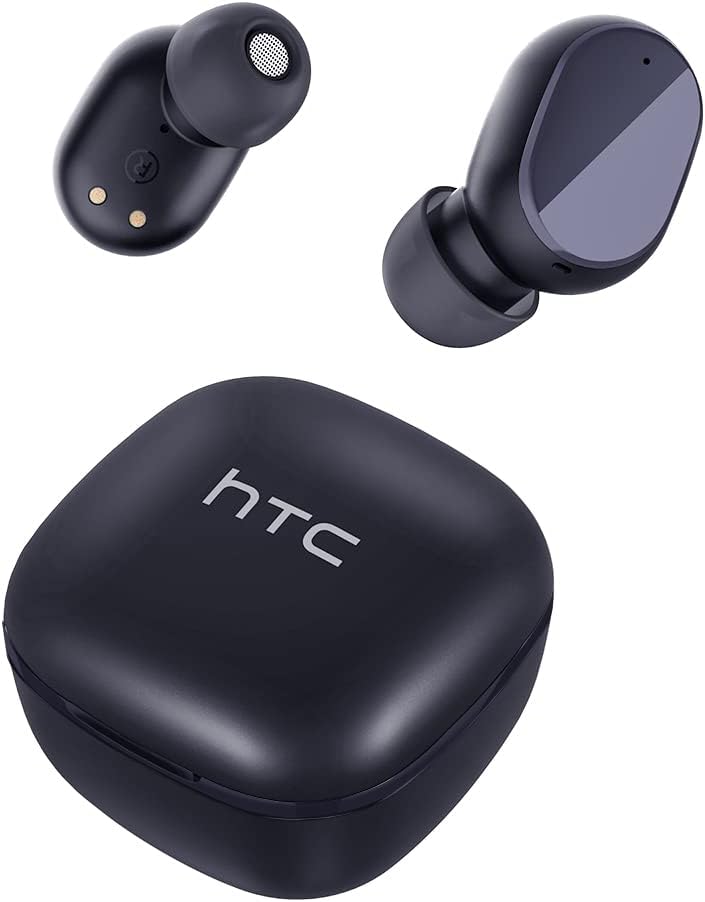

يثبت
شحن سماعات الأذن والعلبة
قبل الاستخدام الأول، قم بشحن سماعات الأذن وعلبة الشحن بالكامل.
- ضع سماعات الأذن داخل علبة الشحن.
- قم بتوصيل كابل USB-C بمنفذ الشحن الموجود على العلبة وبمصدر الطاقة.
- سيظهر ضوء المؤشر الموجود على العلبة حالة الشحن.
- A full charge provides approximately 5 hours of playback for earbuds and up to 22 hours with the charging case.

بلوتوث الاقتران
اتبع هذه الخطوات لربط سماعات الأذن بجهازك:
- افتح علبة الشحن. ستدخل سماعات الأذن تلقائيًا في وضع الاقتران.
- على جهازك (الهاتف الذكي، الجهاز اللوحي، وما إلى ذلك)، قم بتمكين البلوتوث.
- بحث عن "HTC TWS6" in the list of available Bluetooth devices.
- Select "HTC TWS6" to connect. A voice prompt will confirm successful pairing.

ارتداء سماعات الأذن
For optimal sound quality and comfort, choose the correct eartip size and wear the earbuds properly.
- Select the eartips (S, M, L) that best fit your ears.
- قم بإدخال كل سماعة أذن برفق في قناة أذنك.
- Rotate slightly to ensure a secure and comfortable fit.
تعليمات التشغيل
عناصر التحكم باللمس الذكية
The HTC TWS6 earbuds feature intuitive touch controls:
- تشغيل/إيقاف الموسيقى: ضغطة واحدة على أي سماعة أذن.
- المسار التالي: اضغط مرتين على سماعة الأذن اليمنى.
- المسار السابق: اضغط مرتين على سماعة الأذن اليسرى.
- رفع الصوت: اضغط ثلاث مرات على سماعة الأذن اليمنى.
- اخفض الصوت: اضغط ثلاث مرات على سماعة الأذن اليسرى.
- الرد/إنهاء المكالمة: ضغطة واحدة على أي سماعة أذن.
- رفض المكالمة: اضغط مع الاستمرار على أي من سماعات الأذن لمدة ثانيتين.
- تنشيط مساعد الصوت: اضغط مع الاستمرار على أي من سماعات الأذن لمدة ثانيتين.

تشغيل/إيقاف الطاقة
The earbuds automatically power on when removed from the charging case and power off when placed back into the case and the lid is closed.
To manually power on, press and hold the touch area for 3 seconds. To manually power off, press and hold the touch area for 5 seconds.
الصيانة والعناية
تنظيف
Regularly clean your earbuds and charging case to ensure optimal performance and hygiene.
- استخدم قطعة قماش ناعمة وجافة وخالية من الوبر لمسح سماعات الأذن وعلبة الشحن.
- قم بإزالة أطراف الأذن ونظفها بالصابون المعتدل والماء، ثم جففها جيدًا قبل إعادة تركيبها.
- لا تستخدم المنظفات أو المذيبات الكاشطة.
مقاومة الماء (IPX5)
The HTC TWS6 earbuds are IPX5 sweatproof, meaning they are resistant to splashes and sweat.
ملحوظة: They are not designed for submersion in water. Avoid exposing them to heavy rain, showering, or swimming. Ensure the charging port is dry before charging.

تخزين
عندما لا تكون قيد الاستخدام، قم بتخزين سماعات الأذن في علبة الشحن الخاصة بها لحمايتها والحفاظ عليها مشحونة.
قم بتخزينه في مكان بارد وجاف بعيدًا عن درجات الحرارة القصوى.
استكشاف الأخطاء وإصلاحها
| مشكلة | حل |
|---|---|
| سماعات الأذن لا تقترن | Ensure earbuds are charged. Turn off and on Bluetooth on your device. Forget "HTC TWS6" from your device's Bluetooth list and re-pair. |
| تعمل سماعة أذن واحدة فقط | Place both earbuds back into the charging case, close the lid, then open it again. Ensure both earbuds are charged. |
| مستوى صوت منخفض أو جودة صوت رديئة | Adjust volume on your device. Clean eartips and earbud mesh. Try different eartip sizes for a better seal. |
| قضية الشحن | Check USB-C cable and power adapter. Ensure charging contacts on earbuds and case are clean and dry. |
| تنفصل سماعات الأذن بشكل متكرر | Ensure your device is within the Bluetooth range (approx. 10 meters/33 feet) and there are no significant obstructions. |
إذا استمرت المشاكل، يرجى الاتصال بدعم العملاء.
تحديد
| ميزة | التفاصيل |
|---|---|
| اسم الموديل | TWS6 |
| نسخة البلوتوث | 5.3 |
| تكنولوجيا الاتصال | لاسلكي |
| تكنولوجيا الاتصالات اللاسلكية | بلوتوث |
| عمر البطارية (سماعات الأذن) | 5 ساعة |
| إجمالي وقت اللعب (مع الحقيبة) | 22 ساعة |
| مدة الشحن (العلبة) | حوالي ساعتين |
| مستوى مقاومة الماء | IPX5 (مقاوم للعرق) |
| طريقة التحكم | يلمس |
| ميكروفون | Yes (with ENC) |
| الأجهزة المتوافقة | Android and iOS Smartphones, Gaming Devices |
| مادة | بلاستيك |
| وزن العنصر | 3.17 أونصات |
| رمز المنتج الموحد | 734257974554 |
| التحكم في الضوضاء | إلغاء الضوضاء التكيفي |
| نوع برنامج تشغيل الصوت | سائق ديناميكي |
| مقاومة | 199.99 أوم |
الضمان والدعم
HTC provides a 360-day warranty extension for this product, as detailed in the product information.
For technical assistance, warranty claims, or any inquiries, please contact HTC customer support.
دعم العملاء: Refer to the contact information provided in your product packaging or visit the official HTC website for the most up-to-date support options.


