1. المقدمة
The Ankilo Bluetooth 5.3 2-in-1 Transmitter Receiver is a versatile audio adapter designed to enhance your audio experience. It functions as both a Bluetooth transmitter (TX mode) and a Bluetooth receiver (RX mode), allowing you to connect various audio devices wirelessly. Featuring Bluetooth 5.3 technology, it offers stable connectivity, low latency, and dual-device pairing capabilities. The integrated LCD screen provides real-time information, and the device includes a BASS boost function for enhanced sound quality and dual microphones for clear hands-free calls.

Figure 1: Ankilo Bluetooth 5.3 2-in-1 Transmitter Receiver
2. محتويات العبوة
يرجى التحقق من الحزمة للعناصر التالية:
- Ankilo Bluetooth 5.3 2-in-1 Transmitter Receiver (Model BR08)
- كابل شحن USB-C
- 3.5 مللي متر كابل صوت AUX
- Airplane Dual-Plug Audio Converter
- دليل المستخدم

الشكل 2: محتويات العبوة
3. انتهى المنتجview
تعرّف على مكونات الجهاز وأدوات التحكم فيه:

الشكل 3: مكونات الجهاز
- شاشة العرض: Shows battery level, volume, and connection status.
- هيئة التصنيع العسكري: لإجراء مكالمات بدون استخدام اليدين.
- زر BASS: One-touch activation for enhanced bass sound.
- TX/RX Button: Slide switch to select Transmitter (TX) or Receiver (RX) mode.
- زر التشغيل / الإيقاف: اضغط مع الاستمرار للتشغيل أو إيقاف التشغيل.
- زر التشغيل/الإيقاف المؤقت: Controls audio playback. Double-click to pair a second device or clear pairing.
- Answer/Hang Up Button: For managing phone calls.
- Next Song/Volume + Button: ضغطة قصيرة للانتقال إلى المقطع التالي، وضغطة طويلة لرفع مستوى الصوت.
- Previous Song/Volume - Button: ضغطة قصيرة للانتقال إلى المقطع السابق، وضغطة طويلة لخفض مستوى الصوت.
- منفذ شحن من النوع C: لشحن الجهاز .
- AUX Audio Cable Port: For connecting to audio sources/receivers via 3.5mm jack.
4. المواصفات
| ميزة | التفاصيل |
|---|---|
| نسخة البلوتوث | 5.3 |
| مسافة الإرسال | حتى 10 أمتار (بدون عوائق) |
| سعة البطارية | 400 مللي أمبير |
| وقت الشحن | حوالي 2 ساعات |
| عمر البطارية (وضع الاستقبال) | تصل إلى 15 ساعة |
| عمر البطارية (وضع الإرسال) | تصل إلى 18 ساعة |
| أبعاد | 3.86 × 3.66 × 1.02 بوصة |
| وزن العنصر | 1.76 أونصات |
| ميزة خاصة | Low Latency, Dual Mics, HiFi Bass Sound, Smart Display |
5. دليل الإعداد
Follow these steps to set up your Ankilo Bluetooth adapter:

Figure 4: Convenient Operation Steps
- تشغيل الطاقة: Press and hold the Power On/Off button for approximately 3 seconds until the display screen illuminates.
- Choose the Mode (TX/RX): Slide the TX/RX button on the side of the device to select your desired mode:
- وضع الإرسال (TX): For sending audio from non-Bluetooth devices (e.g., TV, PC, MP3 player) to Bluetooth headphones or speakers.
- وضع الاستقبال (RX): For receiving audio from Bluetooth-enabled devices (e.g., smartphone, tablet) and playing it through non-Bluetooth audio systems (e.g., car stereo, home speakers).
- توصيل كابل الصوت: Plug the 3.5mm AUX audio cable into the device's AUX port and connect the other end to your audio source (in TX mode) or audio receiver (in RX mode).
- Pairing (First Device):
- Ensure your Bluetooth headphones/speakers (TX mode) or smartphone/tablet (RX mode) are in pairing mode.
- The Ankilo adapter will automatically enter pairing mode when powered on in either TX or RX mode. The display will show a blinking Bluetooth icon.
- On your external device, search for "BR08" in the Bluetooth settings and select it to connect. The display will show a steady Bluetooth icon upon successful connection.
- Dual Device Pairing: To connect a second device simultaneously (supported in both TX and RX modes):
- After the first device is successfully paired, ensure the second device is in pairing mode.
- Double-click the Play/Pause button on the Ankilo adapter. The device will search for the second device.
- Select "BR08" on your second device's Bluetooth list to connect.
6. تعليمات التشغيل
6.1 الضوابط الأساسية
- تشغيل/إيقاف مؤقت: اضغط على زر التشغيل/الإيقاف المؤقت مرة واحدة.
- المسار التالي: Short press the 'Next Song/Volume +' button.
- المسار السابق: Short press the 'Previous Song/Volume -' button.
- رفع الصوت: Long press the 'Next Song/Volume +' button.
- اخفض الصوت: Long press the 'Previous Song/Volume -' button.
- BASS Boost: Press the BASS button once to activate/deactivate the bass enhancement.
6.2 Hands-Free Calling (RX Mode Only)
When connected to your smartphone in RX mode:
- الرد على المكالمة: Press the Answer/Hang Up button once.
- إنهاء المكالمة: Press the Answer/Hang Up button once during a call.
- رفض المكالمة: Press and hold the Answer/Hang Up button for 2 seconds.
6.3 Using in TX Mode
Connect the adapter to devices like TVs, PCs, or in-flight entertainment systems to transmit audio wirelessly to your Bluetooth headphones or speakers.
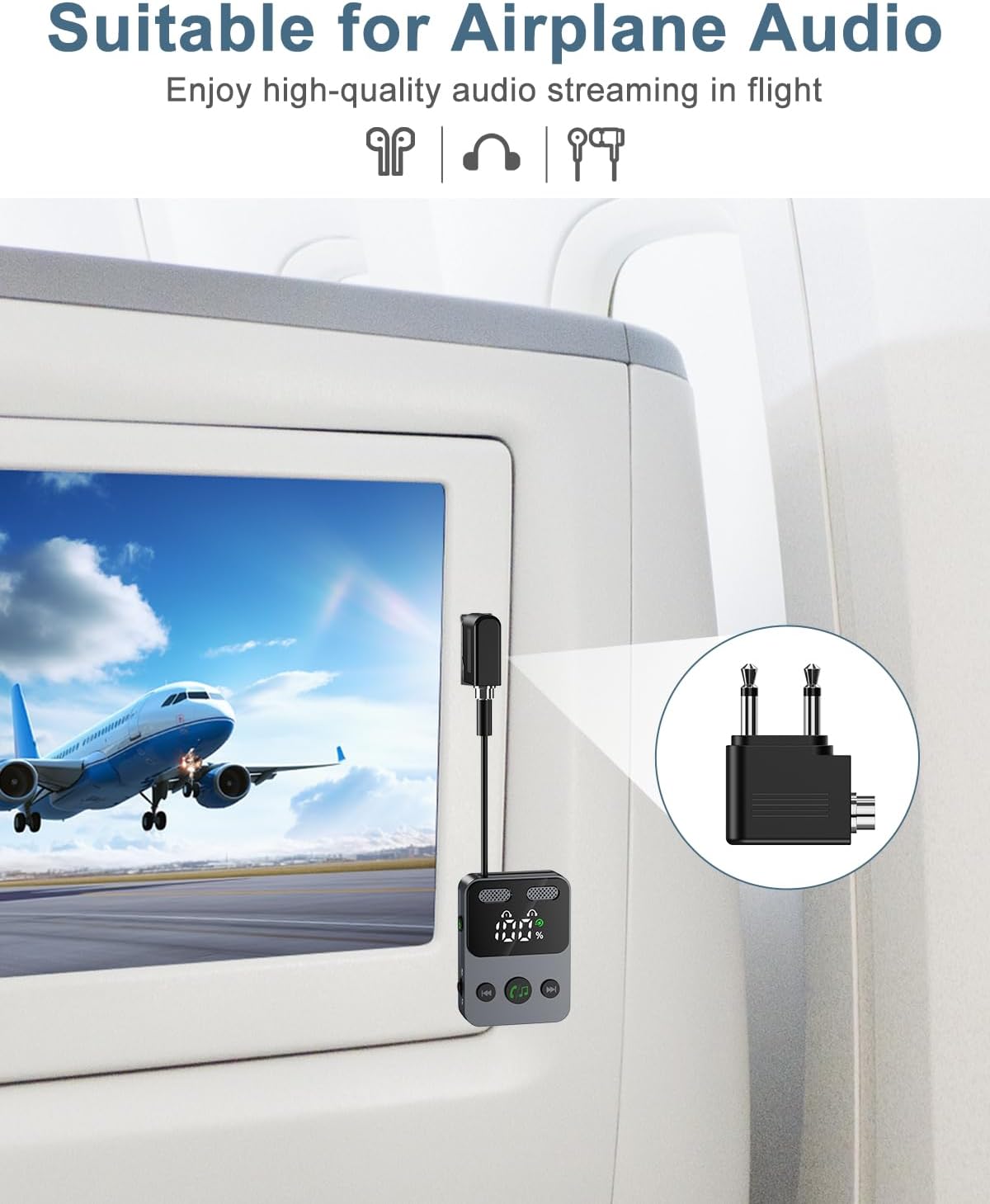
Figure 5: Using the adapter for airplane audio (TX Mode)
6.4 Using in RX Mode
Connect the adapter to your car stereo, home speaker system, or other non-Bluetooth audio input to receive audio wirelessly from your smartphone or tablet.

Figure 6: Wide Compatibility and Mode Usage

الشكل 7: مثالample Use Cases (TX and RX Modes)
7. البطارية والشحن
The Ankilo adapter features a 400 mAh battery, providing up to 18 hours of use in TX mode and 15 hours in RX mode. To charge the device, connect the included USB-C cable to the Type-C charge port and a standard USB power source. A full charge takes approximately 2 hours. The display screen will show the battery level.
8. معلومات السلامة
يرجى مراعاة إرشادات السلامة التالية:
- Avoid using the device near other wireless devices to prevent potential interference.
- Handle the battery with care. Do not expose the device to extreme temperatures (high or low).
- Do not drop the product, as this may cause surface damage or internal malfunction.
- Do not disassemble the unit without authorization. For any issues, contact customer support.
9. الصيانة
To ensure optimal performance and longevity of your Ankilo Bluetooth adapter:
- Keep the device clean and dry. Avoid exposure to dust and humid environments.
- قم بتخزين الجهاز في مكان بارد وجاف عندما لا يكون قيد الاستخدام.
- استخدم فقط كابل الشحن المقدم أو كابل USB-C معتمدًا للشحن.
- The product will automatically shut down after 10 minutes of inactivity (no device connection or key operation). If connected to a device, it will not auto-shutdown; manual shutdown is required.
10. استكشاف الأخطاء وإصلاحها
If you encounter issues with your Ankilo Bluetooth adapter, refer to the following common problems and solutions:
- الجهاز لا يعمل:
- تأكد من شحن الجهاز بالكامل. وصّله بمصدر طاقة باستخدام كابل USB-C.
- Press and hold the Power On/Off button for at least 3 seconds.
- لا يمكن الاقتران بجهاز:
- Ensure the Ankilo adapter is in the correct TX or RX mode.
- Make sure the external device (headphones, speaker, phone) is in pairing mode and within 10 meters of the adapter.
- Check if the adapter's display shows a blinking Bluetooth icon, indicating it's searching.
- Try restarting both the Ankilo adapter and the external device.
- Double-click the Play/Pause button to clear previous pairings and try again.
- No audio or poor sound quality:
- Verify that the 3.5mm AUX audio cable is securely connected to both the adapter and the audio source/receiver.
- Check the volume levels on both the Ankilo adapter and the connected audio device.
- تأكد من عدم وجود عوائق أو مسافة زائدة بين المحول وجهاز البلوتوث المقترن.
- Confirm that the correct input/output is selected on your audio source/receiver.
- Volume control issues (e.g., skips track instead of changing volume):
- Remember that a ضغطة قصيرة on the +/- buttons changes tracks, while a الضغط لفترة طويلة adjusts the volume. Ensure you are performing a long press for volume adjustments.
- يتم إيقاف تشغيل الجهاز تلقائيًا:
- This is normal behavior if the device is powered on for 10 minutes without any device connection or other key operation. Re-power on the device to use it.
- If the device is connected to an audio source/receiver, it will not automatically shut down. You must manually power it off.
11. الضمان والدعم
Ankilo is committed to providing high-quality audio experiences. Your Ankilo Bluetooth 5.3 2-in-1 Transmitter Receiver comes with:
- 12-Month Quality Protection: Ensuring your product is free from defects in materials and workmanship under normal use.
- 60 Days Free Replacement: For any manufacturing defects within the first 60 days of purchase.
- 7*24h Customer Service: Our dedicated support team is available around the clock to assist you with any questions or concerns.
For support, please refer to the contact information provided with your purchase or visit the official Ankilo webموقع.


