1. المقدمة
Thank you for choosing the EvoFox Deathray v2 Pro Gaming Keyboard. This manual provides detailed instructions for setting up, operating, and maintaining your new gaming keyboard. Please read this manual carefully to ensure optimal performance and longevity of your device.
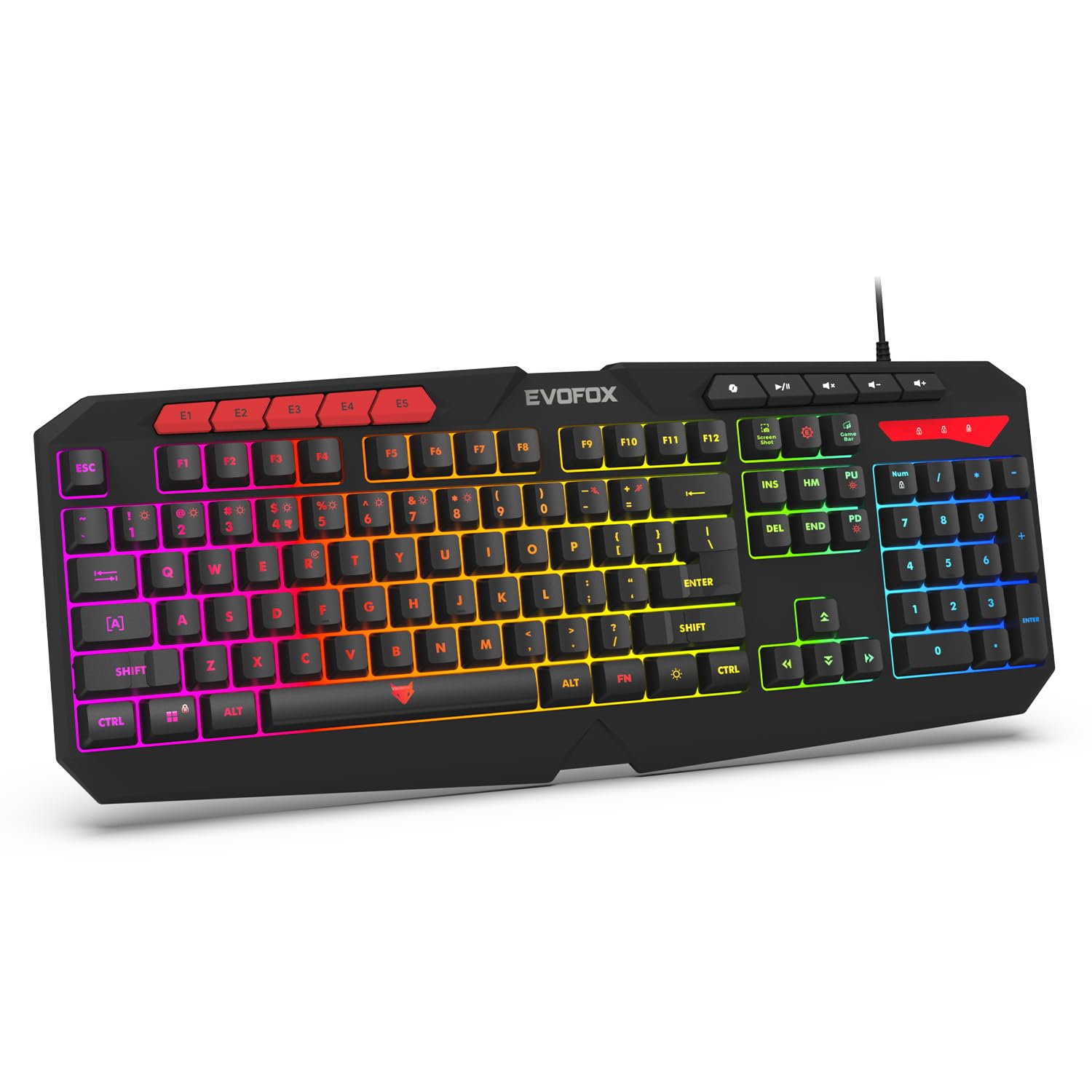
Image 1.1: EvoFox Deathray v2 Pro Gaming Keyboard overview.
2. محتويات العبوة
- EvoFox Deathray v2 Pro Gaming Keyboard
- دليل المستخدم
3. تعليمات الإعداد
3.1 توصيل لوحة المفاتيح
- Unpack the EvoFox Deathray v2 Pro Gaming Keyboard from its packaging.
- حدد منفذ USB المتاح على جهاز الكمبيوتر الخاص بك (كمبيوتر شخصي أو كمبيوتر محمول).
- قم بتوصيل موصل USB الخاص بلوحة المفاتيح بمنفذ USB.
- ستقوم لوحة المفاتيح بتثبيت برامج التشغيل اللازمة تلقائيًا. قد تستغرق هذه العملية بضع لحظات.
- Once installed, the RGB backlighting will illuminate, indicating the keyboard is ready for use.
The keyboard features a durable 1.8m braided cable for reliable connectivity.

Image 3.1: Keyboard with durable braided cable and soft membrane keys.
4. تعليمات التشغيل
4.1 RGB Backlighting Customization
The EvoFox Deathray v2 Pro features 6-zone customizable RGB backlighting with 8 dynamic lighting modes. You can personalize your gaming setup for an immersive experience.
- تغيير أوضاع الإضاءة: Use the dedicated lighting control keys (often indicated by a sun or lightbulb icon, or through a combination with the Fn key) to cycle through the 8 available dynamic lighting modes.
- الإضاءة المخصصة: Refer to the keyboard's software (if available, check the official EvoFox website) for advanced custom lighting profiles and per-key RGB customization.

الصورة 4.1: عرض لوحة المفاتيحasing 6-zone RGB backlighting with 7 lighting presets and 1 custom lighting option.

Image 4.2: Comparison illustrating the difference between RGB lighting with full color customization per zone and standard rainbow lighting with fixed color zones.
4.2 Programmable Macro Keys
The keyboard includes 5 programmable macro keys (E1-E5) to streamline your gameplay with customizable macros for lightning-fast responses. These keys allow you to record and assign complex sequences of commands to a single key press.
- تسجيل الماكرو: Typically, macro recording is initiated by a dedicated macro recording key (often labeled 'MR' or similar, or accessed via Fn key combination). Follow the on-screen prompts or software instructions to record your desired key sequence.
- Assigning Macros: Once recorded, assign the macro to one of the programmable macro keys (E1-E5) using the keyboard's software.

Image 4.3: Highlight of the 5 programmable macro keys (E1-E5) for executing complex commands.
4.3 Special Function Keys
Access essential tools quickly with dedicated shortcuts for Screenshot, Macro Recording, and Xbox Game Bar. These functions are typically accessed via specific keys or Fn key combinations.
- Screenshot Key: Captures a screenshot of your display.
- Macro Recording Key: Initiates macro recording.
- Xbox Game Bar Key: Opens the Xbox Game Bar interface for gaming features.
- مفتاح مساعد الطيار: Activates the Copilot feature (if supported by your operating system).

Image 4.4: Illustration of special function keys for Screenshot, Macro Recording, Xbox Game Bar, and Copilot.
4.4 مفاتيح منع التداخل
The keyboard features 19 anti-ghosting keys, ensuring flawless input during high-stakes moments. This technology allows multiple key presses to be registered simultaneously and accurately, preventing missed commands.

Image 4.5: Keyboard layout highlighting the 19 anti-ghosting keys for precise, uninterrupted gameplay.
4.5 Ergonomic Full-Size Layout
Designed for comfort during extended gaming sessions, the keyboard features an ergonomic full-size layout with soft and silent membrane keys. This design aims to provide precision without sacrificing ease of use.
5. الصيانة
5.1 تنظيف لوحة المفاتيح
- افصل لوحة المفاتيح عن الكمبيوتر قبل التنظيف.
- استخدم قطعة قماش ناعمة وخالية من الوبر وامسحها برفق.ampاغسل سطح لوحة المفاتيح بالماء أو بمحلول تنظيف خفيف.
- لإزالة الغبار والحطام بين المفاتيح، استخدم الهواء المضغوط.
- تجنب استخدام المواد الكيميائية القاسية أو المنظفات الكاشطة أو المذيبات، لأنها قد تتلف طلاء لوحة المفاتيح ورموز المفاتيح.
- تأكد من أن لوحة المفاتيح جافة تمامًا قبل إعادة توصيلها بالكمبيوتر.
6. استكشاف الأخطاء وإصلاحها
6.1 لوحة المفاتيح لا تستجيب
- التحقق من اتصال USB: تأكد من توصيل كابل USB بإحكام بمنفذ USB سليم بجهاز الكمبيوتر. جرّب منفذ USB آخر.
- إعادة تشغيل الكمبيوتر: في بعض الأحيان قد تؤدي إعادة التشغيل البسيطة إلى حل مشكلات الاتصال.
- إعادة تثبيت برنامج التشغيل: If the issue persists, try uninstalling the keyboard drivers from your computer's Device Manager and then reconnecting the keyboard to allow for automatic reinstallation.
6.2 إضاءة خلفية RGB لا تعمل
- التحقق من إعدادات السطوع: Ensure the brightness level is not set to minimum or off. Use the dedicated lighting control keys to adjust brightness.
- أوضاع الدورة: Cycle through different RGB modes to see if any mode activates.
- فحص البرنامج: إذا كنت تستخدم برنامجًا مخصصًاfiles, ensure the keyboard software is running and configured correctly.
6.3 Macro Keys Not Functioning
- تكوين البرنامج: Verify that macros are correctly recorded and assigned to the desired keys within the keyboard's software.
- البرامج قيد التشغيل: Ensure the keyboard's macro software (if applicable) is running in the background.
7. المواصفات
| ميزة | مواصفة |
|---|---|
| ماركة | إيفوفوكس |
| نموذج | 498 |
| أبعاد المنتج | 44.7 × 17.2 × 2.6 سم |
| وزن العنصر | 565 جرام |
| منصة الأجهزة | نوافذ |
| الأجهزة المتوافقة | كمبيوتر محمول ، كمبيوتر شخصي |
| المميزات الخاصة | Compact Design, Silent Membrane Keyboard, True Prims RGB |
| وصف لوحة المفاتيح | الألعاب |
| نوع الموصل | USB |
| مادة | بلاستيك ايه بي اس |
| بلد المنشأ | الصين |
8. الضمان والدعم
8.1 معلومات الضمان
The EvoFox Deathray v2 Pro Gaming Keyboard typically comes with a ضمان محدود لمدة سنة واحدة يسري هذا الضمان من تاريخ الشراء. ويغطي عيوب التصنيع ويضمن عمل المنتج على النحو الأمثل في ظل الاستخدام العادي. يرجى الاحتفاظ بإثبات الشراء لتقديم مطالبات الضمان.
8.2 دعم العملاء
For technical assistance, warranty claims, or any product-related inquiries, please contact EvoFox customer support through their official website or the contact information provided with your product packaging. You may also refer to the Amkette helpline mentioned in some product documentation.


