1. المقدمة
Thank you for choosing the AVMATRIX PKC4000-NDI PTZ Camera Controller. This device is designed for professional live streaming, church, and conference applications, offering intuitive control over PTZ cameras. Featuring a 5-inch touch screen and a 4D joystick, it provides precise control over camera functions such as pan, tilt, zoom, focus, and iris. This manual will guide you through the setup, operation, maintenance, and troubleshooting of your controller.
2. معلومات السلامة
Please read and understand all safety instructions before operating the device. Keep this manual for future reference.
- لا تعرض الجهاز للمطر أو الرطوبة أو درجات الحرارة العالية.
- تأكد من التهوية المناسبة لمنع ارتفاع درجة الحرارة.
- استخدم فقط محول الطاقة المرفق أو مصدر PoE متوافق.
- تجنب وضع أشياء ثقيلة على وحدة التحكم.
- لا تحاول تفكيك الجهاز أو تعديله. أحل جميع أعمال الصيانة إلى فنيين مؤهلين.
- نظف الجهاز بقطعة قماش ناعمة وجافة. تجنب استخدام المنظفات السائلة.
3. محتويات العبوة
تأكد من تضمين جميع العناصر المدرجة أدناه في الحزمة الخاصة بك:
- AVMATRIX PKC4000-NDI PTZ Camera Controller x1
- محول طاقة 12 فولت تيار مستمر x1
- Tally Connector x1
- دليل المستخدم (هذا المستند)
4. انتهى المنتجview
The PKC4000-NDI controller features a robust design with a clear 5-inch touch screen and a precise 4D joystick for comprehensive camera control.
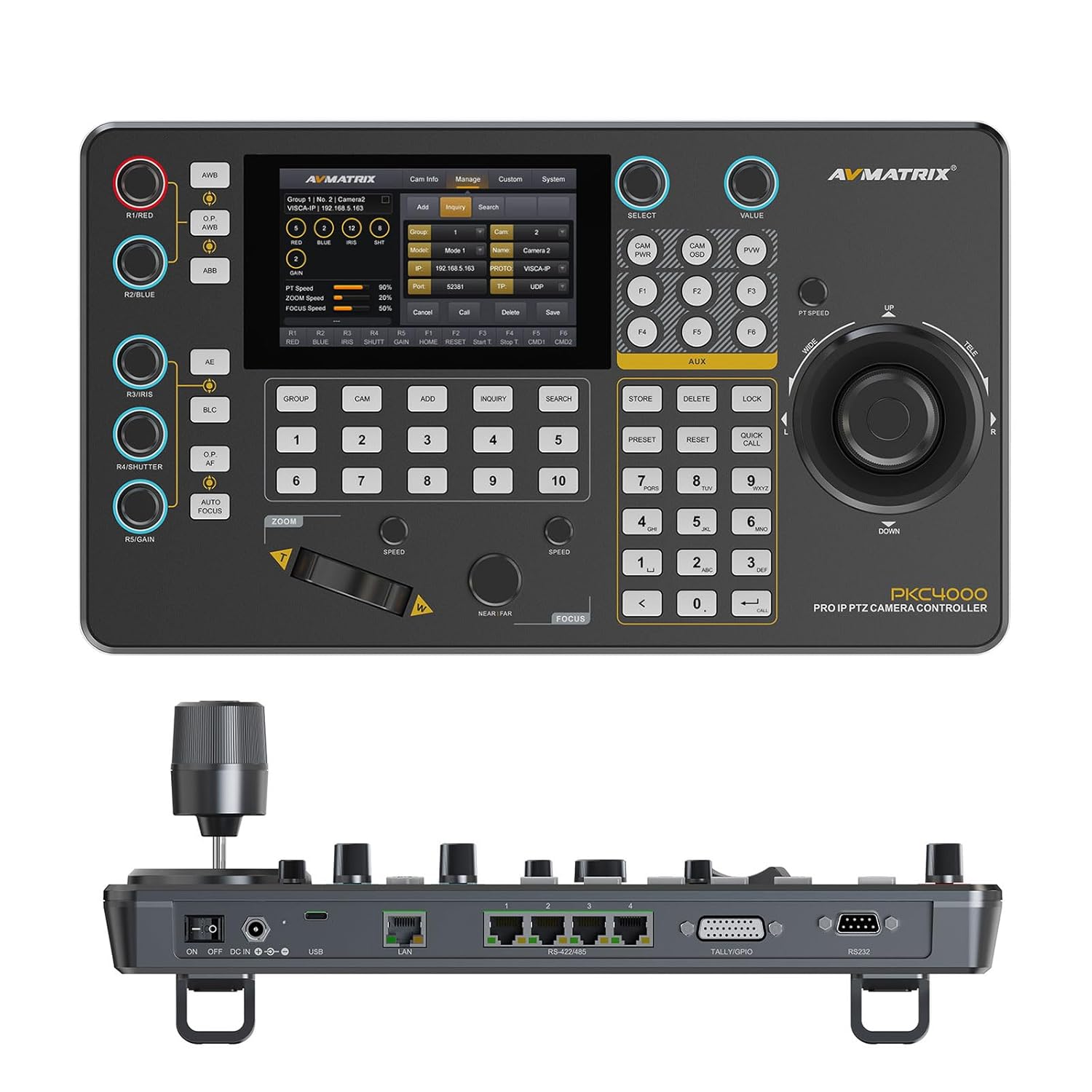
الشكل 4.1: الجبهة view of the PKC4000-NDI Controller
المميزات الرئيسية:
- Universal Compatibility & Protocol Support: Supports IP and serial control protocols including VISCA, VISCA-IP, ONVIF, PELCO P&D, and NDI (NDI for Optional). Works with AVMATRIX PTZ cameras and most major PTZ brands.
- Fast Setup with Intuitive Touchscreen: Equipped with a 5-inch full-color touchscreen and menu knob for quick setup and operation.
- Smooth, Professional PTZ Control: Precise control over pan, tilt, zoom, focus, iris, shutter, and more. Supports up to 100 camera shortcuts (10 groups x 10 cameras).
- PoE & Flexible Power Options: Supports both Power over Ethernet (PoE) and traditional DC power for simplified cabling.

Figure 4.2: PKC4000-NDI Key Features Overview
5. الإعداد
5.1 الاتصال الأولي
Follow these steps to set up your PKC4000-NDI controller:
- توصيل الطاقة: Connect the 12V DC power adapter to the 'DC IN' port on the rear of the controller, or connect an Ethernet cable from a PoE-enabled switch to the 'LAN (PoE)' port.
- إتصال شبكة: For IP control, connect an Ethernet cable from your network switch to the 'LAN (PoE)' port.
- الاتصال التسلسلي (اختياري): For RS-232, RS-422, or RS-485 control, connect the appropriate serial cables from your PTZ cameras to the corresponding ports on the controller.
- Tally/GPIO (Optional): Connect Tally lights or GPIO devices to the Tally/GPIO port as needed.
- تشغيل الطاقة: Flip the 'ON/OFF' switch to the 'ON' position. The controller will boot up and display the main interface on the 5-inch touch screen.

Figure 5.1: Rear Panel Control Interfaces
5.2 تكوين الكاميرا
After initial power-up, you will need to configure your PTZ cameras. The controller supports automatic IP address assignment for quick setup.
- Navigate to the 'CAM' or 'System' menu on the touch screen.
- Select 'Add Camera' and follow the on-screen prompts to discover and add your cameras via IP or serial connection.
- Assign each camera to a group and address for easy recall. The controller can manage up to 100 IP cameras (10 groups x 10 cameras).
6. تعليمات التشغيل
6.1 التشغيل الأساسي
The PKC4000-NDI provides intuitive control through its touch screen and physical controls.
- اختيار الكاميرا: Use the numeric keypad or the 'CAM' menu on the touch screen to select the camera you wish to control.
- التحكم بعصا التحكم: The 4D joystick allows for smooth and precise control of Pan, Tilt, and Zoom. Rotate the joystick for zoom control.
- Exposure Controls: Dedicated knobs and buttons allow quick adjustment of Exposure, Iris, Focus, and Gain.
- استدعاء مسبق: Store and recall up to 255 camera presets using the 'PRESET' and numeric buttons.
6.2 واجهة شاشة اللمس
The 5-inch touch screen provides access to advanced settings and real-time monitoring.
- التنقل في القائمة: Tap on menu icons to access camera settings, network configurations, system preferences, and more.
- المراقبة في الوقت الحقيقي: The NDI version supports video decoding for real-time monitoring of camera feeds directly on the 5-inch screen. This allows for visual confirmation of camera movements and adjustments.

Figure 6.1: Real-time Video Preview on Touch Screen
6.3 Track Recording and Playback
The controller supports track loop function, allowing you to record camera pan, tilt, and zoom movements and replay them whenever needed without manual control.
- Access the 'Track' function from the touch screen menu.
- Initiate recording of your desired camera movements.
- Save the recorded track for future playback.

Figure 6.2: Track Recording and Playback Feature
7. الصيانة
7.1 التنظيف والعناية
To ensure the longevity and optimal performance of your PKC4000-NDI controller, follow these maintenance guidelines:
- تنظيف: Use a soft, dry, lint-free cloth to clean the exterior of the controller, including the touch screen. Do not use liquid cleaners, aerosols, or solvents.
- تخزين: When not in use for extended periods, store the controller in a cool, dry place away from direct sunlight and extreme temperatures.
- التعامل: Handle the joystick and buttons with care to prevent mechanical damage.
8. استكشاف الأخطاء وإصلاحها
8.1 المشكلات والحلول الشائعة
If you encounter problems with your controller, refer to the table below for possible solutions.
| مشكلة | السبب المحتمل | حل |
|---|---|---|
| وحدة التحكم لا تعمل بالطاقة. | No power supply; Power adapter faulty; PoE not active. | Check power adapter connection; Ensure PoE switch is active; Try a different power outlet. |
| Cannot control camera. | Incorrect camera IP/serial settings; Network issue; Camera not powered on. | Verify camera IP address and protocol settings; Check network cables; Ensure camera is powered on and accessible. |
| لا يوجد فيديو مسبقview على الشاشة. | NDI stream not active; Network congestion; Camera not sending video. | Ensure camera is configured for NDI output; Check network bandwidth; Verify camera video output settings. |
| Joystick/buttons unresponsive. | Firmware issue; Hardware malfunction. | Restart the controller; Check for firmware updates; Contact technical support if problem persists. |
9. المواصفات
9.1 المواصفات الفنية
Detailed technical specifications for the AVMATRIX PKC4000-NDI PTZ Camera Controller:
| فئة | المعلمة | PKC4000-NDI |
|---|---|---|
| الاتصالات | الواجهات | IP(RJ45)x1, RS-232x1, RS-485/RS-422x4, TALLYx1, USB2.0 (For upgrade) |
| بروتوكول IP | ONVIF, VISCA-IP, NDI | |
| البروتوكول التسلسلي | بيلكو-د، بيلكو-بي، فيسكا | |
| المسلسل بود معدل | 2400 ، 4800 ، 9600 ، 19200 ، 38400 ، 115200 بت في الثانية | |
| ميناء LAN | 100 م × 1 (PoE/PoE+: IEEE802.3 af/at) | |
| واجهات المستخدم | عرض | شاشة تعمل باللمس مقاس 5 بوصة |
| مقبض الباب | Quickly control iris, shutter speed, gain, auto exposure, white balance, etc. | |
| عصا التحكم | تحريك / إمالة / تكبير | |
| مجموعة الكاميرا | 10 (Each group connect up to 10 cameras) | |
| عنوان الكاميرا | حتى 100 | |
| الإعداد المسبق للكاميرا | حتى 255 | |
| قوة | قوة | PoE/DC 7~24V |
| استهلاك الطاقة | PoE: <8W, DC: <8W | |
| بيئة | درجة حرارة العمل | -20 درجة مئوية ~ 60 درجة مئوية |
| درجة حرارة التخزين | -20 درجة مئوية ~ 70 درجة مئوية | |
| البعد | البعد (LWD) | 340mm×195mm×49.5mm/ 340mm×195mm×110mm(With joystick) |
| وزن | Net:1730g, Gross:2360g | |
| عام | رقم الموديل | NW-PKC4000-NDI |
| الشركة المصنعة | NW-AVMATRIX | |
| تاريخ الافراج عنه | 1 مارس 2025 |

الشكل 9.1: المواصفات والأبعاد التفصيلية
10. الضمان والدعم
10.1 معلومات الضمان
The AVMATRIX PKC4000-NDI PTZ Camera Controller is backed by a ضمان محدود لمدة سنة واحدة من تاريخ الشراء. يغطي هذا الضمان عيوب المواد والتصنيع في ظل الاستخدام العادي. ولا يغطي الأضرار الناجمة عن سوء الاستخدام، أو الحوادث، أو التعديلات غير المصرح بها، أو الأسباب الخارجية.
10.2 الدعم الفني
For technical assistance, troubleshooting, or warranty claims, please contact AVMATRIX customer support. We offer الدعم الفني مدى الحياة لمنتجاتنا.
Please have your product model number (PKC4000-NDI) and purchase information ready when contacting support.


