مقدمة
The SUUNTO Aqua Light Open-Ear Swimming Bone Conduction Headphone is designed for active individuals, offering a unique audio experience while maintaining environmental awareness. Featuring bone conduction technology, a 32GB MP3 player for offline music, Bluetooth 5.4 connectivity, and IP68 waterproofing, these headphones are suitable for various sports, including swimming, running, and cycling.
This manual provides comprehensive instructions for setting up, operating, maintaining, and troubleshooting your SUUNTO Aqua Light headphones.

Image: SUUNTO Aqua Light headphones in Tidal Black, showcasing تصميم مفتوح الأذن.

Image: SUUNTO Aqua Light headphones highlighting Bluetooth 5.4 for running and 32GB MP3 storage for swimming, with the headphones partially submerged in water.
ماذا يوجد في الصندوق
عند فتح العبوة، تأكد من وجود جميع المكونات التالية:
- سماعات SUUNTO Aqua Light
- كابل شحن USB
- سدادات السباحة
- حقيبة التخزين
- دليل المستخدم (هذا المستند)
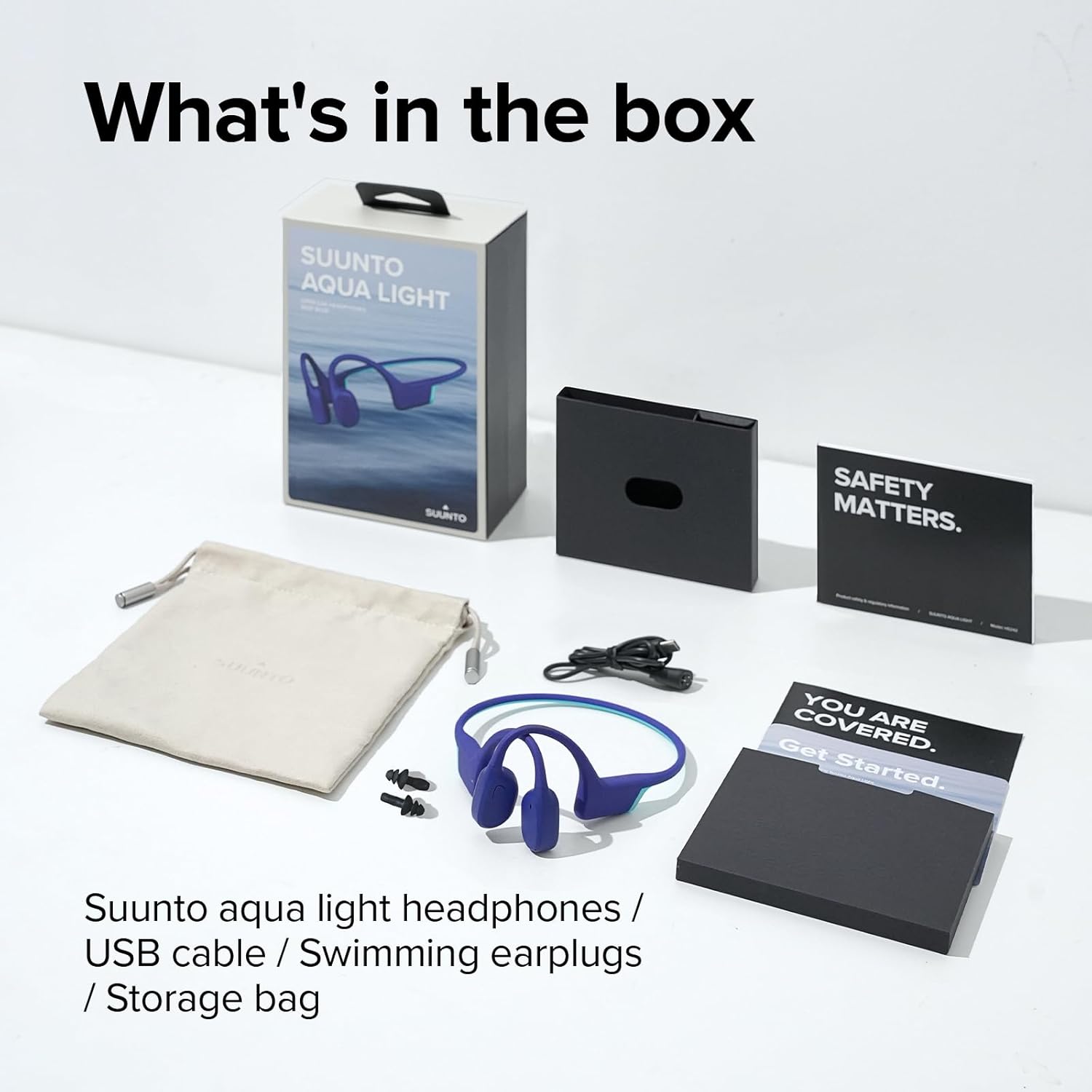
Image: All items included in the SUUNTO Aqua Light package: headphones, USB cable, swimming earplugs, and documentation.
يثبت
شحن سماعات الرأس
Before first use, fully charge your SUUNTO Aqua Light headphones. Use the provided USB charging cable. Connect the magnetic end of the cable to the charging port on the headphones and the USB-A end to a compatible USB power source (e.g., computer USB port, wall adapter).
- يستغرق الشحن الكامل حوالي ساعة واحدة.
- A 10-minute fast charge provides up to 3 hours of playtime.
- سيُظهر مؤشر LED حالة الشحن (على سبيل المثال، أحمر للشحن، أزرق للشحن الكامل).

Image: SUUNTO Aqua Light headphones connected to a laptop via the USB charging cable, illustrating the charging process.
بلوتوث الاقتران
لتوصيل سماعات الرأس بجهاز يدعم تقنية البلوتوث:
- تأكد من إيقاف تشغيل سماعات الرأس.
- Press and hold the Power/Multi-function button until the LED indicator flashes red and blue, indicating pairing mode.
- على جهازك (الهاتف الذكي، الجهاز اللوحي، الكمبيوتر)، قم بتمكين البلوتوث وابحث عن الأجهزة المتاحة.
- Select "SUUNTO Aqua Light" from the list of found devices.
- بمجرد الاتصال ، سيتحول مؤشر LED إلى اللون الأزرق الثابت.
The headphones support dual-device connection, allowing seamless switching between two paired Bluetooth devices.
تعليمات التشغيل
تشغيل/إيقاف الطاقة
- تشغيل الطاقة: اضغط مع الاستمرار على زر التشغيل/الوظائف المتعددة لمدة 2 ثوانٍ.
- إيقاف التشغيل: اضغط مع الاستمرار على زر التشغيل/الوظائف المتعددة لمدة 3 ثوانٍ.
Controls (Touch Method)
| وظيفة | فعل |
|---|---|
| تشغيل/إيقاف مؤقت | Single tap on the Multi-function button. |
| رفع الصوت | Tap the Volume Up button. |
| خفض الصوت | Tap the Volume Down button. |
| المسار التالي | Double tap on the Multi-function button. |
| المسار السابق | Triple tap on the Multi-function button. |
| الرد على المكالمة/إنهائها | Single tap on the Multi-function button during a call. |
| رفض المكالمة | اضغط مع الاستمرار على زر الوظائف المتعددة لمدة ثانيتين أثناء المكالمة الواردة. |
| تفعيل المساعد الصوتي | اضغط مع الاستمرار على زر الوظائف المتعددة لمدة ثانيتين (عندما لا تكون في مكالمة). |
| Switch between Bluetooth/MP3 Mode | Press and hold the Volume Up and Volume Down buttons simultaneously for 2 seconds. |
Using the 32GB MP3 Player
The SUUNTO Aqua Light headphones feature an integrated 32GB MP3 player, ideal for use in environments where Bluetooth connectivity may be limited or unavailable, such as underwater. The player supports MP3, FLAC, WAV, AAC, M4A, APE, and WMA formats.
- To transfer music, connect the headphones to a computer using the USB cable. The headphones will appear as a removable storage device. Drag and drop your audio fileيتم تخزينها في وحدة تخزين الجهاز.
- Switch to MP3 mode using the control table above.
- The headphones can store up to 8000 songs (assuming 4MB per song).
Sound Modes and Underwater EQ
The headphones offer different sound modes optimized for various activities, including an "Underwater EQ" mode for superior audio quality while swimming.

Image: A user interacting with the SUUNTO Aqua Light mobile application, which allows switching to an optimized Underwater EQ for swimming.
For optimal underwater performance, ensure the headphones are in MP3 mode and the Underwater EQ is activated, typically through the SUUNTO app or specific button combination (refer to app instructions for details).

Image: A swimmer wearing SUUNTO Aqua Light headphones, illustrating their IP68 waterproof capability for submersion up to 2 meters for 2 hours.
Open-Ear Safety and Comfort
The open-ear bone conduction design allows you to hear your surroundings while enjoying audio, enhancing safety during outdoor activities like cycling or running.

Image: A person wearing SUUNTO Aqua Light headphones while cycling, highlighting the open-ear design that maintains awareness of surroundings.
Dual Microphone & Noise Cancellation
Equipped with dual microphones and Environmental Noise Cancellation (ENC) technology, the headphones ensure clear voice quality during phone calls, even in noisy environments.

Image: A person wearing SUUNTO Aqua Light headphones by a swimming pool, demonstrating the effectiveness of the dual microphone and environmental noise cancellation for clear communication.
صيانة
تنظيف
Regular cleaning helps maintain the performance and longevity of your headphones:
- امسح السماعات بقطعة ناعمة، دamp cloth after each use, especially after exposure to sweat, chlorine, or saltwater.
- لا تستخدم المنظفات أو المذيبات الكاشطة.
- تأكد من أن منفذ الشحن جاف قبل توصيل كابل الشحن.
تخزين
When not in use, store your headphones in the provided storage bag in a cool, dry place, away from direct sunlight and extreme temperatures.
استكشاف الأخطاء وإصلاحها
| مشكلة | الحل المحتمل |
|---|---|
| لا يتم تشغيل سماعات الرأس. | تأكد من شحن سماعات الرأس بالكامل. قم بتوصيلها بالشاحن وتحقق من مؤشر LED. |
| لا يمكن الاقتران بجهاز بلوتوث. |
|
| لا يوجد صوت في وضع MP3. |
|
| Sound quality is poor underwater. | Ensure you are in MP3 mode and the Underwater EQ setting is activated (if applicable via app). Use the provided swimming earplugs for optimal sound. |
| Headphones are unresponsive. | Perform a soft reset by connecting the headphones to the charger for a few seconds, then disconnecting and attempting to power on. |
تحديد
| ميزة | التفاصيل |
|---|---|
| اسم الموديل | سوونتو أكوا لايت |
| رقم الموديل | اس اس 051124000 |
| تكنولوجيا الاتصال | لاسلكي (بلوتوث 5.4) |
| التخزين الداخلي | مشغل MP32 سعة 3 جيجا بايت |
| مقاومة الماء | IP68 (مقاوم للماء حتى عمق مترين لمدة ساعتين) |
| وقت اللعب | Up to 10 hours (Bluetooth mode), Up to 6 hours (MP3 mode underwater) |
| وقت الشحن | Approx. 1 hour (full charge), 10 minutes for 3 hours playtime |
| وزن | 1.06 أونصة (حوالي 28 جرامًا) |
| أبعاد | 4.92 × 4.02 × 1.77 بوصة |
| ميكروفون | Dual-Mic with Environmental Noise Cancellation (ENC) |
| طريقة التحكم | يلمس |
| نوع البطارية | بوليمر الليثيوم (متضمن) |
الضمان والدعم
For detailed warranty information and customer support, please refer to the official SUUNTO website or the included warranty card. You can also access the official user guide PDF for additional information:
تنزيل دليل المستخدم الرسمي (PDF)
For further assistance, contact SUUNTO customer service through their official channels.


