1. المقدمة
Thank you for choosing the ELISWEEN Wireless PC Gaming Controller. This controller is designed to provide a superior gaming experience across multiple platforms, including PC, Nintendo Switch, Android, and iOS devices. Featuring advanced Hall Effect joysticks, programmable back buttons, and customizable vibration, this manual will guide you through its setup, operation, and maintenance to ensure optimal performance.
2. محتويات العبوة
- ELISWEEN Wireless PC Gaming Controller
- كابل شحن USB-C (1.5 متر)
- دونجل يو اس بي 2.4 جيجا هرتز
- دليل المستخدم
3. انتهى المنتجview
تعرّف على مكونات وحدة التحكم:
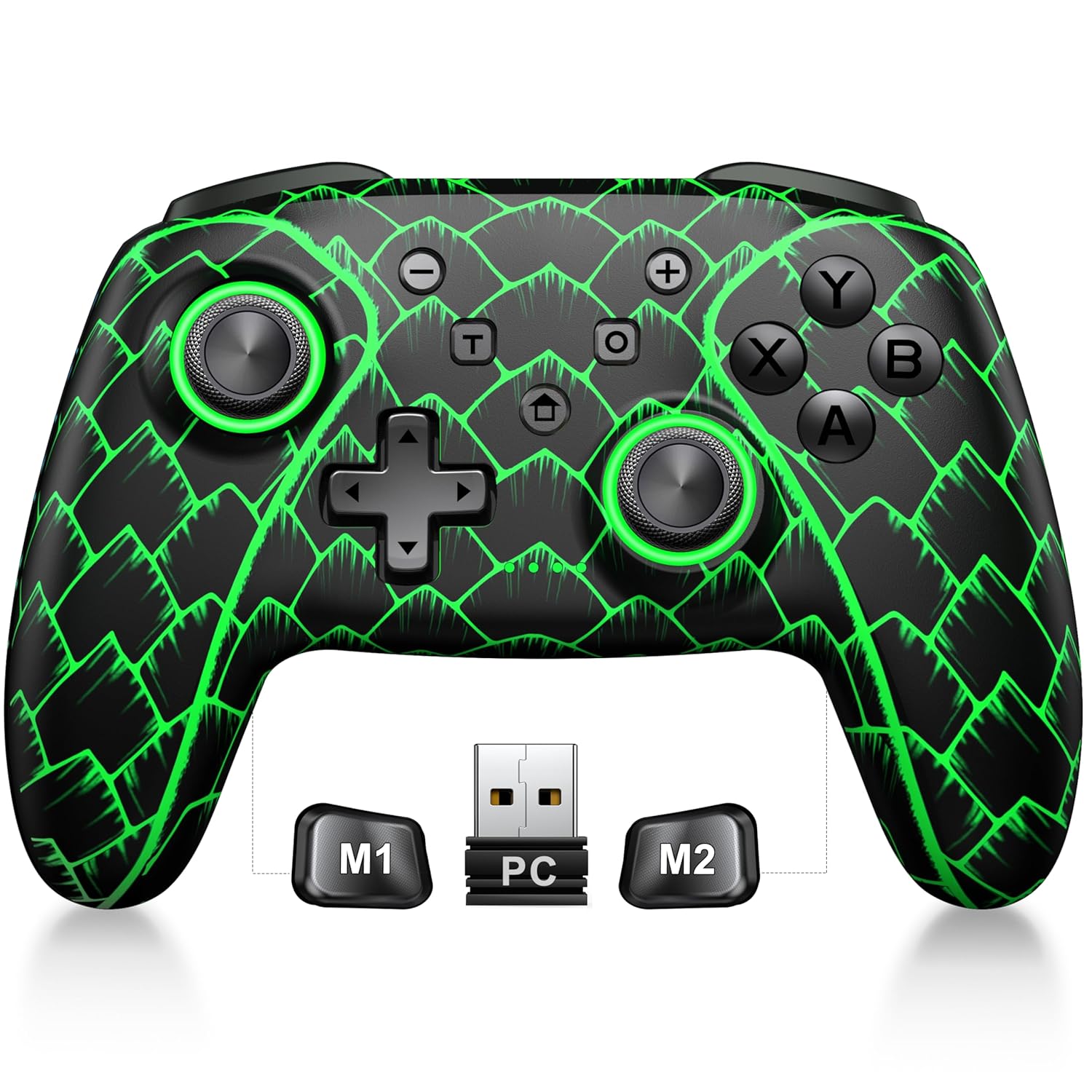
Figure 3.1: ELISWEEN Wireless PC Gaming Controller with its 2.4GHz USB dongle and highlighted M1/M2 programmable buttons.
- العصي التناظرية اليسرى/اليمنى: Hall Effect joysticks for precise movement.
- D- الوسادة: الإدخال الاتجاهي.
- أزرار التحكم (A/B/X/Y): أزرار إدخال الألعاب القياسية.
- أزرار الكتف (يسار/يمين): الأزرار المثبتة في الأعلى.
- Trigger Buttons (ZL/ZR): مشغلات تناظرية بتأثير هول.
- أزرار M1/M2: أزرار خلفية قابلة للبرمجة.
- زر الصفحة الرئيسة: Powers on/off and returns to system home screen.
- +/- الأزرار: System navigation/menu buttons.
- زر التقاط الشاشة: يلتقط لقطات الشاشة.
- زر توربو: تفعيل/إلغاء تفعيل وظيفة التوربو.
- منفذ USB-C: للشحن والاتصال السلكي.
4. الإعداد والاتصال
4.1 شحن وحدة التحكم
Before first use, fully charge the controller. Connect the USB-C cable to the controller's USB-C port and the other end to a USB power source (e.g., PC, USB wall adapter). The charging indicator will show status and turn off when fully charged. A full charge takes approximately 3 hours.
4.2 Connecting to PC (Wireless 2.4GHz)

Figure 4.1: Multi-platform compatibility of the ELISWEEN controller, including PC, Switch, Android, and iOS.
- Insert the 2.4GHz USB dongle into an available USB port on your PC.
- اضغط على زر الصفحة الرئيسية في وحدة التحكم لتشغيلها.
- The controller will automatically connect to the dongle. The indicator lights will stabilize once connected.
4.3 Connecting to PC (Wired USB-C)
- Connect the USB-C cable to the controller and the other end to your PC.
- The controller will be recognized as a plug-and-play device.
4.4 الاتصال بجهاز نينتندو سويتش
- On your Nintendo Switch, go to System Settings > Controllers and Sensors > Disconnect Controllers.
- ثم انتقل إلى وحدات التحكم وأجهزة الاستشعار > تغيير القبضة/الترتيب.
- Press and hold the Home button on the ELISWEEN controller until the indicator lights begin to flash rapidly.
- Once paired, the indicator light(s) corresponding to the player number will remain solid.
4.5 Connecting to Android/iOS (Bluetooth)
- تأكد من تفعيل البلوتوث على جهازك الذي يعمل بنظام Android أو iOS.
- On the controller, press and hold the X + Home buttons simultaneously until the indicator lights flash rapidly, indicating pairing mode.
- On your device, search for Bluetooth devices and select "STK-7040RG" (or similar) to pair.
- Once connected, the indicator light will stabilize. Supports iOS 13+ MFi titles.
5. تعليمات التشغيل
5.1 عصي التحكم ذات تأثير هول
The controller features precision Hall Effect joysticks and triggers, designed to prevent stick drift and provide accurate, responsive control. These magnetic, contactless sensors ensure long-term durability and precision.

الشكل 5.1: داخلي view of Hall Effect joystick technology, highlighting its magnetic, contactless design for enhanced accuracy and durability.
Zero Deadzone Mode: For competitive gaming, activate a temporary 0 deadzone mode by holding the T زر + R3 (right stick click) or L3 (left stick click). A green light confirms activation. To revert to default calibration, press the same combo (blue light indicator). The controller automatically resets to factory default settings upon restart for consistent anti-drift performance.
5.2 أزرار خلفية قابلة للبرمجة (M1/M2)
The M1 and M2 back buttons can be programmed to map up to 21 different key combinations, allowing for quick execution of complex actions.

Figure 5.2: The M1 and M2 programmable back buttons, capable of mapping up to 21 different actions for enhanced control.
Refer to the Keylinker App (search "NC300") for detailed instructions on programming and customizing these buttons.
5.3 وظيفة توربو
The controller supports Turbo fire functionality for 10 action buttons with adjustable speeds (5, 12, or 20 presses per second).
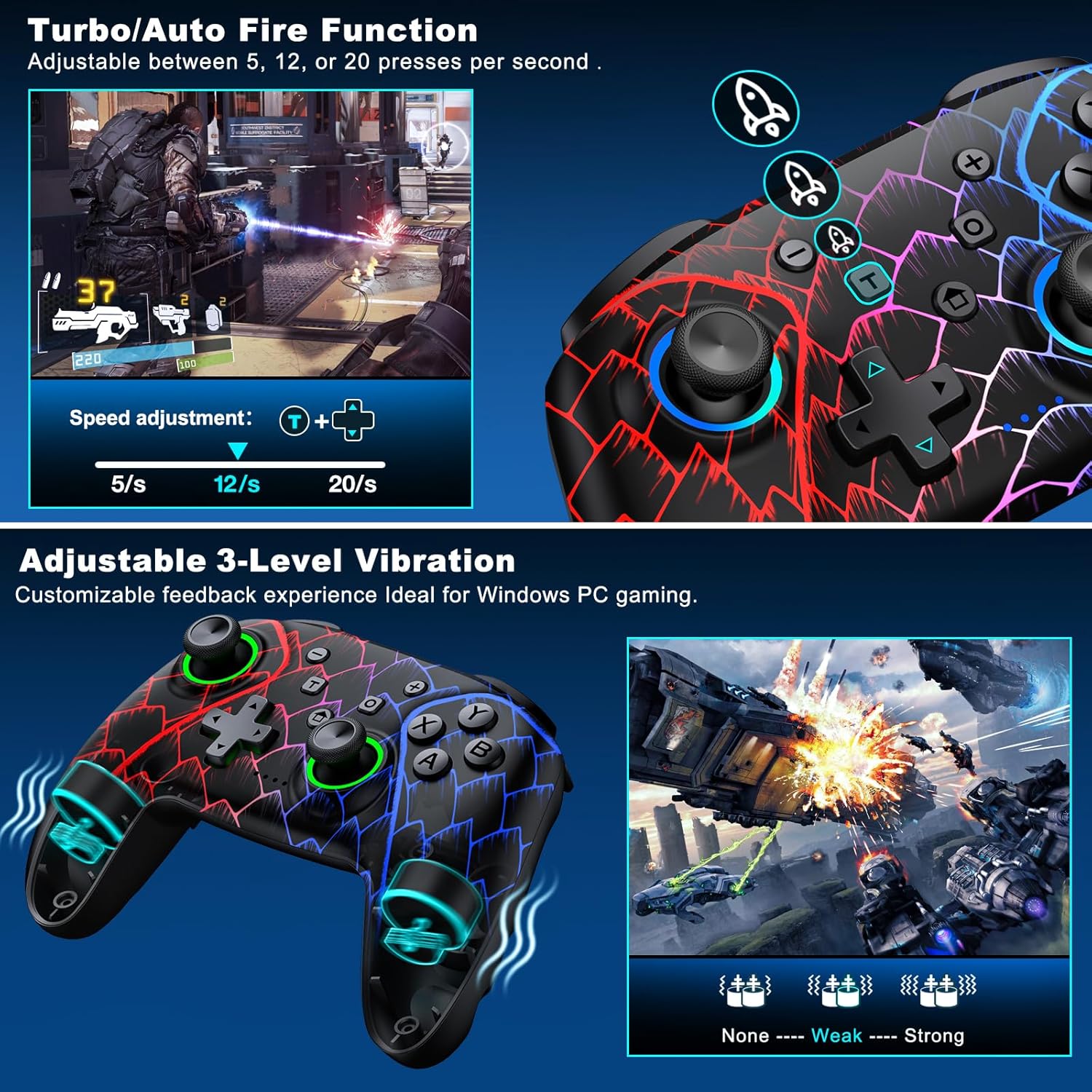
Figure 5.3: Visual representation of the Turbo/Auto Fire function and the adjustable 3-level vibration feature.
- تفعيل التوربو: اضغط على توربيني button + the desired action button.
- ضبط السرعة: يضعط توربيني + Up arrow (increase) or تحت arrow (decrease) on the D-pad.
- مسح توربو: امسك ناقص زر + تحت arrow on the D-pad to instantly clear all Turbo binds.
5.4 ضبط الاهتزاز
Experience immersive feedback with dual vibration motors offering 3 intensity levels.
- Adjust intensity by pressing L + R + ZL + ZR simultaneously. Cycle through levels: None, Weak, Strong.
- Note: Vibration is disabled on mobile platforms. Gyro functionality works only with Nintendo systems.
5.5 Hair Trigger Locks
Shorten trigger pulls for faster response times in games requiring quick inputs, such as first-person shooters.
5.6 إدارة عمر البطارية
The controller is equipped with a 1000mAh battery, providing over 20 hours of continuous gameplay on a single charge. Charging takes approximately 3 hours via USB-C.

Figure 5.4: The ELISWEEN controller's 1000mAh battery provides extended playtime with quick charging capabilities.
5.7 تأثيرات الإضاءة الديناميكية
Customize the controller's lighting effects via the Keylinker App (search "NC300").
5.8 إيقاف التشغيل التلقائي
To conserve battery, the controller will automatically power off after 20 minutes of inactivity.
6. الصيانة
- تنظيف: استخدم قطعة قماش ناعمة وجافة لتنظيف وحدة التحكم. لا تستخدم المنظفات الكاشطة أو المذيبات.
- تخزين: قم بتخزين وحدة التحكم في مكان بارد وجاف بعيدًا عن أشعة الشمس المباشرة ودرجات الحرارة القصوى.
- العناية بالبطارية: Avoid fully discharging the battery frequently. Charge it regularly to prolong its lifespan.
7. استكشاف الأخطاء وإصلاحها
- وحدة التحكم غير متصلة:
- تأكد من شحن وحدة التحكم.
- Verify the correct connection method for your device (2.4GHz dongle for PC, Bluetooth for mobile, pairing for Switch).
- Try restarting the controller and the device you are connecting to.
- For PC, try a different USB port for the dongle or wired connection.
- Stick drift or inaccurate input:
- Activate the 0 deadzone mode (T + R3/L3) to recalibrate.
- Ensure the controller firmware is up to date via the Keylinker App.
- الأزرار لا تستجيب:
- تأكد من توصيل وحدة التحكم بشكل صحيح.
- تأكد من عدم وجود أي شوائب عالقة تحت الأزرار.
- Perform a factory reset if issues persist (refer to Keylinker App or contact support).
- قضايا الشحن:
- جرب كابل USB-C مختلفًا ومصدر طاقة مختلفًا.
- Ensure the USB-C port on the controller is clean and free of obstructions.
8. المواصفات
| الاتصال | بلوتوث 5.2، 2.4 جيجاهرتز لاسلكي، USB-C سلكي |
| التوافق | PC, Nintendo Switch, Android, iOS (iOS 13+ MFi) |
| سعة البطارية | 1000 مللي أمبير |
| وقت اللعب | 20+ ساعات (تقريبا) |
| وقت الشحن | 3 ساعة (تقريبًا) |
| عصا التحكم | Hall Effect (Drift-Proof) |
| أزرار قابلة للبرمجة | 4 Back Buttons (M1/M2) |
| اهتزاز | محركان مزدوجان، 3 مستويات قابلة للتعديل |
| أبعاد | 6.38 × 4.72 × 2.64 بوصة |
| وزن | 11.99 أونصة (حوالي 340 جرامًا) |
| الشركة المصنعة | Qixun تك |
| بلد المنشأ | الصين |
9. الضمان والدعم
The ELISWEEN Wireless PC Gaming Controller comes with a standard manufacturer's warranty. For specific warranty terms and conditions, please refer to the product packaging or contact our customer support.
For any technical assistance, troubleshooting, or inquiries, our 24/7 Expert Support team is available to help. Please refer to the contact information provided on the product packaging or our official webموقع.


