1. المقدمة
يُقدّم دليل المستخدم هذا تعليمات شاملة لكاميرا المراقبة المنزلية الصغيرة AOBOCAM Q18. ويشمل الإعداد والتشغيل والصيانة واستكشاف الأعطال وإصلاحها لضمان الأداء الأمثل وطول عمر الجهاز. تُعدّ Q18 كاميرا صغيرة الحجم وعالية الدقة مصممة للمراقبة الداخلية، وتتميز بقدرة تصوير فيديو بدقة 4K، ورؤية ليلية، وكشف ذكي للحركة.
2. انتهى المنتجview
2.1 المكونات المضمنة
- كاميرا AOBOCAM الصغيرة Q18
- كابل شحن USB
- حامل التركيب
- دليل التعليمات (هذا المستند)
2.2 ميزات وأجزاء الكاميرا
صُممت كاميرا AOBOCAM Q18 للمراقبة السرية والفعالة. فيما يلي الميزات الرئيسية ورسم توضيحي لمكوناتها.

الشكل 2.2.1: كاميرا المراقبة المنزلية الصغيرة AOBOCAM Q18. تعرض هذه الصورة الكاميرا الصغيرة بجانب هاتف ذكي لتوضيح إمكانيات الفيديو بدقة 4K وأيقونات الاتصال اللاسلكي.
الشكل 2.2.2: مفصل view صورة لكاميرا AOBOCAM Q18. توضح هذه الصورة عدسة الكاميرا، وأضواء المؤشر، ومنفذ USB، وزر إعادة الضبط كمرجع للمستخدم.
- عدسة: عدسة عالية الدقة بدقة 4K بزاوية رؤية 120 درجة viewزاوية جي.
- مؤشر الضوء: يعرض حالة الكاميرا (مثل الشحن، التسجيل، اتصال Wi-Fi).
- منفذ USB: للشحن وتوفير الطاقة بشكل مستمر.
- زر إعادة الضبط: يُستخدم لإعادة ضبط الكاميرا إلى إعدادات المصنع.
- منفذ كارت الذاكرة الصغيرة: يدعم ما يصل إلى 256 جيجابايت للتخزين المحلي (البطاقة غير مرفقة).
3. دليل الإعداد
3.1 شحن الكاميرا
قبل الاستخدام الأولي، اشحن الكاميرا بالكامل باستخدام كابل USB المرفق ومحول طاقة 5 فولت 1 أمبير. يوفر الشحن الكامل ما يقارب 6-8 ساعات من الاستخدام المتواصل. للمراقبة على مدار الساعة، أبقِ الكاميرا موصولة بالكهرباء.
3.2 تنزيل التطبيق وتثبيته
قم بتنزيل تطبيق AOBOCAM الرسمي من متجر تطبيقات هاتفك الذكي (iOS أو Android). بحث عن "AOBOCAM" أو راجع رمز الاستجابة السريعة الموجود في دليل البدء السريع المرفق مع الكاميرا.
3.3 الاتصال بشبكة Wi-Fi و Bluetooth
تدعم كاميرا Q18 تقنية Wi-Fi بتردد 2.4 جيجاهرتز للتحكم عن بعد viewيدعم الاتصال بالإنترنت وتقنية البلوتوث لإعداد سريع في البداية.
- الخطوة 1: سجّل الدخول إلى تطبيق AOBOCAM. إذا لم يكن لديك حساب، فأنشئ حسابًا جديدًا.
- الخطوة 2: قم بتشغيل كاميرا Q18 بالضغط مع الاستمرار على زر الطاقة حتى يضيء ضوء المؤشر.
- الخطوة 3: في التطبيق، اختر "إضافة جهاز" واتبع التعليمات الظاهرة على الشاشة لتوصيل الكاميرا بشبكة Wi-Fi بتردد 2.4 جيجاهرتز. سيرشدك التطبيق خلال عملية الاقتران عبر البلوتوث لتسهيل عملية الاتصال.
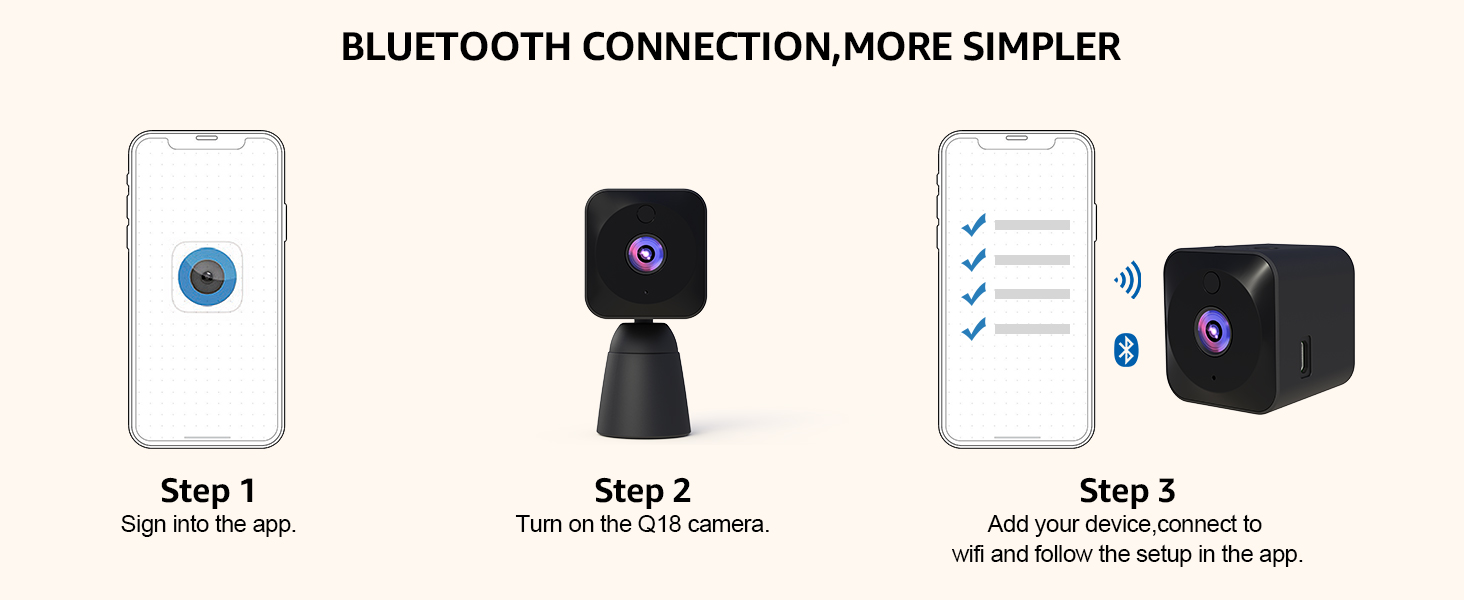
الشكل 3.3.1: خطوات الاتصال عبر البلوتوث. يوضح هذا الرسم التخطيطي عملية الاتصال بكاميرا AOBOCAM Q18 عبر البلوتوث والواي فاي باستخدام تطبيق الهاتف المحمول، والتي تتكون من ثلاث خطوات.
3.4 التركيب والتثبيت
يُتيح التصميم الصغير لكاميرا Q18 خيارات متعددة لوضعها. استخدم الحامل المرفق لوضعها بشكل مستقل، أو ثبّتها بشكل غير ملحوظ على الرفوف أو الجدران أو المكاتب. تأكد من أن الكاميرا في خط رؤية واضح للمنطقة التي ترغب في مراقبتها.

الشكل 3.4.1: تركيب متعدد المشاهد. توضح هذه الصورة خيارات وضع متنوعة وغير ظاهرة لكاميرا AOBOCAM Q18، بما في ذلك على رف، وجدار، وأريكة، ومكتب، وستارة.
4. تعليمات التشغيل
4.1 مباشر View والتسجيل
بعد الاتصال، افتح تطبيق AOBOCAM للوصول إلى بث الفيديو المباشر من الكاميرا. يمكنك بدء التسجيلات يدويًا أو التقاط لقطات شاشة مباشرةً من واجهة التطبيق.

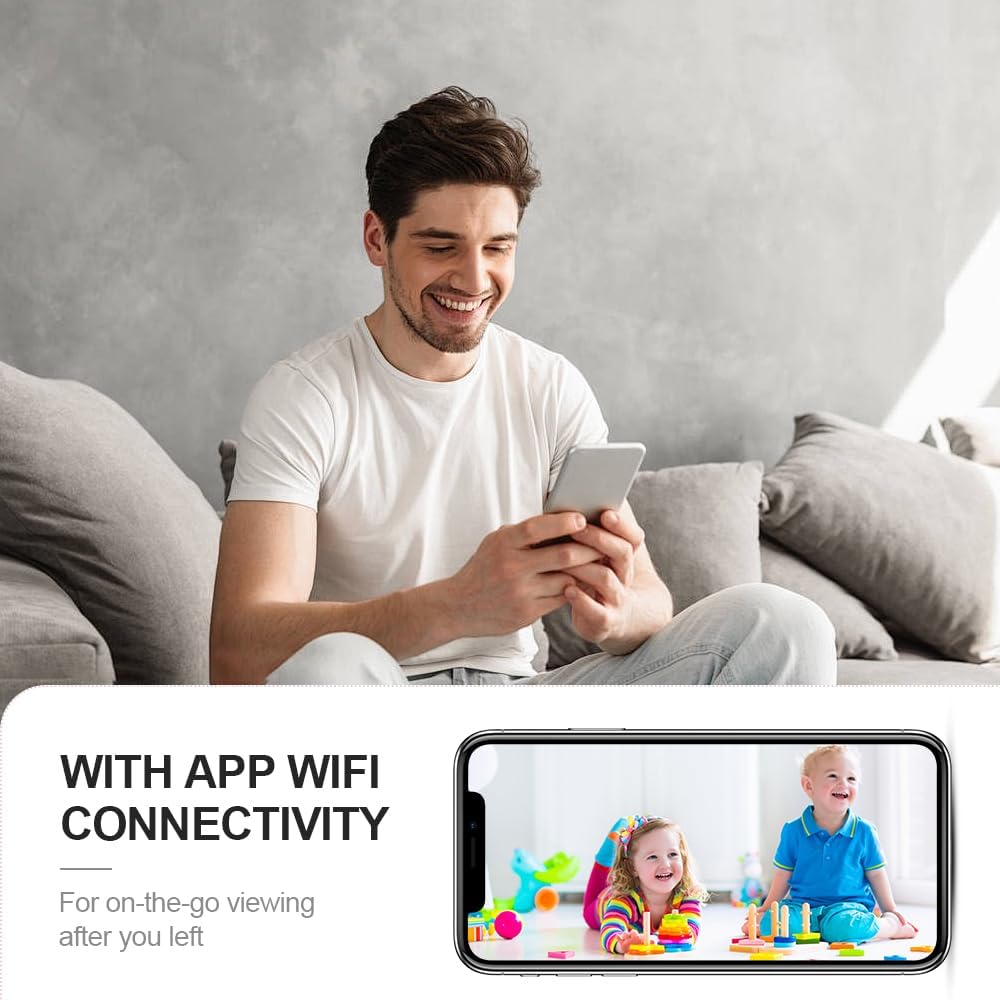
الشكل 4.1.1: اتصال التطبيق بشبكة Wi-Fi. تُظهر هذه الصورة مستخدمًا viewعرض بث مباشر للأطفال على هواتفهم الذكية، مما يوضح تطبيق الكاميرا واتصالها بشبكة Wi-Fi للاستخدام أثناء التنقل viewعمل.

الشكل 4.1.2: View تسجيلات الفيديو في أي وقت وأي مكان. توضح هذه الصورة واجهة التطبيق لـ viewيدعم البث المباشر والفيديو المسجل، مع خيارات لبطاقة الذاكرة الصغيرة (micro SD) والتخزين السحابي.
دقة صورة فائقة الوضوح 4K 4.2
تلتقط كاميرا Q18 الفيديو بدقة قصوى تبلغ 4K، مما يوفر صورًا واضحة ودقيقة. كما تعمل تقنية النطاق الديناميكي الواسع الحقيقي (TURE-WDR) على تحسين جودة الصورة في ظروف الإضاءة المختلفة.

الشكل 4.2.1: صورة فائقة الوضوح بدقة 4K. تُظهر هذه المقارنة الوضوح الفائق والألوان الزاهية وانعدام انحراف الألوان في دقة 4K مقارنةً بدقة 2K، مما يؤكد قدرات الكاميرا عالية الدقة.
4.3 الكشف الذكي عن الحركة
تتميز الكاميرا بتقنية الذكاء الاصطناعي للكشف الذكي عن الحركة. فعند رصد أي حركة، تقوم الكاميرا بالتسجيل تلقائيًا وإرسال تنبيهات فورية إلى هاتفك. صُمم هذا النظام لتقليل الإنذارات الكاذبة من خلال تمييز الحركات المهمة.

الشكل 4.3.1: أجهزة إنذار مثالية لكشف الحركة. توضح هذه الصورة سيناريو حيث ينبه نظام كشف الحركة المستخدم إلى وجود متسلل، مما يؤكد قدرات الكاميرا على مراقبة الأمن في الوقت الفعلي.

الشكل 4.3.2: خاصية الكشف الذكي عن الحركة بالذكاء الاصطناعي. تُظهر هذه الصورة الكاميرا وهاتفًا ذكيًا يعرضان تنبيهات فورية يتم تشغيلها بواسطة الحركة، مع وجود كلاب في الخلفية، مما يوضح ميزة الكشف الذكي.
4.4 رؤية ليلية ممتازة
بفضل مستشعر ضوء النجوم وضوء الأشعة تحت الحمراء LED الفعال، يوفر جهاز Q18 تجارب بصرية واضحة وغنية حتى في الإضاءة المنخفضة أو الظلام الدامس، مع مدى رؤية ليلية يصل إلى 6 أمتار.

الشكل 4.4.1: دقة صورة فيديو فائقة الوضوح 4K مع رؤية ليلية. تقارن هذه الصورة بين الرؤية النهارية والليلية للطعامtage لطفل نائم، مما يدل على قدرة الكاميرا على التقاط صور واضحة في كلتا الحالتين.

الشكل 4.4.2: رؤية ليلية عالية الدقة. هذه الصورة تُظهر امرأة viewعرضت كاميرا هاتفها بثًا واضحًا للرؤية الليلية لطفل نائم، مما يسلط الضوء على قدرة الكاميرا على الرؤية بوضوح حتى في الظلام.
4.5 مشاركة الفيديو والخصوصية
يتيح لك تطبيق AOBOCAM مشاركة الوصول إلى الكاميرا مع الأصدقاء والعائلة. يمكنك إدارة صلاحيات المستخدمين، وتعيين/تغيير كلمات المرور، وحذف الوصول لحماية خصوصية منزلك.

الشكل 4.5.1: إمكانية وصول المستخدمين المتعددين. توضح هذه الصورة وصول عدة مستخدمين في وقت واحد إلى بث الكاميرا من هواتفهم الذكية، مما يدل على ميزة المشاركة في كاميرا AOBOCAM Q18.
5. الصيانة
تضمن الصيانة المناسبة طول عمر كاميرا AOBOCAM Q18 وأدائها الأمثل.
- تنظيف: استخدم قطعة قماش ناعمة وجافة لتنظيف عدسة الكاميرا وجسمها. تجنب استخدام المنظفات الكاشطة أو المذيبات.
- العناية بالبطارية: لحماية البطارية، يُنصح باستخدام قابس 5 فولت 1 أمبير للشحن. تجنب درجات الحرارة القصوى التي قد تؤثر على عمر البطارية.
- تحديثات البرامج: تحقق بانتظام من تطبيق AOBOCAM بحثًا عن تحديثات البرامج الثابتة لضمان حصول الكاميرا على أحدث الميزات والتحسينات الأمنية.
6. استكشاف الأخطاء وإصلاحها
إذا واجهت مشاكل مع كاميرا AOBOCAM Q18 الخاصة بك، فراجع المشاكل والحلول الشائعة التالية.
| مشكلة | السبب المحتمل | حل |
|---|---|---|
| الكاميرا غير متصلة بشبكة Wi-Fi | كلمة مرور الواي فاي غير صحيحة، شبكة 5 جيجاهرتز، الكاميرا بعيدة جدًا عن جهاز التوجيه. | تأكد من صحة شبكة الواي فاي بتردد 2.4 جيجاهرتز وكلمة المرور. قرّب الكاميرا من جهاز التوجيه. أعد ضبط الكاميرا وحاول مرة أخرى. |
| جودة الصورة رديئة | عدسة متسخة، إضاءة غير كافية، مشاكل في عرض النطاق الترددي للشبكة. | نظّف العدسة. تأكد من وجود إضاءة كافية أو فعّل خاصية الرؤية الليلية. تحقق من سرعة اتصالك بالإنترنت. |
| تنبيهات كشف الحركة متكررة جدًا/غير متكررة | إعدادات الحساسية، العوامل البيئية. | اضبط حساسية كشف الحركة في التطبيق. تأكد من أن الكاميرا لا تواجه مناطق ذات حركة مستمرة وغير ذات صلة (مثل تأرجح أغصان الأشجار). |
| تستنزف البطارية بسرعة | التسجيل المستمر، والكشف المتكرر عن الحركة، والرؤية الليلية تعمل دائماً. | للاستخدام المطول، أبقِ الكاميرا موصولة بالكهرباء. اضبط إعدادات كشف الحركة والرؤية الليلية للحفاظ على البطارية. |
إذا استمرت المشاكل، يرجى الاتصال بدعم عملاء AOBOCAM للحصول على مزيد من المساعدة.
7. المواصفات
| ميزة | التفاصيل |
|---|---|
| اسم الموديل | س18 |
| دقة التقاط الفيديو | 4K (دقة فيديو فعالة 3840) |
| Viewزاوية جي | 120 درجة |
| نطاق الرؤية الليلية | 6 مترا |
| معدل الإطارات | 30 إطارًا في الثانية |
| تكنولوجيا الاتصال | راوتر بتردد 2.4 جيجاهرتز، يدعم واي فاي، بلوتوث، وشبكة خلوية (نقطة اتصال) |
| مصدر الطاقة | يعمل بالبطارية (بطارية ليثيوم بوليمر 1400 مللي أمبير، مرفقة) |
| عمر البطارية | 6-8 ساعات (استخدام متواصل)؛ 4-5 ساعات (مع الرؤية الليلية وكشف الحركة) |
| تخزين | يدعم بطاقة ذاكرة مايكرو إس دي بسعة تصل إلى 256 جيجابايت (غير مرفقة)، ويدعم التخزين السحابي. |
| المميزات الخاصة | دقة عالية الوضوح، مستشعر حركة، رؤية ليلية، محمول |
| الاستخدام الداخلي والخارجي | داخلي |
| الأبعاد (الطول × العرض × الارتفاع) | 30 × 40 × 40 مليمتر (3 × 4 × 4 سم) |
| وزن العنصر | 150 جرام |
| مادة | بلاستيك |
| لون | أسود |
8. الضمان والدعم
8.1 معلومات الضمان
تأتي كاميرا المراقبة المنزلية الصغيرة AOBOCAM Q18 مع ضمان لمدة 1 سنوات يسري هذا الضمان من تاريخ الشراء. ويغطي عيوب التصنيع والأعطال الناتجة عن الاستخدام العادي. يرجى الاحتفاظ بإثبات الشراء لتقديم مطالبات الضمان.
8.2 دعم العملاء
للحصول على الدعم الفني، أو لتقديم مطالبات الضمان، أو لأي استفسارات أخرى تتعلق بكاميرا AOBOCAM Q18، يرجى الرجوع إلى معلومات الاتصال الموجودة في العبوة أو زيارة موقع AOBOCAM الرسمي. webالموقع. فريق الدعم لدينا متوفر لمساعدتك.


