1. المقدمة
Welcome to the user manual for your new Tiqvi 7-inch Digital Photo Frame. This device is designed to help you easily display and share your cherished photos and videos with family and friends, no matter where they are. Featuring a vibrant IPS touch screen, WiFi connectivity, and compatibility with the intuitive Frameo app, your digital photo frame offers a modern way to relive memories. Please read this manual carefully to ensure proper setup, operation, and maintenance of your device.

This image illustrates the Tiqvi digital photo frame in use, showcasing a vibrant family photo on its screen. Next to it, a smartphone displays the Frameo application, highlighting the seamless integration for sharing memories directly to the frame.
2. ما الذي يوجد في الصندوق؟
يرجى التحقق من محتويات الحزمة للتأكد من أن جميع العناصر موجودة وفي حالة جيدة.
- Tiqvi 7-inch Digital Photo Frame
- محول الطاقة
- حامل قابل للفصل
- دليل المستخدم (هذا المستند)

This image displays all items typically found inside the product packaging: the Tiqvi digital photo frame itself, its power adapter, and a detachable stand. Key dimensions of the frame are also provided for reference.
3. دليل الإعداد
3.1 Powering On Your Frame
Connect the provided power adapter to the DC port on the back of the digital photo frame. Plug the adapter into a standard electrical outlet. The frame will automatically power on.
3.2 الاتصال بشبكة Wi-Fi
Upon first power-on, the frame will guide you through the initial setup process, including connecting to your Wi-Fi network.
- اختر اللغة المفضلة لديك.
- اختر منطقتك الزمنية.
- حدد شبكة Wi-Fi الخاصة بك من القائمة.
- أدخل كلمة مرور شبكة Wi-Fi الخاصة بك باستخدام لوحة المفاتيح التي تظهر على الشاشة وانقر على "اتصال".
- Once connected, the frame will display a unique Frameo ID.
3.3 Installing the Frameo App
To send photos and videos to your frame, you need to download the Frameo app on your smartphone or tablet.
- بحث عن "Frameo" in the Apple App Store (for iOS devices) or Google Play Store (for Android devices).
- تنزيل التطبيق وتثبيته.
- افتح التطبيق وقم بإنشاء حساب أو تسجيل الدخول.
- Add your frame by entering the unique Frameo ID displayed on your digital photo frame.

This image emphasizes the integration with the Frameo app, showing the frame alongside the Google Play and App Store logos, indicating where users can download the necessary application for managing and sharing photos.
4. Operating Your Digital Photo Frame
4.1 إرسال الصور ومقاطع الفيديو
Once your frame is connected to the Frameo app, you can easily send photos and short videos (up to 15 seconds) from your smartphone.
- افتح تطبيق Frameo على هاتفك الذكي.
- اختر الصور أو مقاطع الفيديو التي ترغب في إرسالها.
- Choose your Tiqvi frame as the recipient.
- Add a caption if desired, then tap "Send".
Photos and videos will appear on your frame shortly after being sent, provided the frame is connected to Wi-Fi. You can connect up to 500 users to share memories with your frame.

This image illustrates the ease of sharing photos and videos with the Tiqvi digital photo frame. It shows a photo being sent from a smartphone to the frame, symbolizing the ability to connect and share memories with loved ones anywhere.
4.2 نظام الملاحة عبر شاشة اللمس
The Tiqvi digital photo frame features an intuitive touch screen for easy navigation.
- اسحب لليسار/اليمين: Navigate through photos.
- مقبض: Access settings, view photo details, or pause slideshow.
- الضغط للتكبير: Zoom in or out on photos.
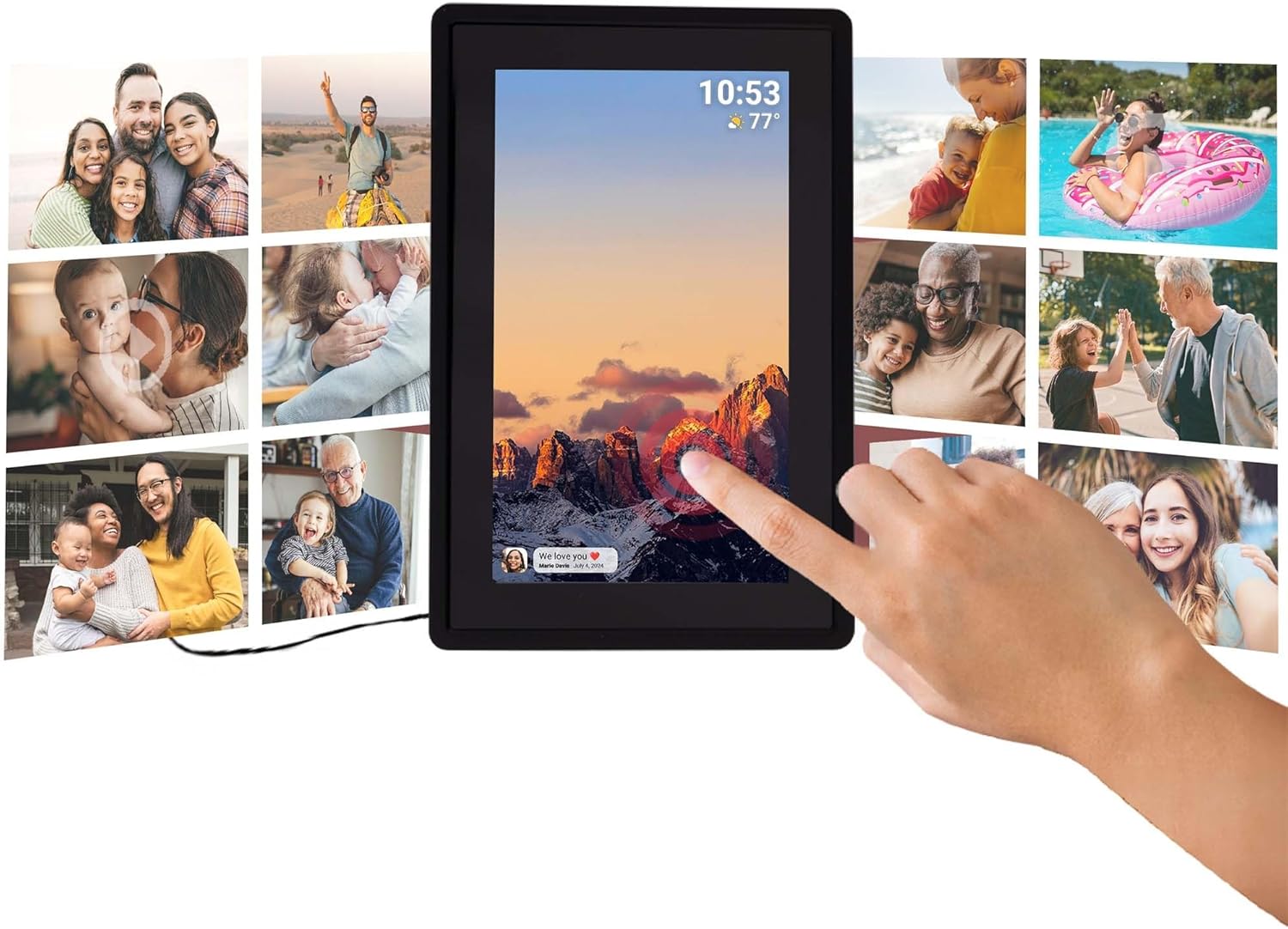
This image illustrates the intuitive touch screen functionality of the digital photo frame, showing a hand interacting directly with the display to navigate through photos and settings.
4.3 Auto-Rotate Function
The frame automatically detects its orientation (landscape or portrait) and adjusts the display of photos accordingly, ensuring your memories are always shown correctly.

Two Tiqvi digital photo frames are shown, one in landscape and one in portrait orientation, demonstrating how the auto-rotate function automatically adjusts the photo display for perfect viewعمل.
5. التخزين
Your Tiqvi digital photo frame comes with 16 جيجابايت من الذاكرة الداخلية, capable of storing thousands of photos and short videos.
For additional storage, the frame includes a فتحة بطاقة microSD, supporting cards up to 32 جيجا بايت. This allows you to expand the frame's capacity significantly.

هذه التفاصيل view of the frame's screen highlights its key technical specifications and features, including WiFi connectivity, 16GB internal storage, the 7-inch IPS display with 1024x600 resolution, support for microSD cards up to 32GB, and compatibility with the Frameo application.

This visual demonstrates the extensive storage capability of the digital photo frame, showing a screen filled with a diverse collage of photos.
6. المواصفات
| ميزة | مواصفة |
|---|---|
| ماركة | تيقوي |
| رقم الموديل | TVH10005 |
| حجم الشاشة | 7 بوصة |
| نوع العرض | إيبس شاشة تعمل باللمس |
| دقة | 1024×600 (نسبة العرض إلى الارتفاع 16:9) |
| الذاكرة الداخلية | 16 جيجا بايت |
| التخزين الخارجي | MicroSD card slot (max. 32GB) |
| الاتصال | واي فاي |
| توافق التطبيق | تطبيق Frameo |
| لون | أسود |
| مصدر الطاقة | كهربائي (محول تيار متردد) |
| أبعاد المنتج (الطول × العرض × الارتفاع) | 22 × 15 × 2.51 سم |
| وزن المنتج | 600 جرام |
7. الصيانة
7.1 تنظيف الإطار
To keep your digital photo frame in optimal condition, follow these cleaning guidelines:
- شاشة: استخدم قطعة قماش ناعمة وخالية من الوبر (مثل قطعة قماش من الألياف الدقيقة) لمسح الشاشة برفق. بالنسبة للبقع العنيدة، افركها قليلاًampامسح الشاشة بقطعة قماش مبللة بالماء أو بمحلول تنظيف شاشات مصمم خصيصًا للإلكترونيات. تجنب المواد الكيميائية القاسية أو المواد الكاشطة.
- الإطار والجسم: Wipe the body of the frame with a dry or slightly damp قطعة قماش ناعمة. لا تستخدمي رطوبة زائدة.
- إيقاف التشغيل: Always unplug the power adapter before cleaning.
7.2 العناية العامة
- تجنب وضع الإطار في ضوء الشمس المباشر أو بالقرب من مصادر الحرارة.
- Keep the frame away from water and high humidity.
- Do not drop or subject the frame to strong impacts.
8. استكشاف الأخطاء وإصلاحها
If you encounter any issues with your Tiqvi digital photo frame, please refer to the table below for common problems and their solutions.
| مشكلة | السبب المحتمل | حل |
|---|---|---|
| الإطار لا يعمل. | محول الطاقة غير متصل أو المنفذ معيب. | Ensure the power adapter is securely plugged into the frame and a working electrical outlet. Try a different outlet. |
| لا يمكن الاتصال بشبكة Wi-Fi. | كلمة مرور غير صحيحة، أو إشارة ضعيفة، أو مشكلة في جهاز التوجيه (الراوتر). | Double-check the Wi-Fi password. Move the frame closer to the router. Restart your Wi-Fi router. |
| لا تظهر الصور على الإطار. | Frame not connected to Wi-Fi, incorrect Frameo ID, or app issue. | Verify Wi-Fi connection on the frame. Ensure the correct Frameo ID is entered in the app. Restart the Frameo app on your phone. |
| الشاشة لا تستجيب. | خلل مؤقت في البرنامج. | Unplug the power adapter, wait 10 seconds, then plug it back in to restart the frame. |
| Photos are blurry or low quality. | Original photo resolution is low. | Ensure you are sending high-resolution photos to the frame for best display quality. |
9. الضمان والدعم
9.1 ضمان الشركة المصنعة
Your Tiqvi digital photo frame is covered by a ضمان الشركة المصنعة لمدة عامين from the date of purchase. This warranty covers defects in materials and workmanship under normal use. It does not cover damage caused by misuse, accidents, unauthorized modifications, or external causes. Please retain your proof of purchase for warranty claims.
9.2 دعم العملاء
For further assistance, technical support, or warranty inquiries, please refer to the product packaging or the official Tiqvi website for contact information. When contacting support, please have your product model number (TVH10005) and purchase details ready.


