Majority Darwin Bluetooth Alarm Clock with 10W Wireless Charging
Model: Darwin | Brand: Majority
مقدمة
This manual provides detailed instructions for the operation and maintenance of your Majority Darwin Bluetooth Alarm Clock. This device integrates an FM radio, dual alarm clock, 10W wireless charging, and ambient lighting to enhance your bedside experience.
معلومات السلامة
- اقرأ كافة التعليمات بعناية قبل الاستخدام.
- احفظ الجهاز بعيدًا عن الماء والرطوبة.
- لا تعرضه لدرجات الحرارة العالية.
- لا تحاول تفكيك أو إصلاح الجهاز بنفسك. استشر فني صيانة مؤهلًا.
- تأكد من توفير تهوية مناسبة عند استخدام وظيفة الشحن اللاسلكي.
محتويات الحزمة
تأكد من وجود جميع العناصر في الصندوق:
- Majority Darwin Bedside Clock
- محول التيار الكهربائي
- دليل المستخدم

Image: Package contents of the Majority Darwin alarm clock, including the clock, power adapter, and user manual.
المنتج انتهىview
Familiarize yourself with the main components and control buttons of your Darwin alarm clock.
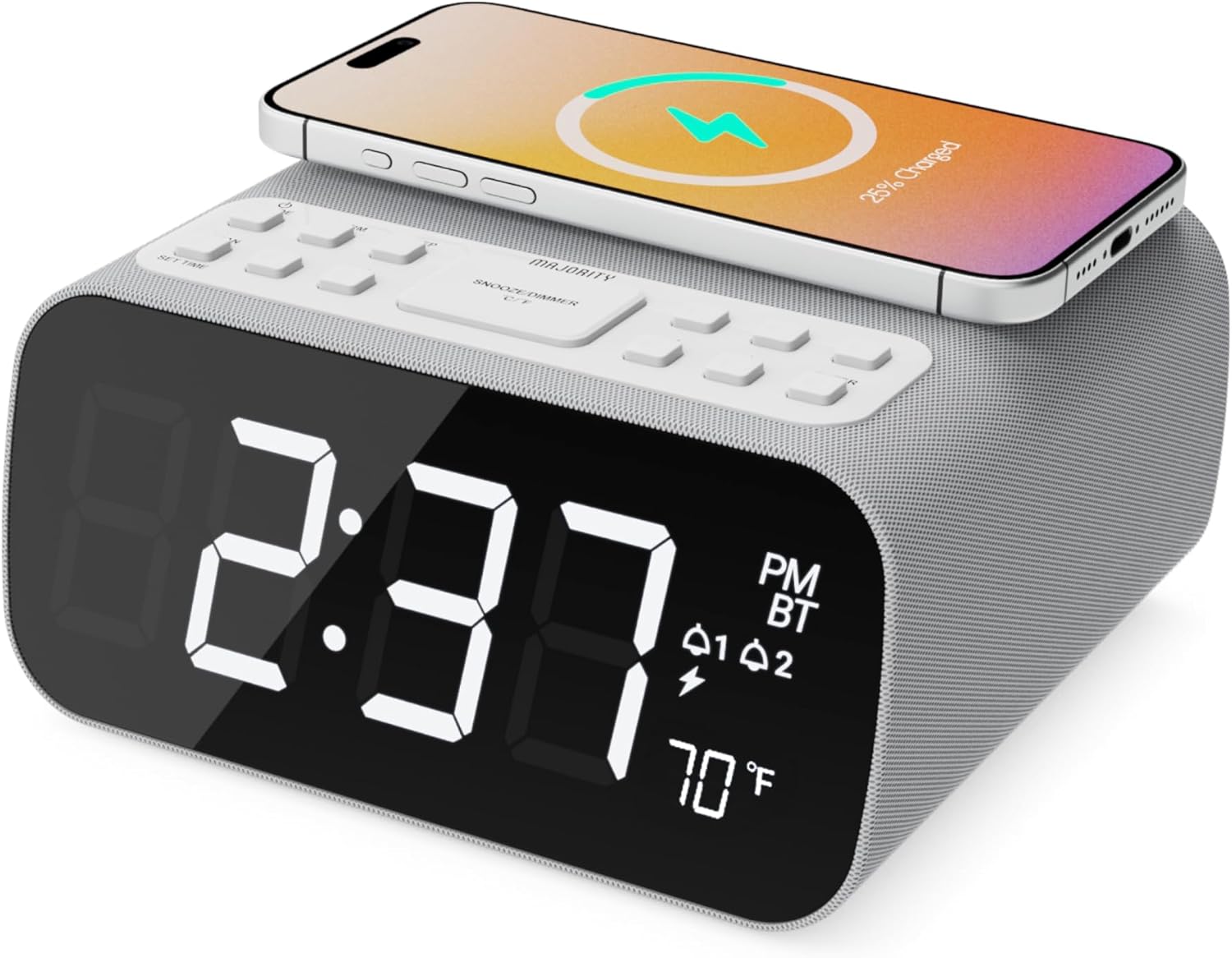
الصورة: الجبهة view of the Majority Darwin alarm clock showing the large digital display, wireless charging pad on top, and control buttons.

الصورة: الجانب view of the Majority Darwin alarm clock highlighting the control panel with buttons for time, alarm, volume, and light settings.
ضوابط اللوحة العلوية
- وسادة الشحن اللاسلكي: Place compatible devices here for 10W wireless charging.
- زر الغفوة/الضوء: Short press to snooze alarm; long press to adjust display brightness or cycle through ambient light colors.
- Time/Date Set Button: Press to enter time/date setting mode.
- أزرار التنبيه 1/2: Press to activate/deactivate Alarm 1 or Alarm 2. Long press to set alarm time.
- Volume/Tune Buttons: Adjust volume or tune FM radio stations.
- زر الوضع: Switch between FM Radio, Bluetooth, and White Noise modes.
Rear Panel Controls & Ports
- مدخلات DC 12V: Connect the mains power adapter here.
- منفذ شحن USB: For charging additional devices via USB cable.
- حجرة البطارية: For backup batteries (not for primary power).
- شريط تمرير خافت الإضاءة للشاشة: Manually adjust the brightness of the main time display.
- Night Light Dimmer: Adjust brightness of the ambient light.
يثبت
توصيل الطاقة
Connect the provided mains power adapter to the DC 12V input port on the rear of the alarm clock and plug it into a wall outlet. The display will light up.
For battery backup, open the battery compartment on the bottom and insert 2 x AAA batteries (not included). This will retain time settings during a power outage but will not power the display or charging functions.
الصورة: الخلفية view of the Majority Darwin alarm clock with the power adapter connected to the DC 12V input.
إعداد الوقت الأولي
- اضغط لفترة طويلة على ضبط الوقت/التاريخ button on the top panel. The hour digits will start flashing.
- استخدم Volume/Tune أزرار لضبط الساعة.
- اضغط على ضبط الوقت/التاريخ اضغط على الزر مرة أخرى لتأكيد الساعة والانتقال إلى إعداد الدقائق.
- استخدم Volume/Tune أزرار لضبط الدقائق.
- Repeat this process for setting the year, month, and day.
- اضغط على ضبط الوقت/التاريخ button one last time to save all settings.
تعليمات التشغيل
Time Display & Dimmer
The large LED display shows the current time.
التعتيم اليدوي: استخدم شريط تمرير تعتيم الشاشة on the rear panel to manually adjust the brightness of the time display.
التعتيم التلقائي: The device features an auto-dimming function that adjusts display brightness at fixed time intervals (e.g., dimming at night, brightening during the day).

الصورة: الجبهة view of the Majority Darwin alarm clock displaying time, AM/PM, and temperature, highlighting the dual alarm icons.
ضبط المنبه
The Darwin alarm clock supports two independent alarms (Alarm 1 and Alarm 2).
- Long press either the إنذار 1 or إنذار 2 button. The hour digits for that alarm will flash.
- استخدم Volume/Tune أزرار لضبط ساعة التنبيه المطلوبة.
- اضغط على المقابلة إنذار اضغط على الزر مرة أخرى لتأكيد الساعة والانتقال إلى إعداد الدقائق.
- استخدم Volume/Tune أزرار لضبط دقائق التنبيه المطلوبة.
- اضغط على إنذار button again to select the alarm source (FM radio or built-in tone). Use Volume/Tune أزرار للاختيار.
- اضغط على إنذار button again to set the alarm volume.
- اضغط على إنذار button one last time to activate the alarm. An alarm icon will appear on the display.
Deactivating an Alarm: Short press the corresponding إنذار 1 or إنذار 2 button to turn it off. The alarm icon will disappear.
وظيفة الغفوة
When an alarm sounds, short press the غفوة / ضوء button on the top panel to temporarily silence the alarm for 9 minutes. The alarm will sound again after the snooze period.
تشغيل راديو FM
- اضغط على وضع اضغط على الزر حتى تظهر كلمة "FM" على الشاشة.
- استخدم Volume/Tune buttons to manually tune to your desired FM station.
- Auto Scan & Store Presets: اضغط لفترة طويلة على وضع زر لمسح وحفظ محطات FM المتاحة تلقائيًا كإعدادات مسبقة.
- اضغط لفترة قصيرة على وضع زر للتنقل بين الإعدادات المسبقة المحفوظة.
Bluetooth Pairing & Playback
- اضغط على وضع button until "BT" appears on the display and the Bluetooth indicator starts flashing.
- On your smartphone or other Bluetooth device, enable Bluetooth and search for "Majority Darwin".
- Select the device to pair. Once connected, the Bluetooth indicator on the alarm clock will stop flashing.
- You can now play audio from your device through the alarm clock's speaker. Use the Volume/Tune buttons on the alarm clock or your device to adjust volume.

Image: A smartphone displaying music playback, connected via Bluetooth to the Majority Darwin alarm clock.
الشحن اللاسلكي
The top surface of the alarm clock features a 10W wireless charging pad.
- Place your Qi-compatible smartphone directly onto the wireless charging pad.
- Ensure the phone is centered on the charging symbol for optimal charging.
- A charging indicator (e.g., a lightning bolt icon) may appear on your phone's screen or the alarm clock's display to confirm charging.
منفذ شحن USB: An additional USB port on the rear allows you to charge other devices using a USB cable.
Image: The Majority Darwin alarm clock with a smartphone placed on top, indicating active wireless charging.
Night Light / Ambient Light
The alarm clock features an ambient light ring around its base.
- اضغط لفترة طويلة على غفوة / ضوء button to turn the ambient light on/off.
- اضغط لفترة قصيرة على غفوة / ضوء button to cycle through different color modes (e.g., red, green, blue, purple, white, color cycle).
- استخدم ضوء الليل باهتة يوجد زر على اللوحة الخلفية لضبط سطوع الإضاءة المحيطة.

Image: The Majority Darwin alarm clock illuminated with a vibrant ambient light from its base.
White Noise Function
The device includes various white noise sounds to aid relaxation and sleep.
- اضغط على وضع button until the white noise mode is activated (indicated by a specific icon or text on the display).
- استخدم Volume/Tune buttons to adjust the volume of the white noise.
- اضغط لفترة قصيرة على وضع button again to cycle through different white noise sounds (e.g., nature sounds, fan noise).
صيانة
- نظّف الجهاز بقطعة قماش ناعمة وجافة. لا تستخدم منظفات أو مذيبات كاشطة.
- حافظ على فتحات التهوية واضحة.
- If not in use for an extended period, disconnect from power and remove backup batteries.
استكشاف الأخطاء وإصلاحها
لا يوجد طاقة / الشاشة مطفأة
- تأكد من توصيل محول الطاقة بشكل آمن بالجهاز ومأخذ الطاقة العامل.
- تحقق مما إذا كان مأخذ الطاقة يعمل أم لا.
الشحن اللاسلكي لا يعمل
- تأكد من أن جهازك متوافق مع Qi.
- تأكد من وضع هاتفك في منتصف لوحة الشحن.
- قم بإزالة أي أغطية سميكة للهواتف أو أجسام معدنية بين الهاتف ولوحة الشحن.
مشاكل الاقتران بالبلوتوث
- Ensure the alarm clock is in Bluetooth pairing mode (BT flashing).
- Make sure your device's Bluetooth is enabled and searching.
- حاول إلغاء إقران الجهاز ثم إعادة إقرانه.
- Ensure no other devices are currently connected to the alarm clock via Bluetooth.
لا يصدر صوت الإنذار
- تأكد من تفعيل جهاز الإنذار (ظهور رمز الإنذار على الشاشة).
- تحقق من ضبط مستوى صوت التنبيه.
- Ensure the correct alarm time is set.
تحديد
| ميزة | التفاصيل |
|---|---|
| ماركة | غالبية |
| اسم الموديل | داروين |
| إخراج الشحن اللاسلكي | 10 واط |
| طاقة خرج السماعة | 12 واط |
| تكنولوجيا الاتصال | بلوتوث |
| مصدر الطاقة | Mains Power (Battery Backup) |
| أبعاد المنتج | 13.07 × 8.22 × 6.09 بوصة |
| وزن العنصر | 1.42 جنيه (645 جرام) |
| المميزات الخاصة | Adjustable Volume, Dual Alarm, Bluetooth, Wireless Charging, FM Radio, Dimmable Display, Ambient Night Light, White Noise |
الضمان والدعم
The Majority Darwin Bluetooth Alarm Clock comes with a standard manufacturer's warranty. Please refer to the warranty card included in your package for specific terms and conditions.
For technical support, troubleshooting, or warranty claims, please visit the official Majority webالموقع أو الاتصال بخدمة العملاء الخاصة بهم.
Online resources and FAQs may also be available on the product support page.


